
How Does a Hand Crank Desk Work? What You Need to Know
A hand crank desk works by using a manual mechanism to raise and lower its height. You turn a crank handle with your arm, which moves a geared system inside the frame. This system is often connected to a locking mechanism to hold the desk steady at your chosen height.
This simple design offers a reliable, non-electric way to adjust your workspace. Many people choose these desks for their durability and for saving energy. We found that a well-built crank desk can be just as effective as an electric model for daily use.
- A hand crank desk uses a manual handle and gears to change height.
- You control the speed and position with your own arm power.
- Key parts include a crank, threaded rods, and a locking system.
- Benefits include no electricity needed and a lower chance of mechanical failure.
- It’s a practical choice for those who want simple, adjustable furniture.
Below, we break down everything you need to know about how it works, the different parts involved, and how to use one effectively. Let’s walk through exactly how this works step by step so you can decide if it’s right for you.
The Mechanics: What Makes a Hand Crank Desk Move
At its core, a hand crank desk transforms your arm’s rotational energy into smooth vertical motion. Think of it like a bicycle chain, but for your furniture. When you turn the crank handle, you start a predictable chain reaction of moving parts.
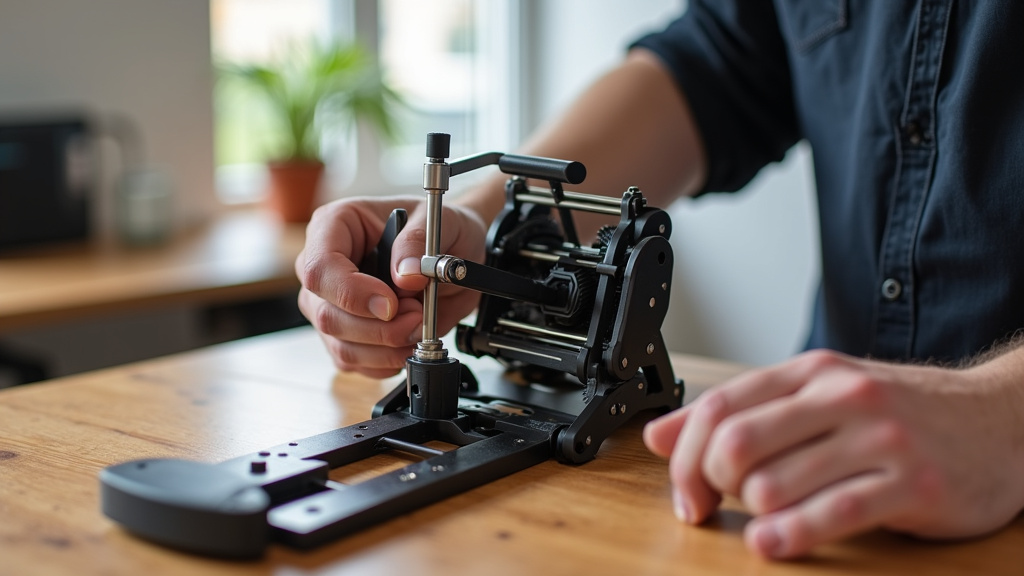
The key is a system of gears and threaded rods. Your spinning handle turns a main gear. This gear meshes with other gears that lift or lower the desk surface. It’s simple physics—turning a circle creates a straight-line push or pull. No fancy electronics, just mechanics you can see and understand.
The Key Components You’ll Find Inside
Let’s pop the hood and look at the essential parts. A typical hand crank desk has a few core pieces working together.
- The Crank Handle: Your interface. This is the part you grab and turn. It’s often removable to keep a cleaner look.
- Gears and Screws: The heart of the operation. Small gears turn larger ones, creating force. Long, threaded steel rods (lead screws) do the heavy lifting.
- The Frame and Legs: The skeleton. Usually made of steel, it must be straight and sturdy to keep everything stable as it moves.
- A Locking Mechanism: Once you find your perfect height, a pin, lever, or friction lock holds it there so your desk doesn’t slowly sink.
Understanding the Desk Frame and Stability
The frame is more than just a shell; it’s the foundation of your desk’s strength. We found that the frame design directly impacts how wobbly or solid the desk feels. The threaded rods are typically housed inside the legs or support columns.
As you crank, the rods rotate, moving the desktop up or down on a track. Quality matters here. Look for frames made from thick-gauge steel. This prevents bending and ensures the movement stays smooth over years of use. A well-built frame is the secret to a hand crank desk that feels solid, not shaky.
Single-Crank vs. Dual-Crank Systems
You’ll notice most hand crank desks come in two flavors: single-crank and dual-crank. The difference is more than just one extra handle.
| Feature | Single-Crank | Dual-Crank |
|---|---|---|
| Mechanism | One crank on one side drives both legs. | Two cranks, often one on each side. |
| Balance | Can have slight uneven wear on gears over time. | More balanced force, potentially longer life. |
| Ease of Use | Simple. You turn one handle. | Requires turning two handles (some models lock them together). |
| Typical Use | Great for standard office desks. | Often found on larger or heavier-duty models. |
For most home offices, a single-crank desk is perfectly sufficient. We found that dual-crank systems shine on larger surfaces where even lifting is crucial.
Step-by-Step: How to Use a Hand Crank Desk
Using one is intuitive, but a quick guide helps you do it right. Follow these steps for the best experience.
- Unlock the Desk: First, disengage any locking mechanism. This is usually a lever or knob near the crank.
- Turn the Crank: Rotate the handle clockwise to raise the desk. Go counter-clockwise to lower it. Remember: righty-tighty (up), lefty-loosey (down) often applies.
- Move Slowly and Steadily: Don’t try to crank at lightning speed. A smooth, even pace ensures the gears engage properly and prevents jamming.
- Find Your Height and Lock It: Once the desk is at your desired level, re-engage the lock. Give it a gentle push to test that it’s secure before you place your computer on it.
Pro Tip: If you switch between sitting and standing often, consider adding sticky notes with your ideal heights. It saves you from measuring every time.
Troubleshooting a Sticky or Squeaky Crank
Most crank desks run smoothly, but issues can pop up. If your crank feels stiff, check for three things first: is the locking mechanism fully released? Is there something blocking the legs’ path? Finally, look for any obvious damage to the gears. A tiny bit of lubricant (like a silicone spray, not WD-40) on the threads can often fix a minor squeak.
Maintenance: Keeping Your Crank Desk in Top Shape
The beauty of a mechanical system is its simplicity, but it’s not completely maintenance-free. A little care goes a long way toward preventing future headaches. Think of it like oiling a bicycle chain.
Every few months, wipe down the threaded rods with a dry cloth to remove dust. Dust buildup is the number one enemy of smooth operation. If you notice more resistance over time, a light application of dry lubricant is recommended. Never use heavy grease, as it will attract more dirt.
What to Check Every Year
Do a quick annual inspection. Make sure all bolts and screws on the frame are tight. Check that the crank handle has no play or wobble. Verify the lock holds firmly without slipping. Catching these small things early ensures your desk remains reliable.
Benefits of Choosing a Hand Crank Desk
So why pick a manual desk over an electric one? The advantages are clear and practical.
- No Electricity Needed: This is a big one. You can place it anywhere without worrying about outlets. It’s also 100% energy-efficient.
- Durability and Simplicity: With fewer parts that can fail (no motors, circuit boards), these desks often last longer. We found they have a lower risk of electronic failure over time.
- Cost-Effective: Generally, hand crank models are less expensive upfront than comparable electric sit-stand desks.
- Silent Operation: The only sound is a gentle whirring. No motor hum to disrupt your focus or a video call.
Many users also appreciate the physical micro-break. Standing up to crank your desk gets you moving, which some studies suggest can benefit circulation more than just pressing a button (Cleveland Clinic).
Potential Limitations to Consider
No desk is perfect for everyone. Hand crank models do have some trade-offs. The most obvious is the effort required. If you have wrist, arm, or shoulder issues, the repetitive motion might not be ideal. You also need enough space to comfortably swing the crank handle.
Additionally, adjusting the height isn’t instant. It takes a minute of cranking, which might be too slow if you switch positions constantly throughout the day. For most people, though, adjusting a few times a day is no problem at all.
Weight Capacity Matters
Always check the weight limit. A desk might say it lifts 150 pounds, but remember to include your monitor, laptop, books, and your arms leaning on it. Exceeding the limit can strain the gears and make cranking difficult. We recommend staying about 20% under the maximum capacity for best performance.
Your Hand Crank Desk Buying Checklist
Ready to shop? Keep this checklist handy. It covers the must-haves for a quality desk that works for you.
- [ ] Frame Material: Look for steel, not thin aluminum, for the main support columns.
- [ ] Weight Capacity: Ensure it can handle your equipment plus a 20% buffer.
- [ ] Adjustable Range: Check the minimum and maximum height. Does it fit your seated and standing needs?
- [ ] Crank Style: Do you want a removable handle? Is the crank positioned where it won’t bump your knee?
- [ ] Locking Mechanism: Test it if you can. Does it feel secure and easy to engage?
- [ ] Warranty: A good warranty on the mechanical parts shows the company stands behind its durability.
Taking a minute to verify these details ensures you get a reliable partner for your workspace. A hand crank desk is a straightforward, trustworthy tool—knowing how it works helps you use it to its full potential.
Conclusion
A hand crank desk offers a straightforward, reliable path to an adjustable workspace. Its simple mechanics, based on gears and threaded rods, provide a durable and energy-efficient solution. We’ve covered how it works, from the key components to the basic maintenance that keeps it running smoothly. This type of desk is a smart choice for anyone who values longevity and doesn’t mind a little manual effort for major benefits. You now have the knowledge to evaluate if this simple technology fits your needs.
Your best next step is to use the **buying checklist** we provided. Consider your space, your work equipment, and how often you’ll adjust the height. This will guide you to a quality hand crank desk that serves you well for years.
Frequently Asked Questions
How much weight can a typical hand crank desk really hold?
Weight capacity varies widely by model, often ranging from 100 to 250 pounds. The key is to check the **manufacturer’s specified limit** and subtract the weight of your equipment. Always stay about 20% below the maximum rating for the smoothest cranking and longest life.
Is it hard to crank if I have a really heavy monitor and computer on the desk?
It should not be difficult with a properly rated desk. The geared system is designed to multiply your force. If cranking feels overly strenuous, you may be exceeding the weight limit, or the mechanical parts might need lubrication or inspection.
How often do I need to lubricate the moving parts?
We recommend a light lubrication every 6 to 12 months, depending on use. Wipe the threaded rods clean first, then apply a **dry lubricant** like silicone spray. Avoid heavy grease, as it can attract dust and create more resistance over time.
Can I attach a keyboard tray or other accessories to the frame?
You can, but you must check for compatibility. First, ensure the accessory’s weight is within the desk’s total capacity. Second, look for pre-drilled holes or clamps designed for the specific frame model to avoid drilling and compromising the structure.
Why would I choose a hand crank over an electric standing desk?
The main reasons are **simplicity, cost, and reliability**. A hand crank desk has no electronics to fail, costs less upfront, and works anywhere without an outlet. It’s an excellent choice if you adjust your height a few times a day, not constantly.