9 Best Adjustable Corner Standing Desks (November 2026)
The best adjustable standing corner desks include the VIVO Manual Height Adjustable Corner Standing Desk Converter for adding standing space to an existing desk, the VIVO Electric Corner Standing Desk for a complete electric corner workstation, and the FEZIBO 63" x 55" L-Shaped Standing Desk for large multi-device setups.
On this page (7 sections)
- Which adjustable standing corner desk is best for each setup?
- Best adjustable standing corner desks compared
- How much space do you need for an adjustable standing corner desk?
- Should you choose a full desk or a corner converter?
- What features matter most in a corner adjustable standing desk?
- How do you set up and care for a corner standing desk?
- Which adjustable standing corner desk should you choose?
The best adjustable standing corner desk for most full workstations is the VIVO Electric Corner Standing Desk. It gives you a 63 x 55.2 in L-shaped work surface, electric adjustment from 28.5 to 46.8 in, 225 lb support and 4 memory presets.
A corner desk must use a room corner well and let you change posture without moving monitors, keyboard, laptop or supplies elsewhere.
A converter is better if you want standing height on your current desk. It suits a sturdy desk that is deep enough and already placed where you want to work.
A full L-shaped desk makes more sense for multiple monitors, office equipment or gaming gear. Its larger surface lets each device keep its own zone, and electric adjustment moves the whole desk.
Consider who uses the setup before comparing sizes. A single laptop user may value a compact riser, while a dual monitor user usually needs the extra width of a full L shape.
Consider also how you use the room day to day. A full desk suits a dedicated home office corner, while a converter suits a shared room where the existing desk cannot be replaced.
For a quick explanation of the layout, read What Is a Corner Standing Desk? What Experts Say.
That guide can help you decide whether the corner shape fits how you work before you look at controls and capacity.
If you want a broader L-shaped comparison, see the best l shaped electric standing desk guide. Use it to compare surface size, leg placement and storage after you have decided between a converter and a complete desk.
Our picks at a glance
-
1
 Best for adding standing space to an existing desk
VIVO Manual Height Adjustable Corner Standing Desk Converter
9.7/10 our score
See it on Amazon -
2
 Best for a complete electric corner workstation
VIVO Electric Corner Standing Desk
9.6/10 our score
See it on Amazon -
3
 Best for large multi-device setups
FEZIBO 63" x 55" L-Shaped Standing Desk
9.4/10 our score
See it on Amazon
- 4
 Best for built-in charging and cable controlCheck it
- 5
 Check it
Rocelco 46" Height Adjustable Corner Standing Desk Converter
Best for dual monitors on a desktop riser - 6
 Check it
SEDETA L Shaped Electric Standing Desk
Best for drawers and open storage - 7
 Check it
Lubvlook 32 inch Corner Standing Desk Converter
Best for a compact converter footprint - 8
 Check it
SEDETA Corner Electric Standing Desk with Drawer
Best for small corners with built-in power - 9
 Check it
Klicelor L Shaped Standing Desk
Best for a simple rustic-brown L-shaped setup
Which adjustable standing corner desk is best for each setup?
The best pick depends on whether you need a converter, a large L-shaped surface, built-in storage or a compact corner footprint. A converter keeps your present desk in use, while a full desk replaces it with an integrated height adjustable base.
We compared the stated dimensions, height ranges, controls, materials, capacity and included features. Those details show what each model can hold, how far it moves and what kind of room it needs.
Our score weighs specs, features and buyer feedback against what you're shopping for. It is a guide to fit, not a substitute for measuring your walls, desk depth and equipment.
Start with the space you have, then match the format to it. Height range and capacity come next, because a desk that cannot reach your standing height or carry your monitors will not work well in daily use.
| Product | Best for | Type | Surface | Height range | Our score |
|---|---|---|---|---|---|
| VIVO Manual Height Adjustable Corner Standing Desk Converter | adding standing space to an existing desk | Manual corner standing desk converter | 37.5 x 18 in | 4.3 to 20 in | 9.7 |
| VIVO Electric Corner Standing Desk | a complete electric corner workstation | Electric L-shaped corner desk | 63 x 55.2 in | 9.6 | |
| FEZIBO 63" x 55" L-Shaped Standing Desk | large multi-device setups | Electric L-shaped standing desk | 63 x 55 in | 9.4 | |
| SIAGO L-Shaped Standing Desk | built-in charging and cable control | Electric L-shaped corner desk | 63 x 55 in | 9.1 | |
| Rocelco 46" Height Adjustable Corner Standing Desk Converter | dual monitors on a desktop riser | Gas-spring corner desk converter | 45.5 x 23.25 in | 9.0 | |
| SEDETA L Shaped Electric Standing Desk | drawers and open storage | Electric L-shaped desk with storage | 55.1 x 55.1 in | 8.9 | |
| Lubvlook 32 inch Corner Standing Desk Converter | a compact converter footprint | Pneumatic corner desk converter | 32 x 18 in | 8.4 | |
| SEDETA Corner Electric Standing Desk with Drawer | small corners with built-in power | Small electric corner desk | 32 x 32 in | 8.2 | |
| Klicelor L Shaped Standing Desk | a simple rustic-brown L-shaped setup | Electric L-shaped standing desk | 28.3 to 45.7 in | 7.9 |
Best adjustable standing corner desks compared
The VIVO manual converter leads this list because it adds a wide standing surface to an existing desk with a 4.3 to 20 in range. The VIVO electric desk is the strongest complete workstation, while the remaining picks target space, storage, charging or setup needs.
VIVO Manual Height Adjustable Corner Standing Desk Converter: Best for adding standing space to an existing desk
- 37.5 x 18 in top
- 4.3 to 20 in height range
- 33 lb desktop capacity
- 37 x 12 in keyboard tray
This manual riser adds a large two-level standing surface to an existing desk. Its pneumatic spring and touch height lock make it a strong fit when you want a corner setup without replacing the desk.
Pros
- Large 37.5 in top
- 20 in maximum adjustment
- Minimal assembly
Cons
- Adds weight to an existing desk
- Desktop capacity is 33 lb
The VIVO Manual Height Adjustable Corner Standing Desk Converter is the best fit when you want to keep your current desk. Its 37.5 x 18 in top gives a broad platform for a laptop, monitors and office supplies, while the 37 x 12 in keyboard tray raises with the top.
The pneumatic spring supports adjustment from 4.3 to 20 in. That range lets you move from a seated desk height to a standing position without replacing the base furniture.
The desktop holds up to 33 lb, and the keyboard tray holds up to 4.4 lb. Keep heavier equipment centered on the main surface, and check the existing desk before placing the converter in a corner.
The steel frame has a black finish, and assembly mainly involves placing the riser and attaching the keyboard tray. Choose this model if you want a manual corner adjustable standing desk with minimal setup.
For daily use, the two level layout helps keep the screen and keyboard at different heights. That separation can make typing more comfortable than placing a keyboard directly on the monitor surface.
Care is simple because there is no motor to power or control. Wipe the laminated surface with a soft cloth, keep the lift mechanism clear of papers and check that the tray stays firmly attached.
VIVO Electric Corner Standing Desk: Best for a complete electric corner workstation
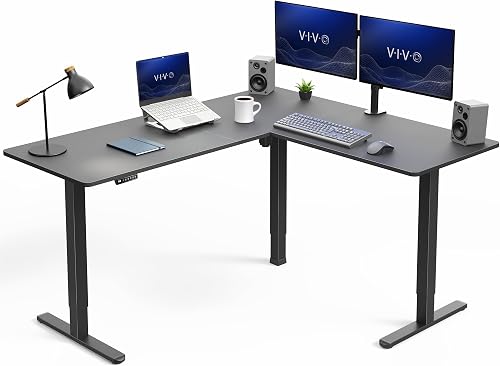
- 63 x 55.2 in L-shaped surface
- 28.5 to 46.8 in height range
- 225 lb capacity
- 4 memory presets
VIVO combines a wide L-shaped top with electric adjustment, a memory controller and a 225 lb support limit. The reversible design gives you more choice when arranging the return side.
Pros
- Large work surface
- High stated capacity
- Memory presets
Cons
- Needs substantial corner floor space
- Single motor
The VIVO Electric Corner Standing Desk is the best complete option for a large adjustable standing desk corner. Its 63 x 55.2 in outside surface includes a main desk and return desk, giving monitors, laptops and office materials separate zones.
The single motor moves the desk from 28.5 to 46.8 in. Its push-button controller stores 4 memory presets, so you can save sitting and standing positions rather than adjusting from scratch.
The all-steel frame and particle board tops support up to 225 lb. The reversible design also gives you more flexibility when the long side of the corner needs to face left or right.
Measure both walls before choosing it. The depth is substantial, and the chair needs enough clearance behind you when the desk is used in both sitting and standing positions.
In daily use, the return side works well for a printer, reference documents or secondary equipment. Keeping those items away from the main keyboard zone can leave the central area less crowded.
For setup, plan cable routes before you load the top. Give cords slack for the full travel range, keep the underside clear of boxes and follow the instructions for the frame, tops and controller.
FEZIBO 63" x 55" L-Shaped Standing Desk: Best for large multi-device setups
- 63 x 55 in surface
- 28.3 to 46.8 in height range
- 2 memory buttons
- 2 hooks and adjustable feet
The FEZIBO gives large setups a broad corner footprint with 2 memory buttons, adjustable feet and 2 hooks. Its FSC-certified wood desktop and alloy steel frame suit a home office or gaming room.
Pros
- Large corner surface
- Anti-collision feature
- Adjustable feet
Cons
- Large 77 lb desk
- Only 2 memory buttons
The FEZIBO 63" x 55" L-Shaped Standing Desk suits a large multi-device setup. Its 63 x 55 in surface is designed for home office or gaming use, with room for 3 desktop PCs, 1 laptop and other accessories according to the product description.
Electric adjustment runs from 28.3 to 46.8 in, with 2 preset memory buttons. The anti-collision feature moves the desk 2 cm in the opposite direction when it meets an obstacle.
The desktop uses FSC-certified wood, and the frame uses alloy steel. Adjustable feet can help with minor floor differences, while the 2 hooks give headphones or other hanging items a place off the work surface.
This desk weighs 77 lb, so plan the installation location first. It is a better fit for a dedicated corner than a room where the desk must move often.
For daily use, the wide return can separate work equipment from gaming or reference items. That division helps when several devices need power, display cables and desk space at the same time.
Care should focus on the wood surface and the underside of the frame. Use a soft cloth on the top, keep the feet adjusted for stability and keep the area below the desk clear so the anti-collision feature is rarely needed.
SIAGO L-Shaped Standing Desk: Best for built-in charging and cable control
- 63 x 55 in surface
- 27.5 to 45.7 in height range
- 3 memory positions
- 3 AC outlets and dual USB ports
SIAGO is the practical pick when charging and cable control matter as much as the desktop. It has reversible installation, 3 height positions, a cable management tray and 2 headphone hooks.
Pros
- Built-in charging
- Reversible layout
- 3 memory positions
Cons
- 80.5 lb desk
- Rustic-brown finish only in the data
The SIAGO L-Shaped Standing Desk is the strongest pick when built-in charging and cable control are priorities. The 63 x 55 in surface supports a multi-device work zone, while the desktop includes 3 AC outlets and dual USB Type-A/C ports.
The smart controller stores 3 custom heights between 27.5 and 45.7 in. Reversible installation lets you place the longer side on the left or right, which matters when a doorway, window or cabinet limits one wall.
SIAGO includes a cable management tray and 2 headphone hooks. The product description also states a 48 dB noise level, child safety lock and 45-minute installation plan.
The metal frame and wear-resistant tabletop support a stated 250 lb load-bearing test. Pick this model if charging access matters more than drawers, and check that the rustic-brown finish suits your room.
In daily use, built-in power can reduce the number of cables crossing the desktop. That helps keep chargers, monitors and peripherals in fixed places instead of sharing one distant outlet.
For care, keep liquids away from the outlets and USB ports. Keep the cable tray accessible for changes, wipe the top with a suitable soft cloth and use the safety lock when children may use the controller.
Rocelco 46" Height Adjustable Corner Standing Desk Converter: Best for dual monitors on a desktop riser
- 45.5 x 23.25 in desktop
- 5 to 18 in adjustment above desk
- 40 lb lift capacity
- 40 x 13 in keyboard tray
Rocelco gives an existing desk a wide corner-friendly riser surface and a large keyboard tray. Its gas piston assist and side handle support continuous adjustment from 5 to 18 in above the desk.
Pros
- Wide riser surface
- 40 lb lift capacity
- Grommet hole
Cons
- Requires an existing desk
- Large 40 lb unit
The Rocelco 46" Height Adjustable Corner Standing Desk Converter is the best riser for a wide dual-monitor setup. Its 45.5 x 23.25 in desktop is made for a corner desk, and the 40 x 13 in keyboard tray can also hold a laptop.
A gas piston and side handle provide continuous adjustment from 5 to 18 in above the existing desk. The riser can raise and lower up to 40 lb, so compare that capacity with your monitors, stands and accessories.
The 4.5 in gap between the tray and desktop is intended to support a more comfortable keyboard position. A grommet hole gives you a route for cables or a monitor mount.
This is a tabletop workstation, not a replacement desk. Choose it when your current desk is sound and you want a large corner adjustable standing desk surface without buying a new base.
For daily use, the deeper top gives more front to back room than a narrow riser. That can help with monitor stands, a notebook and a keyboard tray that stays separate from the screen platform.
Setup is mainly attaching the keyboard tray and placing the riser on a stable desk. Check the original desk for levelness, keep the load within 40 lb and wipe the surface with a soft cloth.
SEDETA L Shaped Electric Standing Desk: Best for drawers and open storage
- 55.1 x 55.1 in corner surface
- 28.3 to 47 in height range
- 6 fabric drawers
- 4 outlets and 2 USB ports
SEDETA combines electric height adjustment with 6 fabric drawers, open storage, a hook and a CPU holder. It fits buyers who want the corner workstation to organize office supplies as well as screens.
Pros
- 6 fabric drawers
- 3 memory settings
- Power for up to 6 devices
Cons
- 94 lb desk
- Engineered wood frame
The SEDETA L Shaped Electric Standing Desk is the best choice when storage is part of the workstation. Its 55.1 x 55.1 in corner surface includes 6 fabric drawers, open storage, a hook and a CPU holder.
The desk adjusts from 28.3 to 47 in and stores 3 favorite settings. Its charging station has 4 outlets and 2 USB ports, with an on-off switch for turning the station off from one place.
The product description states a 200 lb support limit, a 25 mm/s lifting speed and motor noise below 30 dB. The desktop is made from FSC-certified wood, while the listed frame material is engineered wood.
This 94 lb desk needs a planned installation area. Choose it for files, office supplies and gaming gear that would otherwise spread across the corner.
In daily use, the fabric drawers can hold letter or A4 files and smaller office items. Open storage and the CPU holder keep larger equipment off the main writing and keyboard area.
For care, empty the drawers before moving the desk and check that the CPU holder clears the floor at every height. Keep the charging station dry, manage cables away from the lift path and wipe the wood top gently.
Lubvlook 32 inch Corner Standing Desk Converter: Best for a compact converter footprint
- 32 x 18 in work surface
- 4.7 to 16 in adjustment
- 22 lb lift capacity
- 25 x 9.5 in keyboard tray
Lubvlook keeps the converter format smaller than the larger risers here. Its 32 x 18 in surface and 22 lb lift capacity suit a lighter laptop or monitor setup on an existing desk.
Pros
- Small 32 in surface
- Pneumatic lift
- One assembly step
Cons
- Lowest capacity here
- Less surface than larger risers
The Lubvlook 32 inch Corner Standing Desk Converter is the best compact riser for a lighter setup. Its 32 x 18 in work surface and 25 x 9.5 in keyboard tray take less room than the larger converters here.
The pneumatic lift adjusts from 4.7 to 16 in, with a 22 lb lift capacity. That makes it a better match for a laptop or a lighter monitor arrangement than a heavy multi-monitor workstation.
The alloy steel structure has a black finish, and the hidden lift handle keeps the control area visually simple. Assembly involves attaching the keyboard tray.
Measure the available desktop before choosing it. The smaller surface helps in a tight room, but it gives you less room for screens, speakers and paperwork.
For daily use, this size suits a laptop focused setup or a single monitor with compact peripherals. The separate keyboard tray keeps typing space clear while the upper surface holds the screen.
Care is straightforward with a steel frame and a simple lift system. Keep the mechanism free of clutter, avoid exceeding 22 lb and wipe the surfaces with a soft cloth after daily use.
For an option that keeps more floor area open, compare wall-mounted standing desks.
SEDETA Corner Electric Standing Desk with Drawer: Best for small corners with built-in power
- 32 x 32 in corner top
- 28.3 to 46.9 in height range
- 1 storage drawer
- 2 USB ports and 3 electrical outlets
This SEDETA is designed for a smaller corner, with a 32 x 32 in top, 1 drawer, 2 hooks and built-in power. It can hold 2 to 3 monitors or PCs according to its product description.
Pros
- Compact corner size
- 3 memory presets
- Built-in power strip
Cons
- Smaller work surface
- Only 1 drawer
The SEDETA Corner Electric Standing Desk with Drawer is the best fit for a small corner that still needs electric adjustment. Its 32 x 32 in top is designed for compact rooms and can hold 2 to 3 monitors or PCs according to the product description.
The desk adjusts from 28.3 to 46.9 in and includes 3 memory presets. Its built-in power strip has 2 USB ports and 3 electrical outlets, while the drawer and 2 hooks keep small accessories off the desktop.
The metal frame supports a stated 200 lb load capacity. The product description also states motor noise under 40 dB, which may matter in a bedroom or shared room.
Choose this model when 32 in walls are available at the corner. For larger monitors, measure the screen stands and cable paths carefully before relying on the full stated surface.
In daily use, the drawer is useful for keyboards, cables or small items that would otherwise cover the top. Hooks can hold headphones, while built-in power reduces the need for a separate strip under the desk.
For setup, check that the drawer and hooks clear nearby walls and furniture at all heights. Keep the power strip dry, route cables with slack for movement and wipe the engineered wood surface with a soft cloth.
Klicelor L Shaped Standing Desk: Best for a simple rustic-brown L-shaped setup
- 55 x 31.5 in corner desk
- 28.3 to 45.7 in adjustment
- Under-50 dB motor claim
- Cable management and dual hooks
Klicelor focuses on a simple L-shaped workstation with electric adjustment, cable management and dual hooks. The rustic-brown wood surface fits buyers who do not need drawers or built-in outlets.
Pros
- L-shaped corner layout
- Cable management
- Anti-collision protection
Cons
- No drawer
- No stated load capacity
The Klicelor L Shaped Standing Desk is a simple choice for a rustic-brown corner workstation without drawers. Its electric lift adjusts from 28.3 to 45.7 in, giving you a sitting and standing range for work, study or gaming.
The L-shaped desktop includes cable management and dual hooks for headphones or a daybag. Klicelor also describes a motor operating under 50 dB and anti-collision protection that responds to obstacles.
The listed frame material is alloy steel, and the desk has a polished rustic-brown wood finish. No load capacity is stated in the supplied product facts, so keep heavier setups conservative and check the exact instructions before loading it.
Choose Klicelor when you want a straightforward corner adjustable standing desk with basic organization. Choose another model if drawers, outlets or a published capacity are central to your decision.
In daily use, the cable management helps keep chargers and monitor cords away from the main work area. Dual hooks keep headphones or a bag within reach without taking desktop space.
For setup, use the labeled components and clear instructions, and leave room under the desk for the frame at full height. Keep the underside clear for anti-collision protection and follow the care guidance for the polished wood surface.
How much space do you need for an adjustable standing corner desk?
The largest desks in this roundup need about 63 x 55 in of corner floor and wall space, while the smallest full desk measures 32 x 32 in. Add room for your chair, standing position, cable bends and access to nearby drawers or doors.
A corner desk can use floor space efficiently, but the return side still occupies a full wall run. Use our guide to How Much Space Do I Need for a Standing Desk? before choosing between a 63 x 55 in desk and a smaller model.
For a converter, measure the existing desktop rather than only the room corner. The VIVO manual riser is 37.5 x 18 in, the Rocelco is 45.5 x 23.25 in and the Lubvlook is 32 x 18 in.
Should you choose a full desk or a corner converter?
Choose a full desk when you need an integrated L-shaped surface, electric controls and a new height-adjustable base. The whole workstation moves together, so monitors, keyboard and accessories keep their relative positions when you sit or stand.
Choose a converter when your current desk already fits the room and you want a smaller change. It can be moved or removed more easily when your room layout changes.
Converters add weight to the current desktop. Check the desk's stability, depth and support before placing monitors on the riser.
A full desk needs more floor space and a clearer corner. Measure both walls, leave room for your chair and standing position, and check that doors, drawers and cabinets still open after installation.
The right choice often depends on the devices you use most. A laptop only setup may work well on a converter, while several monitors, a desktop PC and storage usually need the larger surface of a full L shaped desk.
Consider how often you will change height. Electric memory presets make frequent changes easier, while a manual or gas spring converter may suit someone who stands for longer periods in the day.
If your main device is a laptop, compare these options with the best adjustable standing desk for laptop guide. A mobile setup may suit you better if you regularly change rooms, so see the best mobile standing desk for laptop guide too.
Before deciding, list what must stay on the desk at all times. That list makes it easier to judge whether a compact converter surface is enough or whether a full corner workstation is the safer fit.
What features matter most in a corner adjustable standing desk?
The most useful features are a height range that fits your body, enough surface for your equipment, a control method you will use and a footprint that leaves room to move. Storage and charging matter when the desk also has to organize the room.
Electric desks here offer memory presets from 2 to 4 positions. That can make sitting-to-standing changes faster, while manual and gas-spring converters avoid a motor and work on an existing desk.
Check the stated capacity against the full setup, not only the computer. Include monitors, monitor arms, speakers, laptop docks, lights and anything stored on the desktop.
A drawer changes how the desk works day to day. Read [What Is a Standing Desk with Drawers?
A Clear Answer](/what-is-a-standing-desk-with-drawers/) if you are deciding between open shelves, fabric drawers and a clear desktop.
How do you set up and care for a corner standing desk?
Start by confirming the desk fits the corner at its lowest and highest positions. A full desk may clear the wall when seated but leave no room for a chair, monitor arms or cables when raised.
Keep cords long enough for the full travel range, and route them so they cannot catch on the frame. Test the movement with equipment in place before you fix cable clips or covers.
Place heavier equipment near the strongest part of the desktop and keep the load within the stated capacity. For a converter, make sure the original desk stays stable when the riser is raised.
Use the height controller or lift handle without forcing it. Keep the area below the desk clear, especially when using electric adjustment or anti-collision protection.
Clean the desktop with a soft, suitable cloth and avoid placing liquids near outlets or USB ports. Follow the model's assembly and care instructions for materials, fasteners and electrical parts.
For a converter, check that the keyboard tray remains secure after repeated lifting. Tighten or reattach it according to the instructions if it shifts during daily use.
For a full desk, check the feet and frame after installation and after any move. A level base helps the desk travel evenly and keeps monitors steady when you change height.
Keep drawers, hooks and open storage within easy reach but clear of the lifting path. Items stored below the top should not block the frame or swing into walls as the desk moves.
Set your sitting and standing heights after the equipment is loaded. The best position for an empty desk may change once monitors, a laptop and accessories are in place.
Which adjustable standing corner desk should you choose?
Choose the VIVO Manual Height Adjustable Corner Standing Desk Converter if you want the highest-scoring manual option on an existing desk. Choose the VIVO Electric Corner Standing Desk for the strongest complete workstation with a 225 lb capacity and 4 memory presets.
Pick FEZIBO or SIAGO when a large 63 x 55 in L-shaped surface matters. Choose SIAGO if built-in charging and cable control are priorities.
Choose SEDETA's 55.1 x 55.1 in model for drawers and storage, or its 32 x 32 in model for a smaller corner. Pick Lubvlook or Rocelco when a converter fits your current desk better than a full replacement.
For a white finish, compare the best white corner standing desk guide. If storage is your main reason for choosing an L-shaped desk, read best l shaped electric standing desk with storage before deciding.
Our top 3 picks at a glance
-
1
Best for adding standing space to an existing desk
VIVO Manual Height Adjustable Corner Standing Desk Converter
9.7/10 our score
See it on Amazon -
2
Best for a complete electric corner workstation
VIVO Electric Corner Standing Desk
9.6/10 our score
See it on Amazon -
3
Best for large multi-device setups
FEZIBO 63" x 55" L-Shaped Standing Desk
9.4/10 our score
See it on Amazon
Frequently asked questions
What is the best adjustable standing corner desk for most people?
The VIVO Electric Corner Standing Desk is the strongest overall choice when you need a complete workstation. Its 63 x 55.2 in L-shaped surface, 28.5 to 46.8 in height range, 225 lb capacity and 4 memory presets cover a wide range of monitor and laptop setups.
Choose a converter instead if you already own a desk.
How much space does an adjustable corner standing desk need?
Measure both walls that meet at the corner, then compare them with the desk's outside dimensions. The largest desks here are about 63 x 55 in, while the compact SEDETA measures 32 x 32 in.
Leave room for the chair, standing movement, cable routing and full height adjustment.
Are corner standing desk converters better than full desks?
A corner standing desk converter is better when you want to keep your existing desk or reduce furniture changes. A full electric desk gives you a larger integrated work surface and adjusts the entire workstation.
Choose a converter for a lower-commitment setup, then check its lift capacity against your monitors and laptop.
Is an L-shaped standing desk good for 2 monitors?
Yes, an L-shaped standing desk can give 2 monitors separate work zones, but the usable layout depends on the monitor stands, arms and other equipment. The VIVO, FEZIBO and SIAGO models have 63 x 55 in surfaces.
Measure each device before placing it in the corner.