9 Best Electric Standing Desks with PC Mounts (November 2026)
The best electric standing desks with PC mounts include the Veken 47.2 Inch Large Electric Standing Desk for compact PC setups, the ErGear 48 X 24 Inch Height Adjustable for memory presets, and the HUANUO 55″ x 26″ Electric Standing Desk for C-clamp mounts.
On this page (8 sections)
- The best electric standing desks with PC mounts for different setups
- How we compared electric standing desks with PC mounts
- Do you actually need a PC mount for a standing desk?
- What desktop size works best with a PC mount?
- How do C-clamp mounts fit standing desks?
- How much weight can a standing desk hold with a PC?
- How do you route cables when the PC moves with the desk?
- Verdict: best electric standing desk with PC mount
The best electric standing desk with PC mount for most buyers is the Veken 47.2 Inch Large Electric Standing Desk, because its size, quiet motor and memory presets fit a PC setup without taking over a small room. The HUANUO 55 inch model is the better choice if you want C-clamp compatibility and a keyboard tray in one package.
We compared desk size, height range, load capacity, motor noise, presets and rear edge details across these nine models. Our score weighs specs, features and buyer feedback against what you are shopping for.
If you are still deciding between sit-stand and fixed setups, start with our best standing desk for gaming guide. For space checks, How Much Space Do I Need for a Standing Desk? covers floor clearance for tall frames.
Our picks at a glance
-
1
 Best for compact PC setups
Veken 47.2 Inch Large Electric Standing Desk
9.7/10 our score
See it on Amazon -
2
-
3

- 4
 Check it
Veken 55 Inch Large Electric Standing Desk
Best for wide dual monitors - 5
 Check it
HUANUO 48″ x 24″ Electric Standing Desk
Best for desk drawers - 6
 Check it
FEZIBO Standing Desk 48 × 24 Inch
Best for quiet lifting - 7
 Check it
ErGear Height Adjustable Electric Standing Desk
Best for deep desktops - 8
 Best for heavy PC buildsCheck it
- 9
 Check it
DeskShow Black 60x28 In Electric Standing Desk
Best for thick tabletops
The best electric standing desks with PC mounts for different setups
The top picks differ mainly in desktop size, mount compatibility and storage. Choose by your room size and how you plan to route cables before you compare presets.
Depth, rear edge space and load capacity matter as much as headline width once a tower and monitor arms join the surface.
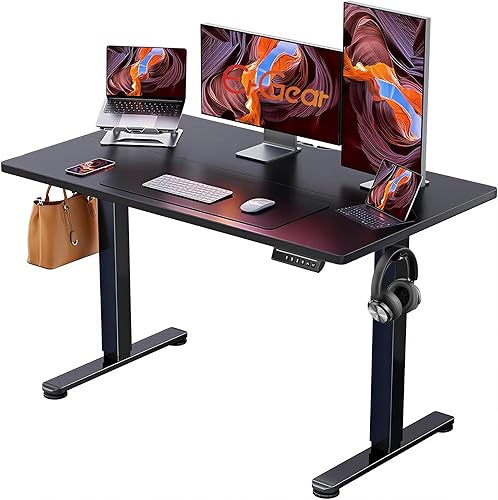
Veken 47.2 Inch Large Electric Standing Desk: Best for compact PC setups
- 47.2 inch desktop
- 28.3 to 46.5 inch height range
- Quiet motor under 52 dB
- Memory presets
- Built-in cable management
A compact 47.2 inch top with memory presets and cable management suits a PC that moves with the desk.
Pros
- Compact footprint for small rooms
- Memory presets for sit and stand heights
- Cable management keeps cords tidy
Cons
- Desktop is composed of two boards
- No PC mount included
The Veken 47.2 inch model suits PC users in small rooms who want a tower, one or two monitors and peripherals on a single moving surface. Its 47.2 x 23.64 inch desktop leaves enough room for a compact tower beside a monitor, while the 28.3 to 46.5 inch range covers most sitting and standing heights.
The height span is wide enough for different chairs and for standing without raising your shoulders.
Veken says the motor runs under 52 dB, which helps in shared rooms and home offices where calls happen nearby. Memory presets let you return to your saved sitting and standing heights with one touch, so you can change position without remeasuring your monitor height or guessing where the desktop should stop.
Built-in cable management keeps cords tidy as the desk moves, and that matters more with a PC mount than with a laptop because display and power cables stay connected at all times. A sedentary reminder and a headphone hook in the included components add small daily conveniences.
The trade-off is a two-board desktop and no included mount, so you still need a holder that fits your tower size. Pick this for a compact everyday setup.
ErGear 48 X 24 Inch Height Adjustable: Best for memory presets
- 48 x 24 inch desktop
- 28.35 to 46.46 inch height range
- 4 memory presets
- 176 lb capacity
- Alloy steel frame
Four memory presets and a 176 lb capacity make this a strong pick for frequent height changes.
Pros
- Four memory presets
- Tested for 100,000 lift cycles
- Low-VOC materials
Cons
- No PC mount included
- 48 inch top limits wide dual monitor setups
The ErGear 48 x 24 inch model suits buyers who change height often and want more than two saved positions. Its 4 memory presets let two people share one desk or let one person save separate heights for work, gaming and video calls.
That extra memory matters when a PC mount and monitor arms are set up once and should return to the exact same alignment every time.
The height range runs from 28.35 to 46.46 inches, and the alloy steel frame carries up to 176 lb. That capacity leaves headroom for a tower, two monitors, a mount and peripherals without pushing the limit, even if you add a riser for eye level viewing.
The 24 inch depth is a familiar working depth that suits keyboards and mice without forcing a long reach.
ErGear says the frame was tested for 100,000 lift cycles, which signals durability for daily use over many sit and stand changes. Low-VOC materials also help if you are sensitive to indoor emissions in a bedroom office where you spend long hours.
The trade-off is a 48 inch top that feels tight for wide dual monitors, and no PC mount is included. You will need to add a C-clamp or under-desk holder and check rear edge clearance before ordering.
HUANUO 55″ x 26″ Electric Standing Desk: Best for C-clamp mounts
- 55 x 26 inch desktop
- 2.6 inch extended rear edge
- 24.4 inch keyboard tray
- 4 height presets
- 176 lb load capacity
C-clamp compatibility and a large keyboard tray suit buyers who want monitors and PC gear mounted together.
Pros
- C-clamp mount compatible
- Large keyboard tray included
- Two drawers for storage
Cons
- Heavier at 69.2 lb
- Keyboard tray reduces under-desk clearance
The HUANUO 55 x 26 inch model suits buyers who want mount compatibility and storage in one desk. Its 2.6 inch extended rear edge makes it easier to attach a C-clamp monitor mount, and a riser can raise screens closer to eye level.
That rear edge detail is specific and practical, because many standard tops leave too little room for a clamp to grip safely behind the desk.
A 24.4 x 9.8 inch keyboard tray fits a full-size keyboard and mouse, which frees desktop space for a PC tower or extra monitors. Two drawers store cables, tools and accessories out of sight, so the moving surface stays clear when you switch positions.
The deeper 26 inch top also gives more front to back room for a tower placed beside monitors, rather than crowding everything along one line.
The height range runs from 28.3 to 46.5 inches with 4 presets, and the load capacity is 176 lb. HUANUO says the steel frame was tested for 50,000 lift cycles at full capacity, which is a useful context for heavy daily use.
The trade-off is weight at 69.2 lb and reduced legroom from the tray and drawers. Check your chair clearance and your under desk height before you commit to this layout.
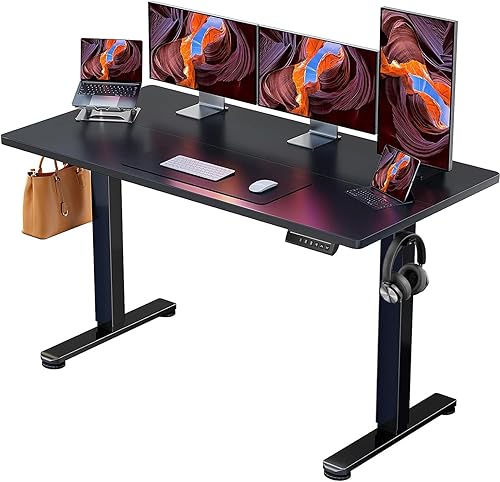
Veken 55 Inch Large Electric Standing Desk: Best for wide dual monitors
- 55 inch desktop
- 28.3 to 46.5 inch height range
- Quiet motor under 52 dB
- Memory presets
- Built-in cable management
A 55 inch top fits dual monitors and a PC tower while cable management keeps the moving parts tidy.
Pros
- Wide 55 inch surface
- Fits dual 37 inch monitors
- Easy 10 to 30 minute assembly
Cons
- Desktop is composed of two boards
- No PC mount included
The Veken 55 inch model suits buyers with dual monitors and a PC tower that need a wide surface. Its 55 inch desktop fits dual 37 inch monitors, according to Veken, with room left for a tower and peripherals.
That width changes daily use because you do not have to squeeze a tower between two screens or push a keyboard to one side to make space.
The height range runs from 28.3 to 46.5 inches, and the motor runs under 52 dB for quiet height changes. Memory presets save your sitting and standing positions, so the tower and monitors return to the same alignment each time without manual adjustment.
Quiet movement matters when the desk is used for calls, recording or a shared household space.
Built-in cable management helps route power and display cables from the tower to monitors without tangling. The steel frame stays solid at full height for daily work, gaming or study, and the included cable clip and headphone hooks support a tidier setup.
The trade-off is a two-board desktop and no included PC mount. You will need a separate holder, and the 55 inch width needs more wall space than the 47.2 inch version.
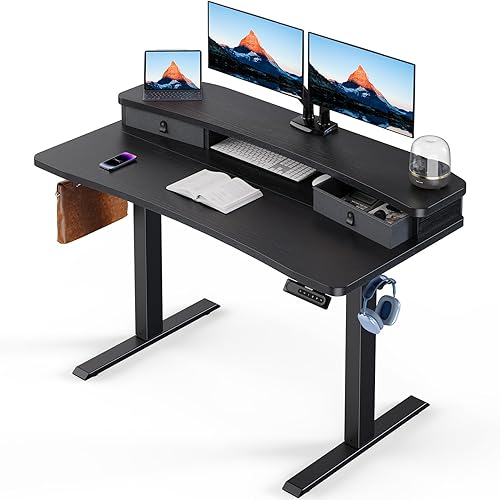
HUANUO 48″ x 24″ Electric Standing Desk: Best for desk drawers
- 48 x 24 inch desktop
- 2.36 inch rear platform edge
- 2 desktop drawers
- 4 height presets
- 2 hooks
Two drawers and C-clamp compatibility help keep PC accessories stored while mounts attach at the rear.
Pros
- C-clamp mount compatible
- Two desktop drawers
- Curved ergonomic edges
Cons
- 48 inch top is narrower than larger picks
- No PC mount included
The HUANUO 48 x 24 inch model suits buyers who value storage and C-clamp mounting in a smaller footprint. Its 2.36 inch rear platform edge supports a C-clamp monitor mount, and two desktop drawers keep cables and accessories stored on the desk.
That combination helps if your PC accessories would otherwise eat into the limited width of a 48 inch top.
The height range runs from 27.5 to 46.4 inches with 4 preset buttons for one-touch changes. The lower minimum height can suit shorter users or higher chairs, while the top end covers standing for most adults.
Curved ergonomic edges reduce bumps as you move around the tabletop during the day, which is a small comfort that matters when you stand and shift position often.
An open storage cubicle holds a keyboard, mouse and accessories within reach, while the 48 inch top still leaves room for a tower and monitors. Two hooks add a place for headphones or cables, and the automotive grade cold rolled steel frame supports everyday loads.
The trade-off is a narrower top than the larger picks here, and no PC mount is included. Drawers also reduce under desk space for some chairs and for taller users.
FEZIBO Standing Desk 48 × 24 Inch: Best for quiet lifting
- 48 x 24 inch desktop
- 28.3 to 46.5 inch height range
- 3 memory presets
- 176 lb capacity
- Motor under 45 dB
A motor under 45 dB and 176 lb capacity suit quiet rooms with a PC and dual monitors.
Pros
- Quiet operation under 45 dB
- Tested for 50,000 lift cycles
- FSC-certified wood desktop
Cons
- 3 presets instead of 4
- No PC mount included
The FEZIBO 48 x 24 inch model suits buyers who prioritize quiet lifting in a shared or bedroom office. Its motor runs under 45 dB, which is quieter than most models in this group during height changes.
That difference is noticeable on calls and in a small room where the desk sits close to a bed or a sofa.
The height range runs from 28.3 to 46.5 inches with 3 memory presets for sitting and standing positions. Three presets cover the basics for one user, and many buyers only use two heights in a typical day.
A reinforced steel frame supports up to 176 lb, so a tower, dual monitors and a mount fit within capacity with room for peripherals and a small riser.
FEZIBO says the motor was tested for up to 50,000 lift cycles for long-term operation. The desktop uses FSC-certified wood, which appeals to buyers who prefer sustainable materials for a home office.
Assembly guidance describes attaching legs and securing the two piece desktop, which suggests a straightforward build. The trade-off is only 3 presets instead of 4, and no PC mount is included.
The 48 inch top also limits very wide monitor arrays.
ErGear Height Adjustable Electric Standing Desk: Best for deep desktops
- 55 x 28 inch desktop
- 28.35 to 46.46 inch height range
- 4 memory presets
- Alloy steel frame
- Clean cable management
A 55 x 28 inch top gives extra depth for a PC tower, monitors and peripherals side by side.
Pros
- Deep 28 inch desktop
- Four memory presets
- Tested for 100,000 lift cycles
Cons
- No PC mount included
- Larger footprint needs more floor space
The ErGear 55 x 28 inch model suits buyers who want extra desktop depth for a PC and peripherals. Its 55 x 28 inch top gives more front-to-back room than the 24 inch deep models here, so a tower, monitors and a keyboard tray fit side by side.
Depth helps when a tower sits on the desk itself, because you can place it behind the keyboard line without pushing monitors too far back.
The height range runs from 28.35 to 46.46 inches with 4 memory presets for quick changes. Four presets help shared households and help you keep separate heights for typing, gaming and calls.
An alloy steel frame supports daily work, study and gaming at full height, and the included cable management helps keep cords routed as the desk moves.
ErGear says the frame was tested for 100,000 lift cycles, and clean cable management helps keep cords routed as the desk moves. Low-VOC materials support a healthier indoor workspace for long sessions.
The trade-off is a larger footprint that needs more floor and wall space, and no PC mount is included. Depth also means you need clearance behind the desk for cables and mounts, and you should confirm your chair and monitor arm reach still works at the deeper surface.
VIVO Electric Standing Desk: Best for heavy PC builds
- 71 x 30 inch desktop
- 29.2 to 48.4 inch height range
- 220 lb capacity
- 4 memory presets
- All-steel frame
A 220 lb capacity and 71 inch top handle heavy PC builds and multiple monitors with room to spare.
Pros
- 220 lb capacity
- Extra deep 71 inch top
- Telescoping legs for stability
Cons
- Largest footprint in this group
- No PC mount included
The VIVO 71 x 30 inch model suits buyers with heavy PC builds and multiple monitors. Its 220 lb capacity and all-steel frame handle a tower, dual monitors, mounts and peripherals with headroom to spare.
That headroom matters if you plan to add a riser, monitor arms and a PC mount on top of the base equipment weight.
The desktop measures 70.9 x 29.5 inches in a 3-piece design, which gives extra depth for monitor setups and supplies. The height range runs from 29.2 to 48.4 inches, so taller users can stand without hunching and shorter users can still sit comfortably at the lower end.
The 3-piece top uses particle board for a scratch-resistant surface, which helps in a busy gaming or work setup.
A memory controller with 4 presets saves your preferred heights for quick changes. Telescoping legs adjust for stability, and leveling feet adapt to most floor surfaces, which helps if your floor is not perfectly even.
The trade-off is the largest footprint in this group, which demands careful room planning and wall clearance. No PC mount is included, so you still need a holder rated for your tower size and weight.
DeskShow Black 60x28 In Electric Standing Desk: Best for thick tabletops
- 60 x 28 inch desktop
- 1 inch thick tabletop
- 27.95 to 45.67 inch height range
- 3 memory buttons
- 220 lb capacity
A 1 inch thick top and 220 lb capacity suit heavy gaming PCs and wide monitor arrays.
Pros
- 1 inch thick desktop
- 220 lb capacity
- Motor under 45 dB
Cons
- 3 memory buttons instead of 4
- No PC mount included
The DeskShow 60 x 28 inch model suits buyers who want a thick tabletop for heavy gaming gear. Its 1 inch thick desktop adds stability for monitors and equipment, while the 60 x 28 inch surface leaves room for a tower and accessories.
Thickness can also help C-clamp mounts grip more securely, though you should still confirm clamp size against the actual edge.
The height range runs from 27.95 to 45.67 inches with 3 programmable memory buttons for sitting and standing heights. The range starts a little lower and ends a little lower than most models here, so check your standing height and monitor setup against the maximum.
A heavy-duty steel base and double-beam design support up to 220 lb, which suits heavier towers and wider arrays.
DeskShow says the lifting mechanism was tested for 50,000 lift cycles, and the motor runs under 45 dB for quiet operation. A cable management tray and hooks help keep cords organized under a moving top.
Pre-drilled holes and clearly labeled accessories support a 30 minute setup. The trade-off is 3 memory buttons instead of 4, and no PC mount is included.
The 60 inch width also needs more wall space than compact models.
How we compared electric standing desks with PC mounts
We checked desktop size, height range, load capacity, motor noise and mount compatibility for each model. We also looked at rear edge details, since C-clamp mounts need enough thickness and clearance to attach.
Desktop depth, storage and preset count were scored in the same pass.
We weighed how each desk handles a tower that moves with the desktop. Cable management, presets and stability at full height matter more when a PC is mounted than when you only use a laptop.
Lift cycle testing, where listed, was treated as a durability signal rather than a guarantee.
For related options, see our best electric standing desk with keyboard tray guide. If power routing is a concern, best electric standing desk with power outlets covers desks with built-in outlets.
H3: What we did not count as a PC mount
None of these nine desks includes a PC mount in the listed included components. That is why mount compatibility, rear edge space and under desk clearance are scored separately.
You should budget for a holder as an extra purchase and confirm its weight limits.
Do you actually need a PC mount for a standing desk?
You need a PC mount if your tower sits on the floor and you change height more than once a day. Without a mount, cables stretch and disconnect as the desk moves up and down.
A mount keeps the tower connected at a fixed distance from your monitors.
A mount keeps the tower at desktop height, so short cables reach your monitors and peripherals. The downside is that the tower adds weight to the moving surface, so stability and capacity become more important.
H3: When a mount is worth it
A mount is worth it for daily sit-stand users with desktop towers. It simplifies cable routing and protects connectors from repeated stretching.
It also keeps the tower within reach for ports and power buttons when you stand.
H3: When a floor tower still works
A floor position can work if you use long cables with enough slack and check connections weekly. It is worse for cable management but better for floor airflow.
It also keeps tower weight off the desk.
For mount options themselves, see Best PC Mounts for Standing Desks.
What desktop size works best with a PC mount?
A 48 inch desktop works for a compact tower and one or two monitors. A 55 to 60 inch top fits dual monitors plus a tower without crowding.
A 71 inch top suits heavy builds but needs a large room. Size choice should start with your monitor width, not just the tower.
Depth matters as much as width. A 24 inch deep top fits most setups, while 26 to 30 inch tops give more room for a tower and peripherals.
Measure from the front edge to the wall before you choose the deepest option.
H3: Compact setups under 48 inches
Compact tops suit small rooms and single monitor setups. Keep the tower on the side with a mount and route cables along the rear edge.
A keyboard tray can free surface space, but it reduces legroom.
H3: Wide setups at 55 inches and above
Wide tops suit dual monitors and gaming setups. Measure your wall and chair clearance before you choose the largest size.
Allow space behind the desk for cables to bend when the desktop moves.
How do C-clamp mounts fit standing desks?
C-clamp mounts need a rear edge thick enough for the clamp and clear of drawers or trays. The HUANUO models list extended rear edges for this purpose, which makes clamp placement easier.
Check desktop thickness, rear clearance and any under-desk storage before you order. Cable management trays can also sit where a clamp needs to grip, so check the mounting zone in the manual.
H3: Rear edge and thickness checks
Measure the rear edge and confirm the clamp fits without hitting cable management trays. Leave space for cables to bend behind the desk.
Test the clamp position with monitors mounted before you finalize cable routing.
H3: Drawers and trays that block clamps
Drawers and keyboard trays can block clamp positions. If you want both storage and a clamp, check the exact mounting zone first.
Some layouts work best with the clamp on an open section of the rear edge.
How much weight can a standing desk hold with a PC?
Capacities here range from 176 lb to 220 lb. Add up all weights before you buy, including the mount, monitor arms, riser and accessories on the moving surface.
A tower plus two monitors and a mount often stays under 80 lb. Heavy custom builds with steel cases and large displays need a closer check, so weigh the tower if you are unsure.
H3: 176 lb models
176 lb models suit everyday PC setups with dual monitors. They leave headroom for mounts and accessories without strain.
They match compact and mid-size tops where stability matters more than maximum load.
H3: 220 lb models
220 lb models suit heavy gaming PCs and wide monitor arrays. They cost more floor space but give more load headroom.
Check the height range as well, since some high capacity models start higher or end lower than others.
For heavier frames in general, see Best Heavy Duty Standing Desks. If storage is your priority, [What Is a Standing Desk with Drawers?
A Clear Answer](/what-is-a-standing-desk-with-drawers/) explains drawer layouts.
How do you route cables when the PC moves with the desk?
Route cables with slack for the full height range, not just your sitting height. Test the full motion after setup and check that no cable pulls tight at the top position.
Use the cable management tray or clips to guide cords along the rear. Label both ends of each cable once the tower is mounted, because labels save time when you rearrange gear later.
H3: Slack and motion testing
Leave enough slack for maximum height without strain. Run the desk up and down twice after setup to check every connection.
Recheck after a week, since cables can settle into a tighter path.
H3: Power strips and surge protection
Mount a power strip under the desk so only one cable runs to the wall. That reduces tangling when the desk moves.
Keep the strip clear of the lifting columns and check that it does not block a clamp or tray.
Verdict: best electric standing desk with PC mount
The Veken 47.2 inch model is the best pick for most buyers because it balances size, quiet operation and presets for a PC setup. The HUANUO 55 inch model wins for C-clamp mounting and storage, while the VIVO wins for heavy builds.
Pick the Veken 47.2 inch if you want a compact everyday desk. Pick the HUANUO 55 inch if you want C-clamp compatibility and a keyboard tray.
Pick the VIVO if you need 220 lb capacity and a 71 inch top.
Measure your room, check rear edge clearance and add up your total load before you order. Then choose the desk that fits your tower, monitors and cable routing plan.
Our top 3 picks at a glance
-
1
Best for compact PC setups
Veken 47.2 Inch Large Electric Standing Desk
9.7/10 our score
See it on Amazon -
2
-
3
Frequently asked questions
What is an electric standing desk with a PC mount?
It is an electric sit-stand desk paired with a holder that keeps your computer tower on or under the moving desktop. The tower rises with the desk, so cables stay connected and you do not lift the PC by hand.
Most desks here do not include the mount, so you add a C-clamp or under-desk holder separately.
Do I need a PC mount for a standing desk?
You need one if your tower sits on the floor and you stand often. Without a mount, cables stretch and disconnect as the desk moves.
A mount keeps the tower at desktop height and lets shorter cables route cleanly to your monitors and peripherals.
Can a C-clamp mount fit a standing desk?
Yes, if the desktop has a rear edge thick enough for the clamp. The HUANUO models list extended rear edges for C-clamp monitor mounts.
Check desktop thickness and rear clearance before ordering a clamp, since drawers and trays can block the fit.
How much weight can these desks hold with a PC on top?
Capacities in this group range from 176 lb to 220 lb. A typical tower, two monitors and peripherals often stay well under those limits.
Add mount weight and any riser before you compare total load to capacity.
Is a PC mount better than a floor tower position?
A mount is better for cable routing because the tower moves with the desk. A floor position forces you to leave slack in every cable and check connections after each height change.
The trade-off is less floor airflow and a higher center of gravity on the desktop.


