Logitech MX Vertical vs Lift: Which Fits Your Hand? (November 2026)
Choose MX Vertical for a larger, right-hand-focused shape and Lift for small to medium right hands. The Logitech MX Vertical mouse vs Lift choice also depends on controls, connection options and battery needs.
On this page (8 sections)
- Logitech MX Vertical mouse vs Lift: which hand fits each?
- Which Logitech vertical mouse has better controls?
- Does MX Vertical or Lift track better?
- Which one lasts longer between charges or battery changes?
- How do the wireless connections compare?
- Which MX Vertical or Lift is easiest to set up?
- What are the main trade-offs between the four products?
- Which Logitech mouse should you choose?
Choose MX Vertical for a larger, right-hand-focused shape and Lift for small to medium right hands. The Logitech MX Vertical mouse vs Lift decision also depends on the controls, connection options and battery life you want.
Both families use an upright shape intended to place your hand in a more natural handshake-like position. For a keyboard and Lift pairing, read the Wave Keys and Lift combo review.
We compared the features and specifications, then focused on the daily differences that matter at a standing desk or seated workstation.
If you are still choosing your overall pointing setup, our keyboards, mice and trays buying guide covers how a mouse fits into a complete desk layout. For an ergonomic keyboard, read the Logitech ERGO K860 review.

 Best for 57-degree wrist posture
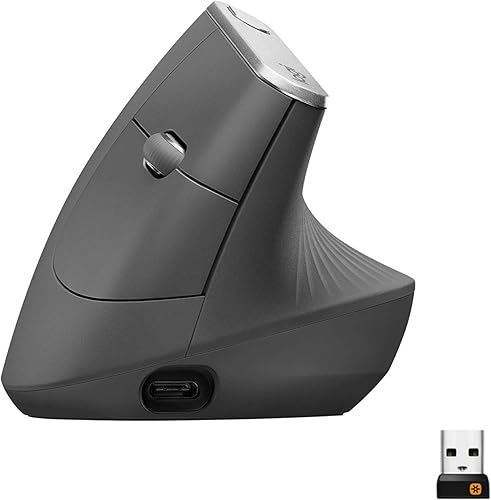
Logitech MX Vertical Wireless Mouse Ergonomic Design
Logitech MX Vertical mouse vs Lift: which hand fits each?
Lift has the clearest hand-size guidance because it is made for small to medium right hands. MX Vertical has a vertical shape and thumb support, but the data does not give the same small-to-medium fit label.
Lift's 57-degree shape rises under the hand and includes a softly textured grip and snug thumb rest. That gives you a clear starting point if a standard mouse feels too flat or your hand tends to rest across the desk.
The MX Vertical models also use an upright layout. The detailed graphite model identifies a 57-degree vertical angle, textured rubber surface and a shape intended to fit a variety of hand shapes and sizes.
Hand orientation matters before any feature comparison. The detailed MX Vertical model and both Lift products are right-hand oriented, while the other MX Vertical product data identifies an ambidextrous hand orientation.
What if your hand is small?
Lift is the more direct choice for a small right hand because Logitech identifies it as a small-to-medium fit. Its 4.3 x 2.7-inch listed dimensions and 125 g weight describe the graphite and rose configurations.
The vertical body gives your thumb a defined resting area instead of leaving it beside the mouse. Its softly textured grip is meant to keep your hand settled while you move the pointer.
A smaller hand can still prefer a taller or larger shape, so use the fit description as a guide rather than a guarantee. Keep your wrist straight and avoid gripping the body tightly during normal work.
What if your hand is medium or large?
MX Vertical is the better starting point when Lift's small-to-medium guidance does not match your hand. The detailed MX Vertical data describes a comfort form that fits a variety of hand shapes and sizes.
The MX Vertical product data includes 4-inch length and width values for one model, while the detailed graphite product gives different package-style dimensions. Treat those figures as model-specific and compare the exact product before ordering.
If you want more help adjusting your grip, read our guide on how to use a Logitech MX Vertical mouse. It explains the hand position and movement habits that matter after you switch from a flat mouse.
Which Logitech vertical mouse has better controls?
Lift gives you more listed buttons and a SmartWheel, while MX Vertical keeps the control layout simpler. Lift has 6 buttons in the product data, and MX Vertical has 4.
Lift's SmartWheel supports precision and speed scrolling. Its customizable buttons can be assigned to shortcuts through Logi Options+ software, which may help if you switch between apps during the day.
MX Vertical includes a cursor speed switch in the detailed graphite model. Its 4000 DPI sensor and speed control let you change pointer behavior without relying only on operating-system settings.
The choice is simple if you know your preference. Pick Lift for extra buttons and scrolling flexibility.
Pick MX Vertical if you want a direct pointer-speed switch and a less busy control layout.
For a broader comparison of scrolling features, see our guide to a vertical mouse with horizontal scroll. If fast wheel behavior is your priority, our vertical mouse with infinite scroll guide explains why that feature needs separate checking.
Does MX Vertical or Lift track better?
The listed tracking headline is similar, because the detailed MX Vertical and Lift data both identify 4000 DPI tracking. The main difference is how each body and control layout feels in your hand.
MX Vertical uses an optical sensor and describes advanced tracking for precise control. That sensor reads hand movement and turns it into pointer movement on the screen, which matters most when you need steady, repeatable motion.
The detailed graphite MX Vertical model adds a cursor speed switch. You can change DPI speed and accuracy with a button on the mouse, rather than reaching for a settings menu during a task.
That switch has a clear daily use. You might use a faster setting when moving across a large monitor, then switch to a slower setting when you need to place a cursor on a small target.
Lift also lists 4000 DPI tracking, with fully adjustable DPI in its product details. That gives it a similar sensitivity range, so the headline number alone does not separate the two mice.
The practical difference comes from the shape around the sensor. MX Vertical asks your hand to move from a raised, upright position, while Lift uses its own 57-degree form for small to medium right hands.
Your hand size changes how tracking feels in use. A mouse that fits well lets you move from the forearm more naturally, while a mouse that feels too large or too small can make fine movement harder.
DPI does not decide hand fit. A high setting can reduce the distance your hand travels, but you still need enough desk space to move comfortably.
High sensitivity can also make small hand movements more obvious. Many people prefer a middle setting that balances speed with control during everyday clicking, dragging and selecting.
Lift pairs its tracking with SmartWheel scrolling and extra buttons. Those controls affect how often you reach for the keyboard, even though they do not change the sensor itself.
MX Vertical keeps the control layout simpler, with a cursor speed switch as the key adjustment. That simpler layout may suit you if you want fewer controls to manage during focused work.
Both mice suit office work where precision matters more than rapid flicks across the screen. Think about your hand position, desk space and preferred pointer speed before you judge tracking by DPI alone.
Which one lasts longer between charges or battery changes?
Lift has the longer stated battery life by a wide margin: up to 24 months from one AA battery, compared with MX Vertical's 4-month average battery life. That makes Lift easier to leave connected in a busy workstation.
The graphite Lift includes 1 AA battery and a Logi Bolt USB receiver. The rose Lift also includes an AA battery and Logi Bolt USB receiver.
The detailed MX Vertical model lists a 4-month battery average and includes a USB C cable, receiver and quickstart guide. Another MX Vertical product lists one included lithium polymer battery and battery-powered operation.
Battery figures can vary with use and computing conditions. Your actual interval will depend on how often you move the mouse, how many hours it stays awake and how you connect it.
Think about your own routine before you choose. Lift suits someone who wants fewer battery changes and is happy to replace a single AA battery when it finally runs low.
MX Vertical suits someone who is comfortable charging more often for its other controls. A rechargeable routine works best if you keep the cable near your desk and charge before the mouse runs out.
For a standing desk, battery life affects where you place the mouse each day. A long-life mouse can stay in one spot, while a shorter-life model needs a small charging habit built into your routine.
Connection choice can also affect daily convenience. Bluetooth may suit a laptop setup, while a USB receiver can help if you prefer a dedicated connection on a desktop computer.
Keep spare batteries in mind for Lift rather than a charging cable. That trade-off is simple, but it means you should check the battery level before an important work period.
The MX Vertical battery claim is an average, not a promise for every user. Treat the 4-month figure as a planning guide and adjust your charging routine to your own use.
The Lift claim is stated as up to 24 months, which also depends on conditions. Even with that care, the gap between 24 months and 4 months is large enough to matter.
Choose Lift if battery life is a priority in your daily setup. Choose MX Vertical if its shape, angle or speed switch matters more to you than charging frequency.
How do the wireless connections compare?
MX Vertical offers Bluetooth and USB receiver options, while Lift connects through Bluetooth Low Energy or a Logi Bolt USB receiver. Check the exact operating system and receiver in your setup before choosing.
The first MX Vertical product works with Mac and Windows and lists Bluetooth, radio frequency and USB connectivity. The detailed graphite MX Vertical model includes compatibility with Windows, macOS and iPadOS, along with Bluetooth or an included USB receiver.
Graphite Lift supports Windows, macOS, iPadOS, Chrome OS and Linux through Bluetooth Low Energy or Logi Bolt USB. Its product details also describe switching between up to 3 devices.
The rose Lift data lists laptop compatibility, Mac and PC hardware platforms, Bluetooth and a Logi Bolt USB receiver. Its compatibility details are narrower than the graphite Lift data, so check the exact configuration if you use a tablet or another operating system.
Which MX Vertical or Lift is easiest to set up?
Start by choosing the correct hand orientation, then connect the mouse by Bluetooth or its receiver and place it so your forearm stays relaxed. A vertical mouse may need a short adjustment period because the buttons sit on a raised body.
Place the mouse close enough that your elbow stays near your side. Move from the forearm and hand together instead of pinching the mouse with your fingertips.
For MX Vertical, decide whether Bluetooth or the receiver makes more sense for your computer. For Lift, choose Bluetooth Low Energy or Logi Bolt USB, then use the available software if you want to assign shortcuts.
The MX Vertical and Lift shapes are not interchangeable in feel. Read our Logitech MX Vertical mouse review for a closer look at that model's angle, controls and tracking.
What are the main trade-offs between the four products?
The first MX Vertical is the highest-scoring option for adjustable-angle control, while graphite Lift is the strongest fit-led choice for small to medium right hands. The two remaining products mainly give you a different MX Vertical configuration or a rose Lift finish.
The first Logitech Mouse MX Vertical is a good match when you want connection flexibility and a 4-month average battery life. Its adjustable angle gives you more positioning choice than a fixed shape, while the 4-button layout keeps the controls straightforward.
The graphite Logitech MX Vertical Wireless Mouse is the better fit for a right-handed user who wants the detailed MX Vertical feature set. Its 4000 DPI sensor, 4 buttons and 4-month battery life suit focused pointer work without adding Lift's extra controls.
The graphite Lift is the clearest choice for a smaller right hand and a long battery interval. Its 57-degree shape, thumb rest, quiet clicks and multi-device connection details give it a more feature-rich daily setup.
For setup ideas specific to this model, read how to use a Logitech Lift mouse.
The rose Lift has the same core hand-fit direction as the graphite configuration, with a 57-degree shape and small-to-medium right-hand focus. Choose it when the color fits your desk and the listed Bluetooth and Logi Bolt options meet your computer needs.
Which Logitech mouse should you choose?
Pick Lift if your right hand is small to medium, you want 6 buttons and SmartWheel scrolling, or you want up to 24 months of battery life. Choose MX Vertical if you prefer its shape, cursor speed switch, adjustable angle or broader hand-shape guidance.
The graphite Lift is the best default for a small-to-medium right hand. The rose Lift makes sense when you want that same product direction with a different finish, while the graphite MX Vertical is the more specific choice for its 57-degree angle and textured rubber grip.
Choose the first MX Vertical when Bluetooth or USB receiver flexibility matters and you use Mac or Windows. Its 4000 DPI optical sensor gives it a clear tracking baseline, but its 4-month average battery life needs more attention than Lift's stated 24 months.
The Logitech MX Vertical mouse vs Lift decision is mainly a fit and control decision. Measure your available hand position, decide whether you need extra buttons or a speed wheel, then choose the product whose connection and battery details match your desk.
Frequently asked questions
Is Logitech MX Vertical better than Lift?
MX Vertical is the better fit when you want a larger upright Logitech shape, a cursor speed switch or an adjustable angle. Lift is better for small to medium right hands, 6 buttons, SmartWheel scrolling and up to 24 months of battery life.
Your hand size and control preferences decide the winner.
What is the difference between Logitech MX Vertical and Lift?
Both use a 57-degree upright design in the detailed product data, but Lift is made for small to medium right hands and adds 6 buttons, SmartWheel scrolling and a 24-month battery claim. MX Vertical uses 4 buttons, 4000 DPI tracking and a 4-month average battery life.
Is Logitech Lift good for large hands?
Lift is described as a fit for small to medium right hands, so it may feel too compact if you need a larger grip. Compare the mouse shape with your current hand position before choosing.
MX Vertical is the safer comparison point when Lift's stated hand range does not match you.
Does MX Vertical have better tracking than Lift?
MX Vertical has a stated 4000 DPI optical sensor, and the detailed Lift data also gives Lift 4000 DPI tracking. That means the headline sensitivity is the same in this comparison.
Choose between them by hand fit, buttons, scrolling, connection method and battery life.


