Vertical Mouse vs Trackball: Which Should You Choose? (November 2026)
Choose a vertical mouse for an upright hand position, or choose a trackball for cursor control without moving your arm. The better fit depends on wrist comfort, desk space, hand size and how you prefer to control the pointer.
On this page (10 sections)
- Vertical mouse vs trackball: what is the main difference?
- Which feels more natural for daily desk work?
- Is a trackball better for a small or crowded desk?
- Which option gives your wrist less work?
- How do connection and battery choices compare?
- Which vertical mouse fits your hand best?
- Which trackball should you choose?
- How should you learn trackball control?
- What should you choose for a standing desk?
- Vertical mouse vs trackball: final choice
Choose a vertical mouse for an upright hand position, or choose a trackball for cursor control without moving your arm. The vertical mouse vs trackball decision depends on your wrist posture, available desk space, hand size and comfort with thumb-controlled movement.
It also depends on how much of your desk you can give to mouse travel and how familiar you want the pointer to feel.
A vertical mouse keeps the pointer motion familiar. You move the whole mouse while your hand rests on an angled shell.
That suits people who already like regular mouse movement and mainly want a different hand angle.
A trackball keeps the base still. You roll a ball with your thumb or fingers, which can suit a small desk, a crowded work surface or anyone who wants less arm movement.
It asks you to learn a new way to steer the cursor, rather than sliding the mouse.
This comparison covers 2 vertical mice and 2 trackball mice. We compared their shapes, controls, connections, power options and setup needs using the listed product information.
The aim is to match each design to a desk and a hand, not to declare one style better for everyone.

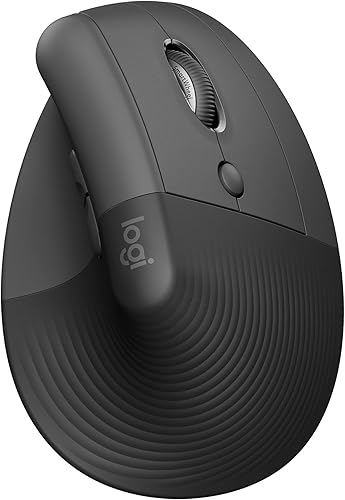 Best for small to medium right hands
Logitech Lift Vertical Ergonomic Wireless Mouse
Vertical mouse vs trackball: what is the main difference?
A vertical mouse changes your hand position, while a trackball changes how the cursor moves. For a comparison with conventional mice, see trackball mouse vs regular mouse.
The first uses a tilted shell and desk movement, while the second uses a stationary base and a rolling ball.
The Anker 2.4G Wireless Ergonomic Mouse has a right-hand vertical design with 800, 1200 and 1600 DPI settings. It connects through a 2.4 GHz USB receiver.
The Logitech Lift Vertical Ergonomic Wireless Mouse uses a 57-degree shape, a thumb rest and a softly textured grip. For a direct comparison, see Logitech MX Vertical vs Lift.
It can connect through Bluetooth or a Logi Bolt USB receiver.
The Logitech Ergo M575S Wireless Bluetooth Trackball Mouse uses thumb control and stays in place while you move the pointer. The ProtoArc EM02 adds a choice between a flat 0-degree position and a 15-degree tilted position.
If you want more background on mouse shape and hand position, our guide to how an ergonomic mouse works explains the basic design choices.
Which feels more natural for daily desk work?
A vertical mouse usually feels more familiar, while a trackball may feel more stable after you learn the control. Your first choice should match the movement that feels easiest to repeat for hours.
Vertical mice still use the standard pattern of moving the device across the desk. The difference is that your hand rests in a more upright position instead of lying flat over a traditional mouse.
The Anker model uses a neutral handshake-style position and includes next and previous buttons. Its optical tracking offers 3 sensitivity settings, which lets you change pointer speed without changing the physical grip.
The Logitech Lift is also upright, but its 57-degree angle gives it a more pronounced vertical shape. For a matching keyboard and mouse setup, see Logitech Wave Keys and Lift.
Its SmartWheel, customizable buttons and whisper-quiet clicks suit shared spaces and regular office work.
Trackballs separate hand position from pointer movement. You can leave the base near the keyboard and use your thumb to roll the ball.
Is a trackball better for a small or crowded desk?
A trackball is usually better when the mouse has little room to move. Because the base stays in one place, your desk can hold a monitor stand, keyboard, notebook or other items without limiting cursor control as much.
The Logitech Ergo M575S is designed around thumb control and can work on any surface because you do not slide the mouse around. It also supports Bluetooth and the included Logi Bolt USB receiver.
The ProtoArc EM02 gives you the same stationary control with a choice of 0 or 15 degrees. Its adjustable hinge lets you try a flatter or slightly tilted hand position without changing to a different mouse.
A vertical mouse needs a clear movement area. That does not mean it needs a large desk, but you should leave enough room for the mouse to travel without hitting the keyboard, monitor base or desk edge.
If you are also choosing a desk for a compact workstation, start with how to choose a standing desk. The usable mouse area matters as much as the desk's outside dimensions.
Which option gives your wrist less work?
A trackball can reduce the amount of wrist and forearm movement, while a vertical mouse focuses on hand angle. Neither design removes the need for a suitable chair, desk height or relaxed grip.
With a vertical mouse, the shell supports your hand in an angled position while your arm moves the device. This can feel natural if you already prefer regular mouse movement but want less twisting in the forearm.
With a trackball, the base remains stationary and the ball controls the pointer. Your thumb or fingers do more of the small movement, so the main question becomes whether that control feels comfortable for your hand.
Do not squeeze either mouse. Keep your shoulder relaxed, place your forearm on the desk or armrest when possible and adjust the pointer speed so you do not need large repeated movements.
A mouse is only one part of a workstation. Our complete ergonomic keyboard and mouse guide covers the relationship between your keyboard, mouse, tray and desk position.
How do connection and battery choices compare?
Choose the connection that matches your computer and desk setup. The Anker uses a 2.4 GHz USB receiver, while the Logitech models support Bluetooth and USB receiver options, and the ProtoArc supports both 2.4 GHz wireless and Bluetooth.
The Anker includes a USB receiver stored in the bottom of the mouse and needs 2 AAA batteries, which are not included. It enters a power-saving mode after 8 minutes of inactivity and wakes when you press the right or left button.
The Logitech Lift includes 1 AA battery and offers up to 24 months of battery life. It can connect through Bluetooth or the included Logi Bolt USB receiver and supports Windows, macOS, iPadOS, Chrome OS and Linux.
The Logitech Ergo M575S includes 1 AA battery and offers up to 18 months of battery life. It also supports Bluetooth and Logi Bolt USB connection.
The ProtoArc EM02 uses USB-C rechargeable power and has up to 90 days of standby time on a full charge. Its 2.4 GHz wireless and Bluetooth options can help when you switch between compatible devices.
Before choosing, check whether your computer has an available USB port or supports the required Bluetooth connection. If you need a frame with room for a keyboard tray and mouse, see our guide to choosing a standing desk frame.
Which vertical mouse fits your hand best?
The Logitech Lift is the clearest choice for small to medium right hands, while the Anker suits right-handed users who want a larger, simple vertical shape. Measure your hand and consider how much grip support you prefer.
The Logitech Lift has dimensions of 108 x 70 x 71 mm and weighs 125 g. Its thumb rest, textured grip and 57-degree angle give the hand a defined place to rest.
The Anker measures 120 x 62.8 x 74.8 mm and weighs 3.4 oz in the product information. Its 5-button design includes next and previous buttons for webpage browsing.
Both are right-hand mice. If you use your left hand, these particular models do not match that need.
For more product-selection help, read how to choose an ergonomic computer mouse. It can help you compare hand size, button layout and grip before you change mouse styles.
Which trackball should you choose?
Choose the Logitech Ergo M575S for a simple thumb trackball, or choose the ProtoArc EM02 if you want an adjustable angle and rechargeable power. Both are designed for stationary cursor control, but their adjustment options differ.
The M575S has a sculpted shape, a graphite and blue ball, quiet clicks and a design intended to fit most hand sizes. Its cursor sensitivity reaches 2000 DPI, and the ball can be removed from its cage for cleaning.
The ProtoArc EM02 has 6 buttons, 5 DPI settings from 200 to 1600 and quiet-touch buttons. Its angle switches between 0 and 15 degrees, giving you more control over the hand position.
The ProtoArc's forward and backward buttons are not compatible with Mac OS. If those buttons matter to your workflow, check your operating system before choosing this model.
Both trackballs need occasional cleaning. Dust can affect smooth movement, so remove the ball where supported and clean the ball and rollers according to the product's care guidance.
How should you learn trackball control?
Start slowly with a lower pointer speed, then raise it after your thumb control improves. ProtoArc says first-time users may need 1–2 weeks to get familiar with the EM02.
Keep the trackball close to the keyboard so your hand does not reach far. Rest your palm lightly, roll the ball with short movements and use the buttons with the same hand.
If the pointer feels too fast, lower the DPI or operating system pointer speed. If it feels slow, increase sensitivity in small steps rather than making large changes at once.
A trackball can feel imprecise when the ball keeps rolling from inertia or when dust builds up around the rollers. Clean it before changing your whole setup.
If you prefer a conventional movement pattern, a vertical model may be easier to learn. For more options beyond standard mice, see alternatives to a computer mouse.
What should you choose for a standing desk?
Choose a vertical mouse if you move between sitting and standing and want familiar cursor movement; choose a trackball if your keyboard and mouse stay in a compact, fixed position. Desk height alone does not decide the better control style.
At a standing desk, keep your mouse close enough that your elbow stays near your side. A vertical mouse gives you a familiar way to move the pointer as you change posture.
A trackball can keep your hand in one place while the desk changes height. That may suit a small keyboard tray or a surface where sliding a mouse is difficult.
Whichever style you choose, set the desk so your forearm is level and your wrist is not bent sharply. A well-positioned mouse cannot correct a desk that is too high or too low.
Vertical mouse vs trackball: final choice
Pick the Anker or Logitech Lift if you want upright movement, and pick the Logitech Ergo M575S or ProtoArc EM02 if you want stationary control. The Lift is the better fit for small to medium right hands, the Anker keeps the design simple, the M575S saves desk space and the EM02 adds angle adjustment and USB-C charging.
Your hand size, connection needs and desk layout should make the final call.
Choose the vertical mouse that matches your hand and connection needs. The Logitech Lift suits small to medium right hands that want a 57-degree grip, quiet clicks and Bluetooth or Logi Bolt connection.
The Anker 2.4G Wireless Ergonomic Mouse suits right-handed users who want a straightforward vertical shape, 3 DPI settings and a USB receiver connection.
Choose the trackball when reducing mouse travel matters more than keeping a familiar movement pattern. The Logitech Ergo M575S helps when desk space is tight because thumb control moves the cursor while the mouse stays still.
It suits users who want simple stationary control with Bluetooth or Logi Bolt USB and up to 18 months from the included AA battery.
The ProtoArc EM02 suits users who want stationary control with a choice of flat 0 or 15 degrees, USB-C rechargeable power and 5 DPI settings. That adjustable hinge gives more control over hand posture, which can matter during long sessions at a standing desk.
It also needs care, since the ball and rollers require cleaning and trackball control takes a short learning period.
Set up whichever style you choose with your forearm supported and your elbow close to your body. Keep the mouse near the keyboard so you do not reach, and adjust pointer speed in small steps until movement feels steady.
A relaxed grip helps more than pressing hard, and either design works best when desk height keeps the wrist from bending sharply.
If you choose the Logitech Lift, our guide on how to use a Logitech Lift mouse can help you set up its grip, connection and buttons. If you choose a trackball, start slowly, clean the ball when it feels sticky and give thumb control time to become familiar.
The right choice is the one you can use comfortably for hours without extra reaching or squeezing.
Frequently asked questions
Is a vertical mouse better than a trackball?
A vertical mouse is better if you want an upright hand position and familiar mouse movement. A trackball is better if you want to keep your hand and forearm mostly still while using your thumb or fingers to move the cursor.
Desk space, hand size and control preference decide the better option.
Is a trackball mouse better for wrist comfort?
A trackball may help reduce wrist and arm movement because the mouse stays in one place. It does not automatically fit every hand, and thumb control can feel unfamiliar at first.
Keep your forearm supported, adjust pointer speed gradually and stop if use causes ongoing discomfort.
Can a vertical mouse replace a trackball?
A vertical mouse can replace a trackball for general desk work, but the control style changes. A vertical mouse moves across the desk, while a trackball keeps the base stationary.
Choose the vertical model for a familiar pointer motion and the trackball for tight spaces or less arm movement.
Which is better for a small desk, a vertical mouse or trackball?
A trackball is usually the easier choice for a small desk because the base stays in one place. The Logitech Ergo M575S and ProtoArc EM02 both use trackball control, while the Anker and Logitech Lift vertical mice need room to move across the desk surface.
How long does it take to get used to a trackball?
A trackball can take about 1–2 weeks to feel familiar, according to ProtoArc's guidance for the EM02. Start with a lower DPI setting, move the ball slowly and increase sensitivity after your thumb control becomes more precise.