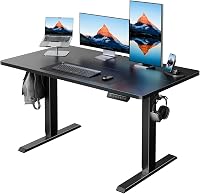
What Size Standing Desk Do I Need? What to Know
On this page (3 sections)
The right standing desk size depends on your space and needs. Measure your area and consider what you’ll place on it, like monitors and accessories. A good rule of thumb is to choose a desk that’s at least 48 inches wide for most home offices. This ensures enough room for your essentials without feeling cramped. Don’t forget to check the depth, too; 24-30 inches is standard.
Getting the size right is key to a comfortable and productive workspace. Too small, and you might feel like you’re juggling items or can’t extend your arms fully. Too large, and it could overwhelm your room. Think about your workflow and how much surface area you genuinely use throughout the day. Many people find a wider desk offers more flexibility.
- Desk size depends on your room and what you’ll put on it.
- Measure your available space first.
- Consider the number of monitors and other items.
- A 48-inch width is a good starting point for many.
- Depth is also important for arm room.
Let’s walk through exactly how to pick the perfect size for your new standing desk.
Choosing the Right Standing Desk Dimensions
Finding the perfect standing desk size is about more than just fitting it into your room. It’s about creating a comfortable and functional workspace that supports your health and productivity. Think of it as tailoring a suit for your work life.
Measure Your Space First: The Foundation of Your Decision
Before you even start looking at desks, grab your tape measure. You need to know exactly how much space you have to work with. Measure the length and width of the area where you plan to put your standing desk. Don’t forget to account for things like doors that swing open, existing furniture, and pathways you need to keep clear.
Consider the overall room layout. If your desk is going into a corner, make sure there’s enough room to easily access the desk and any drawers or shelves. If it’s in the middle of a room, you’ll want to ensure it doesn’t feel like a giant obstacle. Think about how you move around your workspace.
What Will You Put On Your Desk?
Now, let’s talk about what you’ll actually be placing on your new desk. This is a major factor in determining the size you need. What’s your current setup? What do you plan for the future?
Monitors: The Biggest Space Hogs
How many monitors do you use? And how big are they? A single 24-inch monitor takes up much less real estate than two 32-inch ultrawide displays. You’ll need enough width for all your screens side-by-side, plus some breathing room between them.
We found that for dual monitor setups, a desk size for two monitors of at least 60 inches in width is often recommended. This provides comfortable spacing for each screen and reduces neck strain from turning your head too much. If you have curved monitors, they can take up even more horizontal space.
Computer, Laptop, and Peripherals
Do you have a desktop tower that sits on the desk, or does it go on the floor? What about a laptop? You’ll need space for your keyboard, mouse, and any other accessories like speakers, microphones, or a webcam. Don’t forget about your phone and any charging stations.
Office Supplies and Decor
Are you someone who likes to keep a lot of pens, notebooks, and other supplies within arm’s reach? Or do you prefer a minimalist setup? Think about whether you’ll have plants, picture frames, or other decorative items. These things add up and require surface area.
Standard Standing Desk Sizes Explained
Standing desks come in a variety of standard widths and depths. Understanding these common sizes can help you narrow down your choices.
Width Options: From Compact to Expansive
You’ll commonly see standing desks in these widths:
- 40-47 inches: These are often called “compact” or “small” standing desks. They can work for smaller spaces or for individuals with minimal equipment, like a single laptop and a small monitor.
- 48-60 inches: This is the most popular range for home offices and general use. A 48-inch desk is a great starting point for many, offering decent space for a monitor, keyboard, and mouse. Moving up to 55 or 60 inches gives you more room for dual monitors or extra accessories.
- 60+ inches: These are considered large or executive standing desks. They’re ideal for those who need ample space for multiple large monitors, extensive equipment, or who simply prefer a more spread-out workstation.
Depth Matters for Arm Room
Desk depth is just as important as width. It determines how far your monitor will be from you and how much room you have to comfortably rest your arms. Common depths range from 20 to 30 inches.
24 inches: This is a fairly standard depth. It’s usually sufficient for a single monitor, keyboard, and mouse. However, if you have a larger monitor or prefer to sit further back, it might feel a bit shallow.
30 inches: A 30-inch deep desk offers a more generous workspace. It provides ample room for deeper keyboards, larger monitors, and allows you to position your screens at an optimal viewing distance, which can be better for your eyes. Many experts recommend at least 24-30 inches of depth for ergonomic comfort (CDC).
How to Calculate Your Ideal Desk Size
Let’s put it all together with a simple calculation. You don’t need a calculator, just a bit of thoughtful measurement.
Step 1: Measure Your Items
Lay out your monitors, keyboard, mouse, and any other essential items on a flat surface. Measure the total width they occupy, including any desired spacing between them. Also, measure the depth of your largest item (likely a monitor or a docking station).
Step 2: Add Buffer Space
You don’t want your desk to be perfectly filled. Add at least 4-6 inches to your measured width for comfortable movement and to avoid things looking cluttered. For depth, ensure you have at least 10-12 inches from the front edge to your keyboard for proper arm support.
Step 3: Compare to Your Room Dimensions
Take the total width and depth you’ve calculated (items + buffer space) and compare it to the measurements of your available space. Make sure your calculated desk size will fit comfortably within your room’s boundaries, leaving space for your chair and movement.
A Quick Checklist for Desk Sizing
Before you click “buy,” run through this quick checklist:
- Have you measured your available space accurately?
- Do you know the total width your monitors will take up?
- Have you accounted for your keyboard, mouse, and other accessories?
- Is there enough depth for comfortable arm and screen positioning?
- Will the desk size fit easily within your room without blocking walkways?
- Does the desk size feel right for your workflow and personal preference?
When Smaller is Better, and When Bigger is Best
There are times when a smaller desk is perfectly fine. If you’re working primarily from a laptop and only occasionally need to stand, a 40-inch desk might suffice. It’s great for small apartments or guest rooms that double as offices.
On the flip side, if you’re a creative professional, a programmer with multiple displays, or just someone who likes to spread out, you’ll likely benefit from a larger desk. Think 60 inches or more. This extra space can reduce stress and make your workday more enjoyable, even if it means planning your room layout a bit more carefully.
Ultimately, the best standing desk size is the one that feels right for your unique needs and space. Don’t be afraid to go a little larger if you have the room; you’ll rarely regret having more workspace.
Conclusion
Choosing the right standing desk size is a personal journey. You’ve learned that measuring your space is the critical first step. Then, consider your monitors, computer, and essential accessories. We’ve seen that a 48-60 inch width is often ideal for home offices, with depth playing a key role in ergonomics. Don’t forget to add buffer space for comfort and workflow. Your ideal desk should feel functional, not cramped or overwhelming. Take these steps to select a desk that truly supports your work and well-being.
Frequently Asked Questions
How do I know if a standing desk is too big for my room?
If the desk prevents you from opening doors fully, blocks essential walkways, or makes the room feel cluttered, it’s likely too big. You should still have comfortable space to move around your chair and the desk itself. Measure your room carefully and compare it to the desk’s dimensions before purchasing.
Can I get away with a smaller standing desk if I only use a laptop?
Yes, if your primary setup is just a laptop, a smaller desk might work well. Desks around 40-47 inches can be suitable. However, consider if you might add an external monitor or other accessories later. A slightly larger desk offers more flexibility for future needs.
What’s the minimum desk depth I should consider for comfort?
For ergonomic comfort, aim for a minimum depth of 24 inches. A 30-inch depth is often recommended, especially for larger monitors or if you prefer to sit further back. This depth ensures adequate space for your screen at a comfortable viewing distance and allows for proper arm positioning.
Should I buy a bigger desk than I think I need?
Often, yes. Most people find they can always use more desk space. If your room allows and the budget fits, opting for a slightly larger desk than your immediate needs dictate can prevent future regrets. Extra space can make your workspace feel less cluttered and more organized.
How do I measure my monitors to see how much desk width they need?
Place your monitors side-by-side on a flat surface exactly as you intend to use them. Measure the total width from the outer edge of one monitor to the outer edge of the other. Add at least 4-6 inches of space between them for comfortable viewing and easy adjustment, plus a few extra inches on each side for buffer.