9 Best Standing Desks with Keyboard Trays (November 2026)
The best standing desk with keyboard tray include the Litwaro Under Desk Cable Management Tray No for hiding cables under any desk, the AODK 63 Inch Electric Standing Desk for a full home office workstation, and the OffiGo 55 Inch U Shaped Electric Standing for dual monitors and gaming.
On this page (10 sections)
- How we compared standing desks with keyboard trays
- The best standing desk with tray picks in full
- Which type of tray do you actually need?
- Standing desk with tray: electric desk or manual riser?
- How big should the keyboard tray be?
- How much desk space do you need?
- Which extras are worth paying for?
- How do trays change with PC mounts and monitor stands?
- How should you set up and care for a tray desk?
- Verdict: which standing desk with tray should you buy?
The best standing desk with tray for most buyers is the AODK 63 Inch Electric Standing Desk, because it pairs a wide desktop with a keyboard tray, drawers, built-in power and three saved heights. If you already like your desk, the VIVO 36 inch riser adds a tray and standing height without replacing any furniture.
A tray changes how a desk feels in daily use. Your keyboard sits lower and closer, your monitors stay higher, and your desktop stays clearer for papers, a phone or a notebook.
Our score weighs specs, features and buyer feedback against what you are shopping for. We compared desk size, height range, tray size, weight capacity and included extras across all nine picks.
Our picks at a glance
-
1
 Best for hiding cables under any desk
Litwaro Under Desk Cable Management Tray No
9.6/10 our score
See it on Amazon -
2
 Best for a full home office workstation
AODK 63 Inch Electric Standing Desk
9.6/10 our score
See it on Amazon -
3
 Best for dual monitors and gaming
OffiGo 55 Inch U Shaped Electric Standing
9.5/10 our score
See it on Amazon
- 4
 Best for upgrading an existing deskCheck it
- 5
 Check it
AODK 55 Inch Standing Desk with Drawers
Best for a smaller drawer desk - 6
 Check it
FEZIBO Standing Desk 48 × 24 Inch
Best for a clean, simple desktop - 7
 Check it
ErGear Electric Standing Desk with Keyboard Tray
Best for a spacious keyboard tray - 8
 Check it
VIVO Manual Height Adjustable Standing Desk Converter
Best for a compact manual riser - 9
 Best for lap, bed and couch workCheck it
How we compared standing desks with keyboard trays
We looked at each product's stated size, height range, tray dimensions and load limits. We also checked what is included in the box, such as drawers, outlets and monitor shelves, because those extras change daily use.
We sorted the picks by score so the strongest all-round options come first. Tray-specific picks, like the ErGear, score well for typing but lose points for fewer extras.
The best standing desk with tray picks in full
Litwaro Under Desk Cable Management Tray No: Best for hiding cables under any desk
- No drill clamp mount
- Metal mesh tray
- Fits desk thickness 0.4 to 2.4 inches
- Holds about 15 lb
A clamp-on metal tray that keeps power strips and cables off the floor. It pairs well with any standing desk that has a flat edge in the stated thickness range.
Pros
- No drilling required
- Keeps cords hidden from feet
- Soft rubber pads on clamps
Cons
- Needs a flat edge desk
- Tray length is only 13.4 inches
The Litwaro is not a keyboard tray at all. It is a metal cable tray that clamps under your desk and hides power strips, chargers and spare cables.
Note the name difference, because "tray" covers two very different products in this search.
It clamps on without drilling and fits flat edge desks from 0.4 to 2.4 inches thick. The mesh basket holds about 15 lb, which covers a power strip and a few adapters with room to spare.
Rubber pads on the clamps protect the desktop from scratches. The tray measures 13.4 by 4.72 inches, so it suits a modest cable load rather than a full PC power chain.
The two side holes let cables pass through freely instead of bunching at one end. Inward or outward installation also lets you choose which side faces the wall or the room.
Pair it with any standing desk in this guide and your floor stays clear. That matters more than it sounds when you change height, because loose cables swing and tug as the desk moves.
Choose it as an add-on for cable control, especially with electric desks that move often. Skip it if your desk has no suitable flat edge or if you need a tray for your keyboard and mouse.
AODK 63 Inch Electric Standing Desk: Best for a full home office workstation
- 63 inch desktop
- Height range 29.9 to 46.1 inches
- 3 memory heights
- 2 fabric drawers and keyboard tray
- 3 outlets and 2 USB ports
A wide electric desk with a monitor shelf, drawers and a keyboard tray. It suits buyers who want storage and power built in rather than added later.
Pros
- Wide 63 inch desktop
- Built-in power and USB ports
- Three saved heights
Cons
- Large footprint needs room to move
- Keyboard tray size should be checked before ordering
The AODK 63 inch is the most complete workstation in this group. You get a full size monitor shelf, two cloth drawers, a keyboard tray, built-in outlets with USB ports and LED lighting with 20 modes.
Its electric height range runs from 29.9 to 46.1 inches with three memory presets. Save your seated and standing heights, then switch with one press during the day.
The 63 inch width gives real room for dual monitors, a laptop and daily accessories. AODK also adds a hidden cable management tray behind the desk to keep the surface tidy.
The monitor shelf raises your screens while the keyboard tray keeps typing lower. That separation can reduce reaching and help your neck and back during long sessions.
The trade-off is size and weight. At 73.3 lb and 63 inches wide, it needs a room where you can move around it without crowding the bed or door.
Choose it if you want one desk that replaces storage, power and a monitor stand. Check the tray size and room space first, as AODK advises.
OffiGo 55 Inch U Shaped Electric Standing: Best for dual monitors and gaming
- U shaped desktop, 55.1 inches wide
- Height range 28.3 to 46.5 inches
- 3 preset buttons
- Keyboard tray included
- 154 lb capacity
A U shaped electric desk with a full size monitor stand and a pull-out keyboard tray. It gives side space for peripherals without crowding the main desktop.
Pros
- U shape adds side workspace
- Monitor stand holds 2 monitors
- 154 lb stated capacity
Cons
- Deep footprint takes more floor space
- White finish shows marks more easily
The OffiGo is built for wider setups. Its U shaped desktop measures 55.1 inches wide and 29.1 inches deep, with side sections that hold a PC, printer or extra peripherals away from the main work area.
Electric adjustment runs from 28.3 to 46.5 inches with three preset buttons. A full size monitor stand raises two monitors, and the keyboard tray holds your keyboard and mouse at a lower level.
Built-in power includes 3 outlets and 2 USB ports. The LED light strip offers 10 colors and 10 dynamic modes, and two hooks add small storage options.
The stated capacity is 154 lb, which covers dual monitors, a laptop and daily gear. Assembly uses labeled parts and step-by-step instructions.
The U shape is the key difference from a straight desk. It gives you a corner for a tower or printer without taking a separate stand in a small room.
Choose it for gaming or multi-monitor work where side space matters. Skip it for a small room, because the U shape needs more floor space than a straight desk.
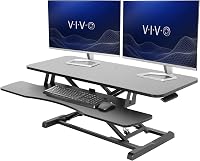
VIVO Standing Desk Converter: Best for upgrading an existing desk
- 36 x 15.7 inch top surface
- Keyboard tray 36 x 11.8 inches
- Height adjustment 4.5 to 20 inches
- Desktop holds 33 lb
A manual riser that turns a regular desk into a sit-stand workstation. The wide tray raises with the top surface for typing and mouse work.
Pros
- No need to replace your desk
- Wide 36 inch tray
- Simple lift mechanism
Cons
- Manual adjustment only
- Tray holds only 4.4 lb
The VIVO 36 inch riser is the simplest way to try standing work. Place it on your existing desk, attach the keyboard tray and you can switch between sitting and standing in one smooth motion.
The top surface measures 36 by 15.7 inches, which fits dual monitors or a laptop and monitor pair. The keyboard tray measures 36 by 11.8 inches and rises in sync with the top.
Height adjustment runs from 4.5 to 20 inches using a simple touch locking mechanism. The desktop holds up to 33 lb and the tray holds up to 4.4 lb, so keep heavier items on the top level.
The steel frame resists scratches and feels sturdy for daily lifting. Assembly is minimal because the riser arrives almost ready to use.
Because it sits on your desk, your monitor height depends on your existing desk height. Check that raised monitors still clear shelves and that your chair can roll under the tray when seated.
Choose it if you like your current desk and want a low-commitment test. Skip it if you want electric adjustment or a permanent full-size replacement.
AODK 55 Inch Standing Desk with Drawers: Best for a smaller drawer desk
- 55 inch desktop
- Height range 29.9 to 46.1 inches
- 3 memory heights
- 2 fabric drawers and keyboard tray
- Built-in outlet and cable tray
A narrower version of the 55 inch AODK, with the same drawers, monitor shelf and keyboard tray idea. It fits rooms where the larger model is too wide.
Pros
- More compact than the 63 inch model
- Drawers for daily supplies
- Built-in outlet and USB ports
Cons
- Less desktop room than the 63 inch model
- Tray size should be checked before ordering
The AODK 55 inch offers the same idea as the 63 inch model in a narrower frame. It has two cloth drawers, a keyboard tray, a full size monitor shelf, built-in power with USB ports and LED lighting.
Height adjustment runs from 29.9 to 46.1 inches with three memory presets. A cable management tray behind the desk keeps wires out of sight, and included components list the outlet and cable tray.
At 55 inches wide and 21.25 inches deep, it fits smaller rooms and alcoves where the 63 inch version would crowd the walls. The rustic brown finish suits warm-toned home offices.
Drawers give you a home for supplies, chargers and small tools within reach. The iron drawer structures are designed to cut assembly steps, and parts are labeled for step-by-step setup.
The narrower top still leaves room for a monitor shelf above the main surface. That means your keyboard tray does not have to share depth with your screens.
Choose it for a compact home office with storage needs. Compare its tray size with the 63 inch model before you decide which width your room can handle.
FEZIBO Standing Desk 48 × 24 Inch: Best for a clean, simple desktop
- 48 x 24 inch desktop
- Height range 28.3 to 46.5 inches
- 3 memory presets
- Supports up to 176 lb
- Headphone hook included
A straightforward electric desk without a built-in keyboard tray. Add a separate tray or riser if you want the keyboard lower than the desktop.
Pros
- Large 48 x 24 inch surface
- High stated capacity
- Three memory presets
Cons
- No keyboard tray included
- Two-piece desktop needs careful alignment
The FEZIBO is the cleanest, simplest desk in this group. Its 48 by 24 inch desktop gives you a large flat surface with no drawers, shelves or trays to work around.
Electric height adjustment runs from 28.3 to 46.5 inches with three customizable memory presets. The reinforced steel frame supports up to 176 lb, and FEZIBO says the motor is tested for up to 50,000 lift cycles with noise under 45 dB.
Most parts arrive pre-assembled, and FEZIBO estimates setup in about 30 minutes with the manual and video guide. A headphone hook is included, and the maple finish uses FSC-certified wood.
The desktop is supplied in two pieces that you join on the frame. Take time to align them properly so the seam stays flush and does not catch papers or your wrist.
The trade-off is clear: there is no keyboard tray in the box. You would add a riser or separate tray if you want a lower typing surface.
Choose it if you prefer a plain desktop and plan your own accessories. It also works well with our top pick if you want both a large surface and a tray.
ErGear Electric Standing Desk with Keyboard Tray: Best for a spacious keyboard tray
- 44 x 24 inch desktop
- Height range 28.35 to 46.46 inches
- 3 saved settings
- Keyboard tray holds 22 lb
- Max load 176 lb
An electric desk built around a roomy tray for a large keyboard and mouse. It suits typing-heavy work where wrist position matters more than extras.
Pros
- Roomy tray for large keyboards
- 22 lb tray capacity
- Three saved heights
Cons
- More compact desktop than the AODK picks
- No drawers or built-in power noted
The ErGear puts the tray at the center of the design. It is made for a large keyboard and mouse, with a sturdy tray rated for 22 lb that holds your typing position steady during long sessions.
The desktop measures 44 by 24 inches, which is compact enough for a small office or bedroom. Electric height adjustment runs from 28.35 to 46.46 inches with three saved settings.
The steel frame and lifting columns are designed for stability at full height. The stated maximum load is 176 lb, which covers monitors, a laptop and desk accessories.
ErGear positions the tray as an ergonomic aid that clears the desktop and keeps your keyboard in a comfortable position for typing or gaming. That lower level also frees the main surface for monitors and papers.
The 22 lb tray capacity is far higher than the 4.4 lb trays on the VIVO risers. That extra strength matters if you use a heavy keyboard or rest your forearms on the tray while typing.
Choose it if typing comfort is your top priority. Skip it if you need drawers, built-in power or a monitor shelf, which this model does not include.
VIVO Manual Height Adjustable Standing Desk Converter: Best for a compact manual riser
- 31.5 x 15.7 inch top surface
- Keyboard tray 31.3 x 11.8 inches
- Height adjustment 4.5 to 20 inches
- Desktop holds 33 lb
A smaller manual riser for single monitor or laptop setups. It sits on your current desk and gives a separate tray for keyboard and mouse.
Pros
- Compact 31.5 inch top
- Minimal assembly
- Raises in sync with the top
Cons
- Manual lift only
- Less room for dual monitors than the 36 inch VIVO
The VIVO 32 inch riser is the compact sibling of the 36 inch model. Its top surface measures 31.5 by 15.7 inches, which maximizes space on a smaller desk while still fitting dual monitors.
The wide keyboard tray measures 31.3 by 11.8 inches and rises in sync with the top surface. Height adjustment runs from 4.5 to 20 inches with a simple touch locking mechanism.
The desktop holds up to 33 lb, and the steel frame is backed by a 3-year manufacturer warranty. Assembly is minimal, since it arrives almost ready to place on your desk.
This size suits laptop and single monitor setups, or a smaller dual monitor pair. If your monitors are wide, the 36 inch VIVO gives you more breathing room on both levels.
The lift design moves straight up, so your keyboard and screens keep the same relative position. That can feel more predictable than a tray that slides out at an angle.
Choose it for a small desk or a first trial of standing work. Skip it if you want electric adjustment, since you will lift the load by hand each time.
SAIJI Laptop Bed Tray Table: Best for lap, bed and couch work
- Fits laptops up to 17 inches
- 5 height settings, 9.4 to 12.6 inches
- 4 angle settings, 0 to 36 degrees
- Wrist rest included
- Holds up to 80 lb
A portable lap tray with height and angle adjustment, not a full standing desk. It works for short standing sessions on a couch, bed or floor.
Pros
- Portable and folds flat
- Adjustable height and angle
- Wrist rest and laptop stoppers
Cons
- Lap use only, no frame for daily office work
- Single surface, no separate monitor level
The SAIJI is a lap tray, not a standing desk, and that distinction matters. It is designed for bed, couch, floor and sofa work, with a portable surface that fits laptops up to 17 inches.
Height adjusts through 5 settings from 9.4 to 12.6 inches, and the angle adjusts through 4 settings from 0 to 36 degrees. Retractable stoppers keep your laptop from sliding, and a soft wrist rest supports your hands.
The wooden surface and metal legs hold up to 80 lb. It folds flat to 1.8 inches thick for storage and travel, and it weighs only 1.75 kg in the stated specs.
The adjustable angle helps you tilt the surface toward you for reading or raise it for a more upright posture. That makes it useful for short tasks where a full desk would be overkill.
Use it for short standing sessions, reading, writing or light study. It cannot replace a framed desk for full-day office work, dual monitors or a fixed ergonomic setup.
Choose it as a portable extra for the couch or a dorm room. For daily work, look at the electric desks and risers above instead.
| Product | Best for | Type | Size | Desk thickness | Our score |
|---|---|---|---|---|---|
| Litwaro Under Desk Cable Management Tray No | hiding cables under any desk | Under desk cable tray | 13.4 x 4.72 inches | 0.4 to 2.4 inches | 9.6 |
| AODK 63 Inch Electric Standing Desk | a full home office workstation | 9.6 | |||
| OffiGo 55 Inch U Shaped Electric Standing | dual monitors and gaming | 9.5 | |||
| VIVO Standing Desk Converter | upgrading an existing desk | 9.5 | |||
| AODK 55 Inch Standing Desk with Drawers | a smaller drawer desk | 9.4 | |||
| FEZIBO Standing Desk 48 × 24 Inch | a clean, simple desktop | 9.2 | |||
| ErGear Electric Standing Desk with Keyboard Tray | a spacious keyboard tray | 8.9 | |||
| VIVO Manual Height Adjustable Standing Desk Converter | a compact manual riser | 8.3 | |||
| SAIJI Laptop Bed Tray Table | lap, bed and couch work | 8.2 |
Which type of tray do you actually need?
A keyboard tray holds your keyboard and mouse on a lower level. A cable tray holds wires and power strips under the desk.
A lap tray holds a laptop on your lap for short sessions.
Those three types solve different problems, even though they share the word "tray" in search results. Mixing them up is the most common buying mistake in this category.
Start by naming your main problem. If your wrists ache, you want a keyboard tray.
If cables tangle your feet, you want a cable tray. If you work from bed, you want a lap tray.
Standing desk with tray: electric desk or manual riser?
Electric desks move with a button and remember your heights. That suits people who change position several times a day.
The AODK, OffiGo, FEZIBO and ErGear models all use electric adjustment with saved presets.
Manual risers lift by hand and need no power. The two VIVO models suit renters, small budgets and anyone testing standing work before committing to a full desk.
Think about how often you will actually switch. If you plan to stand for only one long block, a riser may be enough.
If you switch hourly, electric memory presets save effort.
Our best electric standing desk with keyboard tray guide covers electric models in more depth. Our best standing desk for gaming guide is useful if a tray is part of a gaming setup.
How big should the keyboard tray be?
Measure your keyboard and mouse together before you shop. Add a few inches on each side so your mouse hand has room to move without hitting the edge.
The VIVO 36 inch tray measures 36 by 11.8 inches, which fits most full-size keyboards with a mouse. The VIVO 32 inch tray is slightly narrower at 31.3 inches wide.
The ErGear tray is designed for large keyboards and holds 22 lb, which is the highest tray capacity in this group. That matters if you use a heavy keyboard or keep items on the tray.
The AODK and OffiGo trays are included in full desks, and both brands advise checking tray size before you order. Do that check, because tray dimensions are easy to overlook under a desktop's headline width.
Tray depth and mouse space
Depth matters for mouse movement as much as width. A tray that is only 10 inches deep may force your mouse hand to the edge.
Check the usable depth after any side rails or lips are fitted. Place your keyboard and mouse on the desk first and measure that footprint with a tape.
If your mouse needs more room, look for a tray like the ErGear that is built for large keyboards. A few extra inches can change whether the tray feels comfortable or cramped.
How much desk space do you need?
Measure your room first, then your desk. A 63 inch desk needs wall clearance and walking space on both sides.
A U shaped desk needs even more floor area, because its depth reaches 29.1 inches.
Our guide How Much Space Do I Need for a Standing Desk? walks through room measurements step by step. Use it before you choose between the 63 inch, 55 inch and 48 inch models here.
Depth matters as much as width. A riser adds height on top of your current desk, so check that your monitors still fit below shelves or cabinets when raised.
Also check the width behind your chair. You need room to pull the tray out and sit or stand without bumping the wall.
Which extras are worth paying for?
Drawers help if daily supplies currently pile up on your desktop. The two AODK models include two cloth drawers, which keep chargers, pens and tools within reach.
Built-in power helps if your outlet is far away. The AODK and OffiGo models include 3 outlets and 2 USB ports, which cuts cable clutter across the surface.
A monitor shelf helps if your desktop feels crowded. The AODK and OffiGo models raise monitors and free the surface below for a keyboard tray and papers.
LED lighting is a preference, not a need. The AODK offers 20 light modes and the OffiGo offers 10 colors with dynamic modes, so choose by the look you want rather than by necessity.
If storage is a priority, read What Is a Standing Desk with Drawers? A Clear Answer before you decide.
It explains drawer size limits and placement.
How do trays change with PC mounts and monitor stands?
A keyboard tray works best when monitors sit at eye level above it. If you plan to add a PC mount under the desk, check that the mount and a cable tray can share the same space.
Our best electric standing desk with pc mount guide covers under-desk mounts and their clearance needs. A cable tray like the Litwaro may compete for that same under-desk area.
A monitor stand or shelf serves a similar goal to a tray. It raises screens so the keyboard can sit lower.
Our best standing desk with monitor stand guide compares models that use shelves instead of trays.
Some buyers combine both. A raised monitor shelf plus a lower keyboard tray gives the most ergonomic separation between screen height and typing position.
How should you set up and care for a tray desk?
Set your seated height first, then your standing height. Save both as presets on electric models so you can return to them quickly.
Place your keyboard so your elbows sit near your body and your wrists stay straight. Your mouse should sit at the same level as the keyboard, not on the higher desktop.
Route cables before you load the tray. A cable tray under the desk keeps power strips off the floor and stops cords from pulling as the desk moves.
Wipe the tray and desktop with a soft cloth and mild cleaner. Check clamp screws and tray mounts every few months, especially on risers that lift daily.
Test every preset height with your full setup in place. Make sure the tray clears your chair, drawers and any under-desk mount at both ends of the range.
Verdict: which standing desk with tray should you buy?
Pick the AODK 63 Inch if you want a complete workstation. It has the widest desktop, drawers, built-in power and a keyboard tray in one package.
Pick the ErGear if typing comfort matters most. Its tray is the roomiest and strongest in this group, at 22 lb capacity.
Pick a VIVO riser if you want to keep your current desk. The 36 inch model suits dual monitors, and the 32 inch model suits compact setups.
Add the Litwaro cable tray to any of these picks. It keeps cords off the floor and stops them from tangling your feet as the desk moves.
Measure your room, measure your keyboard and check tray size before you order. Those three checks will tell you more than any feature list.
Our top 3 picks at a glance
-
1
Best for hiding cables under any desk
Litwaro Under Desk Cable Management Tray No
9.6/10 our score
See it on Amazon -
2
Best for a full home office workstation
AODK 63 Inch Electric Standing Desk
9.6/10 our score
See it on Amazon -
3
Best for dual monitors and gaming
OffiGo 55 Inch U Shaped Electric Standing
9.5/10 our score
See it on Amazon
Frequently asked questions
What is a standing desk with a keyboard tray?
It is a desk where the keyboard and mouse sit on a separate lower tray instead of on the main desktop. The tray keeps the keyboard closer to you while monitors stay at eye level.
Electric models move the whole desk up and down, while risers lift both levels together.
Do I need a tray if my desk already feels deep enough?
Many buyers do not. A deep desktop can hold a keyboard comfortably, and a tray mainly helps when you want more depth or a lower typing position.
Check your chair height and monitor height first, then decide if a tray would improve your posture.
Can I add a keyboard tray to a desk that did not include one?
Yes, with a riser or a separate tray, depending on your desk shape. A riser sits on top and lifts both surfaces, while a clamp-on tray adds a lower level.
Measure the tray width and depth before you order so your keyboard and mouse fit.
How much space does a tray need under the desk?
You need enough knee and leg room below the tray when seated, and clearance above when standing. Pull the tray out fully and sit or stand in your usual position before you commit.
Leave at least a few inches so the tray does not press against your legs.
Are electric desks with trays better than manual risers?
Electric desks move with a button and save your preferred heights, which suits frequent changes during the day. Manual risers cost less and need no power, but you lift the load each time.
Your change frequency is the main deciding factor.