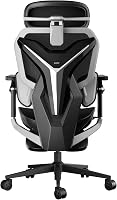
Hbada E3 Pro Ergonomic Office Chair Review: Worth It? (November 2026)
The Hbada E3 Pro is the strongest choice here for detailed posture adjustment, with 3-zone lumbar support, a 4D headrest, 720° armrests and 4 recline positions. Choose GABRYLLY for a wide seat and 300 lb capacity, or ELABEST for a footrest and 5D armrests.
On this page (8 sections)
- Hbada E3 Pro ergonomic office chair reviews: quick answer
- What makes the Hbada E3 Pro different?
- How does the Hbada E3 Pro adjust for everyday work?
- Hbada E3 Pro vs GABRYLLY: which chair fits better?
- Hbada E3 Pro vs ELABEST X100: which features matter?
- How should you set up the Hbada E3 Pro?
- What are the main trade-offs?
- Is the Hbada E3 Pro worth choosing?
The Hbada E3 Pro 2026 Edition is the best fit for buyers who want detailed ergonomic adjustment, especially around the lumbar area, headrest and armrests. These Hbada E3 Pro ergonomic office chair reviews point to a chair with a broad fit range, breathable mesh and four useful recline positions.
That broad range is the main reason to consider it over a simpler chair. You get separate controls for lumbar height, seat depth, backrest position, headrest depth and arm rotation, so you can tune each contact point instead of accepting one fixed shape.
This approach suits people who sit for long stretches and notice pressure building in the lower back, shoulders or neck. It also suits a shared home office, because the stated fit range runs from 5 ft 1 in to 6 ft 5 in and several adjustments can be reset for a different user.
The trade-off is that more adjustment points require more time to set up. A chair with fewer controls may feel easier on the first day, while this one rewards a short period of trial and small changes.
Daily use depends on desk height as much as chair settings. Your elbows, screen angle and foot position all affect whether the lumbar wings and headrest actually help, so set the chair at your normal workstation and test it while typing, reading and using a mouse.
Care is straightforward for a mesh chair, but the moving parts need attention. Keep the pivoting wings and rotating armrests free of debris, check fasteners after the first weeks of use, and clean the mesh with a soft cloth so airflow stays open.
Its trade-off is that more adjustment points require more time to set up. The GABRYLLY is simpler and wider, while the ELABEST adds a footrest and 5D armrests for work-to-relaxation use.
Hbada E3 Pro ergonomic office chair reviews: quick answer
The Hbada E3 Pro earns a 9.7/10 score because its adjustment range covers more body contact points than the alternatives here. Its 3-zone lumbar support, 4D headrest, 720° armrests, adjustable backrest and 50 mm seat-depth adjustment give you several ways to tune the chair.
The brand describes the lumbar system as gravity-responsive, with lateral wings that pivot from 40° to 80° and 60 mm of vertical movement. Those figures matter if you change between upright typing, forward reading and reclined screen time.
In practical terms, the vertical movement lets you move support to different levels of the lower back. That can help shorter users whose waist sits lower, and taller users who need support higher up, without relying on a single fixed pad.
The pivoting wings add a different kind of adjustment. As you lean forward for reading or ease back for video calls, the side supports can wrap more closely, while a more upright position keeps the contact lighter.
The E3 Pro also has a 140° maximum recline and a footrest. Its black mesh design is aimed at airflow, while the stated fit range runs from 5 ft 1 in to 6 ft 5 in.
The four recline positions divide daily use into clear modes. The 105° and 115° settings keep you closer to a focused working posture, while 130° and 140° open up space for reading, calls or short breaks.
Recline alone does not create comfort, however. The footrest, seat depth and headrest need to work with the back angle, so a relaxed position still keeps your feet supported and your neck in a natural line.
For setup, start with seat height and depth, then set lumbar contact before moving to the arms and headrest. That order prevents you from tuning the upper body around a seat position that later changes.
It also helps to change only one setting at a time. Sit for several minutes, note where pressure appears or eases, and then adjust the next control instead of changing everything at once.
The honest trade-off is complexity. A wide adjustment range gives more chances to fine-tune support, but it also takes longer to learn than a fixed lumbar pad and a simple tilt lock.
If you prefer fewer controls, the alternatives in this comparison may feel more direct. If you like to refine fit over time, this range of movement is the E3 Pro at its most useful.
What makes the Hbada E3 Pro different?
The Hbada E3 Pro stands out for how many adjustment areas work together. Instead of relying on one lumbar height setting and a simple tilt lock, it combines lumbar movement, headrest movement, arm rotation, seat depth and backrest adjustment.
Hbada E3 Pro 2026 Edition Ergonomic Office: Best for detailed posture adjustment
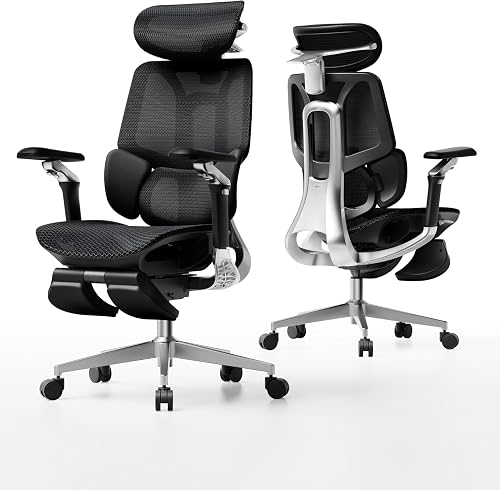
- 3-zone floating lumbar support
- 4D dual-axis headrest
- 140° adaptive recline
- 720° armrests
- Footrest
The Hbada E3 Pro suits buyers who want many ways to tune lumbar, head, arm and recline support. Its adjustment range is the main reason to choose it, while its black mesh design and footrest support longer desk sessions.
Pros
- 60 mm vertical lumbar adjustment
- 70 mm headrest depth adjustment
- 720° mechanical armrests
- 5-year warranty on core structure
Cons
- More adjustments take more time to set up
- The 27.5 in depth needs careful desk placement
The 4D dual-axis headrest adjusts 70 mm in depth, 40 mm in height and 70° in rotation. That gives you more control over neck contact when your sitting position changes, although finding the right setting may take several small adjustments.
The 720° mechanical armrests use dual 360° rotation and 39° folding. This should help you support your elbows during typing, mousing or reading, but the useful position depends on your desk height and where your arms rest.
The chair has four stated recline positions: 105°, 115°, 130° and 140°. The first two suit focused work and the latter two create more relaxed positions, with the footrest adding support when you lean back.
Who should consider the Hbada E3 Pro?
The Hbada E3 Pro suits users who want fine control over posture support and are willing to spend time tuning the chair. Its stated height range also makes it a strong option for households where several adults use the same workspace.
It may be less appealing if you want a basic chair with fewer controls. In that case, the GABRYLLY's simpler tilt and flip-up arms may be easier to understand from the start.
For a wider look at chair features, use this ergonomic office chair buying guide before comparing models.
How does the Hbada E3 Pro adjust for everyday work?
The chair's most useful daily adjustments are lumbar height, seat depth, arm position and recline. Set those in that order so your lower back and seat position are stable before you tune your elbows and head.
Start with the seat height so your feet can rest on the floor. Then adjust the 50 mm seat depth so the seat supports your thighs without pressing into the backs of your knees.
Next, use the 60 mm lumbar adjustment and the pivoting lateral wings. The goal is steady contact while your back remains relaxed, not the strongest possible pressure.
Set the headrest after the backrest. The 70 mm depth adjustment and 70° rotation let you move support toward the back of your head without forcing your neck forward.
Finish with the armrests. Keep your shoulders relaxed and bring the supports toward your elbows, then use the folding and rotating movement to match the task.
For mesh options with a different feel, compare these best ergonomic mesh office chairs.
Hbada E3 Pro vs GABRYLLY: which chair fits better?
The Hbada E3 Pro is better for adjustment range, while the GABRYLLY is better for a wide seat and a simpler control layout. Both are indoor mesh office chairs with headrests, lumbar support and reclining functions.
GABRYLLY Ergonomic Office Chair: Best for a wide seat

- 20.5 in wide seat
- 300 lb capacity
- 90° to 120° recline
- Flip-up arms
- 3D headrest
The GABRYLLY is a practical alternative for users who want a wide cushion, breathable mesh and flip-up arms. Its adjustment range is simpler than the Hbada E3 Pro, but the 300 lb capacity and large seat may suit bigger body frames.
Pros
- Wide 20.5 in seat
- Flip-up arms save space
- 90° to 120° tilt range
- 3-year warranty
Cons
- Shorter stated height range than the Hbada
- Armrests offer less adjustment than the Hbada and ELABEST
The GABRYLLY has a 20.5 in wide seat and a stated capacity of 300 lb. Its overall dimensions are 24.5 in wide by 27.5 in deep, with a height range of 46 in to 56.4 in including the arms.
Its backrest reclines from 90° to 120°, and the chair includes a 3D headrest, flip-up arms and a wide cushion with a waterfall edge. The arms fold up 45°, which can help you push the chair under a desk when you need more floor space.
The GABRYLLY's stated user range is about 5 ft 2 in to 6 ft 1 in. That makes it a reasonable choice for many users, but the Hbada covers a taller upper range and offers more ways to tune support.
Read our Sihoo M18 ergonomic office chair reviews if you want another comparison point in this category.
Hbada E3 Pro vs ELABEST X100: which features matter?
Choose the Hbada E3 Pro for more detailed lumbar and head support adjustment. Choose the ELABEST X100 if an extendable footrest, 5D arms and relaxation use matter more to you than the Hbada's 4D headrest and 720° arms.
ELABEST X100 Ergonomic Mesh Office Chair: Best for footrest relaxation

- 3D lumbar support
- 5D flip-up arms
- 18 in extendable footrest
- 3-stage recline
- 300 lb capacity
The ELABEST X100 fits buyers who want work and relaxation features in one chair. Its 5D arms, 3D lumbar system and extendable footrest give it a different focus from the Hbada E3 Pro's wider posture-adjustment range.
Pros
- 18 in extendable footrest
- 5D armrest adjustment
- 3-stage recline
- Tool-free assembly within 15 minutes
Cons
- Midnight Mist color may not suit every room
- Its 26 in depth needs space behind the chair
The ELABEST X100 has 3D lumbar support with lockable depth adjustment, height movement and 15° rotation. Its 5D flip-up arms adjust by height, width, forward and backward movement, rotation and flipping.
The X100 also includes an 18 in extendable footrest with 2-position angle adjustment. Its 3-stage reclining mechanism creates a different work-and-rest setup from the Hbada's four stated recline positions.
The ELABEST has a 28 cm³ 3D AirFloat headrest, a 26 in depth and a 24 in width. Its seat height adjusts from 18.3 in to 23 in, and its stated capacity is 300 lb.
Its Midnight Mist color and 43 lb item weight may matter when planning your room and moving the chair. The best Hbada ergonomic office chair guide can help if you want to compare this model with other Hbada options.
How should you set up the Hbada E3 Pro?
Set up the Hbada E3 Pro by building the base securely, attaching the backrest and armrests, then adjusting the chair at your desk. The assembly instructions call for attaching the legs with screws, inserting the backrest into the seat frame and securing the armrests with bolts.
Use the provided tool to tighten the fasteners evenly. Check that the casters, base and gas lift are seated before putting full weight on the chair.
Place the chair at your normal desk position before tuning it. A setting that feels good away from the desk may leave your elbows too high or your monitor too low once you begin typing.
Adjust one area at a time and sit for a few minutes before changing another. This makes it easier to tell whether the seat depth, lumbar position or headrest is causing pressure.
Keep the backrest and seat clear of objects that could affect the mesh. Use a soft cloth for routine cleaning and follow Hbada's care guidance for any deeper cleaning.
What are the main trade-offs?
The Hbada E3 Pro's biggest advantage is its wide adjustment range, but that range can also create a steeper setup process. You may need several small changes before the lumbar wings, headrest, arms and recline feel coordinated.
The chair's 27.5 in depth also deserves attention. Measure the space behind your desk so the reclined chair and footrest don't interfere with a wall, cabinet or walkway.
The GABRYLLY takes a more direct approach with a wide seat, flip-up arms and a 90° to 120° recline. Its stated height range is narrower than the Hbada's, but its 300 lb capacity may make it the better fit for some users.
The ELABEST focuses on flexible work and rest. Its footrest and 5D arms are useful if you change positions often, while its 26 in depth needs similar placement planning.
For another brand comparison, see the best Gabrylly ergonomic office chair guide.
Is the Hbada E3 Pro worth choosing?
The Hbada E3 Pro is worth choosing if you want the broadest adjustment range in this comparison and will use those controls to fine-tune your sitting position. Its 3-zone lumbar system, 4D headrest, 720° armrests, four recline positions and stated 5 ft 1 in to 6 ft 5 in fit range make it the most adaptable option here.
Pick the GABRYLLY if a wide seat, flip-up arms and a 300 lb capacity are your priorities. Pick the ELABEST X100 if you want an extendable footrest and 5D armrests for switching between focused work and relaxation.
The best Hbada E3 Pro ergonomic office chair reviews should focus on fit rather than feature count alone. Measure your desk area, set the chair in stages and choose the model whose adjustment pattern matches how you sit each day.
For a different high-end adjustment approach, compare our Steelcase Gesture office chair review. If you need a smaller mesh chair, the Staples Hyken Pro chair review offers another type of office seating comparison.
Users who work at a raised desk may also want to compare best ergonomic drafting chairs before choosing a standard-height office chair.
Frequently asked questions
Is the Hbada E3 Pro comfortable for long work sessions?
The Hbada E3 Pro is designed for long desk sessions with CloudMesh material, 3-zone lumbar support, a 4D headrest, adjustable seat depth and several recline positions. Comfort still depends on your height, desk setup and preferred support, so use its adjustments to keep your elbows and screen at a natural level.
How adjustable is the Hbada E3 Pro?
The Hbada E3 Pro has 60 mm of vertical lumbar adjustment, 50 mm of seat-depth adjustment, an 80 mm adjustable backrest, a headrest with 70 mm depth and 40 mm height adjustment, and 720° armrests. It reclines through 105°, 115°, 130° and 140° positions.
Is the Hbada E3 Pro good for tall users?
Hbada states that the E3 Pro suits users from 5 ft 1 in to 6 ft 5 in, or 155 cm to 195 cm. Its adjustable backrest, lumbar support, seat depth and headrest give taller users more ways to set contact points, but your desk height and leg length still affect the final fit.
Should you choose the Hbada E3 Pro or GABRYLLY?
Choose the Hbada E3 Pro for a wider adjustment range, 4 recline positions, 720° arms and a footrest. Choose the GABRYLLY if you prefer a 20.5 in seat, a 300 lb capacity, flip-up arms and a simpler 90° to 120° recline range.