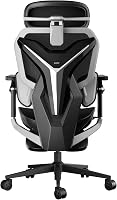
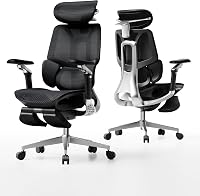
Are Gaming Chairs Ergonomic?
Gaming chairs can be ergonomic when they offer adjustable lumbar support, armrests, seat height, head support, and recline. The shape alone doesn't guarantee a good fit.
On this page (7 sections)
- What makes a gaming chair ergonomic?
- Are gaming chairs ergonomic for long sitting?
- Which gaming chair features are worth prioritizing?
- How should you set up an ergonomic gaming chair?
- Are gaming chairs better than ergonomic office chairs?
- What are the trade-offs of gaming chairs?
- So, are gaming chairs ergonomic?
Gaming chairs can be ergonomic when their adjustments let you keep your lower back supported, shoulders relaxed, elbows near your sides, and feet stable. The gaming label, high back, or side bolsters alone doesn't prove that a chair suits your posture.
The most useful features are adjustable lumbar support, seat height, armrests, head support, and recline. Your desk height, body size, sitting habits, and the amount of time you spend gaming or working matter just as much.
What makes a gaming chair ergonomic?
Adjustability makes a gaming chair more ergonomic than its appearance does. You should be able to set the seat and back support so your body stays supported without forcing one fixed position.
Look for a seat height that lets your feet rest on the floor. The backrest should support your trunk, while lumbar support should meet your lower back instead of pushing too high or too low.
Armrests should support your forearms without lifting your shoulders. A headrest can help when you recline, but it shouldn't push your head forward while you're focused on a screen.
A chair with a helpful range of adjustments is easier to match to your body. Our guide to an ergonomic office chair explains the same fit points in more detail.
Are gaming chairs ergonomic for long sitting?
A gaming chair may suit long sitting if you change its settings and posture during the day. No adjustment replaces regular movement, and a chair that fits one person may feel wrong for another.
Set the seat height first, then adjust the backrest and lumbar support. Place your keyboard and mouse so your elbows can stay close to your body instead of reaching forward.
Use recline for posture changes rather than staying rigidly upright. If you work and play at the same desk, compare the chair's setup with our guide to the best ergonomic office chair for gaming.
Which gaming chair features support posture?
Lumbar adjustment, armrest adjustment, and recline usually matter most. They let you support the lower back, reduce shoulder loading, and move between focused and relaxed positions.
Headrests matter most when you lean back. Seat depth matters because too much seat length can press behind your knees, while too little can leave part of your thighs unsupported.
Breathable materials may feel more comfortable in warm rooms, but comfort still depends on the chair's shape and your clothing. A footrest can support a reclined break, though it isn't a substitute for a stable working position.
Which gaming chair features are worth prioritizing?
Prioritize the features that solve your actual sitting problem. If your lower back loses contact with the chair, look for adjustable lumbar support.
If your shoulders tense while using a mouse, focus on armrest height and movement.
If you alternate between work, console play, and rest, a wider recline range may be useful. If you sit upright for keyboard work, check that the armrests can align with your desk without blocking you from getting close.
Who may prefer the AutoFull G7 Gaming Chair?
The AutoFull G7 suits readers who want many adjustment points and breathable mesh. Its 3-Zone Floating Lumbar System has 1.6 in of up/down movement, 1.2 in of forward/back movement, 12° lumbar rotation, and 0.8 in of recline tracking.
Its 720° dual-axis armrests provide height, slide, pad rotation, arm-body rotation, tilt, folding, and inward or outward movement. The 4D headrest adds rotation, forward/back movement, and up/down movement.
The chair has a 140° recline, a 2 in seat-depth adjustment, a retractable footrest, and massage function. Its stated user height range is 155–195 cm, and its maximum weight recommendation is 350 lb.
The AutoFull G7 is a poor match if you want a simple chair with few controls. More adjustment points can also mean more time spent finding a setting that feels right.
For a closer look at this model, read the AutoFull G7 ergonomic gaming chair review.
Who may prefer the GTPLAYER Gaming Chair with footrest?
The pearl white GTPLAYER Gaming Chair suits readers who want a reclining chair with a footrest, headrest, and lumbar pillow. It has a metal frame, metal legs, a solid back, foam filling, and a 360° swivel seat.
Its dimensions are 20.08 in deep, 20.05 in wide, and 49.21 in high. The chair has pillow-top armrests and weighs 40.6 lb.
The footrest gives you a way to support your feet while reclining. That can help during a break, but you should retract it when you need to move close to a desk.
This model may suit people who prefer foam cushioning and a solid back over mesh. Measure your available space before assembly, especially if the footrest and recline will extend into a walkway.
For more footrest options, see our guide to the best gaming chair with footrest.
Who may prefer the black GTPLAYER Gaming Chair?
The black GTPLAYER Gaming Chair suits readers who want pocket springs, breathable fabric, linkage armrests, and a footrest. Its seat uses independent pocket springs, polyurethane foam, and a recyclable polyurethane core.
The chair has a high back, a step-free recliner, and linkage armrests that adjust with the backrest angle. Its dimensions are 21.5 in deep, 20 in wide, and 51 in high, with a 20.5 in backrest width.
Its 10 cm height-adjustment range gives you room to set the seat for your desk. The footrest is useful for reclining, while the linkage armrests are designed for people who don't want to reset them separately after every backrest movement.
This chair may not suit someone who wants mesh or independent armrest positioning. Its fabric, high-back shape, and 21.5 in depth also make measuring your room and desk clearance worthwhile.
How should you set up an ergonomic gaming chair?
Set the chair from the floor up, then match it to your desk. Start with seat height, followed by lumbar support, backrest angle, armrests, and headrest position.
Keep your feet supported and avoid raising the seat so high that your feet dangle. Bring the chair close enough to the desk that you don't need to reach forward for the keyboard or mouse.
Adjust lumbar support until it meets your lower back without forcing you into an exaggerated arch. Set the armrests so your shoulders can drop naturally while your forearms receive support.
Keep the monitor at a height that lets you look forward without bending your neck for long periods. If your current chair causes pressure or discomfort, our guide to are gaming chairs good for your back covers the main trade-offs.
Are gaming chairs better than ergonomic office chairs?
Gaming chairs are not automatically better than ergonomic office chairs. Gaming models often offer deep recline, headrests, footrests, and stronger visual styling, while office chairs may emphasize a less enclosed back shape and simpler movement.
Choose a gaming chair if you want gaming-focused features such as a footrest, deep recline, or adjustable head and arm support. Choose an office chair if you prefer a quieter design or want a less structured backrest.
The right comparison is about fit, not category. For alternatives with different shapes, compare the Sihoo M18 or M57 ergonomic chair, the Branch Ergonomic Chair Pro review, and the best armless office chair.
What are the trade-offs of gaming chairs?
Gaming chairs can offer more relaxation features, but those features don't guarantee better work posture. A footrest and deep recline are useful for breaks, while lumbar and armrest adjustments matter more for keyboard and mouse work.
Mesh can help airflow, while foam, polyurethane, fabric, or leathaire materials create different contact points and care needs. A more adjustable chair can fit more postures, but it can also take longer to set up.
Side bolsters and high backs may feel supportive to some users and restrictive to others. Test your desk clearance, sitting position, and preferred recline before choosing a large chair.
So, are gaming chairs ergonomic?
Gaming chairs are ergonomic when their adjustments support your body and your main tasks. Pick the AutoFull G7 if you want the widest range of documented adjustments and breathable mesh.
Pick the pearl white GTPLAYER for a simpler reclining chair with a footrest, headrest, and lumbar pillow.
Pick the black GTPLAYER for pocket springs, breathable fabric, linkage armrests, and a high back.
The best choice is the one you can set so your feet, lower back, arms, and screen position stay comfortable. If you still feel pain, change positions and seek professional advice instead of relying on a chair label.
Frequently asked questions
Are gaming chairs ergonomic for office work?
Gaming chairs can work for office tasks when the seat height, back support, armrests, and recline fit your body and desk. Look for adjustments that let your shoulders relax, elbows stay supported, and lower back remain in contact with the backrest.
A racing-style shape alone doesn't make a chair ergonomic.
What makes a gaming chair ergonomic?
An ergonomic gaming chair usually offers adjustable lumbar support, a height-adjustable seat, supportive armrests, a headrest, and a backrest that reclines. These features help you change posture during long sessions.
Breathable materials, suitable seat depth, and stable movement can also affect daily comfort.
Are gaming chairs better than office chairs?
Gaming chairs aren't automatically better than office chairs. Gaming models often include recline, head support, footrests, and bold styling, while office chairs may use a simpler shape with more flexible back movement.
The better choice is the chair whose adjustments match your body, desk, and main tasks.
Can an ergonomic gaming chair prevent back pain?
No chair can guarantee that it will prevent or fix back pain. An adjustable gaming chair may help you maintain a more comfortable seated posture, but regular movement and correct desk height still matter.
If pain continues, seek advice from a qualified health professional.