How to Use a VariDesk Standing Desk
Raise or lower a VariDesk converter with both handles, keeping your hands clear of the lift mechanism. Move it smoothly, then check that your screen and keyboard are at comfortable heights before working.
On this page (6 sections)
To use a VariDesk standing desk converter, raise or lower it with both handles, keep your hands clear of the lift mechanism, and set the keyboard and screen at comfortable working heights. Check your specific model's instructions before adjusting it for the first time.
The Vari Pro Plus 36 uses a rowing lift and spring-assisted mechanism. Vari says its dual handles and foam-wrapped steel help protect against pinch points, but you should still keep fingers clear of moving parts.
How do you raise a VariDesk standing desk?
Use both handles to raise the converter smoothly, then stop at a height that suits your posture. Keep your fingers away from hinges and the space between moving parts.
Before raising it, move mugs, papers, and other loose items away from the edges. Check that the monitors are steady and that cords can move freely without pulling.
The Vari Pro Plus 36 arrives assembled and has an upper tier for monitors plus a lower deck for a keyboard and mouse. Its spring-assisted rowing lift is designed to make raising and lowering easier.
If you are still deciding whether a converter suits your desk, compare a standing desk vs converter before choosing a setup.
How do you lower a VariDesk safely?
Hold both handles and guide the converter down in a controlled motion. First check that nothing is under the platform and that cables won't snag as it moves.
Keep your hands clear of the lift arms and hinges throughout the movement. Don't force the platform if it sticks; pause and check for an obstruction, then consult the instructions for your model.
Move the converter down before rearranging heavy equipment. That gives you a lower, more stable position for repositioning monitors or clearing the keyboard deck.
Where should your monitor and keyboard sit?
Set the monitor so you can look ahead without tilting your head, and place the keyboard where your elbows can stay relaxed. Adjust your chair, monitor, and converter together instead of judging the desk height alone.
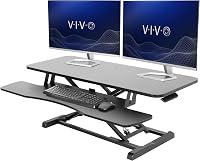
A two-tier converter keeps the screen and keyboard on separate levels. The Vari Pro Plus 36 has a spacious upper tier for 2 monitors and a lower deck for a keyboard and mouse.
If your current desk needs a broader setup change, read how to convert a desk to a standing desk. For a wider choice of frame and surface options, use How to Choose a Standing Desk: A Simple Guide.
Can a monitor riser help with screen height?
A fixed monitor riser can lift your screen, but it does not raise your keyboard with it. Use one when you need screen height and plan to keep working while seated.
The WESTREE Dual Monitor Stand Riser holds 2 monitors and has open space underneath for desk items. Its height is fixed, so it won't switch your full workstation between sitting and standing.
Choose a converter if you want to raise both the monitor surface and keyboard area for standing work. Our best manual standing desk converter guide compares manual options.
How often should you switch between sitting and standing?
Change positions when it feels useful, and avoid treating standing as an all-day target. A converter lets you vary your working posture, while short movement breaks can add variety too.
Start with a standing period that feels comfortable, then sit again when you want to. Adjust the converter before you begin typing so you don't have to reach or lean while working.
A standing setup is one way to change your work routine. See what a standing desk is good for for a broader look at common uses.
What should you check before using a VariDesk converter?
Confirm the converter sits securely, equipment is stable, and cords have enough slack at both heights. Keep the desk area clear of objects that could fall or get caught while the platform moves.
The VIVO converter offers a simple touch height-locking mechanism and a keyboard tray that raises with its top surface. Its manufacturer describes an adjustment range of 4.5 to 20 in, so check the exact model instructions and workspace fit.
If you want to compare another converter style, explore Best FlexiSpot Standing Desk Converters. Measure your desk and equipment first so you can choose a size that fits.
How to use a VariDesk standing desk every day
For daily use, raise the converter when you want to stand, lower it when you want to sit, and adjust your monitor and keyboard after each change. Keep movements smooth and hands clear of the lift mechanism.
Choose the Vari Pro Plus 36 if you want a two-tier Vari converter with dual handles. Choose a fixed monitor riser if you only need screen height, or compare standing desk vs converter options if you haven't settled on a setup.
Frequently asked questions
How do you raise a VariDesk standing desk?
Use both handles to raise the VariDesk converter smoothly, keeping your fingers clear of the lift mechanism. Set it at a height that brings the keyboard near elbow level while your shoulders stay relaxed.
Check that monitors remain stable and cords have enough slack before you start working.
How do you lower a VariDesk standing desk?
Hold both handles and guide the converter down smoothly, keeping hands away from hinges and moving parts. Make sure nothing is underneath the lower deck and that cables won't catch.
Follow the instructions for your specific model if its controls or lowering steps differ.
Should you stand all day at a VariDesk?
No. Alternate between sitting and standing in a way that feels comfortable, and move during the day.
A standing converter changes your work height, but it doesn't make one posture right for hours.
If standing causes discomfort, lower the desk and reassess your setup.
Can you put a VariDesk converter on any desk?
A VariDesk converter is designed to sit on an existing desk or table, but check the converter's dimensions, weight, and support needs against your surface. Leave enough room for the base and raised workspace, and confirm the desk is stable before placing monitors or other equipment on it.