Logitech MX Vertical Mouse Review: Worth It? (November 2026)
The Logitech MX Vertical is a strong ergonomic mouse for right-handed desk work if you want a 57° handshake angle, wireless use and up to 4 months of battery life. Choose the Anker for a simpler USB receiver design, or compare the second MX Vertical listing carefully because its details differ.
On this page (9 sections)
- Logitech MX Vertical mouse review: the short answer
- How does the MX Vertical hand fit feel?
- Controls and tracking for daily work
- Wireless connection and charging
- Is a vertical mouse better for desk comfort?
- How does the Anker compare?
- Which vertical mouse is easiest to set up?
- What should you check before buying?
- Final verdict on the Logitech MX Vertical
The Logitech MX Vertical is a strong choice for right-handed desk work when you want a vertical handshake grip, wireless control and high cursor sensitivity. Its main trade-offs are the learning curve, right-hand shape and the need to distinguish between the two MX Vertical product entries.
The graphite model has the clearest feature set for buyers who care about hand posture and charging. It lists a 57° angle, 4000 DPI tracking, a cursor speed switch, Bluetooth, an included USB receiver and up to 4 months of battery life.
Logitech MX Vertical mouse review: the short answer
The Logitech MX Vertical works best for a right-handed user who wants the mouse body to keep the hand in a natural handshake position. Logitech says this design reduces muscular activity by 10 percent compared with a standard mouse, while the 57° angle is intended to reduce wrist pressure.
Those are design claims, not a promise that the mouse will solve pain or suit every hand. A vertical mouse changes how you move your fingers and forearm, so comfort depends on your grip, desk height and daily workload.
If you are comparing several shapes, start with our guide to ergonomic keyboard and mouse choices. It explains how the mouse fits into a wider desk setup instead of treating it as an isolated accessory.
Logitech MX Vertical Wireless Mouse Ergonomic Design: Best for adjustable cursor control
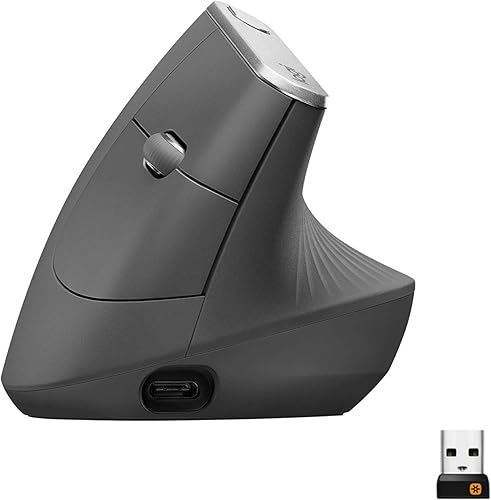
- 57° vertical angle
- 4000 DPI sensor
- 4 buttons
- Up to 4 months per charge
The graphite MX Vertical combines a handshake-shaped grip with a 57° angle, 4000 DPI tracking and a cursor speed switch. It suits right-handed users who want wireless desk control with rechargeable power.
Pros
- 57° angle supports a handshake-style grip
- 4000 DPI sensor and cursor speed switch
- Bluetooth or included USB receiver
- USB-C cable included
Cons
- Right-handed design
- The vertical shape needs an adjustment period
- The title and data do not state a separate battery capacity
The graphite MX Vertical is the best match here for buyers who want the most detailed combination of posture features, tracking control and rechargeable use. Its textured rubber surface and thumb rest are intended to give the hand a stable resting position.
Who should choose the graphite MX Vertical?
Choose it if you want 4000 DPI tracking and a physical cursor speed switch. The switch lets you change pointer speed and accuracy at the touch of a button, which can help when you move between broad screen movement and more precise work.
It also suits a desk with several operating systems. The product data lists Windows, macOS and iPadOS compatibility, plus Bluetooth Low Energy details for Windows 10 or later, macOS 10.15 or later and iPadOS 13.4 or later.
The graphite version lists wireless operation through Bluetooth or the included USB receiver. Its included components are the mouse, quick-start guide, receiver and USB-C cable.
How does the MX Vertical hand fit feel?
The MX Vertical uses a 57° vertical angle instead of a flat palm position. Your thumb rests on one side, while your fingers reach toward the buttons from a raised position.
That angle may feel natural if your wrist dislikes turning fully flat. It may feel unusual if you are used to steering a small, low mouse with your fingertips.
The textured rubber surface gives the hand a defined contact area. The shape is designed to fit a variety of hand shapes and sizes, but no single vertical body fits everyone equally well.
Give the mouse a short adjustment period. Move from the elbow and forearm more often, keep your wrist relaxed and avoid gripping the body tightly.
If you have ongoing hand or wrist pain, ask a health professional for advice rather than relying on a mouse change alone.
Our guide on how to use a Logitech MX Vertical mouse covers grip, pointer movement and desk placement in more detail.
Controls and tracking for daily work
The graphite model has 4 buttons, a 4000 DPI high-precision sensor and a cursor speed switch. The sensor's stated advantage is lower hand movement compared with a traditional mouse using a 1000 DPI sensor.
In daily use, higher sensitivity can let you cross more screen space with less physical movement. That does not mean you must use the highest setting.
Start at a comfortable speed and adjust it when your pointer feels too slow or too jumpy.
The button count keeps the layout focused. You get the main controls needed for normal pointing and clicking, while the speed switch handles a different kind of adjustment.
The black MX Vertical entry also lists a 4000 DPI optical sensor and 4 buttons. Its data describes Bluetooth, radio frequency and USB connectivity, plus a 5.0-meter range.
Logitech Mouse MX Vertical: Best for Mac and Windows desks

- 4000 DPI optical sensor
- Bluetooth, RF and USB connectivity
- 4 buttons
- Average 4-month battery life
This black MX Vertical version lists Bluetooth, radio frequency and USB connectivity, along with Windows and macOS support. Its product data also lists an ambidextrous orientation, which makes the details worth confirming before ordering.
Pros
- 4000 DPI optical tracking
- Bluetooth, RF and USB connectivity
- Windows and macOS support
- Battery included
Cons
- The data conflicts with the right-hand shape commonly associated with MX Vertical
- The title does not state the 57° angle
- Battery life is described as an average
This second Logitech entry may suit a buyer searching for Windows and macOS support with several wireless connection options. However, its information differs from the graphite entry, including the listed hand orientation, included battery and stated range.
Why the model number matters
The graphite entry uses model number 910-005447 and ASIN B07FNJB8TT. The black entry uses model number 910-005448 and ASIN B07FNHV4MW.
The black data lists an ambidextrous orientation, while the graphite data lists right-hand orientation. It also lists batteries as included and describes the power source as battery powered.
Those differences are enough to justify checking the exact model number before you order.
If you want a broader comparison with another Logitech shape, read our Logitech Lift mouse review. The Lift is a separate design, so compare palm angle, hand size and button placement rather than assuming every ergonomic Logitech mouse feels the same.
Wireless connection and charging
The graphite MX Vertical gives you Bluetooth or a USB receiver, so you can choose between a direct wireless connection and a receiver-based setup. Its wireless operating distance is listed as 10 m, and the included receiver may be inside or alongside the mouse packaging.
The battery data lists up to 4 months on a full charge. It also says a 1-minute quick charge provides 3 hours of use.
Battery life can vary with use and computing conditions, so treat those figures as planning guidance.
The USB-C cable matters when the mouse needs power. You can keep working around a charging routine instead of treating a low battery as a reason to replace the mouse.
The black model's data describes a battery-powered design with an average 4-month battery life. It does not present the same charging details as the graphite entry, which is another reason to match the product name and model number carefully.
Is a vertical mouse better for desk comfort?
A vertical mouse may feel more comfortable if you prefer a neutral handshake-style grip. It cannot guarantee comfort because desk height, chair position, arm support and gripping force also affect how your hand rests.
Set the mouse beside the keyboard so your elbow stays close to your body. Avoid reaching forward or holding your shoulder raised.
If the mouse feels too far away, move the keyboard and mouse together rather than stretching only your arm.
Your keyboard also changes the angle at which your forearm approaches the desk. Learn what makes a keyboard ergonomic before changing only the mouse.
A vertical shape can make broad pointer movement feel different. Use the forearm for larger movements and the fingers for clicks.
Keep the wrist loose, and take short breaks during long sessions.
How does the Anker compare?
The Anker 2.4G Wireless Ergonomic Mouse is the simpler alternative for a right-handed USB receiver setup. It uses 2.4 GHz wireless, has no Bluetooth and includes a receiver stored in the bottom of the mouse.
Anker 2.4G Wireless Ergonomic Mouse: Best for a simple USB setup

- 800, 1200 and 1600 DPI settings
- 2.4 GHz USB receiver
- 5 buttons
- Right-handed vertical shape
The Anker is a right-handed vertical mouse with a 2.4 GHz USB receiver, 3 DPI settings and next/previous buttons. It fits buyers who want a lower-complexity wireless setup and don't need Bluetooth.
Pros
- Three DPI settings
- Next and previous buttons
- Power-saving mode after 8 minutes
- USB receiver stores in the mouse
Cons
- No Bluetooth
- 2 AAA batteries are not included
- Key click sounds are unavoidable
The Anker offers 800, 1200 and 1600 DPI optical tracking, which gives you 3 sensitivity choices rather than the MX Vertical's stated 4000 DPI sensor. It also has 5 buttons, including next and previous buttons for web browsing.
Its size is 120 x 62.8 x 74.8 mm, and its weight is listed as 3.4 oz in the product description. The mouse uses 2 AAA batteries, which are not included.
The Anker enters a power-saving mode after 8 minutes of inactivity and wakes when you press the right or left button. The product data also warns that key click sounds are unavoidable, so it is a weaker fit for a quiet shared workspace.
Choose the Anker if you want a straightforward receiver and do not need Bluetooth. Choose the MX Vertical if you want a 57° angle, 4000 DPI tracking, Bluetooth options or the graphite model's charging details.
Which vertical mouse is easiest to set up?
The Anker has the most direct setup: insert 2 AAA batteries, connect its USB receiver and use the mouse with a compatible laptop or computer. The receiver stores in the mouse, which can reduce the chance of losing it during travel.
The graphite MX Vertical gives you more connection choice. Pair Bluetooth when you want to keep a USB port free, or use the included receiver when that fits your desk better.
Keep the receiver near the computer's host port when possible. The Anker data warns that USB 3.0 devices may cause interference with wireless devices, and it suggests using a host port, USB 2.0 connection or USB 2.0 extension cord when needed.
For more options, compare our guide to the best vertical ergonomic mice. If wireless flexibility is your top concern, see the best wireless vertical mice before making a final choice.
What should you check before buying?
First, confirm hand orientation and body shape. The graphite entry is right-handed, the Anker is right-handed and the black Logitech entry lists ambidextrous orientation.
These details affect whether the mouse matches your natural grip.
Next, decide how you want to connect. Bluetooth is useful when you want fewer receiver accessories, while a USB receiver can be simpler on a desktop that already supports it.
Then compare sensitivity and controls. The MX Vertical models list 4000 DPI and 4 buttons.
The Anker lists 800, 1200 and 1600 DPI, plus 5 buttons and browser navigation controls.
Finally, check your charging or battery routine. The graphite model lists USB-C charging and up to 4 months per charge.
The black Logitech entry lists one included lithium polymer battery, while the Anker requires 2 AAA batteries that are not included.
If you prefer a vertical mouse with a ball, read how to choose a vertical trackball mouse. A trackball changes movement demands, so it belongs in a separate comparison from these optical mice.
Final verdict on the Logitech MX Vertical
The Logitech MX Vertical mouse review verdict is to choose the graphite model when you want the clearest mix of a 57° handshake angle, 4000 DPI tracking, cursor speed control, Bluetooth, USB receiver support and rechargeable power.
Choose the black MX Vertical entry only after confirming the 910-005448 model and its listed connection, orientation and battery details. Choose the Anker when a right-handed 2.4 GHz USB receiver, 3 DPI settings and browser buttons matter more than Bluetooth or USB-C charging.
For a complete desk setup, our Logitech Wave Keys MK670 combo reviews can help you compare the keyboard side of an ergonomic workstation.
Frequently asked questions
Is the Logitech MX Vertical good for desk work?
The Logitech MX Vertical suits desk work when a right-handed user prefers a vertical grip and wireless control. Its 57° angle, textured rubber surface, thumb rest, 4 buttons and 4000 DPI sensor target everyday cursor work.
Give yourself time to adjust before judging the shape.
What is the difference between the Logitech MX Vertical models here?
The graphite model lists a 57° angle, Bluetooth or USB receiver, iPadOS support, a cursor speed switch and USB-C charging. The black 910-005448 data lists Bluetooth, radio frequency and USB connectivity, Windows and macOS support, a 5-meter range and an included battery, so confirm the exact model before ordering.
Does the Logitech MX Vertical work with a Mac?
The graphite MX Vertical lists macOS compatibility, while the black 910-005448 version lists Windows and macOS support. The graphite data also lists iPadOS, Windows 10, Chrome OS and Linux Bluetooth details.
Check your operating system and connection method before choosing a model.
Is the Anker vertical mouse Bluetooth?
No. The Anker 2.4G Wireless Ergonomic Mouse uses a 2.4 GHz wireless USB receiver, not Bluetooth.
The receiver stores in the mouse's bottom, and the mouse uses 2 AAA batteries that are not included.
It also has 800, 1200 and 1600 DPI settings.


