Logitech Lift Mouse Review: Worth It? (November 2026)
The Logitech Lift is a strong ergonomic mouse for small to medium right hands, with a 57-degree shape, quiet clicks, SmartWheel scrolling and wireless Bluetooth or Logi Bolt connections. Choose among these versions mainly by color, included items and the device details you need.
On this page (9 sections)
- Logitech Lift mouse review: the short answer
- What makes the Logitech Lift different?
- Which Logitech Lift version should you choose?
- Is the Logitech Lift comfortable for long work sessions?
- How do the Lift's wireless controls work?
- What should you know about handedness and hand fit?
- Is the Logitech Lift a good wireless mouse for a standing desk?
- What do desk height and mouse movement have to do with this review?
- Logitech Lift mouse review: final verdict
The Logitech Lift is a comfortable ergonomic mouse choice for small to medium right hands, with a 57-degree vertical shape, softly textured grip, thumb rest, quiet clicks and SmartWheel scrolling. These three versions share the core Lift design, so the main differences are color, device wording and included items.
The Lift is a right-hand mouse in the Rose, Graphite and Sand versions covered here. It connects through Bluetooth Low Energy or Logi Bolt USB, supports up to 24 months from 1 AA battery and includes customizable buttons for work shortcuts.
Logitech Lift mouse review: the short answer
The Logitech Lift suits you if you want a wireless vertical mouse that changes your wrist and forearm position without adding a large body to your desk. Its 57-degree angle, thumb rest and small-to-medium hand fit are the key reasons to consider it.
The trade-off is fit. A vertical mouse can feel unfamiliar if you are used to a flat shape, and the Lift range here is aimed at right-handed users with small to medium hands.
Our score weighs specs, features and buyer feedback against what you're shopping for. We compared the three supplied versions by comfort features, hand fit, wireless controls, device support and practical differences.
What makes the Logitech Lift different?
The Lift uses a 57-degree vertical shape that places your hand in a more upright position than a conventional flat mouse. Logitech pairs that shape with a softly textured grip and a snug thumb rest.
The design is meant to promote a more natural forearm posture, but comfort still depends on your hand size, desk height and how you hold the mouse. The Lift is not a universal fit for every hand.
The mouse has six buttons, including four customizable buttons described for shortcuts. Logitech's Logi Options+ software supports customization on Windows and macOS.
Quiet clicks matter in shared work areas, while SmartWheel scrolling can shift between precision and speed scrolling. That gives you two useful scrolling styles without changing the mouse.
The complete ergonomic keyboard and mouse guide explains how the mouse fits with keyboard position, desk height and the rest of an ergonomic workstation.
Which Logitech Lift version should you choose?
Choose the Graphite version for the clearest device range, the Rose version for its color, or the Sand version if adjustable tracking and optical movement detection matter most to you. All three are right-hand models for small to medium hands.
Logitech Lift Rose
Logitech Lift Vertical Ergonomic Wireless Mouse: Best for a rose desk setup

- Rose color
- 57-degree vertical shape
- Bluetooth Low Energy or Logi Bolt USB
- Up to 24 months from 1 AA battery
The Rose Lift combines a vertical 57-degree shape with quiet clicks, SmartWheel scrolling and customizable buttons. It suits small to medium right hands and connects through Bluetooth Low Energy or the included Logi Bolt USB receiver.
Pros
- Rose color
- Quiet clicks and SmartWheel scrolling
- Connects by Bluetooth Low Energy or Logi Bolt USB
- Up to 24 months of battery life
Cons
- Right-hand version
- Designed for small to medium hands
- Requires 1 AA battery
The Rose model is a straightforward choice when color is part of your desk setup. It measures 4.3 in long by 2.7 in wide and weighs 125 g, with a 57-degree shape that raises the hand above a flat mouse position.
It includes 1 AA battery and a Logi Bolt USB receiver. Bluetooth Low Energy is also available, so you can choose between a receiver connection and a compatible wireless device connection.
The Rose version works with Windows, macOS, iPadOS, Chrome OS and Linux according to its product details. The minimum operating system versions listed include ChromeOS 134, Windows 10 and iOS 14.
It suits a right-handed user with small to medium hands who wants quiet clicks, customizable buttons and a color that stands out from a dark desk. It is less suitable if you need a left-hand configuration or a mouse designed for larger hands.
Logitech Lift Graphite
Logitech Lift Vertical Ergonomic Wireless Mouse: Best for wider device support
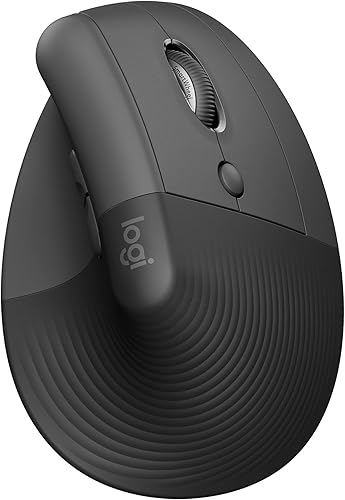
- Graphite color
- Works with laptops, personal computers and tablets
- Bluetooth Low Energy or Logi Bolt USB
- Includes mouse, AA battery, receiver and quick start guide
The Graphite version has the broadest compatible-device wording among these three options. It keeps the Lift shape, SmartWheel, quiet clicks and customizable controls while including a quick start guide with the mouse, battery and receiver.
Pros
- Compatible with laptops, personal computers and tablets
- Includes a quick start guide
- Quiet clicks and SmartWheel scrolling
- Up to 24 months of battery life
Cons
- Right-hand version
- Designed for small to medium hands
- Requires 1 AA battery
The Graphite model is the best fit here for a mixed-device desk because its data names laptops, personal computers and tablets as compatible devices. It also supports Bluetooth Low Energy and Logi Bolt USB.
The included items are the Lift mouse, 1 AA battery, Logi Bolt USB receiver and quick start guide. That makes the box contents clearer for someone setting up a new mouse across several devices.
Like the other versions, it has six buttons, quiet clicks, SmartWheel scrolling and a 57-degree vertical shape. Logitech describes connection with up to three devices and Easy-Switch support for moving between them.
The Graphite finish is a restrained choice for an office or shared workspace. Choose it when device flexibility and the included quick start guide matter more than selecting Rose or Sand.
For a different Logitech vertical design, compare our Logitech MX Vertical mouse review. The MX Vertical is a separate model, so compare its shape and controls with the Lift rather than assuming the two mice fit the same way.
Logitech Lift Sand
Logitech Lift Vertical Ergonomic Wireless Mouse: Best for a neutral desk color

- Sand color
- 4000 DPI adjustable tracking
- Optical movement detection
- Logi Bolt USB receiver and 1 AA battery included
The Sand Lift is the color-focused choice with stated adjustable tracking up to 4000 DPI and optical movement detection. It has the same 57-degree vertical design, quiet clicks and wireless connection options.
Pros
- Sand color
- Adjustable tracking up to 4000 DPI
- Optical movement detection
- Includes Logi Bolt USB receiver and 1 AA battery
Cons
- Right-hand version
- Designed for small to medium hands
- Requires 1 AA battery
The Sand version is the clearest choice if you want a light desk color and stated adjustable tracking up to 4000 DPI. It uses optical movement detection and includes a Logi Bolt USB receiver with 1 AA battery.
Its physical details match the other versions here: 4.3 in long, 2.7 in wide and 125 g. The product details also identify six buttons, Bluetooth connectivity and Mac and PC hardware support.
The Sand Lift is still a right-hand mouse for small to medium hands. Choose it when the finish and tracking details suit your setup, not because the color changes the ergonomic shape.
All three options have the same basic setup priorities. Keep the mouse close enough that your elbow stays near your body, and position it where you can reach it without stretching across the desk.
Is the Logitech Lift comfortable for long work sessions?
The Lift's upright 57-degree design may feel more comfortable if a flat mouse leaves your wrist or forearm in a position you dislike. The textured grip and thumb rest give your hand specific contact points instead of making you balance on the mouse shell.
That does not guarantee comfort for every user. Hand size, grip pressure and desk height change how the shape feels, so give yourself time to learn the movement before deciding whether the angle suits you.
A vertical mouse also changes pointer control. Move from the arm and forearm when practical, keep your grip light and avoid pressing down hard on the thumb rest.
The best vertical ergonomic mouse options can help if you are still comparing vertical shapes, hand sizes and control layouts.
How do the Lift's wireless controls work?
The Lift offers Bluetooth Low Energy and Logi Bolt USB, giving you two ways to connect. Bluetooth can keep a USB port free, while the receiver can be useful on a computer where you prefer a dedicated wireless connection.
The Graphite version is identified as compatible with laptops, personal computers and tablets. The Rose and Sand data focus on laptop compatibility, while their broader platform details include Mac and PC support and multiple operating systems.
Logitech describes Easy-Switch for moving between up to three devices. Its Flow feature can move between screens and transfer files, with Logi Options+ software required for customization and Flow.
Check your operating system before setup. Basic mouse functions may work without extra drivers on some systems, but the software features require Logi Options+ on Windows and macOS.
Our guide to how to use a Logitech Lift mouse covers connection, button setup, scrolling and hand placement.
What should you know about handedness and hand fit?
The three products reviewed here are right-hand Lift mice for small to medium hands. If you use your left hand, choose a clearly marked left-hand configuration instead of relying on the general Lift name.
Hand fit matters because the thumb rest and button positions are built around the mouse shape. If your fingers extend well past the buttons or your palm cannot settle on the grip, the vertical angle may not feel natural.
Measure your hand if you are unsure, then compare that measurement with Logitech's current fit guidance before ordering. Also check the exact color and hand orientation because product names can look similar across a range.
The Lift measures 108 x 70 x 71 mm and weighs 125 g. Those dimensions give you a useful reference for comparing it with a flatter mouse already on your desk.
Is the Logitech Lift a good wireless mouse for a standing desk?
The Logitech Lift works well with a standing desk because wireless connection keeps the mouse area clear as you change position. Bluetooth or Logi Bolt USB avoids a cable that could pull across the desk surface.
A standing desk does not automatically create better mouse posture. Set the mouse near the keyboard at both sitting and standing heights, then check that your shoulder stays relaxed when your hand reaches it.
If you use a desk mat, keep its surface large enough for the mouse to move without hitting the edge. If you are considering a setup without one, see what you can use instead of a mouse pad.
The Lift's 24-month battery estimate also reduces the need to stop and change batteries often. Battery life can vary with user and computing conditions, so keep track of the battery rather than waiting for an inconvenient shutdown.
What do desk height and mouse movement have to do with this review?
A mouse cannot correct a desk that is too high or too low. Desk height affects whether your forearm approaches the Lift comfortably, so adjust the desk until your elbow and wrist feel supported without leaning your shoulder forward.
A standing desk's movement speed is separate from mouse comfort. If you want to understand that distinction, read what desk lift speed means before comparing desk controls.
The same idea applies to lift desks in general. [What Is a Lift Desk?
Facts Worth Knowing](/what-is-a-lift-desk/) explains the basic desk category, while this review focuses on the mouse used on that surface.
Set the Lift close to the keyboard, keep the pointer sensitivity comfortable and use the customizable buttons only for shortcuts you will remember. More buttons are useful when they reduce repeated movements, but they can slow you down if every button has a different task.
Logitech Lift mouse review: final verdict
Pick the Graphite Logitech Lift if compatibility across laptops, personal computers and tablets is your priority. Choose the Rose model for its color, or the Sand model for adjustable tracking up to 4000 DPI and optical movement detection.
All three versions fit the same buyer pattern: a right-handed user with small to medium hands who wants a 57-degree vertical shape, quiet clicks, SmartWheel scrolling and wireless Bluetooth or Logi Bolt control.
If you are still comparing wireless vertical designs, continue with our guide to best wireless vertical mice. It is the next useful step when the Lift's hand fit or right-hand configuration does not match your needs.
Frequently asked questions
Is the Logitech Lift good for small hands?
The Logitech Lift is designed for small to medium hands, so it is a sensible starting point if a standard mouse feels too large. Its 57-degree vertical shape, textured grip and thumb rest change how your hand rests on the mouse.
Compare the stated hand fit with your own hand size before buying.
Is the Logitech Lift mouse right handed or left handed?
The three Lift versions in this review are right-hand models. Logitech also describes the Lift range as available in right and left configurations, but the Rose, Graphite and Sand products covered here are marked right hand.
Check the exact configuration before ordering if you use your left hand.
How does the Logitech Lift connect?
The Logitech Lift connects through Bluetooth Low Energy or a Logi Bolt USB receiver. The Rose and Sand versions include a Logi Bolt receiver and 1 AA battery, while the Graphite version includes the mouse, receiver, battery and quick start guide.
Compatibility varies by version, so check your computer and tablet setup.
How long does the Logitech Lift battery last?
Each version has a stated battery life of up to 24 months from 1 AA battery. Actual battery life can vary with use and computing conditions.
The long stated interval suits a desk where you want fewer battery changes, but keep a replacement AA battery available if the mouse is part of your daily work setup.


