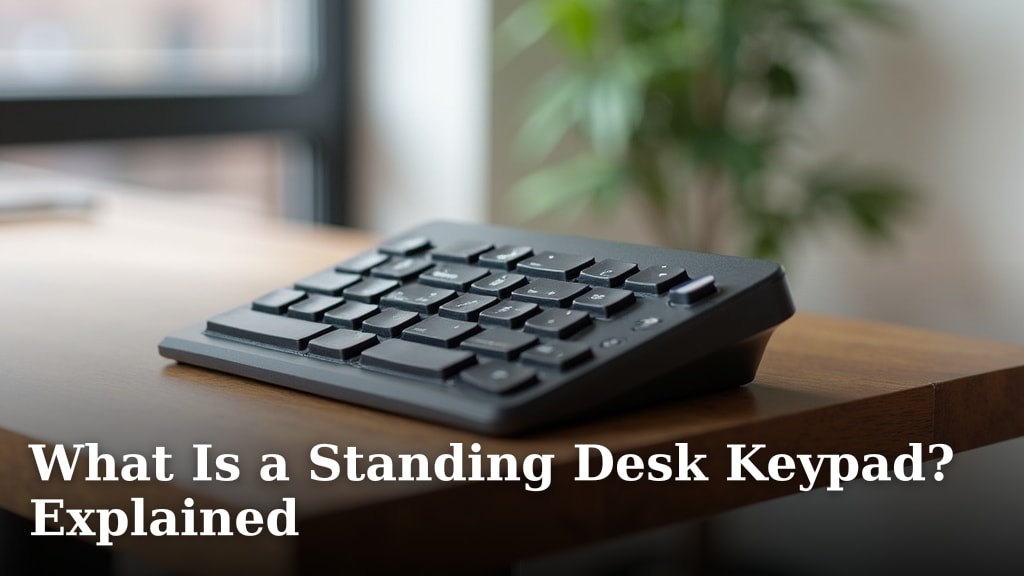
What Is a Standing Desk Keypad? Explained
A standing desk keypad, also known as a programmable controller, is a small device that lets you control your standing desk’s height. It typically has memory presets so you can quickly adjust to your favorite sitting and standing positions. This makes switching positions simple and fast.
Think of it as the remote for your desk. Instead of fiddling with basic up and down buttons, a keypad offers more control. It often connects directly to your desk’s motor and helps you program specific heights. Many users find it a helpful addition for ergonomic consistency.
- A standing desk keypad is a programmable controller.
- It lets you save favorite desk heights.
- This makes switching between sitting and standing easy.
- It connects to your desk’s motor to manage height adjustments.
We’ve found that understanding what a standing desk keypad does is key to making the most of your adjustable desk. Let’s break down exactly what it is and how it can help you.
Understanding Your Standing Desk Keypad
A standing desk keypad is a programmable controller. It lets you manage your desk’s height settings. Think of it as the advanced remote control for your adjustable desk. It connects to your desk’s internal motor system. This allows for more precise control than simple up and down buttons.
What Exactly Does a Keypad Do?
The main job of a standing desk keypad is to provide convenient height adjustments. You can program specific heights. These are often called memory presets. You can save your ideal sitting height. You can also save your favorite standing height. This makes switching between positions very quick.
Instead of holding a button to reach your desired height, you just press a number. We found this significantly speeds up the transition. It helps you stick to your ergonomic goals more easily. Many users find this simple function a major improvement for their daily routine.
Memory Presets Explained
Memory presets are the standout feature. You typically have 2 to 4 preset buttons. You use these to store your preferred desk heights. To set a preset, you move your desk to the desired position. Then, you press a “set” or “memory” button. After that, you press the number button you want to assign it to. Your desk will now remember that height.
This makes it super easy to go from your sitting desk height to your standing height. You don’t have to guess or manually find the right spot each time. It’s about consistency and ease of use. For example, you might set preset 1 for your perfect sitting height. Preset 2 could be for your preferred standing position.
Different Types of Keypads
Keypads come in various designs. Some are very basic with just a few buttons. Others are more advanced. They might have LED displays showing the current height. Some even include features like sit-stand reminders.
Basic vs. Advanced Keypads
A basic keypad might have simple up, down, and memory buttons. An advanced model often features a digital screen. This screen shows the exact height in inches or centimeters. Some advanced keypads have more memory presets. They might also include timers to remind you to switch positions. Research shows that reminders can help increase overall activity levels (CDC).
We found that the display is a nice-to-have feature. It helps you be more precise if you need to match exact heights. For example, if you share a desk, you can easily return it to your setting. The timer feature is also popular for encouraging movement.
Connecting Your Keypad
Your keypad will connect to your standing desk’s control box. This is usually a simple plug-in connection. You’ll likely see a specific port on the control box for the keypad cable. It’s generally a straightforward setup. Most manufacturers provide clear instructions.
Why Use a Standing Desk Keypad?
The primary benefit is making the most of your adjustable desk’s capabilities. It transforms the basic up and down function into a more user-friendly system. It’s designed to help you use your desk more often and more effectively.
Ergonomic Benefits
Achieving good ergonomics involves regular movement. Experts often recommend alternating between sitting and standing throughout the day. For instance, the Mayo Clinic suggests breaking up long periods of sitting. Using a keypad makes this transition so simple that you’re more likely to do it.
When it’s easy to change your desk height, you benefit from improved posture. You can also reduce strain on your back and neck. We found that consistent height changes help prevent stiffness. It keeps your blood flowing better.
Increased Productivity and Focus
Some users report feeling more focused when they can easily switch positions. Feeling physically comfortable can lead to better concentration. When you’re not distracted by discomfort, you can get more done. A keypad helps you find that comfort zone quickly.
You might find that standing for a portion of the day energizes you. It can combat that afternoon slump. Being able to switch to standing in seconds is key here. You don’t lose momentum trying to adjust your desk.
Convenience and Simplicity
Let’s be honest, fiddling with buttons can be annoying. Especially if you have multiple heights you like to switch between. A keypad streamlines this process. It offers one-touch adjustments for your saved positions. This saves you time and frustration.
Imagine you’re on a video call and need to stand up quickly. With presets, it’s a simple button press. You don’t have to awkwardly hold down a button. This convenience factor is why many people choose desks with keypads or add one as an accessory.
Key Features to Look For
When considering a keypad, think about what you need. Not all keypads are created equal. Some offer more features than others. Understanding these can help you choose the right one for your setup.
Number of Memory Presets
How many specific heights do you want to save? Most keypads offer 2 to 4 presets. If you only need a sitting and standing height, 2 is enough. If you have multiple users or prefer several different standing heights, look for more options.
Display Type
Do you want to see the exact height? A digital display shows numbers. This is helpful for precision. Some displays are simple LED readouts. Others are more sophisticated. A non-display keypad will just have buttons.
Additional Functions
Some keypads have extra features. Sit-stand reminder alerts are common. These can be programmed to vibrate or beep. Some may have a “lock” feature to prevent accidental adjustments. Think about what will genuinely help you use your desk.
What to Expect When Using One
Getting used to a keypad is usually very simple. It’s designed for ease of use. The learning curve is minimal. You’ll likely be programming your presets within minutes of setting up your desk.
Consider these points as you start:
- Program your presets carefully. Take your time to find the perfect heights.
- Test each button after programming to ensure it works.
- Keep the keypad accessible. Place it where you can easily reach it.
- Clean it regularly to keep the buttons responsive.
- Understand its limitations. It controls height, but doesn’t adjust your chair or monitor.
- Enjoy the flexibility! Use it to your advantage for better work habits.
We found that users quickly adapt to the convenience. It becomes second nature to press a button instead of holding one. This small change can have a big impact on your daily routine.
Conclusion
You’ve learned that a standing desk keypad is more than just a set of buttons. It’s your direct link to an ergonomic workspace. By allowing you to save and recall your favorite sitting and standing heights, it makes transitioning effortless. This simple convenience encourages you to move more throughout your day, potentially boosting comfort and focus. Think of it as a small tool for a big improvement in your daily work routine. Ready to make your desk work smarter for you? Consider adding a keypad to optimize your adjustable desk experience.
Frequently Asked Questions
Can I use a standing desk keypad with any adjustable desk?
Generally, keypads are designed to work with specific desk brands or models. They connect to the desk’s control box. You’ll want to check your desk’s specifications or the keypad’s compatibility list to ensure a proper fit.
How do I program my standing desk keypad’s memory presets?
The process usually involves moving your desk to your desired height, pressing a “set” or “memory” button, and then pressing one of the numbered preset buttons. We found that referring to your desk’s manual is the best way to get precise instructions.
What’s the difference between a basic and an advanced keypad?
Basic keypads typically have simple up, down, and memory buttons. Advanced keypads often include a digital display showing the exact desk height and may offer additional features like timers for sit-stand reminders.
Will a keypad help me stand more often?
Yes, research suggests that convenience is key. When it’s as easy as pressing a button to change your desk height, you’re more likely to alternate between sitting and standing, which supports better ergonomic habits.
Is it hard to set up a standing desk keypad?
Most keypads are designed for simple plug-and-play setup. You’ll usually connect the keypad cable to a designated port on your desk’s control box. Manufacturers typically provide clear, easy-to-follow instructions.