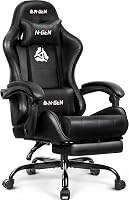
What Makes a Good Gaming Chair?
A good gaming chair fits your body and gives you useful adjustments, especially for seat height, back support, arm position and recline. The right choice also depends on the chair's materials, size, desk height and how long you sit.
On this page (11 sections)
- What makes a good gaming chair for your body?
- Which adjustments matter most?
- What should you compare in the armrests?
- Does the chair material matter?
- How important are the seat and backrest?
- What weight capacity and size details should you check?
- Which features are worth paying for?
- How should you set up a gaming chair?
- Are premium gaming chairs always better?
- How do you choose between these two chairs?
- What makes a good gaming chair for long sessions?
A good gaming chair fits your body and gives you useful adjustments, especially for seat height, back support, arm position and recline. That fit matters more than racing style or colour.
The right choice also depends on materials, size, desk height and how long you sit each day.
A high back or extra padding does not make a chair automatically ergonomic.
Compare the parts that affect posture and daily use, starting with seat height.
Feet need support so hips and knees feel comfortable.
Back support should contact your lower back without pushing you forward.
Arm position affects elbows and shoulders when you reach the keyboard and mouse.
Recline lets you change angle during breaks and shift position.
Materials affect air movement and cleaning, while size affects whether the seat feels open or tight.
Desk height decides if the chair can sit close enough for comfortable typing and mouse work.
Session length matters because a chair that feels fine for an hour may feel different after several hours.
Who the chair suits is as important as the spec list.
A tall user may need a taller back and wider seat, while a shorter user may need a lower seat range.
A wide cushion helps if you shift often, while a narrower seat can feel more structured.
Daily care starts here too, since mesh, fabric and leatherette suit different rooms and routines.
If you are also considering a standard desk chair, our ergonomic office chair guide explains the same fit questions from an office seating angle.
That guide helps you decide between a gaming style back and a more office style task chair.
Use the same checks in both cases, including feet position, elbow support and head position.
Do not judge only by appearance, because a chair can look right and still fit poorly.
Compare controls first, then material and size, and only then style details.
What makes a good gaming chair for your body?
The best gaming chair for you is one that supports your back while letting your feet rest on the floor. Fit comes before color, branding or extra styling.
Check the recommended user height, seat height range, seat width and weight capacity. A chair that is too large can leave you without proper back support, while a narrow seat can make long sessions uncomfortable.
Your knees should stay near a right angle when your feet are flat. Your shoulders should remain relaxed when your hands reach the keyboard and mouse.
A high back can support more of your upper body, but height alone does not guarantee a good fit. The backrest should meet your shoulders and support the area where you need it.
How should a gaming chair fit?
A gaming chair should let you sit back with your lower back supported and your head in a neutral position. Your body should fit the chair without needing to brace against the armrests or slide forward.
Use this quick fit check:
- Your feet can rest flat on the floor or on a suitable footrest.
- Your knees have room to move without pressing against the seat edge.
- Your lower back meets the chair's lumbar support.
- Your shoulders are not forced forward by the backrest.
- Your elbows can stay close to your sides.
- The seat does not press sharply behind your knees.
The chair should also fit your desk. A seat that raises your elbows above the keyboard can create tension even if the chair feels comfortable by itself.
Which adjustments matter most?
The most useful gaming chair adjustments are seat height, backrest recline, armrest position and lower-back support. These controls let you match the chair to your body and desk.
Seat height is the first adjustment. Set it so your feet are supported and your knees are comfortable.
Then adjust the desk or keyboard position so your forearms can stay level.
A reclining backrest lets you change position during breaks, games and other tasks. A tilt lock can help if you prefer a fixed angle, while free movement can suit people who shift position often.
Armrests should support your elbows without pushing your shoulders upward. If you use a keyboard and mouse for long periods, arm support can make desk height and shoulder position easier to manage.
For a direct comparison of seating styles, read our gaming chair vs office chair guide.
Is lumbar support necessary?
Lumbar support is useful when it meets the curve of your lower back without pushing you too far forward. The right support should feel supportive, not like a hard point pressing into one spot.
Some chairs use a shaped backrest, while others use a separate cushion or adjustable support. Check whether the support can stay in the right place as you recline.
Head support also matters if you lean back. A headrest or pillow should support your head without forcing your chin toward your chest.
The Secretlab Titan Evo Black Gaming Chair has a solid high back, lumbar support and an adjustable memory foam magnetic head pillow. Its ergonomic form and reclining design suit an adult who wants a structured chair for work and gaming.
What should you compare in the armrests?
Good armrests keep your elbows supported while leaving your shoulders relaxed. At minimum, look for height adjustment that matches your desk and keyboard position.
Flip-up armrests can help when you need to push the chair under the desk. This is useful in a small room, but folding arms do not replace a wider range of adjustment.
Check whether the arms interfere with the desk surface. If they hit the underside of the desk, you may not be able to sit close enough to the keyboard.
A chair with arms should also let you enter and leave without awkward twisting. Consider the space beside the desk, especially if the chair has a wide seat or fixed arm supports.
Does the chair material matter?
Material affects airflow, cleaning and the feel of the seat. Choose mesh when air movement is a priority, or leatherette when you prefer a smoother surface and easier wipe-down care.
Mesh can feel cooler because air can pass through the back and sometimes the seat. Its support depends on the tension and shape of the mesh, so inspect the seat design rather than assuming every mesh chair feels the same.
Leatherette can provide a smooth, padded surface. It may feel warmer in a room with limited airflow, and it needs regular cleaning with products suitable for the material.
Fabric can offer a softer feel and a different appearance. Compare our guides to the best mesh gaming chair options and the best fabric gaming chairs before choosing.
The GABRYLLY Ergonomic Office Chair uses a breathable mesh back and mesh seat, with a wide cushion, high back, headrest and flip-up arms. Its seat and back design suit a buyer who wants airflow, a large seating area and office-style adjustments.
Our leather vs fabric gaming chair guide covers the daily trade-offs between those two surfaces.
How important are the seat and backrest?
The seat and backrest should support your posture without making you feel trapped. A wide cushion helps with room to shift, while a shaped backrest helps keep your upper body supported.
Look for a seat that gives your legs enough room without extending so far that it presses behind your knees. A waterfall-style front edge can reduce pressure at the front of the seat.
The backrest should support the height of your torso. A solid back can feel structured, while mesh can provide more airflow and a different type of support.
Padding also changes the feel over a long session. Very soft padding may feel comfortable at first but can make it harder to stay supported.
Very firm padding may suit some users but feel less forgiving.
What weight capacity and size details should you check?
Check the chair's weight capacity and dimensions before you buy. A chair should have enough capacity and usable seat space for your body, with room for normal movement.
Do not compare weight capacity by itself. Seat width, seat depth, backrest width and armrest placement also affect whether the chair feels open or restrictive.
Measure your desk opening and the path into the room. A chair can fit at the desk but still be difficult to move through a doorway or around a tight corner.
If you need a lower-cost option, compare our best cheap gaming chair guide and best gaming chairs under 150 dollars. For a higher spending range, see best gaming chairs under 200 dollars and best gaming chairs under 300 dollars.
Which features are worth paying for?
Pay for adjustments and fit before decorative features. A chair with useful height, recline, armrest and support controls usually helps more than one with extra styling that does not change your sitting position.
Prioritize these features:
- A seat height range that matches your desk.
- A backrest that supports your torso.
- Lumbar support that meets your lower back.
- Armrests that keep your shoulders relaxed.
- A seat width and depth that fit your body.
- A material that suits your room and cleaning routine.
- A stable base and smooth movement on your floor.
Extra pillows, bold colors and themed designs can be worthwhile if they fit your room. They should come after the basic fit checks.
For design-led choices, compare our best pink gaming chair guide. For brand-specific research, see the GTRacing gaming chair review and best AndaSeat gaming chair guide.
How should you set up a gaming chair?
Set up the chair in stages instead of changing every control at once. Start with the seat height, then adjust the backrest, lumbar support and arms around your desk position.
Place both feet on the floor and sit fully back. Raise or lower the seat until your knees and hips feel comfortable.
Next, adjust the backrest so your torso is supported. Set the lumbar support where it meets your lower back, then position the head pillow or headrest so your neck stays neutral.
Finish with the armrests. Raise them until your elbows are supported while your shoulders remain down.
Move the chair close enough that you can reach the keyboard without leaning forward.
Recheck the settings after a few days. Your preferred position may change when you switch between gaming, writing and watching content.
Are premium gaming chairs always better?
Premium gaming chairs are not automatically better for every user.
A higher-end chair is worth considering when its fit, support and adjustment range solve a specific problem for you.
A premium design may suit someone who spends many hours at a desk and wants a particular material, back shape or adjustment system.
It may be poor value if the seat dimensions do not fit your body.
That trade off is the key point, because a higher price does not fix a seat that is too wide or a back that is too tall.
It also does not fix armrests that hit your desk or a seat height range that misses your desk height.
Honest comparison means asking what daily problem the chair solves.
If you need stronger structure, a specific material or wider adjustment, a premium model may help.
If your main issue is simply wanting a new look, the extra cost may not change your sitting position.
Set up also matters, because a chair with many controls needs time to tune for your body and desk.
Care matters too, since some materials need more regular cleaning to keep their feel and appearance.
A structured leatherette chair can suit a user who wants a smooth surface and a firm back shape.
A breathable mesh chair can suit a user who runs warm or wants more air movement.
Neither choice is better in every room, because heat, cleaning habits and session length change the answer.
Read our best most expensive gaming chairs guide for premium features, then compare the Secret Lab Titan chair review before deciding whether that style matches your needs.
Use those guides to check fit and adjustment first, rather than assuming a higher tier means a better daily sit.
How do you choose between these two chairs?
Choose based on your preferred support style and room conditions. The Secretlab Titan Evo suits someone who wants a structured leatherette gaming chair with a reclining high back and magnetic head pillow, while the GABRYLLY suits someone who prefers a wide breathable mesh office chair with flip-up arms.
The Secretlab chair has a metal frame, solid back, leatherette finish, swivel movement, reclining support, 4D armrests and an adjustable magnetic memory foam head pillow. Assembly is required.
The GABRYLLY chair has a mesh back and seat, a wide cushion, a headrest, flip-up arms, lumbar support and a 90 to 120 degree tilt range. Its recommended user height is about 5 ft 2 in to 6 ft 1 in, and its capacity is up to 300 lb.
For a broader shortlist, see our best chairs for gaming guide. If you are considering Secretlab specifically, our guide to whether Secretlab chairs are worth it covers the buying question from another angle.
What makes a good gaming chair for long sessions?
A good gaming chair for long sessions gives a close fit, stable back support and enough adjustment to change position.
Pick the Secretlab Titan Evo for a structured leatherette chair, or the GABRYLLY for breathable mesh and a wide seat.
Measure your desk and body first, then compare seat height, back support, armrest position, material and capacity.
A chair that fits your routine beats one chosen only for gaming appearance.
For long sessions, small changes in position matter as much as the first setup.
Seat height should keep feet supported, so legs do not carry extra pressure.
Back support should meet your lower back without forcing shoulders forward.
Armrests should support elbows while shoulders stay relaxed and hands reach the desk with ease.
Recline and tilt options help when you switch between focused work, games and breaks.
The Secretlab Titan Evo Black Gaming Chair is a regular size leatherette ergonomic chair with a metal frame and solid back.
It has lumbar support, 4D armrests, height adjustment and reclining support for work and gaming.
Its memory foam magnetic head pillow adjusts over a wide range and snaps into place on the backrest.
That suits an adult who wants a structured seat with head support and neck pressure relief.
The trade off is leatherette, which may run warmer than mesh in a room with limited airflow.
Assembly is required, so set aside time to build it and tune the controls after setup.
The GABRYLLY Ergonomic Office Chair is a high back mesh chair with a headrest, flip up arms and wide cushion.
It offers lumbar support and a 90 to 120 degree tilt range, with seat height from 18.9 to 23.6 inches.
Its recommended user height is about 5 feet 2 inches to 6 feet 1 inch, and its loading capacity is 300 pounds.
That suits a buyer who wants airflow, a larger seating area and arms that flip up to save space.
The trade off is mesh support depends on tension and shape, so it may feel different from a padded leatherette seat.
Setup takes about 15 to 20 minutes with the included manual and tools, and the flip up arms help when you push the chair under the desk.
For care, mesh needs regular attention to dust and spills, while leatherette needs wiping with products suited to that surface.
Choose based on heat, cleaning habits, room space and how often you change position.
Then recheck seat height, lumbar position, arm height and head support after a few days of use.
Frequently asked questions
What makes a good gaming chair?
A good gaming chair fits your height and body, supports your back, lets you adjust the seat and armrests, and reclines without forcing your neck or shoulders into an awkward position. Material, seat width, weight capacity and desk height also matter because they affect daily comfort and fit.
Is lumbar support important in a gaming chair?
Lumbar support matters because it helps the chair support the lower back area while you sit. Look for a design that matches your body and can be adjusted or positioned comfortably.
A chair cannot replace medical advice, so speak with a health professional about ongoing back pain.
Should a gaming chair have adjustable armrests?
Yes, adjustable armrests can help you keep your elbows supported while your shoulders stay relaxed. Height adjustment is a useful starting point, while wider adjustment can help you match different desks, keyboards and sitting positions.
Are mesh gaming chairs better than leatherette chairs?
Mesh gaming chairs can allow more air movement, while leatherette chairs may offer a different feel and are often easier to wipe clean. Neither material is automatically better.
Compare the chair's support, fit, adjustment range and care needs with your room and sitting habits.