Are Gaming Chairs Comfortable?
Gaming chairs can be comfortable when the seat, back support, armrests, and recline fit your body. Their comfort varies by padding, mesh or fabric, adjustment range, and how long you sit.
On this page (8 sections)
- What makes a gaming chair comfortable?
- Are gaming chairs comfortable for work and gaming?
- Do headrests and lumbar supports improve comfort?
- Which materials feel coolest?
- How should you adjust a gaming chair for comfort?
- Are racing-style gaming chairs comfortable for everyone?
- How do you choose a comfortable gaming chair?
- So, are gaming chairs comfortable?
Gaming chairs can be comfortable when their seat, back support, armrests, and recline fit your body. Comfort depends less on the gaming look and more on adjustability, padding, airflow, and whether the chair supports your usual posture.
A racing-style back can feel supportive to one person and restrictive to another. Before you buy, compare seat dimensions, back height, material, lumbar design, armrest movement, and how easily you can change position.
What makes a gaming chair comfortable?
A comfortable gaming chair lets you support your lower back, rest your arms, and change position without fighting the chair. The most useful features are a suitable seat depth, adjustable height, a backrest that reclines, and armrests that meet your desk setup.
Padding also changes the experience. Foam can feel cushioned, while pocket springs and polyurethane cushioning may create a softer, more sofa-like seat.
Mesh can improve airflow, but its feel differs from padded fabric or synthetic leather.
Your desk matters too. If the armrests cannot rise close to the desktop, your shoulders may stay lifted.
If the seat is too high, your feet may not rest securely on the floor.
For a broader comparison, see our guide to ergonomic office chairs. If you want an office-style design for gaming, compare the best ergonomic office chair for gaming.
Are gaming chairs comfortable for work and gaming?
Gaming chairs can suit both work and gaming when their adjustments match the tasks you switch between. Upright support helps when you type, while recline can give your back and neck a different position during videos or controller play.
Check whether the chair includes the adjustments you will actually use. A chair with a headrest and lumbar support may suit long desk sessions, while a footrest can help when you want to recline and rest your legs.
Avoid choosing by appearance alone. A tall back or aggressive side shape does not tell you whether the seat width, depth, cushion feel, or armrest position will work at your desk.
Which chair suits users who want many adjustments?
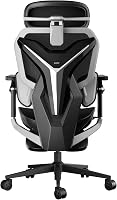
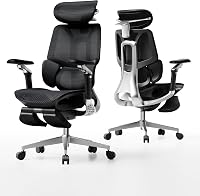
The AutoFull G7 Gaming Chair suits readers who want a wide adjustment range for gaming and desk work. It has 22-point adjustment, 3-zone lumbar support, a 4D headrest, 720° dual-axis armrests, a 2 in seat-depth adjustment, and a 140° recline.
Its breathable mesh back is designed for airflow, while the retractable footrest and massage function support a more relaxed reclined position. The chair is 20.27 in deep, 20.47 in wide, and 39.59 in high.
Choose it if you expect to fine-tune several contact points. More adjustments can also mean more setup decisions, so take time to position the lumbar support, headrest, and armrests instead of leaving every setting at its default.
Do headrests and lumbar supports improve comfort?
Headrests and lumbar supports can improve comfort when they meet your body in the right places. They should support your position without pushing your head forward or forcing your lower back into an unnatural curve.
A lumbar pillow may feel useful if you prefer a simple cushion that moves with you. Built-in adjustable lumbar systems offer more control, but they can take longer to position correctly.
If you are concerned about posture, read are gaming chairs ergonomic and are gaming chairs good for your back. Comfort is personal, and persistent back pain needs medical advice rather than a chair upgrade alone.
Which chair suits users who want a footrest?
The GTPLAYER Gaming Chair suits readers who want a recliner-style gaming chair with a footrest and separate headrest and lumbar support. Its metal frame, metal legs, padded armrests, foam fill, and pearl white PU leather make it a padded option for indoor office or gaming use.
The chair has a 360° swivel seat and dimensions of 20.08 in deep, 20.05 in wide, and 49.21 in high. Its included accessories include arm pads, and assembly comes with detailed instructions and the necessary accessories.
Choose it if you want to put your feet up during breaks or reclined gaming. Measure your desk and room first, especially because the chair's 49.21 in height and reclining movement need clear space.
For more footrest options, see our guide to the best gaming chair with footrest.
Which materials feel coolest?
Breathable mesh and fabric usually allow more airflow than covered foam, but comfort also depends on the room and your clothing. A padded PU leather chair may feel soft and easy to wipe, while fabric or mesh may feel less enclosed during warm sessions.
The AutoFull G7 uses CloudTech mesh and is designed around airflow. The black GTPLAYER chair uses leathaire fabric, breathable fabric, polyurethane cushioning, and pocket springs in the seat.
No material is automatically best for every user. Mesh can feel firmer or more structured, while a spring-supported cushion may feel softer.
Consider whether you prefer a cooler contact surface or a cushioned seat.
Which chair suits users who prefer a spring-supported seat?
The GTPLAYER Gaming Chair with pocket springs suits readers who want a high-back chair with a cushioned seat, footrest, and armrests that move with the backrest. Its seat uses independent pocket springs, a recyclable polyurethane core, and polyurethane cushioning.
Its breathable fabric is designed for airflow, and the linkage armrests adjust with the backrest angle. The chair is 21.5 in deep, 20 in wide, and 51 in high, with an iron frame and leathaire fabric.
Choose it if a spring-supported seat and automatically linked armrests appeal to you. Its 51 in height makes measuring your desk area and overhead clearance especially useful before assembly.
How should you adjust a gaming chair for comfort?
Start with seat height, then set the back, lumbar support, armrests, and headrest in that order. Your feet should feel supported, your shoulders should stay relaxed, and your elbows should meet the desk without reaching upward.
Use the seat depth to keep the front edge from pressing behind your knees. If the chair has a fixed seat depth, move the chair closer or farther from the desk while keeping your feet supported.
Set lumbar support against your lower back, not high against your ribs. A headrest should support your head when you lean back without pushing your chin toward your chest.
Adjust armrests so your forearms can rest while your shoulders stay down. If the armrests hit the desktop, lower them or move the chair back before changing your keyboard and mouse position.
Recline for a posture change, not as a replacement for movement. Stand, walk, and vary your position during long sessions.
Are racing-style gaming chairs comfortable for everyone?
No, racing-style gaming chairs are not comfortable for everyone. Side bolsters, tall backrests, and a shaped seat can feel supportive, but they may limit how freely you sit or cross your legs.
A flatter office-style seat may suit people who shift position often. A high-back chair may suit someone who wants more upper-body contact, while a compact chair may work better in a smaller desk area.
If you prefer a taller back, compare the best high back office chair. If you want a different seat shape, the best saddle stool with backrest guide covers another approach to supported sitting.
How do you choose a comfortable gaming chair?
Choose the chair that matches your body, desk, climate, and preferred sitting position. Use this order:
- Measure your available floor and desk space.
- Compare chair height, depth, width, and back height.
- Decide between mesh, fabric, PU leather, and spring-supported cushioning.
- Check whether lumbar support, headrest, armrests, seat depth, and recline are adjustable.
- Choose a footrest only if you have room to extend your legs.
- Set the chair after assembly instead of judging comfort at the default settings.
For a reclining setup, see the best comfortable reclining office chair. A recline feature helps most when the chair still supports your neck, lower back, and arms as you change angle.
So, are gaming chairs comfortable?
Gaming chairs are comfortable when their fit and adjustments suit you, but the gaming label alone proves nothing. Choose the AutoFull G7 if you want extensive adjustment and breathable mesh, the pearl white GTPLAYER if you want a footrest and padded recliner design, or the black GTPLAYER if you prefer pocket springs, fabric, and linkage armrests.
Measure first, set the chair carefully, and change position during long sessions. If comfort is your main goal, compare each chair's seat, support system, and materials against the way you actually work or play.
Frequently asked questions
Are gaming chairs comfortable for long hours?
Gaming chairs can stay comfortable for long sessions when the seat depth, lumbar support, armrests, and recline suit your body. Look for useful adjustments instead of relying on the racing-style shape alone.
Stand, walk, and change position during long work or gaming periods.
Are gaming chairs more comfortable than office chairs?
Neither type is always more comfortable. A gaming chair may offer a headrest, recline, footrest, or strong side bolsters, while an ergonomic office chair may provide a flatter seat and more flexible posture.
Compare the adjustments and materials with your daily sitting position.
Do gaming chairs help with back comfort?
A gaming chair's lumbar support can help you maintain a more supported sitting position, but it doesn't guarantee relief from back pain. Choose adjustable support that fits your lower back, and speak with a health professional about ongoing pain or numbness.
What makes a gaming chair uncomfortable?
Common causes include a seat that is too short or deep, fixed armrests, poor lumbar placement, heat from non-breathable materials, and padding that does not suit you. A chair can also feel wrong if its height leaves your feet unsupported or its back angle limits movement.