9 Best Black Standing Desk Risers (November 2026)
The best black standing desk risers include the WESTREE Dual Monitor Stand Riser for a wide two-screen setup, the BONTEC 1home Monitor Stand Riser for a compact organized desk, and the VIVO Manual Height Adjustable Standing Desk Riser for alternating between sitting and standing.
On this page (4 sections)
The best black desk riser for standing work is the VIVO Manual Height Adjustable Standing Desk Riser, which raises its top from 4.9 to 19.7 in. For a fixed black shelf, choose by the number of screens, usable desk width and storage you need.
A black desk riser can tie a dark monitor, keyboard and desk frame together, but “riser” describes more than one kind of product. Some picks here are fixed monitor shelves.
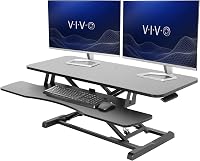
The VIVO is a standing desk converter that raises a work surface and keyboard tray.
If you're setting up a seated desk for standing, start with our guide on how to convert a desk to a standing desk. For a fixed shelf, measure your monitor base and desk depth before choosing.
Our picks at a glance
-
1

-
2
 Best for a compact organized desk
BONTEC 1home Monitor Stand Riser
9.6/10 our score
See it on Amazon -
3
 Best for alternating between sitting and standing
VIVO Manual Height Adjustable Standing Desk Riser
9.6/10 our score
See it on Amazon
- 4
 Check it
TEAMIX 2-Pack Wood Monitor Stand Riser
Best for two separate screens - 5
 Check it
Across-Star Dual-Monitor-Stand-Riser-For-Desk Adjustable Length 32-40 Inch,Large Desktop
Best for changing monitor layouts - 6
 Check it
TEAMIX 20 Inch Monitor Stand Riser
Best for a basic 20-inch shelf - 7
 Check it
Klearlook Computer Monitor Stand for Desk
Best for adjustable shelf width - 8
 Best for a 24-inch desktop shelfCheck it
- 9
 Best for an adjustable-length multi-monitor shelfCheck it
Which black desk riser suits your setup?
The VIVO suits sit-stand use, while the other picks are fixed-height monitor shelves. Match the type to your goal first, then compare the top size and storage layout.
WESTREE Dual Monitor Stand Riser: Best for a wide two-screen setup
- 35.8 in wide
- Steel legs and wood top
- Storage space underneath
A wide black and rustic brown shelf gives two monitors room while leaving storage space below. It can also serve as a printer or laptop stand.
Pros
- Wide surface for two monitors
- Space underneath for office supplies
- Can be used for a printer or laptop
Cons
- Fixed-height shelf, not a standing desk converter
- Rustic brown top may not match an all-black setup
The WESTREE is the widest fixed shelf in this group at 35.8 in, making it a useful fit to consider for a two-monitor setup. Its top combines a black frame with a rustic brown wood finish, so it may work best when you want a dark frame without an all-black surface.
Storage space underneath can hold office supplies, and the stand can also be used for a printer or laptop. WESTREE describes the construction as thick steel legs with a wood top, and anti-slip pads are included for the bottom.
This shelf stays at one height, so it won't create a standing position by itself. Choose it when the desk is already at a comfortable working height and you want to raise screens while keeping some items underneath.
BONTEC 1home Monitor Stand Riser: Best for a compact organized desk
- 16.54 in wide
- 5.6 in height
- Cable slots and phone holder
This compact black riser adds a phone holder and cable slots alongside storage space for small desk items. Its 5.6 in height is a fixed shelf height.
Pros
- Cable management slots
- Built-in phone holder
- Compact footprint
Cons
- Fixed height
- Measure the monitor base against the shelf
The BONTEC 1home is a compact black riser with a 16.54 in width and a 5.6 in height. It suits one monitor or a smaller desk where a wide two-screen shelf would take too much space.
The engineered-wood shelf includes cable slots and a phone holder. The space below can store a keyboard, mouse or laptop when you want to clear the main work area.
Its fixed height makes it a monitor stand rather than a standing desk converter. Check that the monitor base fits the shelf and that the raised screen lands at a comfortable viewing height for you.
VIVO Manual Height Adjustable Standing Desk Riser: Best for alternating between sitting and standing
- 31.5 x 15.8 in top
- Height adjusts from 4.9 to 19.7 in
- Keyboard tray rises with top
Unlike fixed monitor shelves, this VIVO riser moves between sitting and standing heights. Its keyboard tray rises with the top surface.
Pros
- Adjustable height for sit-stand use
- Keyboard tray moves with the desktop
- Minimal assembly
Cons
- Requires room for a 31.5 x 15.8 in top
- Desktop capacity is 26 lb
The VIVO is the pick here for changing work height, since the pneumatic lift adjusts from 4.9 to 19.7 in. Its top measures 31.5 x 15.8 in, and the keyboard tray rises in sync with that surface.
The steel frame supports up to 26 lb on the desktop. VIVO says the lift uses a height-locking mechanism and spring assist, and the riser needs only the keyboard tray attached before use.
Measure the available desk area and count the weight of the monitor, keyboard and other items that will sit on the top. For more manual options, see our guide to the best manual standing desk converter.
TEAMIX 2-Pack Wood Monitor Stand Riser: Best for two separate screens
- Two black stands
- Use separately or stack
- 80 lb stated capacity
The two stands can sit side by side for separate screens or stack to create a two-tier riser. Their small individual footprints suit desks that need a split layout.
Pros
- Two stands in the set
- Can be used separately or stacked
- Two height arrangements
Cons
- Short individual width
- Fixed height in either arrangement
The TEAMIX 2-Pack gives you two black shelves, each measuring about 14 x 9.5 in. Use them side by side for separate screens, or stack them to make a two-tier arrangement that is 6.75 in high.
This layout is helpful when you want to separate monitors or place a small device on a second level. The stands are made from engineered wood, and the brand gives an 80 lb capacity.
The two pieces are fixed-height shelves, even though the pack offers two configurations. Check whether one shelf is wide enough for each monitor foot before choosing a split layout.
Across-Star Dual-Monitor-Stand-Riser-For-Desk Adjustable Length 32-40 Inch,Large Desktop: Best for changing monitor layouts
- Length adjusts from 32 to 40 in
- Storage space underneath
- Wood and metal construction
The adjustable length can be set to suit a single monitor or a wider multi-screen layout. Space underneath can hold a keyboard and other desk items.
Pros
- Adjustable length
- Long surface for multiple screens
- Space underneath for a keyboard
Cons
- Fixed height
- Depth is 9.25 in, so check desk clearance
The Across-Star shelf changes length from 32 to 40 in, so it can be set for a single screen or widened for multiple monitors. Its black surface and metal sliding section offer a dark look with a mixed-material build.
A keyboard and other desk items can fit underneath, freeing the top surface. The stated capacity is 80 lb, but place your screens across the supported surface and keep the total load within that limit.
This is a fixed shelf, so it won't raise your whole workstation for standing. Measure desk depth as well as width: the shelf is 9.25 in deep.
TEAMIX 20 Inch Monitor Stand Riser: Best for a basic 20-inch shelf
- 20 x 9.5 in top
- 4 in tall
- 80 lb stated capacity
This simple black shelf provides a defined 20 in surface with room for a keyboard or notebook below. It has a fixed height rather than a lifting mechanism.
Pros
- Clear, compact dimensions
- Space under the shelf
- Simple assembly
Cons
- Fixed height
- Check monitor feet and cable clearance
The TEAMIX 20 Inch Monitor Stand Riser is a straightforward shelf for a single monitor or a compact desk. Its 20 x 9.5 in top is 4 in high, with an opening below for a keyboard or notebook.
The wooden stand has a stated capacity of 80 lb. Its modest width makes it important to compare the monitor base with the shelf size before setting a screen on it.
Choose this model if a fixed four-inch lift fits your viewing position. If you need to switch heights during the day, a manual converter is the better type.
Klearlook Computer Monitor Stand for Desk: Best for adjustable shelf width
- Three widths from 16.5 to 20.5 in
- Built-in drawer
- Phone and tablet holder
This foldable riser offers three widths and adds a drawer plus a phone and tablet holder. It is a fixed monitor shelf, not a sit-stand converter.
Pros
- Three width settings
- Drawer for small items
- No assembly required
Cons
- Fixed height
- Check the unfolded leg spacing against your desk
The Klearlook riser adjusts to three widths: 16.5, 18.5 or 20.5 in. That gives you a way to fit different desk spaces without choosing a long fixed shelf.
A built-in drawer, phone and tablet holder add places for small items. The foldable stand requires no assembly, and its stated capacity is 55 lb.
It remains at a fixed height, so use it for monitor positioning and storage rather than alternating between sitting and standing. Check the fully unfolded leg spacing and the drawer's access before arranging nearby desk items.
VIVO Monitor and Laptop Stand: Best for a 24-inch desktop shelf
- 24 in wood desktop
- Steel footing
- 44 lb capacity
A black 24 in desktop sits on steel footing and can hold a monitor, laptop or small TV. It also creates space underneath for desk storage.
Pros
- 24 in surface
- Steel footing
- Anti-slip silicone padding
Cons
- Fixed height
- Depth is 10.3 in
The VIVO Monitor and Laptop Stand has a 24 in wood desktop supported by steel footing. Its black finish can suit a dark setup, and the 44 lb capacity covers a monitor or laptop within that limit.
Anti-slip silicone padding helps keep the stand in place and protect the desk surface from scratches. The space below can also be used for storage.
The 4.6 in height is fixed, so use it when that rise suits your screen position. Its 10.3 in depth is worth checking against the available desk space.
TAVR Monitor Stand Riser: Best for an adjustable-length multi-monitor shelf
- Length adjusts from 30.7 to 43.3 in
- Angle can be adjusted
- 44 lb capacity
The long shelf adjusts in length and angle to fit different desk and monitor layouts. Its three underneath storage spaces can keep small work items close by.
Pros
- Broad adjustment range
- Adjustable end-piece angle
- Three storage spaces underneath
Cons
- Fixed height
- Check the adjusted footprint against desk space
The TAVR shelf offers the broadest length range here, adjusting from 30.7 to 43.3 in. Its end pieces can also change angle, which gives you options for different screen arrangements and desk shapes.
Three storage spaces underneath can hold items such as a keyboard, mouse or notebook. TAVR gives a 44 lb capacity for the 9.3 in deep shelf.
The height is fixed, so it raises monitors without turning a seated desk into a standing workstation. Measure the desk before choosing a long setup, especially if the screen layout needs the full extension.
How we compared black desk riser options
We compared the risers by how well they fit the needs behind this search: a dark finish, enough room for the intended screen setup, and a clear use as either a fixed shelf or a standing converter. Our score weighs specs, features and buyer feedback against what you're shopping for.
The VIVO standing riser ranks highly because its height adjusts and the keyboard tray rises with the top. For fixed monitor stands, width, storage and configuration shape the order: a two-screen shelf differs from a compact riser with a drawer.
The scores are specific to this roundup and its black desk riser use case. Check the size, material and stated capacity against your own equipment and workspace before choosing.
What should you check before choosing a black desk riser?
Measure the available desk area, screen bases and equipment weight before choosing a riser. Those details help you avoid an unstable fit or a shelf that takes more space than you have.
Will a black desk riser fit your monitor?
Compare the monitor foot's width and depth with the stand's top dimensions. Leave room for cables to bend behind the screen, and avoid placing a base partly over an edge.
For two monitors, check the full combined width and where the stands' legs sit. The WESTREE and Across-Star offer longer surfaces, while separate TEAMIX risers let you split the screens.
Do you need a standing converter or monitor shelf?
A fixed shelf raises the screen but leaves the keyboard at desk level. A converter raises the working surface so you can move between sitting and standing.
If you're new to the second option, see how to use a VariDesk standing desk for setup ideas. Compare the standing desk vs converter tradeoffs if you're still deciding which style fits your room.
How much desk space does a black riser need?
Measure both width and depth, including room for your keyboard, mouse and any items that stay on the desk. A shelf can fit the monitor yet leave too little usable space in front of it.
Check the opening under a fixed stand if you want to store a keyboard there. For cords and power strips, a desk cable management box can help keep accessories together below the surface.
Which black desk riser should you choose?
Choose the VIVO if you want an adjustable surface for standing and seated work. Choose the WESTREE for a wide fixed shelf for two screens, or the BONTEC for a compact stand with cable slots and a phone holder.
If a fixed riser meets your needs, match its dimensions to your monitor bases and desk. For a movable work surface, compare the height range and top size before choosing a standing desk converter.
Our top 3 picks at a glance
-
1
-
2
Best for a compact organized desk
BONTEC 1home Monitor Stand Riser
9.6/10 our score
See it on Amazon -
3
Best for alternating between sitting and standing
VIVO Manual Height Adjustable Standing Desk Riser
9.6/10 our score
See it on Amazon
Frequently asked questions
Is a black desk riser the same as a standing desk converter?
No. A monitor riser is usually a fixed shelf that raises a screen, while a standing desk converter lifts the work surface so you can change between sitting and standing.
Choose a converter, such as the VIVO Manual Height Adjustable Standing Desk Riser, if you need a standing position.
A fixed shelf can improve monitor placement but won't raise your keyboard with the screen.
How do I choose the right width for a black monitor riser?
Measure the monitor base or bases, then compare that space with the riser's usable top. Leave room for cables and any other items you plan to keep on the shelf.
A 35.8 in WESTREE is wide for two screens, while the 16.54 in BONTEC is a more compact option.
Can a monitor riser hold a keyboard underneath?
Often, but check the opening height and width against your keyboard. The TEAMIX 20 Inch Monitor Stand Riser has a 2.95 in inner height, and several of the wider stands leave space underneath for a keyboard.
Keep in mind that a keyboard stored there may need to be moved before you work.
How do I choose between a fixed riser and a manual desk converter?
Choose a fixed riser if you want a monitor shelf at one height or need storage below it. Choose a manual converter if you want to raise the keyboard and screen together for standing work.
Our standing desk vs converter guide explains the main setup differences.