7 Best Electric Standing Desk Converters for Dual Monitors (November 2026)
The best electric standing desk converters for dual monitors include the FLEXISPOT 32" Motorized Standing Desk Converter for a compact dual-screen setup, the VERSADESK PowerPro 36 Inch Electric Standing Desk for a heavier monitor load, and the SANODESK 42" Electric Standing Desk Converter for a wider work surface.
On this page (5 sections)
- How we chose electric standing desk converters for dual monitors
- Which electric converter fits your dual-monitor setup?
- What should you check before buying an electric dual-monitor converter?
- How do you set up two monitors on a standing desk converter?
- Which electric standing desk converter should you choose?
The best electric standing desk converter for dual monitors is the FLEXISPOT 32-inch Motorized Standing Desk Converter for a compact setup with a wide keyboard tray. VERSADESK has a higher stated capacity, SANODESK offers a wider desktop, and the other picks add features such as saved heights or built-in charging.
A powered converter raises the screen and keyboard area together, so you can change between sitting and standing without lifting the setup by hand. Before choosing one, measure your monitors, stands and desk, then check the combined weight against the converter’s stated capacity.
If you’re starting with a fixed-height desk, read how to convert a desk to a standing desk. For general desk selection, see How to Choose a Standing Desk: A Simple Guide.
Our picks at a glance
-
1
 Best for a compact dual-screen setup
FLEXISPOT 32" Motorized Standing Desk Converter
9.7/10 our score
See it on Amazon -
2
 Best for a heavier monitor load
VERSADESK PowerPro 36 Inch Electric Standing Desk
9.6/10 our score
See it on Amazon -
3
 Best for a wider work surface
SANODESK 42" Electric Standing Desk Converter
9.5/10 our score
See it on Amazon
- 4
 Check it
Rocelco 46" Height Adjustable Corner Standing Desk
Best for a corner desk - 5
 Check it
AVLT Electric Standing Desk Converter for Dual
Best for saved height presets - 6
 Check it
Rocelco 37.4" Electric Standing Desk Converter
Best for built-in charging - 7
 Best for adjustable monitor placementCheck it
How we chose electric standing desk converters for dual monitors
We compared the listed work surface sizes, lift methods, stated capacities, monitor support and useful setup features. Our score weighs specs, features and buyer feedback against what you’re shopping for.
A wide top is helpful when two monitors sit side by side, but width alone does not guarantee a good fit. Measure the monitor bases, leave room for cables and accessories, and make sure the converter’s keyboard tray suits your typing position.
Electric converters use powered lifting. If you’re still deciding between a powered and a manual model, compare these picks with our best manual standing desk converter guide.
| Product | Best for | Work surface | Lift range | Stated capacity | Our score |
|---|---|---|---|---|---|
| FLEXISPOT 32" Motorized Standing Desk Converter | a compact dual-screen setup | 32 x 16.3 in | 5.7–19.7 in | 55 lb total | 9.7 |
| VERSADESK PowerPro 36 Inch Electric Standing Desk | a heavier monitor load | 36 in wide, two tiers | 80 lb | 9.6 | |
| SANODESK 42" Electric Standing Desk Converter | a wider work surface | About 4.9–19.7 in | 9.5 | ||
| Rocelco 46" Height Adjustable Corner Standing Desk | a corner desk | 45.5 x 23.25 in | 40 lb | 9.0 | |
| AVLT Electric Standing Desk Converter for Dual | saved height presets | 3.9–23.6 in | 55 lb | 8.9 | |
| Rocelco 37.4" Electric Standing Desk Converter | built-in charging | 37.4 x 15.75 in | 4.7–19.7 in | 33 lb | 8.8 |
| Ergotron | adjustable monitor placement | 8.5 |
Which electric converter fits your dual-monitor setup?
The FLEXISPOT is the best fit for a compact desk, while the VERSADESK suits heavier equipment and SANODESK gives you a wider surface. Compare the measurements and limits with your actual setup before you choose.
FLEXISPOT 32" Motorized Standing Desk Converter: Best for a compact dual-screen setup
- 32 x 16.3 in work surface
- 34.6 in keyboard tray
- Electric lift from 5.7 to 19.7 in
- 55 lb stated capacity
A compact powered riser with a broad keyboard tray and a stated 55 lb total capacity. Check the combined weight of your monitors and accessories before choosing it.
Pros
- Wide keyboard tray
- One-touch electric controls
- Nearly assembled
Cons
- 32 in wide work surface may limit larger screens and accessories
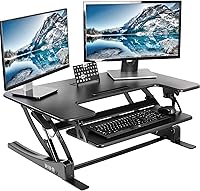
The FLEXISPOT 32-inch converter combines electric height adjustment with a U-shaped work surface and a wide keyboard tray. FLEXISPOT gives the desktop size as 32 x 16.3 in and the tray width as 34.6 in, so measure the space taken by your monitors and stands before deciding whether it’s enough.
Its motor adjusts the converter from 5.7 to 19.7 in with one-touch controls. The stated 55 lb total capacity includes 44 lb for the desktop and 11 lb for the keyboard tray, so count the weight on each level rather than treating the whole figure as desktop capacity.
The unit arrives nearly assembled, with the keyboard tray to attach. That can make setup simpler, but you’ll still need to route cables and position the monitors safely.
Choose it for a modest dual-screen setup that fits within its top surface and capacity. If your monitors take up more room, consider the wider SANODESK or VERSADESK.
VERSADESK PowerPro 36 Inch Electric Standing Desk: Best for a heavier monitor load
- 36 in split-level surface
- 80 lb stated capacity
- Built-in USB charging port
- Three cable grommets
The 36-inch PowerPro has the highest stated capacity in this group. Its split-level layout separates screens from the keyboard, and the three grommets help route cables.
Pros
- 80 lb stated capacity
- Three cable grommets
- Safety lock and USB charging
Cons
- Monitor arms are sold separately
The VERSADESK PowerPro 36 Inch Electric Standing Desk is the strongest match here when equipment weight is a priority. It has a stated capacity of 80 lb and a two-tier layout, with the screens on the upper surface and the keyboard below.
Three grommet holes give you cable-routing options and can support an optional monitor arm setup. The USB charging port adds a place to power a device, while the child safety lock helps prevent accidental height changes.
The converter is described as fully assembled, and its motorized lift uses push-button controls. Monitor arms are sold separately, and monitors aren’t included, so account for those items when planning the full workstation.
Choose this model if its 36-inch width fits your desk and your combined load is within its stated limit. For an attached monitor mount, see how to choose a standing desk converter with a monitor mount.
SANODESK 42" Electric Standing Desk Converter: Best for a wider work surface
- 41.7 in wide desktop
- Dual-tier layout
- Electric lift from about 4.9 to 19.7 in
- Keyboard tray included
This wide electric riser gives two monitors more room across the top tier, with a separate keyboard tray below. Measure your desk and check the combined equipment weight before buying.
Pros
- Wide upper surface
- Keyboard tray included
- Only the tray needs to be attached
Cons
- Confirm the safe capacity for your full setup
The SANODESK 42-inch converter gives a dual-monitor setup more width across its upper tier. Its desktop measures 41.7 x 16.3 in, with a separate keyboard tray for your keyboard and mouse.
The powered lift adjusts from about 4.9 to 19.7 in, according to the product details. The manufacturer describes a 44 lb lift in its feature text, while the specifications give a 40 lb maximum weight recommendation.
Since those figures differ, confirm the current safe capacity for your setup before putting both monitors on it.
Only the keyboard tray needs to be attached before use. Measure your desk depth as well as width, since the converter is 16.3 in deep and the monitor bases need room to sit securely.
Choose it if you want a wide, dual-tier electric surface and can confirm the capacity works for your monitors. If you’re considering a third display, use our standing desk converter guide for three monitors.
Rocelco 46" Height Adjustable Corner Standing Desk: Best for a corner desk
- 45.5 x 23.25 in desktop
- 40 in keyboard tray
- Gas spring assist
- Supports up to 40 lb
Its broad, deep surface is designed for corner desks and can hold up to two 32-inch monitors. The gas spring assist is manual, so it does not meet a strict requirement for powered lifting.
Pros
- Large corner-friendly surface
- Wide keyboard tray
- Grommet can route cables or fit a monitor mount
Cons
- Gas spring lift is not electric
The Rocelco 46-inch Height Adjustable Corner Standing Desk is the largest surface in this roundup, but its lift is gas-spring assisted rather than electric. It belongs here as a wide corner-desk alternative if you’re willing to give up powered adjustment.
The desktop measures 45.5 x 23.25 in and is designed for corner desks. Rocelco says it can hold up to two 32-inch monitors, with a 40-inch keyboard tray below and support for up to 40 lb.
A side handle helps raise or lower the converter from 5 to 18 in above the existing desk. Its grommet can route cables or fit an optional monitor mount, and the keyboard tray attaches with minimal assembly.
Pick it when a broad corner work area matters more than electric lifting. If powered height changes are essential, choose one of the other six products.
AVLT Electric Standing Desk Converter for Dual: Best for saved height presets
- Electric lift from 3.9 to 23.6 in
- Three height presets
- Timer reminder
- Cable management
AVLT includes three saved height presets and a timer reminder for standing breaks. Its dual-monitor design is intended for VESA-compatible screens up to 32 inches.
Pros
- Three height presets
- Wide lift range
- Cable management included
Cons
- Check desktop depth and monitor placement against your desk
The AVLT Electric Standing Desk Converter for Dual puts saved height settings and a standing reminder at the center of its design. It offers three height presets and an integrated timer, so you can return to preferred positions without adjusting from scratch each time.
Its electric lift moves from 3.9 to 23.6 in, the widest stated range among the electric models here. The desktop measures 28.3 x 15.7 in, with a 28.3 x 8.7 in keyboard tray, so check that the monitor bases fit within the available width.
AVLT describes the converter as ready for two VESA-compatible monitors up to 32 inches. The stated capacity is 55 lb, and cable management is included to help keep cords organized.
Choose it if saved heights and a timer are useful for your routine. Check your screens’ VESA pattern and weight, along with the converter’s dimensions, before you buy.
Rocelco 37.4" Electric Standing Desk Converter: Best for built-in charging
- 37.4 x 15.75 in work surface
- Four AC outlets and two USB ports
- Electric lift from 4.7 to 19.7 in
- 33 lb stated capacity
This electric riser adds four AC outlets and two USB ports to the desktop. Its 33 lb stated capacity makes it important to weigh both monitors and other items.
Pros
- Multiple built-in power ports
- Full-size keyboard tray
- Electric height adjustment
Cons
- Lower stated capacity than several picks here
The Rocelco 37.4-inch Electric Standing Desk Converter is a practical choice if you want charging ports close to the work surface. It has four AC outlets and two USB 2.0 ports mounted on the desktop.
The electric lift adjusts from 4.7 to 19.7 in and supports up to 33 lb. That lower stated capacity means you should add the weight of both monitors, their stands and any other items on the top before choosing this model.
Its 37.4 x 15.75 in surface sits above a fixed 31.8 x 11.8 in keyboard tray. The tray can also hold a laptop, and the converter has a grommet for cable routing or an optional monitor mount.
Choose it if built-in power is useful and your equipment stays within the capacity limit. If you need more space, compare it with the VERSADESK or SANODESK.
Ergotron: Best for adjustable monitor placement
- Clamp-mounted dual-monitor system
- Fits two screens up to 24 in and 6–12 lb each
- 18 in worksurface lift
- Independent screen height adjustment
The WorkFit-S clamps to the desk and supports two compatible screens, with independent screen-height adjustment. Check screen size, weight, VESA pattern and desk thickness before choosing it.
Pros
- Independent monitor adjustment
- Clamp mount saves desktop space
- Keyboard tray moves with the worksurface
Cons
- Screen size and weight limits rule out some monitors
The Ergotron WorkFit-S Dual Monitor Standing Desk Converter uses a desk clamp and adjustable monitor supports instead of a wide platform for both screens. It fits two monitors up to 24 in diagonal and 6–12 lb each, with VESA patterns of 75 x 75 mm or 100 x 100 mm.
The worksurface lifts 18 in, while the screens have 5 in of independent height adjustment. This lets you fine-tune screen placement separately from the keyboard tray, which moves with the worksurface and sits 6 in below it.
Check your desk before choosing this setup. Its clamp fits desktops 0.47 to 2.4 in thick, and the screen size, weight and VESA limits may exclude larger or heavier displays.
Choose Ergotron if your monitors meet those limits and you want flexible screen placement. For a converter with a conventional tray, compare the best standing desk converter with keyboard tray.
What should you check before buying an electric dual-monitor converter?
Measure the monitors, stands and desk space, then compare the full setup with the converter’s surface and weight limits. Check that the converter can reach a comfortable typing height while keeping both screens at a useful viewing position.
A monitor arm can free space on the work surface, but confirm the converter has a suitable mounting point and that the arm is supported. Some models list grommets for optional monitor arms; those arms may be sold separately.
Also consider the keyboard tray. A tray that fits your keyboard and mouse can keep typing separate from the monitor stands, while a wider tray may help when you use extra input devices.
Laptop users can compare our best standing desk converter for laptop picks.
How do you set up two monitors on a standing desk converter?
Place the converter on a stable desk, keep the monitors within its capacity and arrange screens so you can view them without turning your neck repeatedly. Adjust the keyboard and monitor positions for both sitting and standing.
Before raising the converter, check that cables have enough slack and won’t catch on the desk or nearby equipment. Keep frequently used items within easy reach, and follow the converter’s setup instructions for the lift and any monitor mount.
Which electric standing desk converter should you choose?
Choose the FLEXISPOT for a compact powered setup with a broad keyboard tray, the VERSADESK for its 80 lb stated capacity, or the SANODESK when you need more desktop width. Pick AVLT for saved heights, Rocelco’s 37.4-inch model for built-in charging, or Ergotron if your smaller monitors fit its clamp-mounted system.
Compare your monitor dimensions and total equipment weight first. The best electric standing desk converter for dual monitors is the one that fits your desk and screens within its stated limits.
Our top 3 picks at a glance
-
1
Best for a compact dual-screen setup
FLEXISPOT 32" Motorized Standing Desk Converter
9.7/10 our score
See it on Amazon -
2
Best for a heavier monitor load
VERSADESK PowerPro 36 Inch Electric Standing Desk
9.6/10 our score
See it on Amazon -
3
Best for a wider work surface
SANODESK 42" Electric Standing Desk Converter
9.5/10 our score
See it on Amazon