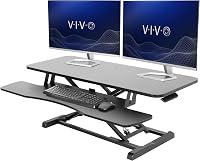
How to Choose a Standing Desk Converter for Three Monitors
Choose a standing desk converter for 3 monitors by checking the full screen footprint, total lifted weight and mount clearance. Confirm that the upper surface or monitor arms can hold your arrangement, then measure the converter on your desk.
On this page (8 sections)
- What should you check first for a standing desk converter with 3 monitors?
- Will three monitors fit side by side?
- How much lifting capacity does a three-monitor setup need?
- Can a converter hold three monitors with a monitor arm?
- Is an electric standing desk converter for 3 monitors the right choice?
- What if the converter surface is too small?
- How should you measure your desk before buying?
- Which standing desk converter for 3 monitors should you choose?
Choose a standing desk converter for 3 monitors by confirming that its work surface, lift capacity and mounting setup fit all three screens. For the broader choice between seated and standing work, see standing desk vs sitting desk.
Many converters are described for two monitors, so three screens require careful measurements and may need separate monitor arms or a different layout.
Start with the size and weight of each display, including its stand if you plan to keep it. Then check how the screens will sit together, whether the converter can lift their combined weight, and whether a clamp or base will fit without blocking movement.
If you are still deciding between a full desk and a riser, compare a standing desk vs converter. A converter can sit on your existing desk, but it also uses some of that desk's depth and needs room to raise.
What should you check first for a standing desk converter with 3 monitors?
Check screen arrangement, total weight and desk footprint before choosing a converter. These determine whether the screens fit at sitting and standing heights and whether the lift can raise the setup safely.
Measure each monitor's width and depth, and note its weight with or without the stand. Include the keyboard, mouse and any laptop or accessories that will move with the converter.
Three monitors can fit in a row, with the center screen straight ahead and the other two angled inward. A stacked arrangement can use less width, but it needs enough height and must not block your view.
| Check | What to measure | Why it matters |
|---|---|---|
| Screen footprint | Combined width and depth of the monitors and stands | Confirms they fit the upper surface or arm layout |
| Lift weight | Screens, stands or arms, keyboard and other moving items | Keeps the total within the converter's stated capacity |
| Desk space | Converter footprint plus room behind and beside it | Prevents collisions with walls, shelves and desk items |
| Sitting and standing reach | Screen height and keyboard position at both ends | Helps keep the setup comfortable through the adjustment range |
| Mount clearance | Clamp space, edge thickness and support underneath | Confirms an arm can attach where you intend |
A converter's upper surface can hold monitors directly, but its dimensions alone do not guarantee a three-screen fit. Monitor bases vary, and the outer displays may extend beyond the platform even when their feet appear to fit.
Will three monitors fit side by side?
Three monitors fit side by side only when their combined width, stands and viewing angles fit the usable surface. Measure the actual setup, because screen diagonal measurements do not tell you how wide the monitors are.
For three screens of similar size, place the center monitor directly in front of you. Angle the outer screens inward so you can see them without turning your head as far.
Measure from the outer edge of the left stand to the outer edge of the right stand. Include any overhang from the screens and leave room for cables to bend without pressing against a wall.
A wide upper tier may suit a row of screens, while a narrower converter may require arms to position the displays beyond its edge. Check whether those arms can clamp to the converter or need to attach to the desk itself.
The Vari Pro Plus 36 has a 36 x 12.25 in upper tier and is described for two monitors. For setup steps, see our VariDesk use guide.
That width may help with a compact three-screen layout, but confirm your screens' actual footprint before relying on it.
A stacked layout can reduce width, but check the top screen's height at both sitting and standing positions. If the top edge sits too high, you may need smaller displays or adjustable arms.
How much lifting capacity does a three-monitor setup need?
The converter must support the combined weight of everything that rises with it. Add the three monitors, their stands or arms, keyboard tray load and any other equipment on the moving platform.
Do not compare only the weight of the screens with the converter's capacity if the keyboard tray also rises. Include a mounted laptop or accessories as well, and leave a margin rather than planning to use the full stated limit.
The VIVO manual converter supports a 33 lb desktop load and has a keyboard tray that rises with the top. Its surface measures 31.5 x 15.7 in, and the maker describes room for dual monitors, so verify both the load and available space for three.
A monitor arm changes how screens sit, but it does not remove their weight from the lift calculation if the arm attaches to the moving converter. If the arm clamps to the fixed desk instead, make sure the screens can still move through the full height range without pulling cables or hitting the raised platform.
Can a converter hold three monitors with a monitor arm?
A converter can work with a monitor arm if the mount attaches securely and has enough clearance. Confirm whether the arm's clamp fits the converter or the desk, and whether the screens stay aligned as the surface moves.
Check the arm's supported screen count, screen size and weight range. Also confirm the converter surface or desk edge can accept the clamp without covering a control, colliding with a wall or making the unit unstable.
A center pole or clamp can take space away from the usable desktop. Plan where the keyboard tray, screens and cables will sit before you assemble the setup.
For a setup that uses an integrated arm, read our guide to a standing desk converter with monitor mount. It explains the mount questions to settle before you choose a model.
If your screens can stay fixed while the desk surface moves, a wall mount is another option. Follow our advice on how to use a monitor wall mount and check that the monitor positions still work at both desk heights.
Is an electric standing desk converter for 3 monitors the right choice?
An electric standing desk converter for 3 monitors may make frequent height changes easier, but the motor does not guarantee enough space or lifting capacity. Compare the stated load limit and adjustment range with your complete workstation.
Electric models vary in desktop size, support and controls. Check whether the published capacity includes the keyboard tray or other moving parts, and whether the maker gives a separate limit for monitors on an arm.
A manual model can also work if its lifting mechanism is rated for the total load and you can raise it smoothly. The VIVO is manual, with a stated 33 lb desktop capacity and a simple touch height-locking mechanism.
If you want to see how monitor count changes converter choices, start with our best electric standing desk converter dual monitor guide. A dual-monitor recommendation may not carry over to three screens, so compare its dimensions and limits with your own equipment.
What if the converter surface is too small?
If the upper surface is too small, use compatible monitor arms, reduce the screen size or choose a wider workstation. For full-desk options, compare FlexiSpot standing desks.
Do not let screens overhang in a way that makes the converter unstable or blocks the controls.
A separate monitor riser can raise a screen on a fixed desk, but it does not move with a standing converter. It is better suited to a fixed monitor arrangement than a setup where all three screens need to rise together.
For a fixed desk arrangement, the BONTEC 1home Monitor Stand Riser has a 16.7 in wide shelf and cable slots. Its compact width means it is not a stand for three monitors by itself, but it may help organize one display outside the converter setup.
If your plan involves wall-mounted screens, compare the wall position and screen reach with the full standing range. Our triple monitor arm wall mounted guide covers the layout questions for three displays on a wall.
How should you measure your desk before buying?
Measure the desk surface, wall clearance and movement path before picking a converter. The converter needs room to sit flat and rise without hitting a shelf, monitor arm or other equipment.
- Measure the desk's width and depth, including any rear lip or cable tray.
- Mark the converter footprint on the desk with tape.
- Place the three monitors or paper outlines where their bases or arms will sit.
- Check space for the keyboard tray, mouse and other work items.
- Measure the highest point of the screens at standing height.
- Check cables for enough slack throughout the full adjustment range.
Also consider how you plan to position the keyboard and mouse. A converter with a separate keyboard tier can keep those items lower than the screens, while a single surface may put them at a different height.
If you are building a workspace from scratch, our how to choose a standing desk guide covers the broader fit questions. For a converter setup, also read how to convert a desk to a standing desk.
Which standing desk converter for 3 monitors should you choose?
Choose a standing desk converter for three monitors only after your screen layout fits and the total moving weight stays within capacity. A wide surface can suit monitors on their stands, while an arm can help position screens when the platform is too narrow.
The Vari Pro Plus 36 offers a 36 in upper tier and a separate keyboard deck, while the VIVO gives a stated 33 lb desktop capacity and a 31.5 x 15.7 in surface. Both are described for dual-monitor use, so measure carefully before assigning either to three displays.
Pick a wall or desk mounted arm if the screens need more placement flexibility, and confirm that the mount supports your displays. For further help choosing the support structure, see how to choose a standing desk frame.