9 Best Height-Adjustable Keyboard Trays (November 2026)
The best height adjustable keyboard trays for standing desks include the EUREKA ERGONOMIC Keyboard Tray Height Adjustable for full-motion height adjustment, the EUREKA ERGONOMIC Height Adjustable Mouse & Keyboard for larger keyboards and mice, and the VIVO Black Clamp-on 23” to 30” x for adjustable-width clamp-on use.
On this page (9 sections)
- Our top height-adjustable keyboard tray picks
- Height adjustable keyboard tray comparison
- How we compared these height adjustable keyboard trays
- How much height adjustment do you really need?
- Clamp-on or screw-mounted: which fits your desk?
- What size tray fits your keyboard and mouse?
- Tilt, swivel and wrist rests: useful or extra?
- Set up and care in general terms
- Verdict: which height adjustable keyboard tray should you buy?
The best height adjustable keyboard tray for most standing desks is the EUREKA ERGONOMIC Keyboard Tray Height Adjustable, because its 5.8 inch height range, 360 degree swivel and 43 degree tilt give you real control over typing position. You do not need to match your keyboard to the desktop height when the tray moves on its own.
That matters more on a standing desk than on a fixed desk. You change desktop height through the day, but your elbows, wrists and shoulders still need a steady typing angle.
An adjustable tray under desk lets you keep that angle while the main desktop moves up or down.
Our score weighs specs, features and buyer feedback against what you are shopping for. We compared height range, tilt, swivel, platform size, weight capacity, clamp limits and mounting type across all nine picks.
Our picks at a glance
-
1
 Best for full-motion height adjustment
EUREKA ERGONOMIC Keyboard Tray Height Adjustable
9.7/10 our score
See it on Amazon -
2
 Best for larger keyboards and mice
EUREKA ERGONOMIC Height Adjustable Mouse & Keyboard
9.6/10 our score
See it on Amazon -
3
 Best for adjustable-width clamp-on use
VIVO Black Clamp-on 23” to 30” x
9.5/10 our score
See it on Amazon
- 4
 Check it
AX WABER Keyboard Tray Under Desk Pull Out
Best for compact clamp-on desks - 5
 Check it
HUANUO Under Desk Keyboard Tray
Best for sit-to-stand height change - 6
 Best for fixed-width clamp-on traysCheck it
- 7
 Check it
XINLEI Keyboard Tray Under Desk Large C-Clamp
Best for two mounting methods - 8
 Check it
Klearlook Upgraded Adjustable Keyboard Tray for Above
Best for above-desk or under-desk use - 9
 Check it
Zontera Ergonomic Keyboard Tray Under Desk
Best for thicker desktop clamps
Our top height-adjustable keyboard tray picks
The EUREKA trays lead on motion and adjustment. The VIVO and AX WABER trays lead if you want no drilling.
The HUANUO leads for a large sit-to-stand height change.
If you want the wider buying picture first, our ergonomic keyboard mouse guide explains how keyboard shape, mouse position and tray height work together.
EUREKA ERGONOMIC Keyboard Tray Height Adjustable: Best for full-motion height adjustment
- 5.8 in height adjustment
- 360 degree horizontal rotation
- 43 degree vertical tilt
- 25 x 9.13 in platform
- 6.6 lb capacity
A full-motion tray that lets you set keyboard height apart from desktop height, with swivel, tilt and slide in and out.
Pros
- Wide height range
- Swivel and tilt
- Wrist rest and mouse pad
Cons
- Needs thick compatible desktop
- Mounting bracket needs desk depth
This tray suits people who type for long stretches and want the keyboard lower than a standing desktop. The 5.8 inch height range is one of the widest here, so you can drop the tray well below desktop level without forcing your wrists up.
You can also swivel 360 degrees horizontally and tilt 43 degrees vertically. That helps you angle the keyboard toward a side monitor or use a slight negative tilt for a straighter wrist position.
The tray slides forward and back, so reach stays short.
The platform measures 25 by 9.13 inches. That fits most keyboards and mice, and EUREKA says it can also hold a small laptop, iPad or other electronics.
The soft wrist rest helps stop the keyboard slipping when tilted.
Weight capacity is 6.6 lb, which suits a standard keyboard and mouse setup rather than heavy gear. The trade-off is mounting: it uses a bracket and self-tapping screws, and your desktop must be at least 0.71 inch thick.
It also needs desk space of at least 19.69 by 39.5 by 29.1 inches, with a 17.8 inch deep mounting bracket. Measure depth and legroom before you order, especially on standing desks with motors.
EUREKA ERGONOMIC Height Adjustable Mouse & Keyboard: Best for larger keyboards and mice
- 28.3 x 10.2 in platform
- 360 degree swivel
- 43 degree tilt
- Gravity self-locking slide
- 6.6 lb capacity
The larger EUREKA tray fits full-size keyboards plus a mouse, with a wrist-rest lip for tilted typing.
Pros
- Largest EUREKA platform
- Self-locking slide
- Fits desks with beams
Cons
- Needs desktop at least 0.71 in thick
- Needs 17.8 in bracket depth
This is the pick if the 25 inch EUREKA feels tight for your keyboard and mouse. The platform measures 28.3 by 10.2 inches, so a full-size keyboard, a mouse and a mouse pad can share the same surface without crowding.
It keeps the same full-motion idea: 360 degree horizontal swivel, 43 degree vertical tilt, and slide in and out. The gravity self-locking setting stops accidental push and pull, and you lift it gently to move it.
That lock makes typing feel steadier once you set the position.
A wrist-rest lip runs along the tray to stop the keyboard sliding down when tilted. EUREKA says the wrist rest and mouse pad are removable, which helps if you prefer your own pad.
Capacity is 6.6 lb, the same as the smaller EUREKA. The surface has a carbon fiber texture from carbon steel and particle board with a carbon fiber finish.
Mounting still needs a compatible desktop at least 0.71 inch thick, made of wood, MDF or a similar material. Plastic, stone and glass are not compatible.
The bracket is 17.8 inches deep, and EUREKA asks for a desk at least 20 by 39.5 by 29.1 inches.
The trade-off is size. Check that the tray will not hit desk motors, and that you have enough legroom when it slides out.
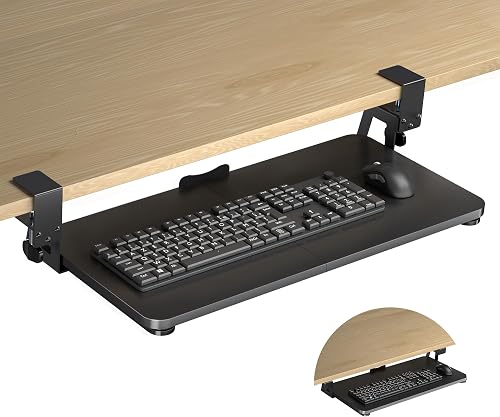
VIVO Black Clamp-on 23” to 30” x: Best for adjustable-width clamp-on use
- 22.5 to 30 in adjustable width
- 2.4 in height adjustment with 5 set points
- 11 lb capacity
- C-clamps up to 3.4 in
- Extends 8.5 in
A split clamp-on tray that widens screen to screen, with wrist pad, mouse pad and mouse wrist rest included.
Pros
- Adjustable width
- No drilling
- Higher capacity than EUREKA trays
Cons
- Not for beveled edges
- Height range is smaller
This VIVO suits renters or anyone who cannot drill into a desktop. It clamps on with C-clamps up to 3.4 inches thick, which covers many standing desks that the other clamp-on trays cannot fit.
Width adjusts from 22.5 to 30 inches, and depth changes from 8.8 to 10 inches from the desk depending on the setup. That split design lets you narrow the tray for a compact keyboard or widen it for a full-size board plus mouse.
Height adjustment is 2.4 inches total across 5 set points. That is less range than the EUREKA trays, but the set points make repeatable positions easier.
You can slide the tray in and out for ergonomic typing angles.
The tray holds up to 11 lb and extends a maximum of 8.5 inches from the desk edge. It includes a keyboard wrist pad, mouse pad and mouse wrist rest, with separate spaces for keyboard and mouse.
The trade-off is edge fit. VIVO says it is not compatible with desktops that have beveled edges.
The total length including clamps is 28.5 to 36 inches, so measure clamp-to-clamp space first.
Choose this over the fixed-width VIVO below if your keyboard size may change or you want width flexibility.
AX WABER Keyboard Tray Under Desk Pull Out: Best for compact clamp-on desks
- 27.3 x 11 in platform
- 32.5 in including clamps
- 11 lb capacity
- C-clamps up to 1.9 in
- Extends 5.7 in
A no-drill pull-out tray for desks where clamp space is tight, with a shorter extension than the VIVO clamps.
Pros
- No drilling
- 11 lb capacity
- Compact extension
Cons
- 1.9 in clamp limit
- Not for beveled edges
AX WABER suits smaller desks where a long tray would eat into work space. The platform is 27.3 inches wide including 32.5 inches with clamps, and it extends a maximum of 5.7 inches from the desk edge.
That shorter extension is a real trade-off against the VIVO trays. You get less reach for the mouse, but also less chance of the tray hitting your legs or chair arms.
For tight setups, that can be the safer choice.
It clamps on without drilling, but the limit is 1.9 inches maximum desktop thickness. Before you buy, make sure your desk surface does not exceed that thickness.
It is also not compatible with beveled edges.
The tray holds up to 11 lb, so a standard keyboard and mouse are well within range. AX WABER says it holds your keyboard, mouse and other small accessories below the desktop.
Height change here comes mainly from sliding in and out, not from a tall height range like the EUREKA or HUANUO. If you mainly need a pull-out drawer that saves desktop space, this works well.
Measure first: total clamp-to-clamp length is 32.5 inches, and you need that space on your desk. Also check for crossbars, reinforcing tubes or other obstructions at the clamp points.
HUANUO Under Desk Keyboard Tray: Best for sit-to-stand height change
- 25 x 9.84 in platform
- 6.3 in height adjustment
- 180 degree swivel
- 6 degree up and 22 degree down tilt
- Fits keyboards up to 17.3 x 5.5 in
A tall height range and wide swivel help corner and multi-monitor setups change position without moving your chair.
Pros
- 6.3 in height range
- 180 degree swivel
- Fits full-size keyboards
Cons
- Needs clearance from crossbars
- Lowest connector height is 7.48 in
HUANUO suits people who switch between sitting and standing and need a large height change. It gives 6.3 inches of height adjustment, the largest range in this group, so the tray can move from a low sitting position to a higher standing position.
The lowest connector height is 7.48 inches, so check thigh clearance under your desk at seated height. A tray that adjusts far may sit low enough to bump your legs if your chair or desk frame is tight.
It swivels 180 degrees left and right, which helps corner desks and multi-monitor setups. You can turn the keyboard toward another screen without moving your chair.
Tilt goes 6 degrees up and 22 degrees down for a wrist-neutral angle.
The platform measures 25 by 9.84 inches and fits keyboards up to 17.3 by 5.5 inches plus mouse space. An included wrist rest adds comfort.
It tucks under the desk when you do not need it.
The catch is clearance. HUANUO asks you to confirm no crossbar under the desk, or allow 14.17 inches from desk edge to crossbar, and 16.22 inches for a full slide-under.
Desk thickness must be over 0.6 inch.
Tighten the knob before typing, and check side clearance of at least 25 inches, or 35.4 inches if you rotate the tray.
VIVO Black Clamp-on 27 x: Best for fixed-width clamp-on trays
- 26.8 x 11 in platform
- 33 in including clamps
- 2.4 in height adjustment
- 11 lb capacity
- Extends 8.5 in
A fixed-width VIVO clamp-on tray for people who know their keyboard and mouse fit and do not need width changes.
Pros
- No drilling
- 11 lb capacity
- Simple fixed width
Cons
- Not for beveled edges
- Small height range
This fixed-width VIVO suits buyers who know their setup and want a simple clamp-on tray. The platform measures 26.8 by 11 inches, or 33 inches including clamps, which fits most keyboards and mice on one surface.
Like the adjustable-width VIVO, it clamps on without damage and fits desktops up to 3.4 inches thick. That thick-desktop fit is a plus for many standing desks with chunky tops.
Height adjustment is 2.4 inches total with 5 set points, and the tray extends a maximum of 8.5 inches from the desk edge. It holds up to 11 lb, well above a typical keyboard and mouse load.
The trade-off is width. You cannot narrow or widen it like the MOUNT-KBST1 above.
Measure your keyboard and mouse together and make sure 33 inches of clamp-to-clamp space exists on your desk.
It is not compatible with beveled edges, and VIVO notes the desktop needs a level underside for clamps to secure properly. Crossbars or other supports in the clamp area can also block fit.
Choose this if you want the VIVO clamp system at a fixed size. Choose the adjustable-width model if your keyboard may change.
XINLEI Keyboard Tray Under Desk Large C-Clamp: Best for two mounting methods
- 25.6 x 11.8 in platform
- 30 in including clamps
- C-clamps up to 1.63 in
- Screw option with 2.4 in clearance
- Slides in 12.24 in and out 7.75 in
A deep clamp-on platform with a screw option for thick desks, plus a back baffle to stop the keyboard sliding off.
Pros
- Two installation methods
- Deep platform
- Back baffle
Cons
- Low clamp thickness limit
- Thicker desks mean less clearance
XINLEI suits people who want mounting choices. It offers two installation methods: C-clamps for no-drill mounting, or a screw option for more desktop options, especially thick desktops.
The platform measures 25.6 by 11.8 inches, with a total length of 30 inches including clamps. That extra depth gives more room for a keyboard, mouse and small accessories than narrower trays.
It slides in a maximum of 12.24 inches and out a maximum of 7.75 inches on metal rails. A back baffle helps stop the keyboard falling off, and a safety ledge stopper can stop it slipping backward.
Clamp fit is the limit: C-clamps fit up to 1.63 inches maximum desktop thickness. With thicker desktops, keyboard clearance drops, and total height is 4.45 inches.
The screw option gives 2.4 inches of height clearance and a neater surface.
Upper EVA pads help protect the desktop from clamp damage. The trade-off is that screw mounting is permanent, so only choose it if you are sure about placement.
Measure clamp space, desktop thickness and leg clearance before you decide between clamps and screws.
Klearlook Upgraded Adjustable Keyboard Tray for Above: Best for above-desk or under-desk use
- Above-desk and under-desk use
- 360 degree horizontal rotation
- 237 degree vertical arm adjustment
- 180 degree tilt
- Drawer, phone slot and headphone hanger
A flexible riser-style tray that can sit above or under the desk, with storage for small items and a phone.
Pros
- Dual installation
- Wide arm adjustment
- Built-in storage
Cons
- Desk space taken when used above
- No stated weight capacity
Klearlook suits people who want more than a drawer. It can be used above the desk or under the desk, which makes it different from every other pick here.
Use it above for a raised typing platform, or slide it under for storage.
The arm gives 360 degree horizontal rotation and 237 degree vertical adjustment, with 180 degree tilt. That range lets you set typing angles that a fixed tray cannot reach.
It also includes a wrist rest to reduce pressure on the wrists.
The tray includes a mouse pad, a drawer for small items, a phone slot and a built-in headphone hanger. That makes it a workspace organizer as much as a keyboard platform.
The trade-off is desktop space. When used above the desk, it raises your keyboard and mouse and takes surface area that could hold monitors, notebooks or other gear.
When not in use, it slides under the desk for a cleaner look.
Klearlook says the construction is durable and designed to minimize wobbling. No weight capacity is stated, so keep the load to a keyboard, mouse and light accessories.
Choose this for flexibility and storage. Choose a clamp-on or screw-mounted tray if you want a lower profile and a fixed, dedicated typing surface.
Zontera Ergonomic Keyboard Tray Under Desk: Best for thicker desktop clamps
- 25.6 x 11.8 in platform
- 31.5 in including clamps
- C-clamps up to 2.76 in
- Extends 7.8 in
- Back baffle
A large no-drill tray that clamps thicker desktops than most rivals here, with non-slip pads to protect the surface.
Pros
- 2.76 in clamp limit
- Large platform
- No drilling
Cons
- Needs 31.5 in clamp space
- No stated weight capacity
Zontera suits thicker desktops where other clamp-on trays fall short. Its adjustable C-clamps fit desktops up to 2.76 inches thick, which is wider compatibility than the AX WABER and XINLEI clamps here.
The platform measures 25.6 by 11.8 inches, or 31.5 inches including clamps. That gives room for a keyboard, mouse and small accessories while keeping the main desktop clear.
The tray extends up to 7.8 inches from the desk edge, with a smooth slide mechanism and a built-in back baffle to stop the keyboard sliding. You can store the keyboard and mouse under the desk when you are done.
Non-slip pads on the clamps help stability and protect the desk surface from scratches. Zontera says installation can be done within five minutes with included hardware and instructions, and no drilling is needed.
The trade-off is space and detail. You need the full 31.5 inches from clamp to clamp, so measure before you order.
No weight capacity is stated, so treat it as a keyboard-and-mouse tray rather than a shelf for heavy gear.
Choose this for thick-desktop clamp fit. Choose the VIVO models if you need a stated 11 lb capacity or a wider clamp limit.
Height adjustable keyboard tray comparison
The table below compares the specs that change daily use most: platform size, height range, capacity and mounting. It is the fastest way to narrow this height adjustable keyboard tray list to two or three finalists.
| Product | Best for | Platform Size | Height Adjustment | Capacity | Our score |
|---|---|---|---|---|---|
| EUREKA ERGONOMIC Keyboard Tray Height Adjustable | full-motion height adjustment | 25 x 9.13 in | 5.8 in | 6.6 lb | 9.7 |
| EUREKA ERGONOMIC Height Adjustable Mouse & Keyboard | larger keyboards and mice | 28.3 x 10.2 in | Height adjustable | 6.6 lb | 9.6 |
| VIVO Black Clamp-on 23” to 30” x | adjustable-width clamp-on use | 22.5 x 30 x 11 in | 2.4 in, 5 set points | 11 lb | 9.5 |
| AX WABER Keyboard Tray Under Desk Pull Out | compact clamp-on desks | 27.3 x 11 in | Slide in and out | 11 lb | 9.2 |
| HUANUO Under Desk Keyboard Tray | sit-to-stand height change | 25 x 9.84 in | 6.3 in | Not stated | 9.0 |
| VIVO Black Clamp-on 27 x | fixed-width clamp-on trays | 26.8 x 11 in | 2.4 in, 5 set points | 11 lb | 8.8 |
| XINLEI Keyboard Tray Under Desk Large C-Clamp | two mounting methods | 25.6 x 11.8 in | Slide in and out | Not stated | 8.5 |
| Klearlook Upgraded Adjustable Keyboard Tray for Above | above-desk or under-desk use | 22.83 x 14.57 x 18.5 in | Arm and tilt adjustment | Not stated | 8.3 |
| Zontera Ergonomic Keyboard Tray Under Desk | thicker desktop clamps | 25.6 x 11.8 in | Slide in and out | Not stated | 8.0 |
How we compared these height adjustable keyboard trays
We looked at each tray's height range first, because that decides whether it works for both sitting and standing. A 2.4 inch range suits small tweaks.
A 5.8 or 6.3 inch range suits real sit-to-stand use.
We then checked tilt and swivel. Tilt changes wrist angle.
Swivel changes which screen you face. Both matter on multi-monitor desks, and both matter less on a single-monitor desk.
Platform size came next. Measure your keyboard length and add mouse space before you compare inches.
A tray that fits your board today may not fit a split keyboard tomorrow.
Mounting type decided several picks. Screw-mounted trays sit flatter and offer taller height ranges.
Clamp-on trays avoid drilling but need edge space, square edges and enough clamp-to-clamp length.
Our best under desk keyboard tray guide covers drawer-style trays in more depth. Our best clamp on keyboard tray guide covers no-drill options for renters.
How much height adjustment do you really need?
Answer first: most people need 2 to 3 inches for fine tuning, and 5 inches or more for true sit-to-stand use. Measure your elbow height sitting and standing before you choose.
Small range: 2 to 3 inches
The VIVO trays give 2.4 inches across 5 set points. That suits a desk you rarely move, or a tray you mainly slide in and out.
Set points also help you return to the same position each day.
Large range: 5 inches or more
The EUREKA tray gives 5.8 inches, and the HUANUO gives 6.3 inches. Those ranges let the keyboard stay at elbow height when the desktop moves.
Check leg clearance at the lowest setting.
Height change versus slide-out
Some trays adjust height directly. Others mainly slide toward you.
Sliding changes reach, not height, so do not treat extension distance as height adjustment.
Clamp-on or screw-mounted: which fits your desk?
Answer first: clamp-on fits renters and thick desktops with square edges, while screw-mounted fits wood and MDF desktops where you want a flatter, wider motion range. Check thickness and edge shape before anything else.
Clamp-on trays
VIVO clamps fit up to 3.4 inches. Zontera fits up to 2.76 inches.
AX WABER fits up to 1.9 inches, and XINLEI clamps fit up to 1.63 inches. Beveled edges block several of these models.
Screw-mounted trays
The EUREKA trays need wood, MDF or similar material at least 0.71 inch thick. Plastic, stone and glass are not compatible.
Screws also mean you cannot move the tray without new holes.
Standing desk frames
Check crossbars, lifting columns and motor housings under the desktop. A tray that clears a fixed desk may hit a frame when the desk lowers.
Our best adjustable keyboard tray for standing desk guide covers frame clearance in more detail.
What size tray fits your keyboard and mouse?
Answer first: measure your keyboard and mouse side by side, then add 2 to 3 inches for movement. Most full-size setups need a 25 inch tray or wider.
A 25 by 9.13 inch tray fits many standard keyboards and mice. A 28.3 by 10.2 inch tray gives more mouse room for wide or split keyboards.
Deep trays at 11 to 11.8 inches help with large mice and wrist rests.
If you use a wide keyboard and mouse tray, our best under desk keyboard and mouse tray guide compares wider platforms. If tilt matters most, our best under desk keyboard tray with tilt guide focuses on angle control.
Tilt, swivel and wrist rests: useful or extra?
Answer first: tilt and swivel help most people, while a wrist rest helps only if you rest your wrists lightly and keep them straight. Too much pressure on a wrist rest can bend the wrist backward.
Tilt
A 43 degree tilt range on the EUREKA trays gives strong angle control. The HUANUO gives 6 degrees up and 22 degrees down.
Negative tilt, with the back higher than the front, can help keep wrists straighter for many typists.
Swivel
Swivel helps corner desks, L-shaped desks and multi-monitor setups. It matters less if you face one screen straight ahead.
Check side clearance before you rotate a wide tray.
Wrist rests and arm support
A wrist rest can stop a keyboard sliding when tilted. If you also get arm support, our best desk arm support guide compares options that attach near the tray.
Keep pressure light in either case.
Set up and care in general terms
Answer first: set tray height so elbows sit near 90 degrees, test it for a short session, then lock it before longer work. A good setup should feel quiet and stable, not wobbly.
Measure desktop thickness, clamp space, crossbar clearance and legroom before installation. Tighten clamps or knobs fully, then check that the tray does not shift when you type.
Route your keyboard cable so it does not pull the tray when it slides. Leave slack for full extension, and avoid trapping the cable under the desktop.
Wipe the platform with a damp cloth and dry it fully. Check clamp pads, screws and knobs every few months, and re-tighten them if the tray starts to move.
Verdict: which height adjustable keyboard tray should you buy?
Pick the EUREKA ERGONOMIC Keyboard Tray Height Adjustable if you want the broadest adjustment for sit-to-stand work. Its 5.8 inch range, swivel and tilt cover most setups.
Pick the larger EUREKA if your keyboard and mouse need more room. Pick the VIVO adjustable-width tray if you cannot drill and want width flexibility.
Pick the HUANUO if your sit-to-stand height change is large.
Before you order, measure desktop thickness, clamp-to-clamp space and crossbar clearance. That one check prevents most returns.
Then start with our best clamp on keyboard tray guide if no-drill mounting is your priority, or the best under desk keyboard tray with tilt guide if wrist angle matters most.
For clamp-on trays with tilt, also see our best clamp-on keyboard tray with adjustable tilt guide. It narrows the field to models that combine both features.
Our top 3 picks at a glance
-
1
Best for full-motion height adjustment
EUREKA ERGONOMIC Keyboard Tray Height Adjustable
9.7/10 our score
See it on Amazon -
2
Best for larger keyboards and mice
EUREKA ERGONOMIC Height Adjustable Mouse & Keyboard
9.6/10 our score
See it on Amazon -
3
Best for adjustable-width clamp-on use
VIVO Black Clamp-on 23” to 30” x
9.5/10 our score
See it on Amazon
Frequently asked questions
What height should a keyboard tray be for a standing desk?
Set the tray so your elbows sit near 90 degrees and your wrists stay straight. Check the height at both your sitting and standing desk positions.
Raise or lower the tray in small steps, then type for a short period before you decide.
Do clamp-on trays work on standing desks?
Yes, if the clamps fit your desktop thickness and the tray clears crossbars and motors. Measure thickness, edge space and under-desk clearance first.
A tray that fits a fixed desk may still hit a lifting frame when the desk moves.
How wide should an under-desk keyboard tray be?
Measure your keyboard and mouse together, then add room to move the mouse. A 25 inch tray fits many full-size keyboards plus a mouse.
Wider trays help split keyboards, but they also need more clamp-to-clamp space.
Can a keyboard tray help wrist comfort?
A tray can help you keep wrists more neutral by setting typing height apart from desktop height. Tilt and a wrist rest can also change wrist angle.
It does not treat pain.
Talk to a clinician if pain lasts or gets worse.


