6 Best Clamp-On Keyboard Trays (November 2026)
The best clamp on keyboard trays include the VIVO Black Clamp-on 27 x 11 in Keyboard Tray for most desks, the VIVO Black Extra Large Clamp-on 34 x 11 in Keyboard Tray for wide setups, and the AX WABER Keyboard Tray Under Desk Pull Out for thicker desks.
On this page (9 sections)
- How we compared these clamp on keyboard trays
- The best clamp on keyboard trays for different desks
- How do clamp on keyboard trays compare side by side?
- What size tray fits your keyboard?
- Will it fit your desk thickness?
- How much slide-out and storage do you need?
- Clamp on, screw on, or drawer style: which should you choose?
- How do you install and care for a clamp on keyboard tray?
- Which clamp on keyboard tray should you buy?
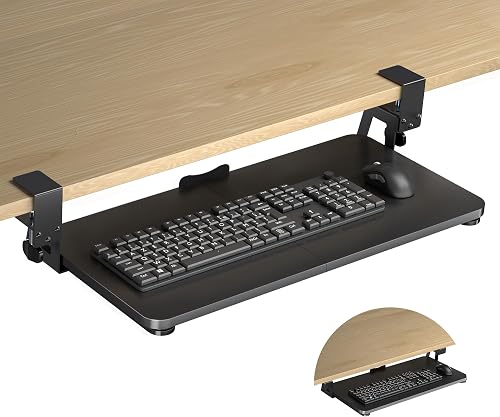
The best clamp on keyboard tray for most desks is the VIVO Black Clamp-on 27 x 11 in, because its 26.8 in tray holds a keyboard and mouse up to 11 lb and its C-clamps fit desks up to 1.25 in thick. It slides out 8.5 in for typing and back under the desk when you do not need it.
A clamp on keyboard tray creates removable keyboard space using clamps instead of screw mounts. That makes it a good fit for a standing desk, a rental, or any desktop you do not want to drill.
Our score weighs specs, features and buyer feedback against what you are shopping for. We compared tray width, total clamp length, desk thickness limits, slide-out reach and weight capacity across these six models.
If you are still choosing your keyboard and mouse, our ergonomic keyboard mouse guide explains sizes and layouts. It helps you match the tray to the gear you plan to put on it.
Our picks at a glance
-
1
 Best for most desks
VIVO Black Clamp-on 27 x 11 in Keyboard Tray, MOUNT-KB05E
9.7/10 our score
See it on Amazon -
2
 Best for wide setups
VIVO Black Extra Large Clamp-on 34 x 11 in Keyboard Tray, MOUNT-KB15EB
9.5/10 our score
See it on Amazon -
3

- 4
 Check it
suptek Small Keyboard Tray Under Desk Pull
Best for small desks - 5
 Check it
XINLEI Keyboard Tray Under Desk Large C-Clamp
Best for deep slide-out - 6
 Check it
BOUNHOHE Large Under Desk Rotatable Computer Keyboard
Best for rotating angle
How we compared these clamp on keyboard trays
We checked the specs for tray size, clamp to clamp length, maximum desk thickness, extension and load limit. We then matched each tray to a desk size and keyboard type, rather than ranking by brand alone.
VIVO leads on width and extension for standard desks. AX WABER and BOUNHOHE lead on thicker desktops. suptek leads on small footprint, and XINLEI leads on slide-in depth.
What we did not count
We did not add features that are not in the product data. If a tray does not state a desk thickness limit, a load limit or a slide-out distance, we left it out of the comparison.
Weight capacity was a useful check. Every tray in this roundup states a limit of 11 lb, except the XINLEI, which does not state a load limit in its bullet points.
That means the comparison rests more on size and fit than on strength.
Desk thickness was the other filter that changed the shortlist quickly. A tray that handles 1.25 in will not fit a 1.75 in top, no matter how good its slide is.
For that reason we grouped the picks by thickness first and width second.
The best clamp on keyboard trays for different desks
The VIVO 27 in is the safest all round pick for a standard desk. The other five win in a specific situation, such as a thick top, a small desk, a deep storage slide, or a need to rotate the tray.
VIVO Black Clamp-on 27 x 11 in Keyboard Tray, MOUNT-KB05E: Best for most desks
- 26.8 in tray, 32.5 in including clamps, by 11 in
- Holds up to 11 lb
- Extends up to 8.5 in from desk edge
- C-clamps for desks up to 1.25 in thick
A balanced removable tray that slides out for typing and under the desk for storage, with C-clamps that need no screw mounts.
Pros
- Fits standard keyboards and mice
- Slides under for storage
- No damage to desk from clamps
Cons
- Needs 32.5 in of clear desk edge
- Not for beveled edges
This tray suits most people with a standard keyboard and mouse on a desk up to 1.25 in thick. Its 26.8 by 11 in tray gives enough room for a full-size keyboard with a mouse beside it.
The total length from clamp to clamp is 32.5 in, so measure your desk edge first. You need that much clear space, with a level underside and no crossbars where the clamps sit.
It extends a maximum of 8.5 in from the desk edge. That reach gives you a lower typing position while you work, then you can slide the tray back under the desk to free the surface.
The tray slides under 12.5 in for storage, so it clears the desktop well when not in use.
VIVO says it holds up to 11 lb and relieves wrist and shoulder stress with ergonomic typing angles. Keep the load to a keyboard, mouse and small accessories.
The alloy steel build and smooth gliding tracks suit daily typing rather than occasional use.
The trade-off is the 1.25 in thickness limit and no fit for beveled edges. If your top is thicker, the AX WABER or BOUNHOHE picks below fit better.
VIVO Black Extra Large Clamp-on 34 x 11 in Keyboard Tray, MOUNT-KB15EB: Best for wide setups
- 33.9 in tray, 39.4 in including clamps, by 11 in
- Holds up to 11 lb
- Extends up to 8.5 in from desk edge
- C-clamps for desks up to 1.25 in thick
The widest tray here, made for full-size keyboards with a mouse and small accessories side by side.
Pros
- Extra wide typing surface
- Same 11 lb capacity as smaller VIVO
- Slides under for storage
Cons
- Needs 39.4 in of clear desk edge
- Not for beveled edges
This tray suits people with a wide keyboard, a large mouse, a wrist rest, or a few small accessories they want side by side. Its 33.9 by 11 in tray is the widest in this roundup.
The total length from clamp to clamp is 39.4 in. That is the key check.
Measure the front edge of your desk from one clamp point to the other before you order. A desk that fits the 32.5 in VIVO may still be too short for this one.
It extends up to 8.5 in from the edge, the same reach as the smaller VIVO. VIVO says it holds up to 11 lb, so the extra width does not mean a higher load limit.
The same sliding motion gives ergonomic typing angles for wrist and shoulder comfort.
The C-clamps fit desks up to 1.25 in thick and need a level underside with a clean square edge. Beveled edges are not compatible.
The tray also slides under 12.5 in for storage, which helps keep a wide tray out of the way.
Choose this over the 27 in VIVO only if your keyboard setup needs the extra width. For a compact or split keyboard, it gives you more tray than you need.
AX WABER Keyboard Tray Under Desk Pull Out: Best for thicker desks
- 27.3 in tray, 32.5 in including clamps, by 11 in
- Holds up to 11 lb
- Extends up to 5.7 in from desk edge
- C-clamps for desks up to 1.9 in thick
A standard-width removable tray with clamps that fit thicker desktops than the VIVO models allow.
Pros
- Fits desks up to 1.9 in thick
- No drilling required
- Slides in and out for typing angles
Cons
- Shorter 5.7 in extension
- Not for beveled edges
This tray suits people with a thicker desktop, up to 1.9 in thick. That limit is the main reason to pick it over the two VIVO models.
Its 27.3 by 11 in tray is close to the VIVO 27 in in daily use. The total length from clamp to clamp is 32.5 in, so you need the same clear desk edge.
Measure that span and check for crossbars or supports near the clamp points.
It extends a maximum of 5.7 in from the desk edge, which is less than the VIVO reach of 8.5 in. You still get a lower typing position, but your keyboard sits closer to the desk edge.
That shorter reach keeps the tray more under the desk.
AX WABER says it holds up to 11 lb and needs no drilling. The clamps should sit on a level underside with no reinforcing tubes or supports in the clamp area.
Desktop mounting is listed for 0.3 to 1.75 in in the description, while the bullet limit is 1.9 in, so measure carefully.
The trade-off is shorter extension. If reach matters more than thickness, the VIVO 27 in gives you more slide-out on a thinner desk.
suptek Small Keyboard Tray Under Desk Pull: Best for small desks
- 20 in tray, 24.2 in including clamps, by 11.8 in
- Holds up to 11 lb
- Dual steel C-clamps
- For desks up to 1.57 in thick
A compact tray for small or shared desks, with an edge stopper to help keep a keyboard from sliding off.
Pros
- Shortest clamp to clamp footprint
- Deeper 11.8 in tray
- No drilling required
Cons
- 20 in width suits small keyboards
- Not for desks over 1.57 in thick
This tray suits a small desk, a compact keyboard, or a shared workspace where a 32 in clamp span is too much. Its 20 in tray is the smallest here.
The total length from clamp to clamp is 24.2 in, so it needs less clear edge than any other pick. The tray depth is 11.8 in, which is deeper than the VIVO trays.
That extra depth helps a mouse sit beside a small keyboard without feeling cramped.
suptek says it holds up to 11 lb and fits desks up to 1.57 in thick. Dual steel C-clamps grip the desk, and non-slip pads help protect the surface.
No drilling is needed, and all hardware and instructions are included.
An edge stopper helps stop a keyboard from falling when you push the tray back. You can stow the keyboard and mouse under the desk when you are not typing.
The updated slide system is meant to pull and push smoothly.
The trade-off is width. A 20 in tray suits a small keyboard, so check your keyboard and mouse side by side before you choose this one.
XINLEI Keyboard Tray Under Desk Large C-Clamp: Best for deep slide-out
- 25.6 in tray, 30 in including clamps, by 11.8 in
- Slides in up to 12.24 in and out up to 7.75 in
- C-clamps for desks up to 1.63 in thick
- Also has screw mounting option
A deep tray with a long slide-in for under-desk storage, plus a screw option for thicker tops.
Pros
- Deep slide-in storage
- Back baffle helps stop keyboard sliding back
- Two installation methods
Cons
- Less extension than VIVO trays
- Thick tops reduce keyboard clearance
This tray suits people who want deep under-desk storage. It slides in a maximum of 12.24 in and out a maximum of 7.75 in, so it hides away more than the VIVO trays.
Its 25.6 by 11.8 in tray fits a keyboard and mouse with room for small accessories. The total length is 30 in, so measure the desk edge before you buy.
The 11.8 in depth is among the deepest here, which suits a mouse and a wrist rest.
XINLEI says the C-clamps fit desks up to 1.63 in thick. A back baffle helps prevent the keyboard from sliding back and falling off the tray.
The upper pads help protect the desk surface from clamp damage.
It also has a screw mounting option for more desktop options, especially for some thick desktops. With screw mounting, the height clearance is 2.4 in.
The metal sliding rail is described as smooth and quiet, and the total height is 4.45 in with clamps.
The trade-off is extension and clearance. It pulls out less than the VIVO trays, and thicker desktops leave less keyboard clearance.
BOUNHOHE Large Under Desk Rotatable Computer Keyboard: Best for rotating angle
- 22.8 x 9.8 in tray
- 360 degree rotation
- Holds up to 11 lb
- Clamp for desks up to 2 in thick
A pivoting tray that can swing to the side or under the desk, for angled typing or easy storage.
Pros
- Full rotation for angle changes
- Fits desks up to 2 in thick
- Rotates under desk when not in use
Cons
- Needs 32 in clearance to rotate
- Narrowest depth here at 9.8 in
This tray suits people who want to change their typing angle or swing the tray out of the way. It rotates a full 360 degrees on a central clamp.
Its 22.8 by 9.8 in tray fits small to standard-size keyboards, plus a mouse. It holds up to 11 lb and the clamp fits desks up to 2 in thick, the highest limit here.
Rotation needs space. BOUNHOHE says you need 32 in of clearance for the circumference and 6 in of space below the desk.
VIVO and XINLEI style straight slide trays do not need that swing room.
When you are not typing, you can pivot the tray under the desktop for storage. The rounded corner design also reduces sharp corners at sitting height.
That shape is a practical plus if you sit close to the tray.
The trade-off is depth and swing space. At 9.8 in deep, it is the shallowest tray here, and it will not fit a wide keyboard and mouse as well as the 34 in VIVO.
How do clamp on keyboard trays compare side by side?
The VIVO 27 in and 34 in give the longest extension at 8.5 in. The AX WABER gives the best thickness limit among straight slide trays at 1.9 in.
suptek gives the shortest clamp span at 24.2 in. XINLEI gives the deepest slide-in at 12.24 in.
BOUNHOHE gives the only rotation, with a 2 in thickness limit.
| Product | Best for | Tray size | Total length with clamps | Max desk thickness | Our score |
|---|---|---|---|---|---|
| VIVO Black Clamp-on 27 x 11 in Keyboard Tray, MOUNT-KB05E | most desks | 26.8 x 11 in | 32.5 in | 1.25 in | 9.7 |
| VIVO Black Extra Large Clamp-on 34 x 11 in Keyboard Tray, MOUNT-KB15EB | wide setups | 33.9 x 11 in | 39.4 in | 1.25 in | 9.5 |
| AX WABER Keyboard Tray Under Desk Pull Out | thicker desks | 27.3 x 11 in | 32.5 in | 1.9 in | 9.2 |
| suptek Small Keyboard Tray Under Desk Pull | small desks | 20 x 11.8 in | 24.2 in | 1.57 in | 9.0 |
| XINLEI Keyboard Tray Under Desk Large C-Clamp | deep slide-out | 25.6 x 11.8 in | 30 in | 1.63 in | 8.5 |
| BOUNHOHE Large Under Desk Rotatable Computer Keyboard | rotating angle | 22.8 x 9.8 in | 2 in | 8.4 |
For a standard desk up to 1.25 in thick, the VIVO 27 in is the balanced pick. For a thicker top, move to the AX WABER.
For a small desk, move to the suptek.
The specs that decide first
Check total clamp length before tray width. A wide tray is of no use if the clamps need more edge than your desk has.
The range here runs from 24.2 in for suptek to 39.4 in for the extra large VIVO.
Check desk thickness next. The range runs from 1.25 in for VIVO to 2 in for BOUNHOHE.
That 0.75 in gap is often the difference between a fit and a return.
What size tray fits your keyboard?
A standard full-size keyboard and mouse usually fit a tray 25 to 28 in wide. The VIVO 27 in, AX WABER 27.3 in and XINLEI 25.6 in all sit in that range.
Small and compact keyboards
A compact or small keyboard fits the suptek 20 in tray. That tray also needs the least clear desk edge, at 24.2 in from clamp to clamp.
Wide and full-size setups
A wide keyboard with a mouse and accessories fits the VIVO 33.9 in tray. Measure your gear side by side, then check the 39.4 in total length.
Why depth matters
Tray depth ranges from 9.8 in to 11.8 in here. A deeper tray gives more room for a mouse and a wrist rest, while a shallow tray is easier to slide under a low desk.
Depth also affects how the tray slides under. A 11.8 in tray takes more vertical room than a 9.8 in tray, so check the space below your desktop before you choose the deepest option.
BOUNHOHE and rotation
The BOUNHOHE tray is 22.8 in wide and 9.8 in deep, so it suits a small to standard keyboard. Its width is not the point.
Rotation is, and that needs swing room rather than tray width.
Will it fit your desk thickness?
Measure your desktop at the front edge where the clamps will sit. Then compare that number with the maximum thickness for each tray.
Desks up to 1.25 in thick
The two VIVO trays fit desks up to 1.25 in thick. They need a level underside and a clean square edge, with no bevel.
Desks from 1.25 to 1.63 in thick
The suptek fits up to 1.57 in and the XINLEI fits up to 1.63 in. Both give you more room than the 1.25 in limit.
Thicker desks
The AX WABER fits up to 1.9 in and the BOUNHOHE fits up to 2 in. If your top is thicker than that, check the clamp on keyboard tray for thick desk guide before you buy.
Thickness is not the only edge check. A beveled or lipped edge can stop a clamp from gripping even when the thickness is in range.
Look for a clean square edge with a smooth upper and lower surface.
How much slide-out and storage do you need?
Slide-out reach controls how far your keyboard sits from the desk edge. More reach can help your arms sit closer to your body while you type.
Long extension
The VIVO trays extend 8.5 in. That is the longest reach in this roundup and suits people who sit back from the desk.
Shorter extension
The AX WABER extends 5.7 in and the XINLEI extends 7.75 in. You get a lower typing position, but your keyboard stays nearer the edge.
Deep storage
The XINLEI slides in up to 12.24 in, so it hides away well. The VIVO trays slide under 12.5 in, which gives similar storage depth.
Storage depth matters when you share a desk. A tray that slides fully under the desktop frees the whole front edge for a monitor, a laptop, or paper work.
Clamp on, screw on, or drawer style: which should you choose?
A clamp on tray is removable and needs no holes. A screw on tray fixes to the underside and suits desks where clamps do not fit.
Why clamp on suits renters
You can remove the tray and move it to another desk. There are no screw holes to repair when you leave.
When a drawer style fits better
An under desk keyboard tray with drawer gives you enclosed storage. A clamp on tray keeps the keyboard on an open platform instead.
Height adjustable options
If you need height change as well as slide-out, our best height adjustable keyboard tray guide covers trays with more adjustment. A clamp on tray mainly changes reach, not height.
The XINLEI is the only pick here with a screw option as well as clamps. That gives it a second route for thick or clamp-unfriendly tops, at the cost of drilling.
How do you install and care for a clamp on keyboard tray?
Installation starts with measuring the desk edge and checking the underside. Clear any crossbars or supports where the clamps will sit.
Set up steps
Tighten the C-clamps evenly so the tray sits level. Then slide the tray in and out a few times and check that it moves without wobble.
Daily care
Wipe the tray with a dry or slightly damp cloth. Check clamp tightness from time to time, especially after you move the tray to a new desk.
Common fit problems
Beveled or lipped edges can stop clamps from gripping. A level underside is required for the clamps to secure properly on most of these models.
If your desk is small, our best small under desk keyboard tray guide may fit better. If you want a wide mouse area, our best under desk keyboard and mouse tray guide covers wider platforms.
For other VIVO sizes, our best vivo under desk keyboard tray guide compares the full range. Our best under desk keyboard tray guide also covers screw mount and drawer models.
Which clamp on keyboard tray should you buy?
Pick the VIVO Black Clamp-on 27 x 11 in if your desk is up to 1.25 in thick and you want the longest slide-out. Pick the VIVO extra large 34 in if your keyboard setup needs the width.
Pick the AX WABER if your desktop is up to 1.9 in thick. Pick the suptek if your desk edge is short.
Pick the XINLEI if deep storage matters most. Pick the BOUNHOHE if rotation matters most.
The best clamp on keyboard tray is the one that fits your desk thickness, your clear edge length and your keyboard width. Measure those three things first, and the right pick becomes clear.
Our top 3 picks at a glance
-
1
Best for most desks
VIVO Black Clamp-on 27 x 11 in Keyboard Tray, MOUNT-KB05E
9.7/10 our score
See it on Amazon -
2
Best for wide setups
VIVO Black Extra Large Clamp-on 34 x 11 in Keyboard Tray, MOUNT-KB15EB
9.5/10 our score
See it on Amazon -
3
Frequently asked questions
What size clamp on keyboard tray do I need?
Measure your keyboard and mouse together, then add room to slide. Most standard setups fit a tray about 25 to 28 in wide, while wide or full-size setups fit better on a tray 33 in or more.
Also measure the total clamp to clamp length, since that is the clear desk edge you need.
Will a clamp on keyboard tray fit a thick desk?
Check the maximum desk thickness for each tray before you buy. The picks here range from 1.25 in up to 2 in, so a thick top needs a higher limit.
Measure your desktop at the clamp spot and leave a small margin below the stated maximum.
Do clamp on trays need drilling?
No. These trays use C-clamps that grip the desktop edge, so you can remove them without screw holes.
Tighten the clamps evenly and check that the underside is level where the clamps sit.
How much weight can a clamp on keyboard tray hold?
Every tray in this roundup holds up to 11 lb. That covers a keyboard, a mouse and small accessories for most home and office use.
Keep heavier items, such as laptops, on the desktop itself rather than on the tray.


