9 Best Under-Desk Keyboard Trays (November 2026)
The best under desk keyboard trays for typing include the VIVO Black Clamp-on 27 x for most desks, the EUREKA ERGONOMIC Height Adjustable Mouse & Keyboard for tilt and swivel, and the VIVO Black Extra Large Clamp-on 34 x for wide keyboards.
On this page (9 sections)
- The best under desk keyboard trays, compared by mounting and space
- Side-by-side comparison of tray size, mounting, and adjustment
- How we compared these under desk keyboard trays
- What size tray do you need for a keyboard and mouse?
- Which mounting system fits your desk: clamp-on or screw-on?
- How much tilt and swivel do you actually need?
- Will an ergonomic keyboard tray fit your keyboard?
- How do you set up and care for a tray in daily use?
- Verdict: which best under desk keyboard tray should you buy?
The best under desk keyboard tray for most people is the VIVO Black Clamp-on 27 x, because it frees desktop space without drilling and gives a standard keyboard and mouse a stable slide-out surface. EUREKA suits buyers who want tilt and swivel, and Zontera suits thicker desktops.
A tray helps most when your desktop is crowded with paper, a laptop, or desk accessories. Moving the keyboard below the top gives monitors and documents more room at eye level.
Start with what is a keyboard tray if you are new to this setup. For a full buying framework, our ergonomic keyboard mouse guide covers keyboards, mice and trays together.
Our picks at a glance
-
1

-
2
 Best for tilt and swivel
EUREKA ERGONOMIC Height Adjustable Mouse & Keyboard
9.6/10 our score
See it on Amazon -
3

- 4
 Check it
BONTEC Under Desk Keyboard Tray
Best for thick desktops - 5
 Check it
AX WABER Keyboard Tray Under Desk Pull Out
Best for shallow pull-out - 6
 Check it
Kensington Keyboard Tray Under Desk
Best for oversize keyboards - 7
 Check it
HUANUO Under Desk Keyboard Tray
Best for corner desks - 8
 Check it
Zontera Ergonomic Mouse & Keyboard Tray Under
Best for small desks - 9
 Check it
Zontera Ergonomic Keyboard Tray Under Desk
Best for thick top value
The best under desk keyboard trays, compared by mounting and space
We compared clamp-on and screw-on mounting, extension reach, tray width, tilt, and desk thickness limits. The VIVO 27 in model leads for everyday use, while the picks below solve thicker tops, corner desks, and wide keyboards.
VIVO Black Clamp-on 27 x: Best for most desks
- 26.8 in tray, 32.5 in including clamps
- 11 in deep tray
- Extends 8.5 in from desk edge
- Holds up to 11 lb
- C-clamps for desks up to 1.25 in thick
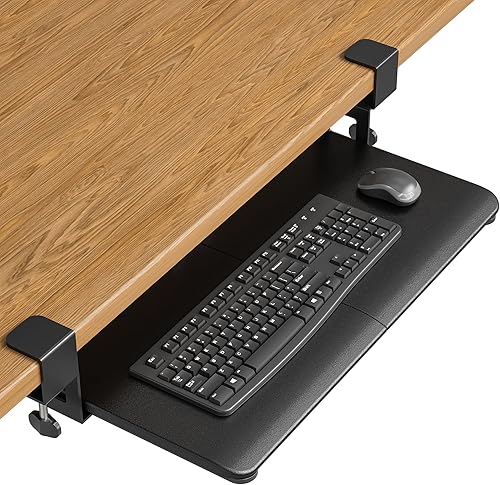
A 27 x 11 in clamp-on tray that frees desktop space and slides under when not in use. It fits standard keyboards and mice within an 11 lb limit.
Pros
- Clamps without drilling
- Slides under for storage
- Holds keyboard, mouse and small accessories
Cons
- Not for beveled edges
- Needs 32.5 in of front width
- Desk underside must be level and clear
This VIVO tray suits most home offices where a standard keyboard and mouse need to move below the desktop. Its 26.8 in tray and 11 in depth leave room for both, with space for small accessories.
Daily use centers on the slide-out action. The tray extends a maximum of 8.5 in from the edge, then slides back under for storage.
That reach gives your mouse more travel than a shallow tray, but it also takes more legroom when pulled out.
C-clamps hold it to desks up to 1.25 in thick without drilling. VIVO says the tray holds up to 11 lb, which covers a typical keyboard and mouse load stated here.
The trade-off is fit. You need 32.5 in from clamp to clamp, a level underside, and a clean square edge.
The alloy steel construction and smooth gliding tracks support repeated slide in and out movement.
Beveled edges and crossbars in the clamp area will block installation. Measure thickness at the front edge and check the underside for supports before you order.
For a standard desk that passes those checks, this balance of width, reach, and mounting simplicity is hard to beat.
EUREKA ERGONOMIC Height Adjustable Mouse & Keyboard: Best for tilt and swivel
- 28.3 x 10.2 in tray
- 360 degree swivel
- 43 degree tilt
- Height adjustable slide-out
- Wrist rest lip
- Weight capacity 6.6 lb
A screw-on tray with wide tilt, swivel and height adjustment for tuning typing angle. It needs a wood or MDF desk at least 0.71 in thick and enough room for its bracket.
Pros
- Wide tilt and swivel range
- Wrist rest lip helps tilted use
- Fits desks with beams
Cons
- Screw-on mounting, not clamp-on
- Not for glass, plastic or stone desks
- Lower 6.6 lb weight capacity
EUREKA suits buyers who want to tune typing angle rather than just slide a tray out. It offers 360 degree swivel and 43 degree tilt, plus height adjustment and a wrist rest lip.
The 28.3 x 10.2 in surface holds a keyboard and mouse, and also claims room for a small laptop, iPad, or other devices. The smooth carbon fiber texture covers a carbon steel and particle board structure.
Weight capacity is 6.6 lb, lower than the 11 lb clamp-on models here. That limit matters if you plan to rest a laptop and accessories on the tray during long sessions.
Mounting is the key difference. This tray attaches with self-tapping screws to wood, MDF, or similar materials.
Glass, plastic, and stone desktops are not compatible, and the top must be at least 0.71 in thick.
The mounting bracket is 17.8 in deep, so your desk should be at least 20 in deep and roughly 39.5 in wide. Check legroom and motor clearance on a standing desk frame before you order.
The gravity self-locking setting helps prevent accidental pushing and pulling, but you lift gently to move it.
VIVO Black Extra Large Clamp-on 34 x: Best for wide keyboards
- 33.9 in tray, 39.4 in including clamps
- 11 in deep tray
- Extends 8.5 in from desk edge
- Holds up to 11 lb
- C-clamps for desks up to 1.25 in thick
The extra large version of the VIVO clamp-on design, with room for wide keyboards plus a mouse. It needs 39.4 in of clear front width.
Pros
- Extra wide typing surface
- Clamps without drilling
- Slides under for storage
Cons
- Largest clamp-to-clamp width here
- Not for beveled edges
- Needs a level, clear underside
This extra large VIVO suits wide keyboards, split boards, or buyers who like extra mouse room. Its 33.9 in tray is about 7 in wider than the smaller VIVO model in this guide.
Like the smaller version, it extends 8.5 in, holds up to 11 lb, and clamps to desks up to 1.25 in thick. That shared design means the same slide-under storage and no-drill setup with sturdy C-clamps.
The alloy steel build and smooth gliding tracks are designed for daily slide out use. The 11 in depth matches the smaller model, so front to back room stays the same while width grows.
The cost is space. Total length including clamps is 39.4 in, so you need that much clear width at the front of the desk.
A smaller desk, corner return, or side leg in that zone can make it a poor fit.
Choose it when width is your main concern and your desk has room. Skip it for compact desks, where the 26.8 in VIVO or the 20 in Zontera fits better.
Also check for a level underside and a clean square edge, since beveled tops are stated as incompatible.
BONTEC Under Desk Keyboard Tray: Best for thick desktops
- 25.6 x 11.8 in platform
- Clamps for desks up to 1.97 in thick
- Supports up to 11 lb
- No-drill C-clamp mounting
- Protective pads on clamps
A clamp-on platform for standard keyboards and mice, with clamps that fit thicker tops than the VIVO models. It needs a flat, straight edge and an unobstructed underside.
Pros
- Fits desks up to 1.97 in thick
- No drilling needed
- Protective pads help prevent scratches
Cons
- May not fit oversized or split keyboards well
- Not for curved or rounded edges
- Needs 31.3 in under-desk width
BONTEC suits desks with thicker tops that rule out the VIVO clamps. Its C-clamps fit desktops up to 1.97 in thick, with protective pads to help prevent scratches.
The platform measures 25.6 x 11.8 in, with an 11.8 in depth that gives more front-to-back room than several rivals. It supports up to 11 lb and slides in and out for use and storage.
The engineered wood surface and anti-skid padding help keep items in place. Smooth gliding motion makes placement under the desk simple after typing.
Fit checks are strict. BONTEC requires at least 31.3 in of width and 11.8 in of depth under the desk.
Curved, beveled, or rounded edges, and crossbars underneath, will not work.
It is designed for standard keyboards and mice. Large gaming keyboards, vertical mice, and split ergonomic keyboards may not fit well, so compare your board's size before ordering.
Compared with Zontera, BONTEC clamps to a thinner maximum but offers a similar platform size. Compared with VIVO, it trades a slightly narrower tray for much thicker desktop compatibility and no drilling.
AX WABER Keyboard Tray Under Desk Pull Out: Best for shallow pull-out
- 27.3 in tray, 32.5 in including clamps
- Extends 5.7 in from desk edge
- Holds up to 11 lb
- C-clamps for desks up to 1.9 in thick
- Slide-out platform
A clamp-on pull-out tray with a shorter 5.7 in extension than the VIVO models. That suits tighter legroom, but gives less reach for mouse movement.
Pros
- Short extension suits tight legroom
- Clamps for desks up to 1.9 in thick
- No drilling required
Cons
- Shorter extension limits mouse space
- Not for beveled edges
- Needs 32.5 in of front width
AX WABER suits buyers who want a clamp-on tray with less reach into legroom. It extends a maximum of 5.7 in from the edge, compared with 8.5 in for the VIVO models.
The tray measures 27.3 in wide, or 32.5 in including clamps, and holds up to 11 lb. C-clamps fit desks up to 1.9 in thick, which covers many tops that exceed the VIVO limit.
The shorter extension is both the point and the trade-off. It preserves knee space, but it gives the mouse less travel and may feel cramped for wide mouse movements.
You still need 32.5 in of front width, a non-beveled edge, and clear space in the clamp area. Structures with reinforcing tubes at the edges are not suitable for this mount.
The stated desktop mounting range in the description runs from 0.3 in to 1.75 in for regular boards, so check your top carefully against both figures. Cable management and wobble prevention are noted in the description, which helps in daily typing.
For tight legroom, this shallow pull-out can be a practical compromise. For generous mouse travel, the longer VIVO extension remains easier to use.
Kensington Keyboard Tray Under Desk: Best for oversize keyboards
- 24.5 in inner drawer, 26 in outer drawer
- Extra-wide tray for wrist rest, mouse and pad
- Mounts at one of four heights
- Cable management
- Total installation width 31 to 33 in
- Total depth 16 in
A screw-on drawer sized for oversize and ergonomically shaped keyboards, with an integrated mousing area. Four mounting heights help match your SmartFit comfort color.
Pros
- Fits oversize and ergonomic keyboards
- Includes wrist rest and mouse pad area
- Cable management built in
Cons
- Screw-on installation
- Needs 31 to 33 in width and 16 in depth
- Fewer tilt and swivel options than EUREKA
Kensington suits oversize and ergonomically shaped keyboards that crowd narrower trays. Its inner drawer is 24.5 in wide, with a 26 in outer drawer and room for a wrist rest, mouse, and mouse pad.
The SmartFit system lets you mount the drawer at one of four heights to match your comfort color. That fixed-height choice is simpler than continuous adjustment, and it helps align the keyboard with your chair height.
Cable management is built in, which helps keep cords from catching as the drawer moves. An integrated USB-A cable is listed in the specs, and the drawer frees desktop space while keeping the mouse beside the keyboard.
The metal or heavy-duty plastic enclosure and easy-glide drawer give it a different feel from clamp-on platforms. The included wrist rest and mouse pad mean you do not need separate accessories for those items.
Install checks matter. Total installation width is 31 to 33 in, and total depth is 16 in, so measure desk clearance first.
This is a screw-on drawer, not a clamp-on tray, so it suits desks you are willing to mount to permanently.
Compared with EUREKA, Kensington offers fewer tilt and swivel options. Compared with clamp-on models, it asks more of your desk but gives a wider, more structured drawer.
HUANUO Under Desk Keyboard Tray: Best for corner desks
- 25 x 9.84 in tray
- Fits keyboards up to 17.3 x 5.5 in plus mouse space
- Swivels 180 degrees left and right
- Tilts 6 degrees up and 22 degrees down
- 6.3 in of height adjustment
- Includes wrist rest
A height adjustable tray that swivels 180 degrees, so you can turn the keyboard toward another screen. It needs 14.17 in of clearance from desk edge to crossbar, or 16.22 in for full slide-under.
Pros
- Swivel helps corner and multi-monitor desks
- Tilt options for wrist-neutral typing
- Height adjustment for sitting to standing
Cons
- Smaller 9.84 in depth
- Needs clear crossbar and leg space
- Tighten knob before typing
HUANUO suits corner desks and multi-monitor setups where you turn to face another screen. It swivels 180 degrees left and right, so the keyboard can turn without moving your chair.
Tilt ranges from 6 degrees up to 22 degrees down for a wrist-neutral angle. Height adjustment gives 6.3 in of travel for the move from sitting to standing, with the lowest connector height at 7.48 in.
The tray is 25 x 9.84 in and fits keyboards up to 17.3 x 5.5 in plus mouse space. A wrist rest is included.
The shallower depth than the 11.8 in models means less front-to-back room for large mice.
Clearance checks are detailed. You need no crossbar under the desk, or 14.17 in from desk edge to crossbar, and 16.22 in for full slide-under.
Desk sides need at least 25 in of clearance, or 35.4 in if you rotate the tray.
The desktop top must be over 0.6 in thick, and you should tighten the knob before typing. That knob step matters, since stability depends on locking the position you choose.
For a straight desk with one monitor, this adjustment may be more than you need. For a corner desk or a sit-stand routine, the swivel and height range solve problems flat trays cannot.
Zontera Ergonomic Mouse & Keyboard Tray Under: Best for small desks
- 20 x 11.8 in tray, 25.9 in including clamps
- Extends up to 7.8 in from desk edge
- Back baffle prevents keyboard sliding
- Dual C-clamps for desks up to 2.76 in thick
- Walnut finish
A compact 20 in walnut tray for smaller desks, with clamps that fit tops up to 2.76 in thick. The shorter width suits a compact keyboard, but wide boards may crowd the mouse.
Pros
- Smallest clamp-to-clamp width here
- Fits very thick desktops
- Back baffle helps keep keyboard in place
Cons
- 20 in width may crowd wide keyboards
- No tilt or swivel stated
- Needs 25.9 in of front width
This walnut Zontera suits smaller desks where a 32 in clamp-to-clamp tray will not fit. Its 20 in tray needs 25.9 in including clamps, the smallest front width in this guide.
Depth is 11.8 in, so front-to-back space is generous for a compact tray. It extends up to 7.8 in from the desk edge and has a back baffle to help keep the keyboard from sliding.
Dual C-clamps fit desks up to 2.76 in thick, the highest limit here. Non-slip pads help protect the desk surface and improve stability during typing.
The walnut finish differs from the black trays in this guide, which may suit a lighter or wood toned desk. The upgraded slide mechanism is described as smooth for extension and retraction.
The trade-off is width. A 20 in surface suits a compact keyboard and mouse, but a full-size or wide board may leave little mouse room.
There is no tilt or swivel stated, so this is a slide-out platform rather than an adjustable arm.
Measure your keyboard width first. If it fits with mouse space to spare, the small footprint and thick-desk clamps make this a strong choice for compact setups.
Zontera Ergonomic Keyboard Tray Under Desk: Best for thick top value
- 25.6 x 11.8 in tray, 31.5 in including clamps
- Extends up to 7.8 in from desk edge
- Back baffle prevents keyboard sliding
- Dual C-clamps for desks up to 2.76 in thick
A black 25.6 in tray with the same thick-desk clamps as the smaller Zontera model. It gives more keyboard room, but still has no tilt or swivel.
Pros
- Fits desks up to 2.76 in thick
- 25.6 in width for standard keyboards
- Back baffle helps keep keyboard in place
Cons
- No tilt or swivel stated
- Needs 31.5 in of front width
- Newer model with less buyer history in the data
This black Zontera suits buyers who want the same thick-desk clamps as the small model, with more keyboard width. Its 25.6 in tray needs 31.5 in including clamps and extends up to 7.8 in.
Dual C-clamps fit desks up to 2.76 in thick without drilling. That covers thick solid tops and many standing desk desktops that exceed the VIVO and BONTEC limits.
The 11.8 in depth and back baffle help keep a standard keyboard and mouse in place. The slide mechanism extends and retracts for storage under the desk when you are not typing.
Non-slip pads on the clamps help prevent scratches and improve grip. The design is described as stable for both work and gaming use, with optimized typing angles to reduce wrist and shoulder strain.
Like the small Zontera, it has no tilt or swivel stated. Choose it for clamping range and width, not for angle adjustment.
EUREKA or HUANUO does that job better.
Compared with BONTEC, it offers a similar tray size with a higher thickness limit. Compared with VIVO, it trades brand history in this list for much wider desktop compatibility.
Side-by-side comparison of tray size, mounting, and adjustment
The VIVO 27 in model is the best all-around clamp-on choice, EUREKA adds the most tilt and swivel, and Zontera fits the thickest tops. Use the table below to match mounting type and tray size to your desk.
| Product | Best for | Tray size | Total length with clamps | Extension | Our score |
|---|---|---|---|---|---|
| VIVO Black Clamp-on 27 x | most desks | 26.8 x 11 in | 32.5 in | 8.5 in | 9.7 |
| EUREKA ERGONOMIC Height Adjustable Mouse & Keyboard | tilt and swivel | 28.3 x 10.2 in | 9.6 | ||
| VIVO Black Extra Large Clamp-on 34 x | wide keyboards | 33.9 x 11 in | 39.4 in | 8.5 in | 9.5 |
| BONTEC Under Desk Keyboard Tray | thick desktops | 9.4 | |||
| AX WABER Keyboard Tray Under Desk Pull Out | shallow pull-out | 27.3 in wide | 32.5 in | 5.7 in | 9.2 |
| Kensington Keyboard Tray Under Desk | oversize keyboards | 9.1 | |||
| HUANUO Under Desk Keyboard Tray | corner desks | 25 x 9.84 in | 9.0 | ||
| Zontera Ergonomic Mouse & Keyboard Tray Under | small desks | 20 x 11.8 in | 25.9 in | 7.8 in | 8.4 |
| Zontera Ergonomic Keyboard Tray Under Desk | thick top value | 25.6 x 11.8 in | 31.5 in | 7.8 in | 8.0 |
How we compared these under desk keyboard trays
We compared mounting system, tray size, extension, weight capacity, desk thickness, and adjustment range from the specs for each model. We weighted fit and usable typing space most, because a tray that blocks clamps or legroom fails in daily use.
Our score weighs specs, features and buyer feedback against what you're shopping for. Higher scores went to trays that combine no-drill or solid mounting, enough width for a keyboard and mouse, and clear installation limits.
We did not rank any tray on price, and we did not add specs that are not in the data. Where a model lacks tilt, swivel, or a stated capacity, we treated that as a limit rather than filling the gap.
How did mounting type affect the ranking?
Mounting type changed the comparisons in practical ways. Clamp-on models scored well for renters because they avoid holes, while screw-on models scored well for adjustment because they support tilt, swivel, and fixed height positions.
Desk thickness limits also separated the group. VIVO tops out at 1.25 in, BONTEC at 1.97 in, AX WABER at 1.9 in, and Zontera at 2.76 in, so a single thick desktop can rule out several otherwise strong trays.
Extension and depth shaped the rest of the ranking. VIVO reaches 8.5 in out, AX WABER only 5.7 in, and HUANUO gives up depth at 9.84 in for swivel and tilt, so each trade-off matched a different desk and body type.
What size tray do you need for a keyboard and mouse?
A 25 to 28 in wide tray fits most standard keyboards with a mouse beside them. The VIVO 26.8 in, BONTEC 25.6 in, and EUREKA 28.3 in models all sit in that range.
Depth matters too. An 11 to 11.8 in deep tray gives more room for a mouse and wrist rest than the HUANUO at 9.84 in.
Check your keyboard width before you order, especially with split or oversize boards.
How do small trays compare for compact desks?
The Zontera 20 in model needs only 25.9 in including clamps, so it fits desks where a 32.5 in tray cannot clamp. Our best small under desk keyboard tray guide covers that narrow-desk case in more detail.
Small trays suit compact keyboards. Wide boards may push the mouse to the edge, so measure both before you choose.
Which mounting system fits your desk: clamp-on or screw-on?
Clamp-on trays attach without drilling and suit renters or desks you want to keep intact. VIVO, BONTEC, AX WABER, and Zontera all use C-clamps, with limits from 1.25 in to 2.76 in.
Screw-on trays such as EUREKA and Kensington mount more firmly and can offer tilt, swivel, and height options. They need wood, MDF, or similar material, and they leave mounting holes in the desktop.
When should you choose a clamp-on tray?
Pick clamp-on if your desk thickness is within the stated limit and the underside is level and clear. Measure thickness at the clamp location, not at the center, because some tops taper or have edge profiles.
For a clamp on keyboard tray for thick desk, Zontera at 2.76 in and BONTEC at 1.97 in cover the thickest tops here. Our best clamp-on keyboard tray guide compares more clamp-on options.
When does screw-on mounting make sense?
Pick screw-on if you want tilt, swivel, or fixed height positions and you own the desk. EUREKA needs at least 0.71 in thickness, and Kensington needs 31 to 33 in of installation width.
Screw-on mounting also suits desks where clamps cannot grip, such as some glass tops. EUREKA states glass is not compatible, so check the material before you assume a screw-on tray will fit.
How much tilt and swivel do you actually need?
Tilt changes wrist angle, and swivel turns the keyboard toward another screen. EUREKA offers 43 degrees of tilt and 360 degrees of swivel, while HUANUO offers 6 degrees up, 22 degrees down, and 180 degrees of swivel.
If you type on one screen all day, a flat slide-out tray may be enough. If you turn between monitors, swivel saves chair movement.
Our best under desk keyboard tray with tilt guide covers tilt-focused picks.
Which trays suit corner desks and multi-monitor desks?
HUANUO suits corner desks because it swivels 180 degrees and needs 35.4 in of side clearance when rotated. Check that clearance before you order, because a return or leg can block rotation.
Our best under desk keyboard tray for corner desk guide covers corner fit in more detail. Also check our best adjustable keyboard tray for standing desk guide if your desk moves up and down.
Will an ergonomic keyboard tray fit your keyboard?
Most trays here fit standard keyboards up to about 25 in wide, but split and oversize boards need a check. Kensington states its drawer fits oversize and ergonomically shaped models, and HUANUO fits keyboards up to 17.3 x 5.5 in.
BONTEC warns that large gaming keyboards, vertical mice, and split ergonomic keyboards may not fit well on its 25.6 in platform. Measure your keyboard and mouse together, including any wrist rest.
What about drawer-style trays with storage?
A drawer slides fully under the desk and can hide the keyboard when not in use. Our under desk keyboard tray with drawer guide explains drawer fit, and our best ergonomic keyboard tray guide covers ergonomic drawer options.
Drawer depth is the limit. Kensington needs 16 in of total depth, so a shallow desk may not have room for the drawer body.
How do you set up and care for a tray in daily use?
Set the tray height so your shoulders stay relaxed and your wrists stay neutral. Tighten clamps or knobs fully, then check that the tray does not wobble when you type.
Keep cables from catching on the tray edge as it slides. Kensington includes cable management, and other trays benefit from leaving slack in the cable run.
Wipe the tray surface with a dry or slightly damp cloth and check clamp tightness after the first week. Our best low profile under desk keyboard tray guide covers setups where knee clearance is tight.
For standing height changes, check motor and crossbar clearance at both ends of travel. EUREKA warns the tray must not interfere with desk motors, and HUANUO gives specific crossbar clearances.
If your desk has built-in storage, our What Is a Standing Desk with Drawers? A Clear Answer guide helps you plan tray space around drawers.
Also see best height adjustable keyboard tray for height-focused options.
Verdict: which best under desk keyboard tray should you buy?
Buy the VIVO Black Clamp-on 27 x if you want the best all-around clamp-on tray. It gives a 26.8 in tray, 8.5 in of extension, and an 11 lb capacity for most desks up to 1.25 in thick.
Buy EUREKA if tilt and swivel matter most. Its 43 degree tilt and 360 degree swivel suit angle tuning, but it needs screw-on mounting to wood or MDF.
Buy Zontera if your top is very thick or your desk is narrow. The 20 in model fits small desks, and both Zontera models clamp to tops up to 2.76 in.
Buy HUANUO for corner desks, Kensington for oversize keyboards, and BONTEC for thick tops without tilt. Each solves one clear problem, and the fit checks in this guide tell you which problem you have.
For a wider shortlist, see best vivo under desk keyboard tray, best standing desk keyboard tray, best under desk keyboard and mouse tray, and best ergonomic keyboard stand.
Our top 3 picks at a glance
-
1
-
2
Best for tilt and swivel
EUREKA ERGONOMIC Height Adjustable Mouse & Keyboard
9.6/10 our score
See it on Amazon -
3
Frequently asked questions
How do I measure for an under desk keyboard tray?
Measure the front width from clamp to clamp, the desk thickness, and the clear space under the desk. VIVO needs 32.5 in or 39.4 in depending on the model, and BONTEC needs 31.3 in wide by 11.8 in deep.
Check for crossbars, beveled edges and legs in the clamp area before you order.
Do I need to drill holes for a keyboard tray?
No, if you choose a clamp-on model. VIVO, BONTEC, AX WABER and Zontera use C-clamps, so they attach without drilling.
EUREKA and Kensington use screw-on mounting, so match the mounting type to what you are willing to do.
What desk thickness works with these trays?
VIVO fits desks up to 1.25 in thick, while BONTEC fits up to 1.97 in and Zontera fits up to 2.76 in. AX WABER fits up to 1.9 in.
EUREKA needs at least 0.71 in, and HUANUO needs a top over 0.6 in thick.
Can a tray fit a standing desk with a frame under it?
It can, if the frame, crossbar and motors leave the needed clear space. EUREKA warns the tray must not interfere with desk motors, and its mounting bracket is 17.8 in deep.
Measure the frame position in both raised and lowered positions before you choose.


