7 Best Left-Handed Ergonomic Mice (November 2026)
The best left handed ergonomic mouse include the エレコム for thumb control and precision, the Logitech Left Handed Lift Vertical Ergonomic Wireless for small to medium hands, and the Perixx Perimice-513L Wired Vertical Ergonomic Mouse (best wired vertical pick).
On this page (7 sections)
- Best left handed ergonomic mice, ranked by score
- How do these left-handed ergonomic mice compare?
- Which shape should a left-handed user choose?
- What size hand works best with each pick?
- Wired, wireless or rechargeable: which connection fits your desk?
- How important are DPI, buttons and quiet clicks?
- What is the verdict on the best left handed ergonomic mouse?
The best left handed ergonomic mouse for most people is the ELECOM EX-G, because left-handed thumb control, 6 programmable buttons and 750/1500 DPI switching give you precise control with less hand movement.
If you prefer a vertical grip, the Logitech Lift is the strongest choice for small to medium hands, while the Perixx Perimice-513L gives you that shape with a wired USB connection.
A left-handed ergonomic mouse is different from a standard mouse flipped to the other side. A mirrored shell can still force your wrist into an awkward angle, while these picks use grips, button layouts and control styles built for your left hand.
Our score weighs specs, features and buyer feedback against what you are shopping for. If you are comparing shapes before you buy, our guide on which type of ergonomic mouse fits your hand helps you decide between vertical, trackball and standard shapes.
Our picks at a glance
-
1

-
2
 Best for small to medium hands
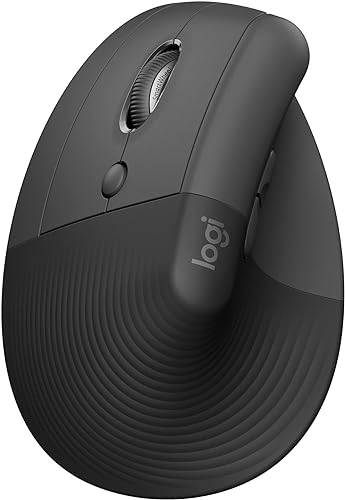
Logitech Left Handed Lift Vertical Ergonomic Wireless
9.6/10 our score
See it on Amazon -
3
 Best wired vertical pick
Perixx Perimice-513L Wired Vertical Ergonomic Mouse
9.4/10 our score
See it on Amazon
- 4
 Check it
MEETION Left-Handed Wireless Ergonomic Vertical Mouse
Best for multiple connection options - 5
 Best for quiet clicksCheck it
- 6
 Best for medium and large handsCheck it
- 7
 Best simple wireless vertical pickCheck it
Best left handed ergonomic mice, ranked by score
The ELECOM EX-G leads for precision and control, the Logitech Lift leads for small to medium hands, and the Perixx models lead for simple wired or wireless vertical setups.
Use the table below to compare connection type, DPI range and button count before you look at each write-up in detail.
エレコム: Best for thumb control and precision
- Left-handed trackball design
- 2.4 GHz USB wireless
- Thumb control with tracking roller ball
- 6 programmable buttons
- Tilt scroll for horizontal scrolling
- 750/1500 DPI switch
A left-handed trackball lets your thumb move the cursor while your hand stays in place. It is a strong pick for desk work where fine cursor control matters more than sliding the mouse across a pad.
Pros
- Thumb control reduces whole-hand movement
- 6 programmable buttons
- 750/1500 DPI switching
- 2.4 GHz wireless connection
Cons
- Trackball control takes time to learn
- AA battery is required
The ELECOM EX-G suits left-handed users who do precise work and want the cursor to move without sliding a mouse across the desk.
Thumb control with a tracking roller ball means your hand stays mostly still while your thumb does the moving, which can feel calmer during long editing, spreadsheet or design sessions.
Six programmable buttons plus tilt scroll cover the jobs most people assign to extra mouse buttons.
You can set functions through ELECOM Mouse Assistant software, and horizontal scrolling comes from tilting the scroll wheel, which helps in wide documents and timelines.
The DPI button switches between 750 and 1500, so you can slow down for careful placement and speed up for crossing a large screen.
That optical tracking and the two level switch are useful when you move between detail work and general navigation on the same day.
The ball rolls on three large 2.5 mm artificial ruby ball bearings, so dust is less likely to clog it and cleaning is less frequent.
The ball pops out through the hole underneath for cleaning, and a black ball is included while a red ball is sold separately, which is a small but practical detail.
The tradeoff is a learning curve, since a trackball feels different from a sliding mouse, and it needs an AA battery for wireless use.
It also connects only by 2.4 GHz wireless, so left-handed users who want Bluetooth or a wired fallback should look elsewhere.
Logitech Left Handed Lift Vertical Ergonomic Wireless: Best for small to medium hands
- Left-handed vertical shape at 57 degrees
- Bluetooth Low Energy and Logi Bolt USB
- SmartWheel for smooth scrolling
- Whisper-quiet clicks
- Customizable buttons
- Up to two years battery life
The Lift puts your hand in a more upright position and is sized for small to medium left hands. It connects by Bluetooth or Logi Bolt and works across Windows, macOS, iPadOS, Chrome OS and Linux.
Pros
- Vertical 57-degree shape
- Bluetooth and USB receiver options
- Connects to up to 3 devices
- Long battery life
Cons
- Sized for small to medium hands
- Uses 1 AA battery
The Logitech Lift suits left-handed users with small to medium hands who sit at a desk for long stretches.
Its 57-degree vertical shape raises your hand into a more upright position, and Logitech says that promotes a more natural posture in the forearm for day-long comfort.
A softly textured grip and snug thumb rest help your hand settle instead of gripping hard.
Whisper-quiet clicks keep noise low in a shared room, and the SmartWheel gives smooth scrolling for long pages and documents.
Connectivity is flexible, with Bluetooth Low Energy or the Logi Bolt USB receiver, and Logitech says you can connect to up to 3 devices and switch between them.
Easy-Switch and Logitech Flow support moving across screens and transferring files, which helps if you split work between a laptop and a desktop.
Tracking is fully adjustable up to 4000 DPI, so you can slow the cursor for careful work or raise it for a large display.
The mouse weighs 125 g and measures 108 x 70 x 71 mm, and the wireless range is 10 m, which gives you normal desk freedom.
The tradeoff is size, since this mouse is made for small to medium hands rather than large hands, and it uses 1 AA battery.
Logitech claims up to two years of battery life, but that also means you should keep a spare AA battery in a drawer for a quick swap.
Perixx Perimice-513L Wired Vertical Ergonomic Mouse: Best wired vertical pick
- Left-handed vertical design
- Wired USB connection
- 6 buttons
- 1000/1600 DPI switch
- Rubber coating surface
- 1.8 m cable
This wired vertical mouse keeps your left hand in a natural gripping position without batteries or wireless pairing. It suits a fixed desk setup where a cable is not a problem.
Pros
- No batteries or charging
- 6 buttons with DPI switch
- Rubber coating for grip
- Vertical left-handed shape
Cons
- Cable limits placement
- Works with Windows 7, 8 and 10
The Perixx Perimice-513L suits left-handed users who work at one fixed desk and do not mind a cable.
Its left-handed vertical shape puts your palm and wrist in a natural gripping position, which helps if you work long periods and want less bending through the wrist and arm.
Perixx recommends this shape for repetitive strain injury users and for people who work particularly long periods on a computer.
The slightly tilted left shape is designed to be easy to grab without bending the wrist and arm, and the button layout is calculated for different hand sizes.
Six buttons include a two-level DPI switch at 1000 and 1600, plus side buttons for browsing.
That setup lets you match cursor speed to the task without installing software, and plug-and-play USB means it is ready as soon as you connect it.
The rubber coating gives a secure feel, and the 1.8 m cable gives you room to route the cord away from your keyboard.
The mouse weighs 116 g and measures 120 x 75 x 63 mm, so it is a mid size vertical shell that should suit a range of hand sizes.
The tradeoff is simple: a wired mouse ties your desk layout to the cable, and Perixx lists Windows 7, 8 and 10 compatibility.
If you move between rooms or use a laptop away from a desk, one of the wireless picks in this roundup will fit better.
MEETION Left-Handed Wireless Ergonomic Vertical Mouse: Best for multiple connection options
- Left-handed vertical shape
- Bluetooth 5.0, Bluetooth 3.0 and 2.4G wireless
- Rechargeable battery
- RGB lighting
- 1200/1600/2400/3200 DPI
- Forward and backward buttons
This rechargeable vertical mouse gives you Bluetooth and 2.4G wireless for switching between devices. Four DPI settings cover everything from careful design work to faster movement across large screens.
Pros
- Bluetooth plus 2.4G wireless
- Rechargeable, no disposable batteries
- Four DPI settings
- Forward and backward buttons
Cons
- Not compatible with Android TV or older Linux systems
- RGB lighting may not suit every office
The MEETION BTM010 suits left-handed users who move between a laptop, tablet or phone and want more than one way to connect.
It offers Bluetooth 5.0, Bluetooth 3.0 and 2.4G wireless, so you can pair it for portable work or use the USB-A receiver at a desk.
The vertical shape is made to reduce strain on the wrist and forearm, and MEETION recommends it for users with a hand length of 6.7 to 7.1 inches.
That size guidance matters, because a vertical mouse only feels comfortable when your palm fills the shell without stretching.
Four DPI settings from 1200 to 3200 cover careful work and fast movement, and forward and backward buttons help with web pages and documents.
You can raise the DPI for a wide monitor or drop it for design work, and the optical sensor supports that range without changing devices.
The mouse is rechargeable and includes a Type-C charging cable, so you avoid buying disposable batteries.
RGB lighting adds a spectrum of colors and effects, which some users will like as a personal touch and others will treat as purely cosmetic.
The tradeoff is that it is not compatible with Android TV or older Linux systems, and RGB lighting may not suit every office.
It supports Windows 10 and 11 and macOS 10.15 and above, so check your system before you rely on Bluetooth pairing.
Perixx PERIMICE-713L: Best for quiet clicks
- Left-handed vertical design
- 2.4 GHz wireless
- 6 buttons
- 1000/1600 DPI settings
- Quiet left and right click buttons
- Soft rubber-coated surface
The PERIMICE-713L pairs a left-handed vertical shape with quiet main buttons for shared offices and quiet rooms. It runs on 2 AAA batteries and reconnects easily on a 2.4 GHz wireless link.
Pros
- Quiet main click buttons
- Rubber-coated grip surface
- 2.4 GHz wireless up to 30 ft
- Back and forward buttons
Cons
- Requires 2 AAA batteries, not included
- Back and forward buttons are not supported on macOS
The Perixx PERIMICE-713L suits left-handed users who want a wireless vertical mouse with quiet main buttons.
Silent left and right buttons help you stay focused in a shared office, library or quiet home office, though the scroll wheel and back/forward buttons are not silent.
Its vertical left-handed shape and soft rubber-coated surface give a secure grip for extended use.
Perixx says most users adapt to the ergonomic shape within 1 to 2 weeks, so give your hand time to adjust rather than judging it on the first day.
DPI settings of 1000 and 1600 provide precise optical tracking, and back and forward buttons help with browsing.
The description also lists 800, 1200 and 1600 DPI in the item type, so you have a wider sensitivity range to explore for slower, careful movement.
The 2.4 GHz wireless connection is plug and play with up to 30 ft or 10 m of operating range.
It reconnects easily if the signal is interrupted, and the shell measures 4.92 x 2.44 x 3.03 inches at 0.35 lb, which makes it easy to carry between desk and meeting room.
The tradeoff is power and platform limits: it needs 2 AAA alkaline batteries that are not included, and back/forward buttons are not supported on macOS.
It is compatible with Windows 7, 8, 10 and 11 and macOS 10.12 or later, so Windows users get the full button set more easily.
Lekvey Left Handed Mouse: Best for medium and large hands
- Left-handed vertical design
- 2.4G USB wireless
- 1000/1200/1600 DPI
- Quiet click buttons
- Up to 6 months on 2 AAA batteries
- Forward and backward buttons
This plug-and-play vertical mouse is recommended for medium and large hands and needs no drivers. It offers three DPI levels and a wireless range up to 33 ft.
Pros
- Sized for medium and large hands
- Plug and play with USB receiver
- Three DPI levels
- Quiet clicks
Cons
- Batteries are not included
- Bluetooth and USB-C are not supported
The Lekvey mouse suits left-handed users with medium and large hands who want a simple wireless setup.
Its vertical shape promotes a neutral handshake posture, and Lekvey recommends this size for medium and large hands, which makes hand size the first check before you buy.
The shell measures 5 x 3 x 2.5 inches and weighs 2.88 ounces, so it has a fuller palm rest than a small vertical mouse.
Lekvey says most left-handed users feel wrist strain ease within 3 to 5 days, which is a useful timeline to set expectations for adjustment.
Setup is plug and play with the USB receiver stored in the bottom of the mouse, and the 2.4G connection reaches up to 33 ft.
No pairing or drivers are needed, so it suits a work laptop that you swap between rooms, and it sleeps after 10 minutes of inactivity to save power.
Three DPI levels at 1000, 1200 and 1600 let you adapt sensitivity to the task, and quiet clicks help in shared spaces.
Forward and backward buttons make web navigation faster, and the mouse claims up to 6 months of power on 2 AAA batteries.
The tradeoff is that batteries are not included, and Bluetooth and USB-C are not supported.
It is widely compatible with Windows 2000 through 11, Mac OS and Linux, so older systems are covered, but USB-C only laptops will need an adapter for the receiver.
KUNSI Left Handed Mouse: Best simple wireless vertical pick
- Left-handed vertical design
- 2.4G wireless
- 800/1200/1600 DPI
- 6 buttons
- Next and previous buttons
- 10 m working distance
A simple vertical wireless mouse for left-handed users who want plug-and-play setup and adjustable sensitivity. It runs on 2 AAA batteries, which are not included.
Pros
- Simple 2.4G plug-and-play setup
- Three DPI levels
- Next and previous buttons
- Vertical left-handed shape
Cons
- Batteries are not included
- Forward/back buttons are unavailable on macOS
The KUNSI mouse suits left-handed users who want a simple vertical wireless mouse without extra settings to manage.
Its vertical design holds your hand in a neutral handshake position, which can help your arm and wrist rest more naturally during long work sessions.
The shell is built only for left-handed users, so the palm rest, thumb area and buttons line up with the way a left hand grips.
That makes it a clear alternative to flipping a right-handed mouse, which often puts the thumb buttons in the wrong place.
The 2.4G wireless connection is plug and play, with a maximum working distance of 10 m.
You plug in the USB receiver and use it straight away, which suits a straightforward home or office desk.
Three DPI levels at 800, 1200 and 1600 let you choose a slower or faster cursor speed.
The lower 800 DPI setting is handy for careful work, while 1600 DPI helps you move across a larger screen, and the laser movement detection supports that range.
Next and previous buttons help with browsing, though they are unavailable on macOS systems.
The mouse weighs 3.52 ounces, runs on 2 AAA batteries that are not included, and includes a 1 year warranty, which is a simple safety net for a budget pick.
How do these left-handed ergonomic mice compare?
The ELECOM is the only trackball here, the Logitech Lift is the only one sized specifically for small to medium hands, and the rest are vertical mice split by wired, wireless, rechargeable and quiet-click designs.
Pick by control style first, then by connection and hand size.
| Product | Best for | Connectivity | Buttons | DPI | Our score |
|---|---|---|---|---|---|
| エレコム | thumb control and precision | 2.4 GHz wireless | 6 programmable buttons | 750/1500 | 9.7 |
| Logitech Left Handed Lift Vertical Ergonomic Wireless | small to medium hands | Bluetooth / Logi Bolt USB | 6 | 9.6 | |
| Perixx Perimice-513L Wired Vertical Ergonomic Mouse | wired vertical pick | Wired USB | 6 | 1000/1600 | 9.4 |
| MEETION Left-Handed Wireless Ergonomic Vertical Mouse | multiple connection options | Bluetooth and 2.4G wireless | 6 | 1200-3200 | 9.2 |
| Perixx PERIMICE-713L | quiet clicks | 2.4 GHz wireless | 6 | 1000/1600 | 9.0 |
| Lekvey Left Handed Mouse | medium and large hands | 2.4G USB wireless | 6 | 1000/1200/1600 | 8.6 |
| KUNSI Left Handed Mouse | simple wireless vertical pick | 2.4G wireless | 6 | 800/1200/1600 | 8.4 |
We compared the specs that matter for daily use: hand orientation, shape, connection type, DPI range, button count, battery type and included parts.
We also checked system compatibility, because a good mouse that does not work with your operating system is not a good buy.
We did not test these mice by hand. We checked the product data, buyer patterns and maker claims, then scored each mouse for how well it fits left-handed use.
Our score weighs specs, features and buyer feedback against what you are shopping for.
A note on weights and dimensions
Weight and dimensions change how a vertical mouse feels during long sessions.
The Logitech Lift is 125 g, the Perixx wired model is 116 g, and the wireless Perixx model is 88 g, so the lightest pick is not always the most comfortable for every hand.
Dimensions matter in the same way, because a shell that is too short can force your fingers to curl and a shell that is too tall can push your palm too far from the buttons.
Use the listed length, width and height together with the hand size guidance before you decide.
Which shape should a left-handed user choose?
A vertical mouse suits most left-handed users who want a familiar sliding motion with a more upright hand.
The Logitech Lift, Perixx models, MEETION, Lekvey and KUNSI all use a vertical grip, so start there if you already use a mouse every day.
A trackball suits users who want precision with less hand movement.
The ELECOM EX-G moves the cursor with your thumb while your hand stays in place, which helps on a crowded desk or during detailed cursor work.
Vertical for familiar control
Vertical mice feel closest to a normal mouse, so the learning curve is shorter.
Perixx says vertical users may need 1 to 2 weeks to adapt, but the motion itself stays familiar.
Trackball for precise, low-movement control
A trackball takes longer to learn, but it rewards patience with fine control.
Choose it if you do detailed work, use a small desk, or prefer fewer large hand movements.
What size hand works best with each pick?
Hand size matters more with a vertical mouse than with a standard mouse, because your palm should fill the shell.
The Logitech Lift is sized for small to medium left hands, while Lekvey recommends medium and large hands for its model.
MEETION gives a clearer guide, recommending a hand length of 6.7 to 7.1 inches for its vertical mouse.
If you fall outside that range, a trackball or a standard left-handed shape may fit better than forcing a vertical shell.
If your hands are smaller than average, our guide to the best ergonomic mouse for small hands helps you compare sizes before you commit.
Small to medium hands
The Logitech Lift is the clearest pick here, with a shape sculpted for small to medium left hands.
Its 57-degree angle and thumb rest help smaller hands settle without gripping hard.
Medium to large hands
Lekvey recommends medium and large hands, and MEETION gives a hand-length range to check.
Compare those numbers with your own hand before you order, since a shell that is too small can still strain your fingers.
Wired, wireless or rechargeable: which connection fits your desk?
A wired mouse suits a fixed desk where you never move the mouse.
The Perixx Perimice-513L needs no batteries, no charging and no pairing, which makes it simple for a single computer setup.
Wireless suits laptops, dual-device setups and desks where a cable gets in the way.
The Logitech Lift uses Bluetooth or Logi Bolt, the MEETION uses Bluetooth plus 2.4G, and the Perixx, Lekvey and KUNSI models use 2.4G receivers.
If you want a closer look at wireless options, our guide to the best left handed ergonomic wireless mouse walks through connection choices in more detail.
Battery and charging trade-offs
Rechargeable models remove disposable batteries, while AA and AAA models let you swap in fresh batteries fast.
The Logitech Lift claims up to two years of battery life from 1 AA battery, while Lekvey claims up to 6 months on 2 AAA batteries.
Check how does a hand crank desk work in our separate guide if your desk setup also uses manual height adjustment, since cable routing changes when the desk moves.
For more desk context, what is a hand crank standing desk explains how manual desks handle movement and cable management.
Platform limits to check before you buy
Some back and forward buttons do not work on macOS, including on the Perixx PERIMICE-713L and KUNSI models.
MEETION is not compatible with Android TV or older Linux systems, so check your device list before you order.
How important are DPI, buttons and quiet clicks?
DPI sets how far the cursor moves when you move the mouse.
Lower settings help with careful work, while higher settings help you cross large screens without moving your hand far.
Most picks here offer 1000/1600 DPI, and MEETION goes up to 3200.
The ELECOM switches between 750 and 1500, which is a useful range for trackball precision.
Buttons for browsing and shortcuts
Six buttons is the standard across this group, often including forward and backward buttons.
Those buttons help in a browser, but check macOS support before you rely on them.
For a broader look at keyboards and mice together, our ergonomic keyboard mouse guide helps you match a mouse with a keyboard layout.
Quiet clicks for shared spaces
Quiet main buttons matter in a shared office or a quiet room.
The Perixx PERIMICE-713L and Lekvey both use quiet clicks, while Logitech describes its clicks as whisper-quiet.
If you prefer to see how right-handed shapes differ, our best right handed ergonomic mouse roundup covers the mirror-image market.
If you want a wired option only, our guide to the left handed ergonomic mouse wired picks explains when a cable is the better choice.
What is the verdict on the best left handed ergonomic mouse?
The ELECOM EX-G is the best left handed ergonomic mouse for precise work, because thumb control and 6 programmable buttons give you the most control over the cursor.
Choose the Logitech Lift if you have small to medium hands and want a vertical grip with Bluetooth and USB options.
Choose the Perixx Perimice-513L for a simple wired desk setup, the MEETION for rechargeable multi-device use, and the Lekvey if you have medium to large hands.
Whichever you pick, check hand size, operating system support and battery type first, since those three details decide whether the mouse fits your daily routine.
Our top 3 picks at a glance
-
1
-
2
Best for small to medium hands
Logitech Left Handed Lift Vertical Ergonomic Wireless
9.6/10 our score
See it on Amazon -
3
Best wired vertical pick
Perixx Perimice-513L Wired Vertical Ergonomic Mouse
9.4/10 our score
See it on Amazon


