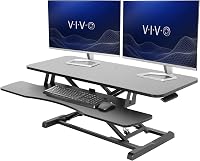
7 Best Standing Desk Converters for Laptops (November 2026)
The best standing desk converters for laptops include the VIVO Standing Desk Converter for wide laptop workstations, the VIVO Standing Desk Converter for dual monitors in less space, and the VIVO Standing Desk Converter for the largest laptop setup.
On this page (7 sections)
- The best standing desk converters for laptops
- Which laptop converter size should you choose?
- How much height range does a laptop converter need?
- Do you need a keyboard tray for a laptop?
- What capacity should a laptop standing desk converter have?
- How should you set up a laptop converter?
- Which standing desk converter is best for your laptop?
The best standing desk converter for laptop use is the VIVO Standing Desk Converter, 42" Black Top, because its wide 42 in surface, 33 lb desktop capacity and 4.5 to 20 in height range suit laptop and monitor work. Choose the VIVO 26 in model for a small desk, or the Hoodutric when you need the smallest desktop.
A converter lets you keep your existing desk while adding a seated-to-standing workstation. The main choice is not just the top width.
You also need enough height range for your body, a top that fits your laptop and accessories, and a keyboard setup that keeps typing comfortable.
This guide compares 7 models using their listed dimensions, adjustment systems, materials, capacity and included parts. Our score weighs specs, features and buyer feedback against what you're shopping for.
If you are starting with an ordinary desk, read how to convert a desk to a standing desk for the basic layout and setup decisions.
Our picks at a glance
-
1
-
2

-
3
- 4
 Check it
TechOrbits Black 32 in Standing Desk Converter
Best for a dual-monitor workstation - 5
 Check it
JOY worker 32" Standing Desk Converter
Best for a white home office - 6
 Check it
VIVO Single Top Standing Desk Converter
Best for small laptop desks - 7
 Check it
Hoodutric Standing Desk Converter Height Adjustable
Best for a compact single monitor
The best standing desk converters for laptops
The best overall laptop converter is the 42 in VIVO because it gives you the most useful mix of width, height and desktop capacity. The other picks are better when your desk is narrower, your setup is smaller, or you want a specific surface layout.
VIVO Standing Desk Converter: Best for wide laptop workstations
- 42 x 15.7 in top
- 4.5 to 20 in height range
- 33 lb desktop capacity
- Wide keyboard tray
The 42 in top gives a laptop and monitor setup more room than the smaller picks. Its manual lift range reaches 20 in and includes a keyboard tray that rises with the top.
Pros
- Widest top in the group
- 33 lb desktop capacity
- Minimal assembly
Cons
- Needs a wide existing desk
- Keyboard tray holds 4.4 lb
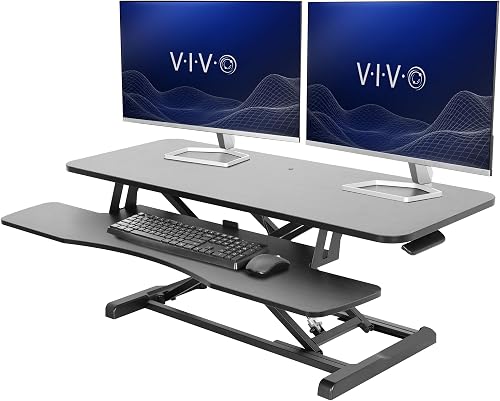
The VIVO Standing Desk Converter, 42" Black Top is the best fit for a laptop plus monitor setup that needs extra width. Its 42 x 15.7 in top leaves more room for a laptop, display and daily work items than the smaller VIVO models.
The desktop holds up to 33 lb, while the 42 x 11.8 in keyboard tray holds up to 4.4 lb. The tray raises with the top, so the keyboard can stay in the same general relationship to the display as you change height.
Its manual adjustment range runs from 4.5 to 20 in. The straight-up lift design uses a simple touch height-locking mechanism, which suits a user who wants to switch positions without using a motor.
The steel frame resists scratches, and the top is laminated. Assembly is limited to placing the riser on the existing desk and attaching the keyboard tray.
Choose this model when your desk can handle a 42 in wide converter and you want room for a laptop and dual-monitor-style workstation. The main trade-off is its footprint, since a wide top can crowd a smaller desk.
VIVO Standing Desk Converter: Best for dual monitors in less space
- 36 x 15.7 in top
- 4.5 to 20 in height range
- 33 lb desktop capacity
- Foldable design
This VIVO keeps the same 33 lb desktop capacity and 20 in maximum height as the wider model while using a 36 in top. It fits laptop and dual-monitor layouts when desk width is tighter.
Pros
- Good balance of width and capacity
- 33 lb desktop capacity
- Minimal setup
Cons
- Less surface than the 42 in model
- Keyboard tray holds 4.4 lb
The VIVO Standing Desk Converter, 36" Black Top is a strong middle option for laptop users who want a wide work area without moving to the 42 in version. Its 36 x 15.7 in top supports laptop and dual-monitor setups.
The desktop capacity is 33 lb, and the keyboard tray holds up to 4.4 lb. The 36 x 11.8 in tray raises in sync with the top, giving you a dedicated place for the keyboard and mouse.
The height range is 4.5 to 20 in. Its manual lift and simple touch height-locking mechanism let you set a seated or standing position without adding a motor or power cable to the desk.
The alloy steel frame has a black powder-coated finish. The converter also has a foldable design, and only partial assembly is required before use.
Pick this VIVO when 36 in of width fits your desk but the 26 in compact model would be too small. It gives you the same maximum height and desktop capacity as the 42 in version, with less surface area.
VIVO Standing Desk Converter: Best for the largest laptop setup
- 47.6 x 15.7 in top
- 4.5 to 20 in height range
- 33 lb desktop capacity
- Keyboard tray included
The 47.6 in top offers the most listed work surface here for a laptop, monitors and desk items. It uses a manual lift with a 20 in maximum height.
Pros
- Largest top in the group
- 33 lb desktop capacity
- Keyboard tray included
Cons
- Requires the most desk width
- Less compact for small work areas
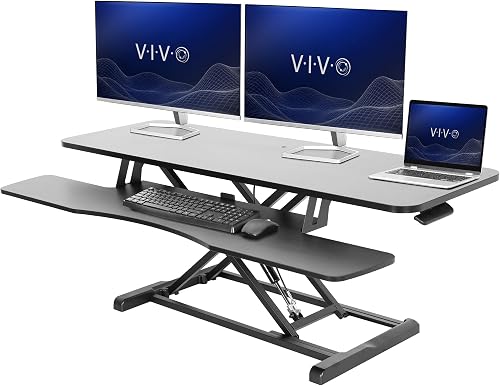
The VIVO Standing Desk Converter, 48" Black Top is the widest pick for a laptop workstation. Its 47.6 x 15.7 in top is useful when you want to keep a laptop, monitors and other work items on one surface.
The 33 lb desktop capacity matches the other full-size VIVO models. Its keyboard tray measures 47.6 x 11.8 in, with a 10.2 in center, and the tray raises with the top.
The converter adjusts from 4.5 to 20 in with a manual lift assist and straight-up movement. That range gives you room to set both seated and standing positions, provided the existing desk and your chair leave enough clearance.
The frame is alloy steel, while the top has a laminated finish. The keyboard tray is included, and assembly is required with instructions included.
This is the best choice for the largest laptop setup in this guide. Measure your desk width, depth and nearby wall or monitor clearance first, because the 48 in format is not intended for a tight workspace.
TechOrbits Black 32 in Standing Desk Converter: Best for a dual-monitor workstation
- 32 in wide work area
- 4.3 to 19.7 in height range
- 33 lb capacity
- Dual monitor stand included
The 32 in TechOrbits combines a 33 lb capacity with a dual monitor stand and keyboard tray. Its pneumatic lift adjusts from 4.3 to 19.7 in.
Pros
- Dual monitor stand included
- Pneumatic height adjustment
- Mostly assembled
Cons
- Deeper base dimensions need checking
- Particle board work surface
The TechOrbits Black 32 in Standing Desk Converter, OF-S05-1 suits laptop users who want a dual-monitor stand included with the workstation. Its 32 in width leaves room for a computer or laptop, dual monitors, keyboard, mouse and other office items.
The particle board work surface and aluminum frame support up to 33 lb. The pneumatic lift adjusts from 4.3 to 19.7 in, so it reaches nearly the same maximum height as the full-size VIVO models.
A dual monitor stand and keyboard tray are included. The converter comes mostly assembled, with the keyboard tray attached using the provided tools.
Its pedestal base has a deeper overall dimension than the simple top width suggests. Check the 16.1 in depth listed for the item dimensions, along with the larger 27.45 in item depth detail, before placing it on a shallow desk.
Choose TechOrbits when the included dual monitor stand matters. Choose a VIVO instead when you want a simpler wide riser or a 20 in maximum height.
JOY worker 32" Standing Desk Converter: Best for a white home office
- 31.5 x 15.7 in top
- 4.9 to 19.3 in height range
- 28.6 lb top capacity
- Removable keyboard tray
The white JOY worker uses a 31.5 in top and a removable keyboard tray for a laptop or monitor workstation. Its top holds up to 28.6 lb.
Pros
- White finish
- Removable keyboard tray
- Two-tier layout
Cons
- Lower capacity than the VIVO and TechOrbits picks
- Shorter maximum height than several options
The JOY worker 32" Standing Desk Converter, Height Adjustable Stand Up Riser is a useful fit for a white home office or a laptop station that benefits from two levels. Its top measures 31.5 x 15.7 in and holds up to 28.6 lb.
The 24.4 x 11.8 in keyboard tray is removable and raises with the top board. That gives you the option to keep the tray attached for keyboard work or remove it when you need a simpler surface.
Its height range runs from 4.9 to 19.3 in. The riser uses an engineered wood frame and a patented X-shaped frame design, with a white finish across the workstation.
The top and lower tier create space for a laptop, monitor and keyboard. The keyboard tray also has a raised edge, which can help keep small items from sliding forward during normal desk use.
Choose JOY worker when the white finish, removable tray and two-tier layout match your desk. Its 28.6 lb top capacity is lower than the 33 lb capacity on the larger VIVO and TechOrbits models.
VIVO Single Top Standing Desk Converter: Best for small laptop desks
- 26.4 x 18.5 in top
- 5 lockable height settings
- 17.6 lb capacity
- No assembly required
This compact single-top riser suits one laptop or one monitor and a full-size keyboard. Five lockable settings and a 17.6 lb capacity keep the setup simple.
Pros
- Smallest footprint
- Five lockable settings
- No assembly
Cons
- Lowest capacity in the group
- Single-top layout
The VIVO Single Top Standing Desk Converter, 26" Black Top is the best compact choice for a laptop or single-monitor station. Its ultra-slim 26.4 x 18.5 in desktop saves space compared with the wider two-tier converters.
The single top supports up to 17.6 lb. That is enough for a smaller setup, but it gives you less room for heavy monitor equipment or several large accessories than the 33 lb models.
Five lockable height settings sit at 8.5, 10.4, 12, 14.4 and 15.9 in. The resting height is 1.8 in from the desk surface, and a squeeze handle changes the position.
No assembly is required. The alloy steel, aluminum, engineered wood, plastic and PVC construction supports a compact workstation with a laminated finish.
Pick this model when your laptop setup needs a small riser and a full-size keyboard. It is not the right match for a wide multi-device workstation, since it has one level and the lowest capacity in this group.
Hoodutric Standing Desk Converter Height Adjustable: Best for a compact single monitor
- 24 x 13.8 in desktop
- 2.4 to 15.7 in height range
- Pneumatic lifting mechanism
- Metal frame
The Hoodutric takes the least desktop space among these picks, with a 24 x 13.8 in surface for a laptop or single monitor. Its pneumatic mechanism adjusts from 2.4 to 15.7 in.
Pros
- Compact desktop
- Low starting height
- Metal frame
Cons
- Smaller surface than the other picks
- Lower maximum height than the VIVO models
The Hoodutric Standing Desk Converter Height Adjustable is a compact option for a laptop or single monitor. Its 24 x 13.8 in desktop takes less space than every other model in this roundup.
The pneumatic lifting mechanism adjusts from 2.4 to 15.7 in. The low starting height helps it sit closer to an existing desk when you are working seated, while the maximum height is suited to a more limited standing range.
Its metal frame has a black lacquered finish. The included component is a mobile phone holder, and the converter comes with instructions for lifting and lowering operations.
The compact surface means you should plan the setup around the laptop or single monitor first. A separate keyboard, speakers or large accessories may leave less usable room than they would on the wider VIVO and TechOrbits tops.
Choose Hoodutric when desk space is the main limit and you want a low starting position. Choose the VIVO Single Top when you need more top area and more lockable height settings.
Which laptop converter size should you choose?
The best size depends on how many screens and accessories you want on the top. A laptop-only station can use a compact converter, while a laptop plus monitor needs more width and a clear keyboard area.
Start with the gear you will keep up top each day. A laptop, separate keyboard, mouse, speakers and notebook can fill a surface faster than they seem on paper.
For the widest workstation, the 47.6 in VIVO gives the most listed top area. That suits a large laptop setup with room to spread items out, but it asks a lot of the desk below.
The 42 in VIVO is slightly easier to fit while keeping a 33 lb desktop capacity and a 20 in maximum height. It suits people who want width for a laptop and monitor without committing to the largest option.
A 36 in or 32 in converter is a practical middle ground. These sizes can fit a laptop and monitor setup without taking as much width as the largest VIVO models.
The middle sizes also help when wall space, shelving or a chair edge limits how far a riser can sit. Measure the clear width of the desk, not the nominal size printed on the box.
The 26 in VIVO and 24 in Hoodutric are better for small desks. They suit a laptop or single monitor where a wide riser would leave little room for papers or other desk items.
Keep top dimensions separate from base dimensions when measuring. The supports can extend beyond the work surface, so a converter that looks right by top size may still crowd the desk.
Depth matters as much as width for daily use. A deeper top can hold a laptop and keyboard more comfortably, but a deep base can push the setup too far forward on a shallow desk.
Choose the size that leaves breathing room around the equipment you use most. Extra width helps only if your desk, chair and cable routing can handle it.
If you want a wide top without the largest footprint, the 42 in VIVO balances width, capacity and height for most laptop and monitor setups.
Measure width, depth and legroom before you place the riser. A converter can work well on a desk and still block drawers, shelves or the path of your chair.
How much height range does a laptop converter need?
A laptop converter needs enough height range to place the screen and keyboard comfortably in both seated and standing positions. The models here range from a 15.7 in maximum height on the Hoodutric to 20 in on several VIVO models.
A laptop screen often sits low when it rests directly on the converter. If you raise the laptop, plan how you will type, since a separate keyboard can give you more freedom to set the screen and hands at different heights.
Manual risers use handles or lift-assist systems, while the VIVO models here use manual height adjustment. The TechOrbits, JOY worker and Hoodutric models use pneumatic mechanisms or lift systems.
For more setup guidance, read How to Choose a Standing Desk: A Simple Guide. It can help you think through user height, available space and the difference between a converter and a complete desk.
Do you need a keyboard tray for a laptop?
A keyboard tray is useful when you want the laptop or monitor higher but still need a lower typing surface. It is less important for a laptop-only setup if you are comfortable using the built-in keyboard at the converter's chosen height.
The VIVO 42 in and 36 in models include wide trays that raise with the top. The JOY worker tray is removable, while the TechOrbits model includes a keyboard tray with its dual monitor stand.
The VIVO Single Top has one surface for the laptop and keyboard. The Hoodutric has a compact desktop, so measure your laptop and any separate keyboard before choosing it.
If you want to compare other manual lift designs, see our guide to the best manual standing desk converter. For a brand-focused comparison, read about the best FlexiSpot standing desk converter.
What capacity should a laptop standing desk converter have?
Choose a capacity that covers the laptop, monitor, keyboard and other items you will keep on the top. The full-size VIVO and TechOrbits models list 33 lb desktop capacities, while JOY worker lists 28.6 lb.
Weigh the items that will stay on the riser all day, not items you only add once in a while. A laptop as the main device leaves more headroom than a laptop plus a display.
Add a monitor arm, speakers, a charger brick and a notebook, and that spare room shrinks quickly. The 33 lb models give a workable margin for a laptop and monitor arrangement, as long as extra items stay at a sensible weight.
JOY worker lists 28.6 lb for the top tier. That still suits many laptop and monitor setups, but you need more care with heavier accessories.
The compact VIVO Single Top lists a 17.6 lb capacity. That is a better match for a laptop or single monitor than for a larger multi-device arrangement.
Think about where each item will sit before you buy. A monitor stand or mount can add weight that is easy to overlook when you focus only on the laptop.
The keyboard tray has its own limit on several models. The VIVO 42 in, 36 in and 48 in versions list a tray limit of 4.4 lb, so the keyboard and mouse need to stay within that range.
Capacity is only one part of fit. The top must also be wide enough for the equipment, and the existing desk must support the converter without crowding your chair or reducing legroom.
Check the height range as well, since a heavier setup can make manual lifting feel less smooth. A riser that lifts well when empty may feel different once a monitor and laptop are in place.
Keep the weight centered on the usable top area. Items pushed to the front edge can make a riser feel less steady during typing and mouse use.
For heavier setups, compare these models with the best heavy duty standing desk converter. That guide helps when your station includes heavier monitors or several devices.
How should you set up a laptop converter?
Start by measuring the existing desk, then place the converter so the laptop and keyboard can sit in a comfortable position. Leave enough space for the riser to move through its full height range.
Measure width, depth and legroom before you lift anything into place. Check that the converter will not block drawers, shelves or the path of your chair.
Place the riser squarely on the desk and check that the base sits flat. A slight angle at the start can make the whole workstation feel uneven once you begin typing.
Attach any keyboard tray or other included part according to the instructions. The VIVO 42 in model requires attaching its keyboard tray, while the VIVO Single Top needs no assembly.
Tighten the tray fixings and check them before you load the top. A tray that shifts during the first day can turn a simple setup into a daily annoyance.
Set the converter at a seated height first and arrange the laptop and keyboard. Sit with your feet supported, elbows relaxed and shoulders down, then adjust until typing feels natural.
Raise the riser slowly to a standing position and check the same points again. The height that suits sitting will rarely suit standing, so expect a second round of small adjustments.
Keep the laptop centered on the usable top area and stay within the stated capacity. For a pneumatic or manual riser, raise and lower it slowly while checking that cables do not catch.
Route cables with a little slack so the riser can move without pulling on plugs. A charging cable, display lead or charger brick should not tighten or snag as the top rises and falls.
Leave space behind the riser for cables and for the mechanism to move. Items stored directly behind the converter can interfere with motion or become hard to reach when raised.
Alternate sitting and standing instead of staying in one position all day. Use the change as a cue to move, stretch and reset your screen distance.
Wipe the top and tray with a soft dry cloth and check fixings from time to time. Keep the lifting parts clean and free of paper, cables and small items that can slip into the mechanism.
A calm setup is one you can adjust without thinking about it. When the base is flat, cables have slack and heights are marked, switching positions becomes simple.
Which standing desk converter is best for your laptop?
The 42 in VIVO is the best standing desk converter for laptop and monitor work when you have enough desk width. Its 33 lb desktop capacity, wide top and 4.5 to 20 in adjustment range give it the broadest everyday fit.
Choose the 36 in VIVO for a smaller dual-monitor-style workstation, or the 48 in VIVO when maximum surface area matters most. Choose TechOrbits if its included dual monitor stand fits your setup.
For a white two-tier workstation, choose JOY worker. For a small desk, choose the VIVO Single Top, and choose Hoodutric when the smallest desktop and low starting height matter most.
If you are still deciding between a converter and a full desk, compare the best ergonomic office desk with your existing workspace. Your final choice should match your laptop size, screen count, desk width and preferred seated-to-standing height range.
Our top 3 picks at a glance
-
1
-
2
-
3
Frequently asked questions
What is the best standing desk converter for a laptop?
The VIVO Standing Desk Converter, 42" Black Top is the strongest choice when you need room for a laptop and monitor. Its 42 x 15.7 in top, 33 lb desktop capacity and 4.5 to 20 in manual height range give you more workspace than the compact models.
Choose a smaller converter when desk width matters more than surface area.
Can a standing desk converter hold a laptop?
Yes. Every converter in this guide is described for laptop use or includes a desktop suitable for a laptop workstation.
Check the top dimensions and capacity before you buy.
A laptop-only setup needs less room than a laptop, monitor, keyboard and speakers together.
How high should a laptop standing desk converter be?
Set the converter so your elbows stay close to your sides and your hands rest comfortably while typing. The right height depends on your chair, desk, laptop position and body size.
A converter with a broad adjustment range gives you more room to find a workable seated and standing position.
Are standing desk converters good for small desks?
Yes. The VIVO Single Top Standing Desk Converter uses a 26.4 x 18.5 in top, while the Hoodutric uses a 24 x 13.8 in desktop.
Both suit a laptop or single-monitor setup where a wide riser would crowd the desk.
Measure the full base and top area before choosing.
Is a standing desk converter better than a standing desk?
A converter is usually the simpler choice when you already have a usable desk and want to switch between sitting and standing. A full standing desk gives you a larger height-adjustable work surface but replaces the existing desk.
Use our standing desk vs converter guide to compare the two setups.