9 Best Wide Standing Desk Converters (November 2026)
The best wide standing desk converters include the Vari Pro Plus 36 Standing Desk Converter for a polished dual-monitor setup, the VIVO Standing Desk Converter for the widest work surface, and the Rocelco 46" X-Frame Standing Desk Converter for up to 3 monitors.
On this page (5 sections)
The best wide standing desk converter for most large workstations is the Vari Pro Plus 36, with a 36 in upper tier, a lower keyboard deck and a fully assembled design. Choose the Rocelco for up to 3 monitors, the VERSADESK for electric lifting and heavy equipment, or VIVO for a 48 in surface.
Wide converters add horizontal room without requiring you to replace the existing desk. That makes them useful when your current workstation is sturdy but too small for multiple monitors, a laptop and the accessories you use every day.
It also makes them useful when your desk height is fixed and you want to change position during the day. You keep the same desk, chair and room layout, then lift the monitors and keyboard to standing height when you choose.
The trade off is that a converter sits on top of the desk rather than replacing it. You need to check the total footprint, the weight of the converter itself and the load your desk can carry with everything in place.
Width is the main reason to choose one of these models over a narrow riser. A wider upper surface gives dual monitors more separation and leaves room for a laptop, notebook or other items that would otherwise crowd the keyboard.
Depth matters too, because the keyboard tray needs its own space in front of the monitors. A converter with a shallow top may feel tight even when the headline width looks generous.
For most buyers, the middle ground works best for daily use. It gives clear room for a dual-monitor setup while still fitting on a standard desk without taking over the whole surface.
If you plan to add a monitor arm, check the rear space and cable routing before you buy. Some models have a grommet or a clamp point, while others rely on the monitor stands sitting on the top surface.
If you're unsure whether the converter will fit your room, start with How Much Space Do I Need for a Standing Desk?. For a full desk instead of a riser, compare our guide to the best large standing desk.
Our picks at a glance
-
1
 Best for a polished dual-monitor setup
Vari Pro Plus 36 Standing Desk Converter
9.7/10 our score
See it on Amazon -
2

-
3
 Best for up to 3 monitors
Rocelco 46" X-Frame Standing Desk Converter
9.3/10 our score
See it on Amazon
- 4
 Check it
TechOrbits Black 32 in Standing Desk Converter
Best for a compact wide setup - 5
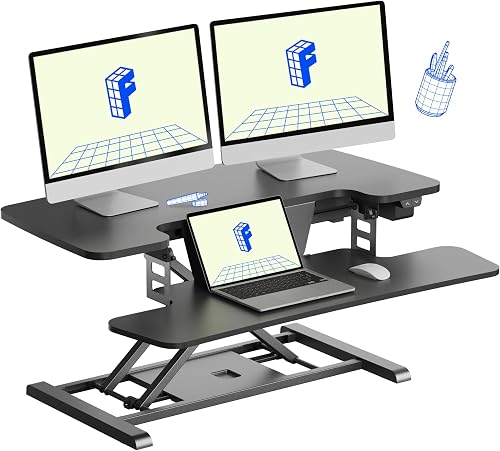 Check it
FLEXISPOT 35 inch Electric Standing Desk Converter
Best for push-button height changes - 6
 Check it
FITUEYES Height Adjustable Standing Desk 32” Wide
Best for a simple dual-monitor riser - 7
 Check it
VERSADESK PowerPro 48 Inch Electric Standing Desk
Best for heavy multi-monitor equipment - 8
 Check it
FLEXISPOT Standing Desk Converter 40" Large Desk
Best for a wide manual workspace - 9
 Check it
VIVO Manual Height Adjustable Standing Desk Converter
Best for a space-efficient budget setup
The best wide standing desk converters for large workstations
The best choice depends on the equipment you need to keep on the platform and how often you change height. Wider surfaces add room, but they also make the converter heavier and require more desk space.
We compared the stated dimensions, support limits, lift systems, tray layouts and setup requirements. Our score weighs specs, features and buyer feedback against what you're shopping for.
| Product | Best for | Width | Layout | Build | Our score |
|---|---|---|---|---|---|
| Vari Pro Plus 36 Standing Desk Converter | a polished dual-monitor setup | 36 in | Two-tier with keyboard tray | Alloy steel base and metal frame | 9.7 |
| VIVO Standing Desk Converter | the widest work surface | 9.5 | |||
| Rocelco 46" X-Frame Standing Desk Converter | up to 3 monitors | 9.3 | |||
| TechOrbits Black 32 in Standing Desk Converter | a compact wide setup | 31.5 in | 9.2 | ||
| FLEXISPOT 35 inch Electric Standing Desk Converter | push-button height changes | 9.2 | |||
| FITUEYES Height Adjustable Standing Desk 32” Wide | a simple dual-monitor riser | 9.0 | |||
| VERSADESK PowerPro 48 Inch Electric Standing Desk | heavy multi-monitor equipment | 48 in | Two levels with keyboard tray | 8.9 | |
| FLEXISPOT Standing Desk Converter 40" Large Desk | a wide manual workspace | 40 in | 8.6 | ||
| VIVO Manual Height Adjustable Standing Desk Converter | a space-efficient budget setup | 8.3 |
Vari Pro Plus 36 Standing Desk Converter: Best for a polished dual-monitor setup
- 36 in upper tier
- Two-tier workspace
- Keyboard tray
- Spring-assisted lift
- No assembly required
The Vari Pro Plus 36 gives a large monitor tier and a separate lower deck for keyboard and mouse. Its spring-assisted lift and fully assembled design suit buyers who want a wide converter with little setup.
Pros
- 36 in upper tier
- Fully assembled
- Two-tier workspace
Cons
- Less width than the 46 in and 48 in picks
- Manual height adjustment
The Vari Pro Plus 36 is the best all-around pick when you want a wide two-tier layout without assembly. Its 36 x 12.25 in upper tier gives 2 monitors room above a lower deck for the keyboard, mouse and other work items.
The lower deck keeps your input devices separate from the monitor tier. That layout can make a wide workstation easier to organize than a single flat surface.
Vari uses a thicker steel base, dual stability bars and a heavy base in this model. The frame is metal with an alloy steel base and a black 3D laminate finish.
The spring-assisted rowing lift is designed to reduce the strain of raising the converter. Dual handles and foam-wrapped steel are part of the lift design, while the included keyboard tray supports the two-tier layout.
It arrives fully assembled, so setup is mainly a matter of placing it on the existing desk or table. Choose it when you want a polished dual-monitor converter with a strong focus on ready-to-use setup.
VIVO Standing Desk Converter: Best for the widest work surface
- 47.6 in top surface
- 33 lb desktop capacity
- 4.5 to 20 in adjustment
- Keyboard tray
- Steel frame
VIVO offers one of the widest surfaces in this group for dual monitors, a laptop and other equipment. Its straight-up lift keeps the depth more predictable while the keyboard tray rises with the top.
Pros
- Very wide top
- 20 in maximum adjustment
- Minimal assembly
Cons
- Lower desktop capacity than the heaviest-duty picks
- Keyboard tray holds 4 lb
The VIVO 48 in converter is the widest top surface in this roundup. Its 47.6 x 15.7 in platform gives dual monitors and a laptop more horizontal room than the 31.5 to 36 in models.
The desktop supports up to 33 lb, while the keyboard tray supports up to 4 lb. Keep the heavier equipment on the main surface and use the tray for the keyboard and other lighter input devices.
Its simple-touch height lock adjusts from 4.5 to 20 in. The lift moves straight upward, so the platform doesn't need to swing forward as you raise it.
The steel frame has a laminated top, and the keyboard tray rises with the main surface. It requires only minimal assembly, since you place the riser on the desk and attach the tray.
This is the strongest fit for buyers who want the most horizontal room while keeping the equipment load within 33 lb. For a heavier multi-monitor setup, compare it with the VERSADESK below.
Rocelco 46" X-Frame Standing Desk Converter: Best for up to 3 monitors
- 45.7 in platform
- 45 lb support
- Retractable keyboard tray
- Dual gas-shock lift
- Fully assembled
The Rocelco combines a wide and deep platform with a retractable tray and dual gas-shock lift. It is a strong match for buyers planning a three-monitor workstation on an existing desk.
Pros
- 45.7 in width
- 45 lb support
- Tray retracts when not needed
Cons
- 42 lb item weight
- Optional monitor arm sold separately
The Rocelco 46 in model is the best choice when your wide workstation needs up to 3 monitors. Its 45.7 x 23.6 in work surface gives it both width and depth for monitors, a laptop and other work essentials.
Its retractable keyboard tray measures 25.6 x 11.25 in. Pull it out for typing, then slide it back when you want the front of the converter clear.
Two gas-assisted lift mechanisms support up to 45 lb. The height adjusts from 5 to 20 in above the existing desktop, and the platform lifts straight up instead of extending outward.
A rear grommet helps route cables or support an optional Rocelco monitor arm. The converter arrives fully assembled, but monitor arms and floor stands are separate items.
Choose Rocelco when three-monitor capacity and a deep platform matter more than a compact footprint. Its 42 lb weight also means your existing desk should be able to support the converter and its equipment.
TechOrbits Black 32 in Standing Desk Converter: Best for a compact wide setup
- 32 in width
- 4.3 to 19.7 in adjustment
- Dual monitor stand
- Keyboard tray
- Mostly assembled
The TechOrbits converter adds room for a computer, dual monitors, keyboard, mouse and speakers without using the width of the largest models. Its included dual monitor stand gives the compact platform a focused workstation layout.
Pros
- Included dual monitor stand
- Nearly assembled
- 19.7 in maximum height
Cons
- 33 lb maximum support
- Requires keyboard tray attachment
The TechOrbits 32 in converter suits a smaller workstation that still needs room for dual monitors and desk accessories. Its 31.5 in width leaves less horizontal clearance than the large picks, but it can hold a computer or laptop, dual monitors, keyboard, mouse and speakers.
The top supports up to 33 lb. Height adjusts from 4.3 to 19.7 in with a pneumatic lift and an aluminum frame.
This model includes a dual monitor stand and keyboard tray. It arrives mostly assembled, with the tray attached using the provided tools.
The particle board work surface and steel materials give it a different feel from the metal-heavy frames in this roundup. Measure the desk depth carefully because the full item depth is 27.45 in.
Pick it when your setup needs a useful amount of width but the 40 in and larger converters would crowd the room. The included monitor stand may also help keep the desktop more organized.
FLEXISPOT 35 inch Electric Standing Desk Converter: Best for push-button height changes
- Electric lift
- 5.7 to 19.7 in adjustment
- 55 lb total support
- 35 in desktop
- 34.6 in keyboard tray
The FLEXISPOT EMT137 uses a one-touch electric control instead of a manual lift. Its 55 lb total support and wide keyboard tray suit a monitor-and-laptop setup with heavier equipment.
Pros
- Electric height adjustment
- 55 lb total support
- Nearly fully assembled
Cons
- Requires power for height changes
- Heavier 38 lb design
The FLEXISPOT 35 in electric converter is the right fit when you want push-button height changes on a medium-wide platform. Its 35 x 16.3 in desktop and 34.6 in keyboard tray provide room for a laptop, monitor, notebooks and other office items.
The motorized lift adjusts from 5.7 to 19.7 in. A one-touch control panel handles the movement, so you don't need to lift the platform manually.
The total support is 55 lb, divided into 44 lb for the desktop and 11 lb for the keyboard tray. Keep the equipment weight within those separate limits rather than treating the two surfaces as one load area.
The metal frame has a black polished finish. The converter arrives nearly fully assembled, with the keyboard tray requiring attachment.
Choose it when you change height often and want electric control without moving to the 48 in VERSADESK. Remember that an electric lift needs access to power near the desk.
FITUEYES Height Adjustable Standing Desk 32” Wide: Best for a simple dual-monitor riser
- 31.5 in work surface
- 4.3 to 19.8 in range
- 33 lb capacity
- Dual gas spring force
- Keyboard tray
FITUEYES keeps the layout simple with a two-level metal converter, a keyboard tray and dual gas spring adjustment. It fits users who want room for 2 monitors without moving to a 40 in or larger platform.
Pros
- Dual gas spring adjustment
- 33 lb capacity
- Suitable for dual-monitor layouts
Cons
- Narrower than the largest picks
- Easy assembly required
The FITUEYES 32 in converter is a simple option for a dual-monitor or laptop-and-monitor setup. Its 31.5 x 15.7 in top provides more room than a narrow riser while staying smaller than the 40 in and 48 in choices.
Its dual gas spring force adjusts the platform from 4.3 to 19.8 in. The base supports up to 33 lb, and the included keyboard tray creates a second level for typing.
The metal frame has a black powder-coated finish. The item is designed as a freestanding tabletop workstation with a rectangular shape.
FITUEYES lists an easy assembly process, so plan for setup before using it. Check the complete converter footprint against the desk, since the item dimensions extend beyond the top surface.
Choose this model when you want a straightforward manual converter for 2 monitors. For an assembled-out-of-the-box option, the Vari or Rocelco models are stronger matches.
VERSADESK PowerPro 48 Inch Electric Standing Desk: Best for heavy multi-monitor equipment
- 48 in width
- Electric height adjustment
- 80 lb support
- Built-in USB port
- Three grommet holes
The VERSADESK PowerPro is the heavy-duty electric choice in this group. Its 48 in split-level workspace, 80 lb support and cable-routing holes fit a large multi-monitor station.
Pros
- Highest support rating here
- 48 in width
- Electric lift with USB port
Cons
- Monitor arms sold separately
- Electronics have a 1-year warranty
The VERSADESK PowerPro 48 is the heavy-duty electric option in this roundup. Its 48 in split-level workspace supports up to 80 lb, giving it the highest stated support limit among these picks.
The push-button motor raises and lowers the converter, and the design includes a child safety lock. Three grommet holes help route cables and support optional monitor-arm setups.
A built-in USB port keeps charging available at the workstation. The engineered wood surface has a heavy-duty, scratch-resistant laminate finish.
The two-level layout separates the monitor area from the keyboard tray. Monitors and monitor arms are not included, so account for those components when planning the final setup.
Choose the PowerPro when your equipment is heavier than the 33 lb range of several manual models. Its broad 48 in footprint needs a large, stable desk, and the electronics have a 1-year manufacturer warranty while the frame has a lifetime manufacturer warranty.
FLEXISPOT Standing Desk Converter 40" Large Desk: Best for a wide manual workspace
- 40 in workspace
- Spring lift system
- 33 lb top support
- 4.4 lb keyboard tray
- Reinforced steel frame
This FLEXISPOT gives you 40 in of width for dual monitors, a laptop and desk accessories. Its mechanical spring system offers manual adjustment without the power connection needed by an electric converter.
Pros
- 40 in workspace
- Mechanical spring system
- Almost fully assembled
Cons
- 33 lb top support
- Keyboard tray holds 4.4 lb
The FLEXISPOT 40 in converter gives you a broad manual workspace for multiple devices. Its 40 in surface is suited to dual monitors, a laptop and office accessories when 31.5 in feels too tight.
The top supports up to 33 lb, while the keyboard tray holds 4.4 lb. Keep the monitor and laptop load on the top and use the tray for the keyboard.
Its patented mechanical spring system provides the height adjustment. The reinforced steel frame and thickened square tubes are designed for stability at different heights.
The converter arrives almost fully assembled, with the keyboard tray requiring attachment. It uses an engineered wood surface with a polished finish.
Choose this model when you want more width than the 32 in and 35 in converters but prefer a manual lift. If you need electric adjustment or more than 33 lb on the top, the VERSADESK or FLEXISPOT EMT137 may fit better.
VIVO Manual Height Adjustable Standing Desk Converter: Best for a space-efficient budget setup
- 31.5 in surface
- 4.5 to 20 in adjustment
- 33 lb desktop capacity
- Wide keyboard tray
- Steel design
The VIVO DESK-V000K offers a 31.5 in surface and a straight-up manual lift for a dual-monitor or laptop setup. It is a practical choice when you want wide desk-converter space without a larger platform.
Pros
- 20 in maximum adjustment
- 33 lb capacity
- Minimal assembly
Cons
- Smallest surface group
- Manual lift
The VIVO 32 in manual converter is the space-efficient choice for a dual-monitor workstation. Its 31.5 x 15.7 in top gives you room for 2 monitors while keeping the surface smaller than the 40 in and larger models.
The straight-up lift adjusts from 4.5 to 20 in and supports up to 33 lb on the desktop. Its 31.3 x 11.8 in keyboard tray rises with the main platform.
The frame uses high-grade alloy steel with a black painted finish. The converter needs minimal assembly, with the tray attached before you organize the workstation.
This model suits a desk that cannot spare the extra width of a 40 in converter. Measure the full base and tray area because the top measurement alone doesn't describe the complete footprint.
Choose it for a simple manual setup with a 20 in maximum adjustment. If you need a deeper platform, a wider keyboard tray or more support, move up to the VIVO 48 in or Rocelco 46 in model.
How do you choose a wide standing desk converter?
Choose the width by counting the equipment that must stay on the upper surface. A dual-monitor setup may fit a 31.5 to 36 in model, while a three-monitor arrangement or a monitor-and-laptop layout may need 40 to 48 in.
Start with the monitors themselves and measure the distance between their outer edges. Add the space you need for stands, a laptop, speakers or a notebook you use during calls.
Then check the keyboard tray as a separate area. The tray needs enough width for your keyboard and mouse, and it should sit at a height that keeps your arms comfortable.
Depth matters just as much as width. A converter can be wide but still leave little room for the keyboard tray, monitor bases or desk edge, so measure the complete footprint before you buy.
Measure your existing desk from front to back as well as side to side. The converter base, tray and lifting frame may need more depth than the top surface alone suggests.
A straight up and down lift can help on a shallow desk because the platform does not swing forward as it rises. That is different from a lift that moves outward and needs clear space in front of the desk.
Check the support limit for the desktop and for the tray on their own. Several models in this group list 33 lb for the top and a much lower limit for the tray, so heavier items belong on the main surface.
Daily use also depends on how you place the equipment. Keeping monitors centered and the keyboard aligned can make a smaller surface feel more open.
If you switch between sitting and standing often, consider how you will raise and lower the converter. A manual lift needs a clear grip and enough strength from you, while an electric lift needs a power connection close by.
Our guide to What Size Standing Desk Do I Need? What to Know can help you compare the converter footprint with your room and existing desk.
Take your time with the measurements before ordering. A wide converter that does not fit your desk or your equipment will be harder to use than a smaller model that matches the space well.
Should you choose manual or electric height adjustment?
Choose manual lifting when you want a simpler converter without a power connection. Choose electric lifting when you change height often and want button control.
Manual models suit a desk where an outlet is far away. You squeeze a handle or use a lift mechanism, then lock the platform at the height you want.
Electric models suit a routine where you move up and down several times in a day. A button makes that change easier when the platform carries monitors and a laptop.
The FLEXISPOT 35 in uses a motorized lift from 5.7 to 19.7 in. It is one of the two electric options in this group.
The VERSADESK PowerPro also uses electric adjustment, with an 80 lb limit, USB charging and three grommet holes. Those details help with charging and cable routing as the platform moves.
The FLEXISPOT 35 in supports 55 lb in total, with 44 lb on the desktop and 11 lb on the keyboard tray. That split matters when you plan where each piece of equipment will sit.
Keep heavier items on the desktop rather than the tray. Treat the two surfaces as separate load areas with separate limits.
Manual options cover a wide range of sizes. Vari uses a spring-assisted lift, Rocelco uses dual gas-shock mechanisms, and the FLEXISPOT 40 in uses a mechanical spring system.
The Vari Pro Plus 36 uses a rowing lift and spring-assisted mechanism designed to reduce strain. Dual handles and foam-wrapped steel are part of that design.
The Rocelco 46 in uses two gas-assisted lift mechanisms and adjusts from 5 to 20 in above the existing desktop. Its platform lifts straight up, which can suit a desk with limited depth.
The FLEXISPOT 40 in uses a mechanical spring system rather than a motor or gas spring. That suits buyers who want manual adjustment without a power connection.
VIVO, TechOrbits and FITUEYES also use manual lifting across their 31.5 to 48 in models. Their height ranges are similar, so surface size, tray layout and load limit set them apart.
Keep the lift area clear and route cables so they do not pull as the platform moves. Also check that the tray and top stay within their listed limits.
There is no clear winner for every desk. The right choice depends on how often you change height, where the outlet is and how heavy your setup is.
What should you check before placing a wide converter?
Check the existing desk width, depth and support before placing a converter. The base, keyboard tray and equipment all add load and take space beyond the headline width.
Measure the desk with the converter in mind rather than looking at top width alone. The base may extend past the surface, and the tray may need room to pull out or sit in front of the desk edge.
Check how sturdy the desk feels when you press down near the center and near the edges. A converter works best on a flat, stable desk that does not wobble under the added weight.
Keep the converter centered on a stable surface. Leave room for the platform to move through its adjustment range, and route cables so they do not catch as the converter rises.
Leave clear space behind the monitors for cables, a monitor arm clamp or a grommet. Some models use the rear area for cable routing, so a tight gap can make setup harder.
Route power and display cables with extra length for the highest position. That helps prevent pulling or tangling when you lower the platform back to sitting height.
Check the load limits for each level before you load the surface. Keep heavier monitors and a laptop on the main desktop, and keep the keyboard tray within its lower limit.
A wide model can crowd a small desk even when the top width seems to fit. Also check the room around the desk for standing space and chair movement.
You need space to stand, move the chair back and pull the keyboard tray out without hitting other furniture. This matters most in a tight office or bedroom setup.
For a room that also needs drawers or shelves, compare the best large standing desk with storage options. If appearance matters, the best white large standing desks may be a better fit than a black desktop riser.
A few minutes of measuring can prevent a poor fit. Confirm desk size, support, cable route and standing space before you place the converter.
What is the best wide standing desk converter for you?
Pick the Vari Pro Plus 36 if you want the best balance of wide workspace, two-tier organization and no assembly. Pick the Rocelco 46 in for up to 3 monitors, the VERSADESK PowerPro 48 for electric lifting and 80 lb support, or the VIVO 48 in for the widest top surface.
The Vari Pro Plus 36 has a 36 x 12.25 in upper tier for 2 monitors and a lower deck for keyboard, mouse and more. It arrives fully assembled, so you mainly need to place it on your current desk.
The Rocelco 46 in has a 45.7 x 23.6 in work surface and supports up to 45 lb. Its retractable keyboard tray measures 25.6 x 11.25 in and can hold a laptop when needed.
The VERSADESK PowerPro 48 has a 48 in split-level workspace with an 80 lb load capacity. It also includes a built-in USB port, three grommet holes and a child safety lock for the electric lift.
The VIVO 48 in has a 47.6 x 15.7 in top surface and adjusts from 4.5 to 20 in. Its desktop supports up to 33 lb, while the keyboard tray supports up to 4 lb.
Choose the FLEXISPOT 35 in when button control matters on a medium-wide platform. Its electric lift adjusts from 5.7 to 19.7 in, with 44 lb on the desktop and 11 lb on the keyboard tray.
Choose the FLEXISPOT 40 in when you want more width with a manual spring lift. Its top supports up to 33 lb and the keyboard tray holds 4.4 lb.
Choose the TechOrbits, FITUEYES or VIVO 32 in when your desk has less room but still needs space for dual monitors. Each has a 31.5 in class surface and a manual lift, with details that vary by model.
The TechOrbits 32 in includes a dual monitor stand and keyboard tray and adjusts from 4.3 to 19.7 in. The FITUEYES 32 in adjusts from 4.3 to 19.8 in with dual gas spring force.
The VIVO 32 in manual model adjusts from 4.5 to 20 in and supports up to 33 lb on the desktop. Its keyboard tray measures 31.3 x 11.8 in and rises with the platform.
For a full-size desk rather than a converter, compare the best standing desk for dual monitors options before deciding which type fits your workstation.
Match the pick to your equipment first, then to desk size and lifting preference. That order helps you choose a wide converter that fits your setup rather than one that only looks wide on paper.
Our top 3 picks at a glance
-
1
Best for a polished dual-monitor setup
Vari Pro Plus 36 Standing Desk Converter
9.7/10 our score
See it on Amazon -
2
-
3
Best for up to 3 monitors
Rocelco 46" X-Frame Standing Desk Converter
9.3/10 our score
See it on Amazon
Frequently asked questions
What is the best wide standing desk converter?
The Vari Pro Plus 36 is the best wide standing desk converter for most buyers because it combines a 36 in upper tier, a lower keyboard deck, spring-assisted lifting and no assembly. Choose a wider VIVO, Rocelco or VERSADESK model when your setup needs more than 36 in of horizontal space.
How wide should a standing desk converter be?
Choose the width by the equipment you keep on the upper surface. A 31.5 to 35 in converter can suit a laptop and monitor setup, while a 40 to 48 in model gives more room for dual monitors, a laptop and desk accessories.
Measure the current desk and leave room for the converter base.
Can a wide standing desk converter hold 3 monitors?
Some can. The Rocelco 46 in model is described for up to 3 monitors and supports up to 45 lb, while the VERSADESK PowerPro 48 supports up to 80 lb and is designed for multi-monitor setups.
Check the total weight and monitor-arm arrangement before loading the surface.
Are electric standing desk converters better than manual models?
Electric converters make height changes with a button, which can be useful when you move between sitting and standing often. Manual models avoid the need for a power connection and can still offer broad height ranges.
Choose FLEXISPOT or VERSADESK for electric lifting, or choose a manual model when simplicity matters more.
How much desk depth does a wide converter need?
Depth varies by model. The Rocelco 46 in converter has a 23.6 in deep work surface and lifts straight upward, with about 23 in of desk depth needed.
Measure the full base and tray area, not just the top width, before placing a converter on an existing workstation.


