Can You Replace Logitech Wave Replacement Keys?
Logitech Wave replacement keys are not a simple universal part. Compatibility depends on the exact Wave keyboard version, and many repairs are limited to carefully reseating a loose key.
On this page (9 sections)
- Can you replace keys on a Logitech Wave keyboard?
- Which Logitech Wave model do you have?
- Are Logitech Wave Keys and Wave Keys for Business parts interchangeable?
- How should you remove a loose key?
- Can cleaning fix a Logitech Wave key that feels stuck?
- Which replacement keyboard can help if a key cannot be matched?
- Should you buy a donor keyboard for one missing key?
- Can a replacement key restore the whole keyboard?
- What is the safest choice for Logitech Wave replacement keys?
Logitech Wave replacement keys are not universal parts. A loose key may be reseated, but a broken cap, hinge, or switch often needs a matching donor part or a replacement keyboard.
That distinction matters because a repair that looks simple can turn into wasted time when the parts do not align. A key that sits correctly from above may still fail if its underside mount or stabilizer points differ.
The name “Wave” covers more than one Logitech keyboard design. Before buying a keycap, find the model number on the keyboard and match the key position, shape, and underside mount.
This step suits anyone who wants to keep a keyboard in use rather than replace it for one damaged key. It also helps you avoid buying a part that fits another Wave generation but not the one on your desk.
Take a clear photo of the model label before you search for parts. That photo makes it easier to compare listings, ask for help, and keep the cap, hinge, and switch details straight.
When the model cannot be confirmed, pause before ordering. A replacement keyboard is often the safer choice if the correct key mechanism remains unclear.
Can you replace keys on a Logitech Wave keyboard?
You can sometimes reseat a loose key, but replacing a broken key is model-specific. The cap, hinge, and switch underneath must all match the keyboard.
A key that has simply popped off may still have an intact hinge. Look for cracks, missing clips, or a bent scissor mechanism before pressing it back into place.
Do not force a key onto the switch. A cap that looks similar from above may use a different underside mount.
For broader advice on choosing a keyboard and mouse setup, see our ergonomic keyboard mouse guide.
Which Logitech Wave model do you have?
Identify the exact model before searching for Logitech Wave replacement keys. “Wave” describes a family of keyboard shapes, not one universal keycap standard.
Check the label on the underside, the original packaging, or the keyboard settings used with the device. Record the model number and the key that needs repair.
The key position matters too. A letter key, spacebar, shift key, and enter key can use different stabilizer parts or lengths.
If your keyboard is the Wave Keys model, our guide to Logitech Wave Keys with a Mac covers the operating-system question separately from physical key compatibility.
Are Logitech Wave Keys and Wave Keys for Business parts interchangeable?
Do not assume that Logitech Wave Keys and Wave Keys for Business share replacement key parts. Compare the model number and the underside of the exact key before buying.
Two keyboards can have similar wave-shaped layouts while using different keycap mounts. A compatible-looking cap may not attach securely or may sit at the wrong height.
Our comparison of Logitech Wave Keys vs. Wave Keys for Business can help you separate the models before you search for a donor part.
What should you check under a damaged key?
Check the keycap clips, hinge, switch, and stabilizer points. These parts show whether the problem is a loose cap or a deeper mechanical failure.
Use a bright light and avoid scraping the switch. Photograph the key position and underside before removing anything else, especially if you are comparing a replacement part.
If the plastic hinge is cracked, glue can interfere with key travel. A matching replacement cap or keyboard is safer than forcing the damaged piece back into place.
How should you remove a loose key?
Use a plastic keycap puller and gentle upward pressure only when the key is designed to come off. Do not twist the cap or pry against the keyboard shell.
For a key that has already lifted, check whether the hinge stayed attached to the keyboard or the cap. Keep every small part together while you compare it with a replacement.
Avoid metal tools, knives, and screwdrivers. They can mark the cap, damage the switch, or catch nearby keys.
If the key does not lift with light pressure, stop and check the model documentation. Logitech's support site is the right place to search by model number and confirm available help.
Can cleaning fix a Logitech Wave key that feels stuck?
Cleaning can help when dust or crumbs interfere with key movement, but it cannot repair a broken hinge or switch. Disconnect the keyboard or turn it off before cleaning.
Hold the keyboard so loose debris can fall away, then use a soft brush or brief bursts of air around the affected key. Keep liquids away from the keyboard.
Do not spray cleaner directly into the switch. If a key still sticks after dry cleaning, inspect the cap and hinge rather than pressing harder.
For general desk comfort and input-device choices, our article on Logitech Wave Keys and Lift together explains how those products can fit into one workstation.
Which replacement keyboard can help if a key cannot be matched?
A replacement keyboard makes more sense when the correct keycap or hinge cannot be confirmed. Choose by layout, operating system, connection type, and the way you use the desk.
The Logitech MK270 has a full-size QWERTY layout with F-keys, a number pad, arrow keys, and 8 multimedia hotkeys. Its wireless connection uses one included USB receiver, and it is compatible with laptops and PCs running Windows.
Its spill-resistant design, adjustable-height tilt legs, and low-profile quiet keys suit a basic desk setup. The trade-off is that it is a standard full-size keyboard, so it does not provide the compact wave-shaped layout of Wave Keys.
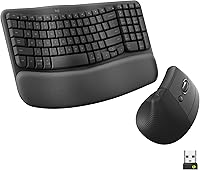
The Logitech Wave Keys MK670 combines a Wave Keys wireless keyboard with a Signature M550 L wireless mouse. The keyboard has 99 keys, a cushioned memory-foam palm rest, and connections through Bluetooth or Logi Bolt.
Its compact keyboard brings the mouse closer to your body, while the wavy design places hands, wrists, and forearms in a natural typing position. The trade-off is that a replacement combo may be more than you need if only one loose key needs reseating.
For a closer look at that setup, read our Logitech Wave Keys and Lift combo review.
Should you buy a donor keyboard for one missing key?
A donor keyboard can work only when its exact model and key mechanism match. Similar color, layout, or branding is not enough.
Compare the donor's model number, key position, cap shape, hinge, and stabilizer points. Avoid assuming that a keyboard from another Wave generation will supply a compatible part.
Check the full key size as well, since larger keys can use different support parts than standard letter keys. A small mismatch may leave the replacement cap loose, uneven, or slow to return after a press.
A donor keyboard may also have hidden wear. If several keys are failing, a complete replacement can be easier to identify and maintain.
That trade-off suits a keyboard with one isolated failure and an otherwise sound frame. It suits less well when the switch itself is worn, because a donor cap cannot restore reliable travel on its own.
Look beyond the single key before you buy. Check nearby keys for looseness, check the shell for cracks, and confirm that the keyboard still pairs and charges or runs on batteries as expected.
If the donor comes from a different model, ask the seller for the label details and a view of the underside of the key. A clear match on those points is worth more than a listing that only promises broad Wave compatibility.
Keep the old keyboard until the replacement key has been tested. That gives you a fallback if the cap does not seat properly or if another part needs attention.
Can a replacement key restore the whole keyboard?
A replacement cap restores only the key area that is damaged. It does not fix a failed switch, wireless connection, battery problem, or cracked keyboard frame.
Test the key gently after reseating it. It should sit level, move without catching, and return after a light press.
Press the surrounding keys too, since a forced repair can disturb a nearby cap or hinge. A stable result across that small area is a better sign than a single press that happens to work.
If the key remains unreliable, use the model number when contacting Logitech support. Keep the keyboard away from spills while deciding whether to repair or replace it.
What is the safest choice for Logitech Wave replacement keys?
Choose repair only when the model matches and the key mechanism is intact. Choose a complete replacement when the hinge or switch is broken, several keys are damaged, or the correct part cannot be verified.
Wave Keys owners should compare the exact model before buying a donor cap. Readers who want the same general ergonomic design can consider the Logitech Wave Keys MK670 combo, while readers who prefer a standard full-size layout can consider the MK270.
If your question is part of a larger standing-desk setup, What Is a Sit-Stand Workstation? Key Facts explains how the keyboard fits into the complete workstation.
For a different desk structure, see What Is a Cross-Frame Standing Desk? Key Facts.
The repair rule is simple: match the model first, inspect the hinge second, and replace the keyboard when the mechanism cannot be confirmed. For another ergonomic keyboard option, compare our Logitech ERGO K860 review.
Frequently asked questions
Can you replace keys on a Logitech Wave keyboard?
Sometimes, but Logitech Wave replacement keys are not automatically interchangeable across keyboard versions. A loose key may be reseated if its clip and switch are undamaged, but a broken cap or hinge usually requires a compatible donor part or keyboard replacement.
Check the exact model before ordering anything.
Are Logitech Wave Keys and Wave Keys for Business keycaps interchangeable?
Do not assume that Logitech Wave Keys and Wave Keys for Business use interchangeable keycaps. Their layouts, mounting parts, and model details may differ.
Compare the exact model number and key position, then confirm compatibility with Logitech support before buying a replacement.
Can you remove a Logitech Wave keycap?
A keycap can sometimes be lifted with a plastic keycap tool, but removal can break the cap hinge or scissor mechanism. Use light, even pressure and stop if the key resists.
For a damaged or missing key, identifying the exact keyboard model matters more than forcing the cap off.
Is it better to repair or replace a Logitech Wave keyboard?
Repair is reasonable when one key is loose and the cap, hinge, and switch still look intact. Replacement is usually simpler when several keys are damaged, the hinge is broken, or a compatible cap cannot be confirmed.
Compare the keyboard's model number before choosing a donor keyboard.