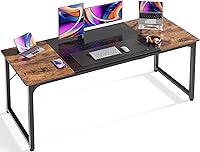
Monitor Arm vs Stand: Which Should You Choose? (November 2026)
Pick a monitor arm for flexible height, reach and desk space, and pick a stand for simple setup and stable shelf height. In this monitor arm vs stand comparison, the right choice depends on your screen size, desk thickness and how often you move the display.
On this page (14 sections)
- Monitor arm vs stand: the quick verdict
- Desk space: arm lifts clear, stand sits on top
- Height and reach: fixed steps vs fine adjustment
- Angles: tilt, swivel and rotation
- Mounting and desk fit: clamp, grommet or no mount
- Screen fit: size, weight and VESA holes
- Setup time and daily use
- Stability and wobble
- Standing desk use: does the support move with you?
- Which arm type fits your screen?
- Stands and risers: when a shelf is enough
- Who should buy which?
- Care and long-term use
- Final verdict on monitor arm vs stand
Pick a monitor arm for flexible height, reach and desk space, and pick a stand for simple setup and stable shelf height. In this monitor arm vs stand comparison, your desk material and screen weight decide the fit as much as your work style does.
A monitor stand vs monitor arm choice is about control. If you plan to mount two screens, compare a dual monitor arm with two single arms.
An arm moves in height, distance and angle through the day.
A stand gives fixed heights and stays put.
We compared 3 arms and 1 stand on size, weight, desk fit, mounting and motion. Scores reflect specs and buyer feedback, not price.

Monitor arm vs stand: the quick verdict
The arm wins on adjustment and desk space, while the stand wins on simple, no-drill setup. The arm raises a screen to eye level and pulls it close.
The stand raises a screen a few inches and leaves the desk otherwise unchanged.
Ask how often you move your screen for calls, coding, gaming or shared viewing. Frequent moves favor an arm.
If you want lift today with no tools or clamping, the stand is easier. A laptop stand can also raise a portable computer for desk work.
Set the legs, place the screen and work.
A full monitor arm mount guide helps match arm type to desk. Read it before measuring for clamps.
Desk space: arm lifts clear, stand sits on top
An arm frees the area under the screen, while a stand uses that area for its shelf.
The WALI stand has a 14.6 x 9.3 in metal shelf. It fits most displays, laptops and printers, supports up to 44 lb, and leaves open space below for a keyboard or notebooks.
That space is shorter than under an arm. A keyboard slides under easily, while a dock or tall notebook may not fit.
All 3 arms lift screens fully off the desktop. For a dual screen option, read the Ergotron LX dual monitor arm review.
The HUANUO dual arm lifts both screens for keyboard, notebook or dock space.
The single arms do the same for one screen.
Arms route cables along the arm. The stand has no cable path, so cords can cross the desk.
On a narrow desk, an arm helps more. It moves the screen toward the back edge and leaves the front free.
Height and reach: fixed steps vs fine adjustment
A stand gives 3 heights, while an arm gives small height moves plus reach in and out.
The WALI stand raises a device by 3.9, 4.7 or 5.5 in. You press a leg button and lift.
You cannot choose a spot between steps.
The HUANUO dual arm raises each screen up to 15.75 in. You can pull a screen close for detail or push it back for video.
The WALI single arm extends 19.3 in and raises up to 17.3 in. The ErGear arm reaches 18.1 in and raises up to 17.5 in.
Taller users often need more than 5.5 in of lift. An arm can place the top line near eye level sitting or standing.
Eye level placement helps neck and shoulder comfort for many people. It does not treat a health issue, so talk with a doctor about pain.
Angles: tilt, swivel and rotation
An arm turns the screen for glare, sharing and portrait work, while a stand keeps it fixed forward.
The HUANUO dual arm offers +85°/-50° tilt, ±90° swivel and 360° rotation. You can rotate to portrait for coding or turn toward a guest.
The WALI single arm swivels +180°/-180°, tilts +70°/-45° and rotates 360°. That wide swivel helps calls and side documents.
The ErGear arm offers +80°/-50° tilt, ±90° swivel and 360° rotation. It covers the same jobs with less swivel than WALI.
The WALI stand has no tilt, swivel or rotation. You can move the whole stand, but the angle stays fixed.
Swivel saves chair moves when you share files beside you. Portrait rotation can reduce scrolling on long pages.
Mounting and desk fit: clamp, grommet or no mount
An arm needs a desk it can clamp or bolt through, while a stand only needs a flat surface.
The HUANUO dual arm uses dual C-clamp or grommet mounting. It fits wooden desks 0.59 to 3.54 in thick, with no cross beams or panels under the clamp zone.
The WALI single arm uses C-clamp or grommet mounting for desks 0.39 to 2.76 in thick. WALI recommends wood with no blocking crossbeam.
The ErGear arm uses C-clamp for 0.39 to 2.56 in, or grommet for 0.39 to 2.95 in. Check which mount you plan to use.
The WALI stand needs no clamp or holes. Rubber pads help prevent slipping or damage.
That suits glass, plastic or a desk you will not modify.
Measure thickness at the mount point, not the average. Edge strips, drawers and cable trays can block a clamp that fits the main top.
Screen fit: size, weight and VESA holes
An arm needs the right size, weight and VESA pattern, while a stand only needs a screen that fits the shelf under 44 lb.
The HUANUO dual arm fits 13 to 32 in screens. Each screen must weigh 4.4 to 19.8 lb and have 75x75mm or 100x100mm VESA holes.
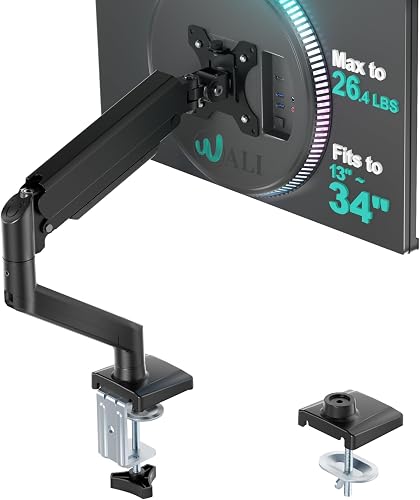
The WALI single arm fits flat or curved screens up to 34 in. Flat screens carry up to 26.4 lb, curved screens up to 19.8 lb, with the same VESA patterns.
The ErGear arm fits 13 to 34 in flat or curved screens up to 19.8 lb, also with 75x75mm or 100x100mm holes.
The WALI stand fits most displays, laptops and printers on its shelf, supports up to 44 lb, and needs no VESA holes.
Weigh the screen with its current mount and any adapter plate if you can. If it lacks VESA holes or is over an arm limit, a stand may be the only fit.
Setup time and daily use
A stand sets up in minutes with no tools, while an arm takes longer but then moves with one hand.
The stand is fastest. Set legs to 3.9, 4.7 or 5.5 in, place the shelf and set the screen on top.
No screws enter the desk.
ErGear claims a 3-step setup with tool-free VESA mounting. The screen side is fast, while clamp or grommet fitting still needs care.
WALI and ErGear both cite cores tested through 20,000+ cycles. WALI notes a wider VESA head and tighter panel, while ErGear notes a 40% wider VESA head for less sag.
The HUANUO dual arm takes most time because 2 arms need alignment. Its larger platform and dual C-clamp lock both arms to the desk.
Once set, arms tilt and rotate with one hand. A stand does not move during the day, which suits a fixed setup.
Stability and wobble
Both designs can feel stable, but arms need correct weight and tight clamps to avoid sag or drift.
HUANUO uses a larger platform plus dual C-clamp structure for screens 4.4 to 19.8 lb per arm. Stay inside that range for steady screens.
WALI and ErGear use wider VESA heads and tighter panels to hold monitors firmly. ErGear states that design helps prevent sagging.
Keep ErGear loads at or under 19.8 lb.
The WALI stand has rubber pads and a sturdy metal shelf with 44 lb capacity. A heavy printer or large display can sit centered without an arm joint to manage.
Wobble often comes from a loose clamp, overload or a flexing desk. Tighten per maker notes and keep heavy items centered on a shelf.
Standing desk use: does the support move with you?
An arm adapts better to sit-stand use because you can reset height and reach as posture changes.
When a standing desk rises, the screen rises with it on either support. The difference is fine tuning after the move.
With an arm, you can raise or lower the screen a few inches after standing. You can pull it close standing and push it back seated.
With a stand, shelf height stays at 3.9, 4.7 or 5.5 in in both positions. A height set for standing may feel too high seated, or the reverse.
Our guide on how to choose a standing desk covers height and frame fit. Our sit-stand desk explainer explains why people switch positions.
An arm also helps when 2 people share a desk. Each can reset height and distance in seconds, while a stand needs leg changes.
Which arm type fits your screen?
Gas spring, mechanical spring and standard arms differ in how they hold weight through motion.
Learn the joint type before comparing reach. A gas spring monitor arm explainer shows how gas pressure supports the screen.
Our spring vs gas monitor arm guide compares control and load. Read it if your screen sits near a weight limit.
A portable monitor arm guide covers lighter and travel use. A monitor arm for bed use guide covers reach from a bed or couch.
None of those types change VESA or desk clamp rules. The arms here still need correct holes and a wooden desk within thickness limits.
Stands and risers: when a shelf is enough
A stand is enough when you need modest lift, storage below and zero desk changes.
The WALI stand has vented holes in the platform. WALI says vents help prevent overheating and keep a device running cool.
That helps a laptop that runs warm.
Open space below stores a keyboard or notebooks. With a laptop as main screen, you can use an external keyboard below and keep desk space clear.
Our monitor risers with storage guide covers shelves with drawers and compartments. Use it if under-shelf storage is your top need.
A stand also holds a printer, which an arm cannot. That makes it useful for a small office corner with mixed devices.
Who should buy which?
Buy an arm for daily adjustment, shared viewing and tight desks, and buy a stand for fixed height and simple setup.
Choose the HUANUO FlowLift Dual if you run 2 screens from 13 to 32 in. Each must weigh 4.4 to 19.8 lb with VESA 75x75/100x100 holes, on a wooden desk 0.59 to 3.54 in thick.
Choose the WALI Adjustable Single if you have one larger screen. It fits up to 34 in and up to 26.4 lb flat, 19.8 lb curved, on desks 0.39 to 2.76 in thick.
Choose the ErGear Single if you want fast VESA attachment. It fits 13 to 34 in up to 19.8 lb, with a tool-free plate and tool-free cable clips.
Choose the WALI Computer Monitor Stand for a shelf with no mounting. It raises 3.9, 4.7 or 5.5 in, holds up to 44 lb, and suits glass or plastic desks.
Skip an arm without VESA holes. Skip a clamp arm on glass or plastic.
Skip a stand if you need portrait rotation or frequent angle changes.
Care and long-term use
Clean joints and clamps with a dry cloth and check tightness every few months.
Wipe metal arms and the shelf with a dry or slightly damp cloth. Keep water away from screen and laptop electrical parts.
Check clamp and grommet tightness after the first week. Wood can settle and a clamp can loosen, so tighten only to maker notes.
Move arms through tilt and swivel range now and then to keep joints smooth. Do not force past stated limits.
Route cables with slack for tilt and rotation. A tight cable can pull a screen out of position.
Keep stand vents clear of dust. Wipe shelf and legs as part of regular desk cleaning.
Final verdict on monitor arm vs stand
Choose the arm for eye-level height, one-hand angle changes and clear desk space, and choose the stand for fixed lift with no desk changes.
Measure desk thickness, check for beams under the edge, and confirm size, weight and VESA holes. Then ask how often you will move the screen.
For dual screens, HUANUO is the only dual option here. For one large screen, WALI has the highest flat-screen capacity.
For fast setup, ErGear has a tool-free VESA plate. For a simple shelf, the WALI stand holds up to 44 lb with no mounting.
Start with the monitor arm mount guide if you lean toward an arm. Start with shelf height needs if you lean toward a stand.
The right support should place the top of your screen near eye level without crowding your keyboard.
Frequently asked questions
Is a monitor arm or a stand better for desk space?
A monitor arm usually frees more desk space because it clamps to the edge and holds the screen above or behind the work area. A stand lifts the screen but its shelf still sits on the desk.
Choose the arm if space under the screen matters for a keyboard, notebook or dock.
Can a stand match the height of a monitor arm?
No, not for most users. This WALI stand raises a screen by 3.9, 4.7 or 5.5 inches in fixed steps.
The arms in this guide raise screens to about 15.75 to 17.5 inches and let you adjust height in small moves.
Do I need a VESA monitor for an arm?
Yes. Each arm here needs VESA 75x75mm or 100x100mm holes on the back of the screen.
Check the hole pattern, screen size and weight before you order.
A stand does not need VESA holes.
Which is safer for a glass or plastic desk?
A stand is safer for glass or plastic because it rests on the surface and does not clamp. The arms here call for wooden desks and set thickness limits.
Do not clamp an arm to a desk material against those limits.
Can I use a monitor stand with two monitors?
Some stands can, but this WALI shelf is 14.6 by 9.3 inches and is best for one display or laptop in most setups. The HUANUO dual arm is made for two screens and gives each screen its own tilt, swivel and rotation.