How to Sit in an Office Chair with Good Posture
Sit with your feet supported, hips near the back of the seat, and lower back supported. Set the chair and desk so your shoulders relax, elbows stay near your sides, and the screen is easy to view.
On this page (8 sections)
- How should you sit in an office chair with good posture?
- How do you set the chair height for desk work?
- Where should your lower back sit against the chair?
- How should your arms and hands rest while typing?
- Where should your screen sit?
- Should you stay in one position all day?
- Which chair adjustments should you check first?
- What is the best sitting posture in an office chair for desk work?
The best sitting posture in an office chair keeps your feet supported, your back comfortably supported, and your shoulders relaxed. Set the seat and desk so your arms can stay near your sides while you work, then change positions and move regularly.
Good posture is a supported, comfortable position, not a pose you must hold perfectly. Small adjustments to the chair, desk, and screen can reduce reaching and slouching.
How should you sit in an office chair with good posture?
Sit with your hips near the back of the seat and your lower back supported. Keep your head balanced over your shoulders, your feet supported, and your elbows close to your body.
Let the backrest carry some of your weight instead of holding your torso upright by effort alone. Your knees should bend comfortably, without the front edge of the seat pressing hard behind them.
A good position should feel natural enough to maintain while typing or using a mouse. If you feel pressure, tingling, or discomfort, adjust your posture and chair rather than forcing the same position.
How do you set the chair height for desk work?
Set the chair height so your feet rest on the floor or a footrest and your thighs have room under the desk. Your knees should sit around hip level or slightly lower if that feels comfortable.
If the desk is too high to use with your feet supported, raise the chair only as much as needed, then use a stable footrest. Lowering the chair may help if your feet reach the floor but your shoulders rise while typing.
For step-by-step instructions, see how to make an office chair higher. Our guides to what height your office chair should be and standard chair height explain how seat height relates to your desk and body.
Where should your lower back sit against the chair?
Your lower back should meet the backrest where it gives comfortable support without pushing you forward. Sit back in the seat and adjust built-in lumbar support, if available, until it feels helpful.
Don't add a cushion or rolled towel if it makes you perch at the front edge or brings your shoulders away from the backrest. A supportive chair should let you relax against it without creating a new pressure point.
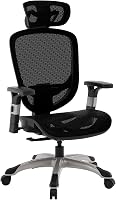
A chair with adjustable lumbar support gives you more room to tailor the fit. The Staples Hyken has adjustable lumbar support and seat height, according to its listed features.
The BestOffice chair has a mid-back mesh design and lumbar support, with an armless setup that leaves the sides open. Consider it if you prefer a chair without armrests, and check that its back support meets the spot where you need it.
For more help choosing chair features, read our ergonomic office chair guide.
How should your arms and hands rest while typing?
Keep your shoulders relaxed and elbows close to your sides as you type. Your forearms should reach the keyboard without lifting your shoulders or stretching forward.
Adjust the chair arms, if present, so they support your forearms without pushing your shoulders up. If the armrests hit the desk or prevent you from sitting close, lower them or move them out of the way if the chair allows.
Place the mouse close to the keyboard to limit reaching. If your wrists feel bent while typing, adjust the keyboard position or chair height rather than leaning toward the screen.
Where should your screen sit?
Place the screen directly in front of you, at a distance and height that lets you read without leaning forward. Keep frequently used items within easy reach so your neck and shoulders don't twist repeatedly.
If you use a laptop for long desk sessions, a separate keyboard and mouse can help you position the screen independently. The goal is a setup where you can look ahead and keep your torso supported.
Should you stay in one position all day?
No. Change positions and take brief movement breaks instead of trying to hold one ideal posture for hours.
Shift your weight, stand for a while, or take a short walk when practical. A sit-stand desk can offer another working position; learn what a sit-stand desk is before deciding whether one suits your routine.
A kneeling chair changes how your weight rests and feels different from a standard chair. For back-related tradeoffs, see kneeling chairs and back health.
Compare the tradeoffs in our guide to kneeling chair vs office chair.
Which chair adjustments should you check first?
Start with seat height, seat depth, back support, and arm position. Make one change at a time, then sit back and see whether you can work without shrugging, reaching, or perching.
A basic adjustment order can keep the process simple:
- Set the seat height so your feet are supported.
- Sit back and position the backrest for comfortable support.
- Check that the seat edge doesn't press hard behind your knees.
- Set armrests low enough for relaxed shoulders, or move them out of the way.
- Position the keyboard, mouse, and screen within easy reach.
If the chair still feels wrong after adjustment, its shape or size may not suit you. See how to use an office chair for more setup guidance, and read our Secretlab Titan chair review if you're considering that specific gaming chair.
What is the best sitting posture in an office chair for desk work?
For good sitting posture in an office chair, support your feet, sit back against comfortable lumbar support, and keep your shoulders relaxed. Set the desk and screen so your arms and neck don't have to reach or bend forward.
Choose the setup that fits your body and desk: adjust the chair first, add a footrest if your feet need support, and move regularly. If no adjustment feels comfortable, consider a chair with a different size or back shape.
Frequently asked questions
What is the best sitting posture in an office chair?
Sit with your back supported, hips near the back of the seat, and feet resting flat or on a footrest. Keep your shoulders relaxed, elbows close to your sides, and screen at a height that lets you look ahead without bending your neck.
Change positions and take movement breaks during the day.
Should my back touch the chair when sitting?
Your back should rest against the backrest when it provides comfortable support. Sit far enough back for the backrest to support your lower back, and avoid forcing a rigid upright pose.
If the chair's shape presses uncomfortably, adjust the support or try a different chair position.
How should my feet rest when sitting at a desk?
Keep both feet supported on the floor or on a stable footrest, with knees bent comfortably. If raising the chair to reach the desk leaves your feet hanging, add a footrest or adjust the desk setup.
Avoid balancing on the chair base or sitting on one foot for long periods.