Dual Monitor Arm vs Two Single Arms: Which to Choose? (November 2026)
Choose a dual arm for a tidy, matched pair and two single arms for total placement freedom. In this dual monitor arm vs two single arms comparison, your monitors, desk size and how often you move them decide the winner.
On this page (12 sections)
- Dual arm vs two single arms: the quick verdict
- Side by side: features that matter most
- Positioning flexibility: where singles pull ahead
- Desk space and mounting: one clamp or two
- Which suits matched side-by-side screens?
- Which suits mixed or portrait setups?
- How easy is setup and daily adjustment?
- Cable management and desk tidiness
- Screen size, weight and VESA checks
- Stability, safety and long-term use
- Cost, value and when to buy two singles
- Which should you buy in this dual monitor arm vs two single arms choice?
Choose a dual arm for a tidy, matched pair and two single arms for total placement freedom. This dual monitor arm vs two single arms guide compares the VIVO freestanding dual stand and the ErGear clamp-on dual arm against two GRIFEMA singles and two MOUNTUP singles.
Our score weighs specs, features and buyer feedback against what you are shopping for. We compared screen size, weight limit, VESA pattern, reach and mounting type across all four products.
A dual arm keeps two screens on one pole and one clamp. Two singles give each screen its own pole, clamp and full range of motion.
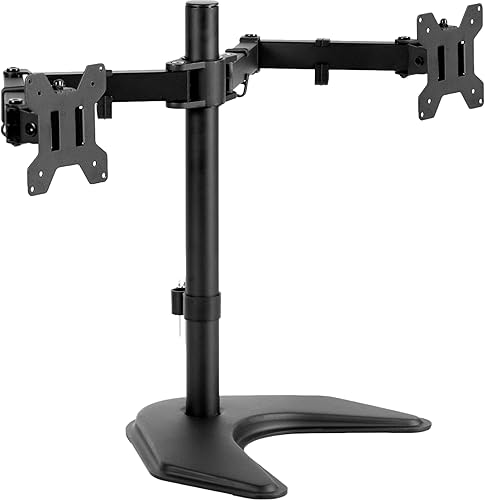 Best for no-drill desks
VIVO STAND-V002F Dual LED LCD Monitor Free-Standing

Dual arm vs two single arms: the quick verdict
The dual arm wins on tidiness and setup speed, and two singles win on flexibility. Pick based on whether your two screens always stay side by side.
The ErGear dual arm fits screens from 13 in to 32 in and holds up to 19.8 lb per screen. The VIVO dual stand fits 13 in to 27 in screens and holds up to 22 lb per screen.
Two GRIFEMA singles each fit 13 in to 32 in screens and hold up to 9 kg. Two MOUNTUP singles each fit 22 in to 32 in screens and hold up to 19.8 lb.
If your screens match in size and stay side by side, a dual arm is simpler. If one screen is portrait, offset or much higher, singles are safer.
Side by side: features that matter most
Screen size and weight limit decide fit before style or price. Check your screen diagonal, weight and rear mounting holes first.
| Feature | VIVO dual stand | ErGear dual arm | GRIFEMA single (x2) | MOUNTUP single (x2) |
|---|---|---|---|---|
| Screen size | 13 in to 27 in | 13 in to 32 in | 13 in to 32 in each | 22 in to 32 in each |
| Max load | 22 lb per screen | 19.8 lb per screen | 9 kg per screen | 19.8 lb per screen |
| VESA | 75x75mm or 100x100mm | 75x75mm or 100x100mm | 75x75mm or 100x100mm | 75x75mm or 100x100mm |
| Mount | Freestanding base | C-clamp or grommet | C-clamp or grommet | C-clamp or grommet |
| Adjustment | Tilt, swivel, rotation, pole height | Height, tilt, swivel, rotation | Height, tilt, swivel, rotation | Height, tilt, swivel, rotation |
All four options use the common 75x75mm or 100x100mm VESA pattern. That shared pattern means the choice comes down to placement, not hole pattern.
Our monitor arm mount guide explains VESA sizing in more detail. Read it before you measure your screens.
Positioning flexibility: where singles pull ahead
Two single arms let each screen sit at its own height, angle and distance. A dual arm links the screens, so large height gaps are harder to keep clean.
The GRIFEMA single offers a height range of 160-420 mm, tilt of +90° and -45°, swivel of ±90° and 360° rotation. You can set one screen high for reading and one low for video calls.
The MOUNTUP single reaches 27.7 in from its base and adjusts in height to 28.5 in. That long reach suits a deep desk where the screen must sit forward of the rear edge.
The ErGear dual arm adjusts in height to 17.5 in and extends to 18.1 in. Both screens share one mount, so independent fine tuning is more limited.
The VIVO stand adjusts height along its center pole and gives +90° to -90° tilt, 180° swivel and 360° rotation. Its screens still share one pole and one base.
Desk space and mounting: one clamp or two
A dual arm uses one attachment point, while two singles need two clamps or two grommet holes. Measure your desk edge before you choose.
The ErGear clamp fits desks from 0.39 in to 2.56 in thick. Its grommet mount fits desks from 0.39 in to 2.95 in thick.
The GRIFEMA single supports both C-clamp and grommet mounting. The MOUNTUP C-clamp fits desks from 0.39 in to 3.15 in thick, and its grommet mount fits desks from 0.39 in to 1.97 in thick.
The VIVO stand needs no clamp or hole at all. Its base measures 13 in by 10.5 in and needs desk space that fits that footprint.
Two singles also need swing room. Each arm must fold, tilt and rotate without hitting the other screen or a wall.
Which suits matched side-by-side screens?
A dual arm suits two equal screens that stay side by side all day. It keeps the gap even and the cable run short.
Our list of best dual monitor arms collects matched-pair options for this use. The ErGear fits larger 32 in screens, while the VIVO fits screens up to 27 in.
A shared pole keeps both screens at the same height. That helps when you read across both screens or move your gaze from left to right.
Setup is also faster with one mount. Our dual monitor arm setup guide walks through the order that keeps screens level.
Two singles can match this result, but you must align height and tilt by eye. Small mismatches show up as a visible step between screens.
Which suits mixed or portrait setups?
Two singles suit portrait beside landscape, or a main screen beside a smaller reference screen. A dual arm can do this, but the shared mount limits spacing.
The GRIFEMA gas-spring arm counterbalances screen weight and rotates 360° from landscape to portrait. That helps when you flip one screen for code or documents.
The MOUNTUP extra-long arm gives 27.7 in of reach and rotation of +180° and -180°. You can pull one screen forward for video work and push the other back.
The ErGear dual arm also rotates 360° and tilts +80° and -50°. Its shared design still keeps both screens closer together than two separate arms.
The VIVO stand rotates 360° and swivels 180°. Its center pole keeps screens near the base, which limits wide portrait splits.
Portrait, landscape and offset pairs
Portrait beside landscape needs different heights and different distances from the desk edge. Two singles handle that gap without strain.
A dual arm may force the portrait screen to sit at the same height as the landscape screen. That can hurt eye level if the screens differ in size.
Offset layouts, with one screen centered and one to the side, also favor singles. Each arm can claim its own clamp position.
How easy is setup and daily adjustment?
A dual arm means one mount to fit, while two singles mean two mounts to fit and align. Daily moves are also simpler with a shared arm.
The ErGear uses tool-free VESA plates and a one-piece C-clamp. The maker says setup takes three simple steps.
The VIVO uses detachable VESA plates and includes hardware and instructions. Its base padding protects the desk from scratches.
The GRIFEMA includes all tools and accessories for both mounting methods. The maker says setup can be completed in 10 minutes.
The MOUNTUP offers C-clamp or grommet mounting with VESA patterns of 75x75mm and 100x100mm. Its arm is tested for over 20,000 lifts.
For daily use, a gas-spring single like the GRIFEMA moves with less effort. A dual arm moves both screens in one motion, which can feel heavier.
Cable management and desk tidiness
A dual arm gives one cable path, while two singles give two cable paths to manage. Tidiness favors the dual arm unless you route singles with care.
The VIVO has detachable cable clips on the arms and center pole. The ErGear has cable clips that open without tools.
The GRIFEMA includes effective cable management for one screen. Two of them mean two sets of cables to route.
The MOUNTUP saves desktop space by lifting the screen. Its cables still need clips or ties along each arm.
Fewer arms also mean fewer joints where cables can snag. That matters if you raise and lower a standing desk each day.
Our guide to how to choose a standing desk helps you match mount reach to desk height range. Arm reach matters more when the desk moves up and down.
Screen size, weight and VESA checks
Check diagonal, weight and VESA holes before you compare arms. A mount that fits one screen may not fit the other.
The VIVO fits 13 in to 27 in screens up to 22 lb each. The ErGear fits 13 in to 32 in screens up to 19.8 lb each.
The GRIFEMA fits 13 in to 32 in screens up to 9 kg each. The MOUNTUP fits 22 in to 32 in screens from 4.4 lb to 19.8 lb.
All four use 75x75mm or 100x100mm rear holes. Measure the distance between holes on each screen before you order.
Curved screens need extra care with reach and tilt. The ErGear supports flat or curved screens from 13 in to 32 in.
If you use Dell screens, our best dual monitor arm for Dell monitors narrows the fit. It helps you match model size and VESA pattern.
Stability, safety and long-term use
Keep screens within the mount weight limit and within its tested range of motion. Stability depends on desk type, clamp position and arm extension.
The VIVO maker warns against pulling monitors too far forward or backward unless the stand is bolted down. Its 13 by 10.5 in base must keep screens within its center of gravity.
The ErGear is tested for over 20,000 cycles. The maker recommends a wooden desk with no crossbeam blocking the underside.
The GRIFEMA uses high-strength steel with an anti-scratch surface. Its gas spring counterbalances the screen weight for stable positioning.
The MOUNTUP is tested for over 20,000 lifts. Its long reach means a full extension puts more leverage on the clamp.
Tighten clamps and VESA screws on a regular schedule. Check for drift after you move a standing desk through its full height range.
Cost, value and when to buy two singles
Two singles usually cost more than one dual arm, but they avoid a second purchase later. Value depends on how fixed your layout is.
One ErGear dual arm replaces two single arms and two clamps. It also gives one cable path and one adjustment point.
Two GRIFEMA singles cost more as a pair, but each screen gets its own gas spring and full motion. A white finish also suits a light desk.
Two MOUNTUP singles cost more as a pair, but each gets 27.7 in of reach. That reach helps on deep desks or L-shaped layouts.
The VIVO dual stand suits desks where drilling or clamping is not allowed. Its freestanding design avoids desk damage and needs no grommet hole.
If you may change screen sizes next year, singles are a safer buy. You can replace one arm without replacing the whole mount.
Which should you buy in this dual monitor arm vs two single arms choice?
Buy a dual arm if your screens match and stay side by side, and buy two singles if your screens differ or move apart. Use this section as your final check.
Choose the ErGear dual arm for 13 in to 32 in screens on a wooden desk with clamp space. Choose the VIVO dual stand for screens up to 27 in on a desk that cannot take a clamp.
Choose two GRIFEMA singles for white, gas-spring arms with independent height from 160-420 mm. Choose two MOUNTUP singles for 22 in to 32 in screens that need 27.7 in of reach.
Check desktop size with our guide on desktop size for two monitors. It helps you confirm arm swing and base space before you order.
For a white dual look, see our best white dual monitor arm guide. For three screens, see our triple monitor arm wall mounted guide.
Our score weighs specs, features and buyer feedback against what you are shopping for. Pick the mount that fits your screens, desk edge and daily layout first.
Frequently asked questions
Is a dual monitor arm better than two single arms?
A dual arm is better for a matched side-by-side pair on one desk, with one clamp, one cable path and tighter spacing. Two single arms are better when you need different heights, portrait and landscape mixes, or wide separation between screens.
Can I use two single arms on a small desk?
Two single arms can work on a small desk if each clamp fits with room to spare and the arms fold back over the desk. Measure the clamp footprint and arm reach first, since two bases need more edge space than one shared dual mount.
Which option is easier to set up?
A dual arm usually means one mount to attach and two screens to fit, while two singles mean two mounts and two separate adjustments. The ErGear dual arm has tool-free VESA plates, while the GRIFEMA and MOUNTUP singles each include clamp and grommet hardware.
Do two single arms take more desk space?
Yes, two singles take more edge space because each needs its own C-clamp or grommet hole and room for its arm to swing. A dual arm uses one attachment point, and the VIVO freestanding dual stand uses no clamp at all but needs a 13 by 10.5 in base.


