Ergotron LX Dual Monitor Arm Review: Worth It? (November 2026)
The Ergotron LX Dual Monitor Arm suits everyday two-screen work with monitors up to 27 in and 7 to 20 lb each. Pick it for wide motion and a 10-year warranty, or choose a larger or lighter alternative if your screens fall outside that range.
On this page (15 sections)
- The Ergotron LX Dual Monitor Arm at a glance
- Who the Ergotron LX dual arm suits best
- Specs that matter in daily use
- Size, weight and VESA fit explained
- Motion for side-by-side and low angle views
- Setup with the desk clamp
- Setup with the grommet mount
- Daily use, folding and space saving
- Cable management and a tidy desk
- Care and long-term stability
- Trade-offs versus the alternatives here
- Alternatives in this review
- Dual arm or two single arms?
- Color and finish options
- Verdict: ergotron lx dual monitor arm review
The Ergotron LX Dual Monitor Arm suits everyday two-screen work when both monitors are up to 27 in and 7 to 20 lb each. It gives side-by-side placement, 13 in of lift and a tidy cable route from one mount point.
That range matters more than the brand name. If your screens are larger, heavier or lighter, an alternative below may fit better.
This review checks specs, motion and mounting, then compares trade-offs in plain terms. Our score weighs specs, features and buyer feedback.
We have not tested these arms, and we rely on published specs and owner reports.
The Ergotron LX Dual Monitor Arm at a glance
The Ergotron LX Dual is a two-arm, one-pole mount for matched displays. It includes two arms, two extensions, a pole, a T-bracket, a base, a two-piece desk clamp and a grommet mount.
Ergotron: Best for side-by-side 27 in screens
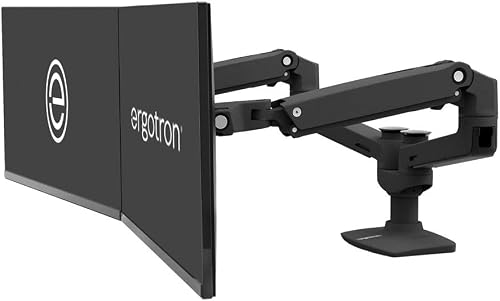
- Two monitors up to 27 in, 7 to 20 lb each
- VESA 75x75mm and 100x100mm
- 13 in lift, 360 degree rotation, 75 degree tilt
- Desk clamp and grommet mount included
- Matte Black, metal build
A dual arm built for two matched displays up to 27 in, with full motion, cable management and clamp or grommet mounting for a clean desk.
Pros
- Wide motion for side-by-side use
- Clamp fits 0.63 to 2.6 in thick desks
- Grommet mount included
- 10-year warranty
Cons
- Not for screens over 27 in
- Not for monitors under 7 lb or over 20 lb
- Back of arms can extend past the desk edge
The finish here is matte black. Ergotron also offers polished aluminum and white in the wider LX range.
The key facts for this model are the 27 in limit, the 7 to 20 lb range per screen and VESA 75x75mm or 100x100mm patterns.
Who the Ergotron LX dual arm suits best
The LX Dual suits people using two similar monitors at one desk. That includes writers with a reference screen, analysts with a spreadsheet and dashboard, and support staff with two ticket views side by side.
It also suits sit-stand users who change height often. You can raise or lower both screens together, then tilt each one for glare.
A dual monitor arm setup guide helps you set eye line and distance before you tighten anything.
Skip it if your monitors are over 27 in or over 20 lb each. Skip it if one screen is much larger than the other and you want a stacked layout.
Specs that matter in daily use
The specs that matter start with size, weight and VESA pattern. Each monitor must be up to 27 in diagonal and weigh 7 to 20 lb.
Motion is the next point. Ergotron gives 13 in of lift, with monitors rising 15.6 in from the desktop.
You also get 25 in of extension, 360 degree rotation and 75 degree tilt.
In use, you can pull screens close for detail work or push them back for a wider view. Cable management runs under the extension and within the arm.
The arms fold out of the way, so you can reclaim space for a laptop, notebook or keyboard tray.
Size, weight and VESA fit explained
Fit depends on all three numbers at once. A 27 in monitor at 21 lb is too heavy.
A 24 in monitor at 6 lb is too light for the stated range.
Size alone will not tell you if the arm will hold your screens well.
VESA pattern is the spacing of the four holes on the back of the monitor. Most common desk monitors use 75x75mm or 100x100mm.
If your screen uses a different pattern, an adapter may change weight and clearance. Measure each monitor with its mount attached, since the arm adds depth behind the screen.
A general monitor arm mount guide explains how these three checks work together.
Motion for side-by-side and low angle views
The LX Dual is built for side-by-side or low angle views. The T-bracket keeps the two arms linked, so both screens move as one unit.
You can angle the pair inward for shared work or straighten them for focused reading.
Lift helps more than reach for most users. Raising the screens puts the top third near eye level, which reduces the need to look down.
Tilt then fine-tunes glare, while rotation lets you turn a screen for a document or video call.
Because the arms fold back, you can use the same desk for paperwork or a laptop. If you often switch between two screens and a laptop, also read about is using a laptop stand good to decide where the laptop sits.
Setup with the desk clamp
Setup starts with the clamp or the grommet mount. The two-piece clamp fits surface edges 0.63 to 2.6 in thick and needs no tools for installation, according to Ergotron.
It attaches to the back or side of the desk and uses little space. A low-profile clamp helps in tight spots behind a desk.
Still, you need clear access under the rear edge. Drawers, cable trays or support rails can block a clamp even when the desk top thickness is right.
Clamp the pole to a firm part of the desk, not a thin edge or loose panel. Tighten it by hand first, then check that the pole stays still when you move each arm.
Setup with the grommet mount
The grommet mount goes through a hole in the desk surface. It fits a hole up to 2 in wide and 3 in deep.
That route gives a cleaner look, since the pole rises from the desk rather than gripping the edge.
Check the hole size with a ruler before assembly. A hole that is too large, too small or too close to the edge will not give a firm mount.
Also confirm the underside is clear for the hardware. Many desks have a cable hole that works for this mount.
If yours does not, the desk clamp is the simpler choice. Our dual monitor arm setup guide walks through height, order and cable routing.
Daily use, folding and space saving
Daily use comes down to how easy it is to move and fold. Ergotron says the design is tested for 10,000 cycles, which it equates to moving the arm three times a day for ten years.
That is a maker claim, but the motion range supports frequent small changes.
Fold the arms back when you need the full desk for calls, paperwork or a laptop. That fold-away design is one reason a dual arm can beat two fixed monitor stands.
Keep a small gap between each screen and the desk edge. The arms extend back, so a screen can end up closer to you than the pole position suggests.
Test the full range before you add cable ties or a power strip.
Cable management and a tidy desk
Cables stay tidy when you route them along the arm from day one. Ergotron routes cables under the extension and within the arm.
Plan where power and video cables will drop to your outlet or dock before you fix the arm height.
Leave slack at each joint. Too little slack will tug when you tilt or rotate a screen.
Too much slack can snag when you fold the arms back.
Group cables by destination, such as power on one side and video on the other. That makes it easier to unplug one monitor for a repair.
If cable clutter is your main issue, also check best dual monitor arms for other cable routes and mounts.
Care and long-term stability
Care is simple because there are few moving parts to service. Wipe the metal arms with a soft, dry cloth.
Check the clamp, grommet hardware and VESA screws every few months.
Ergotron says extensive quality testing keeps displays stable and secure. The model carries a 10-year warranty, with expert technical support from Ergotron.
Keep your model number, 45-245-224, and proof of purchase in case you need help.
Do not add weight beyond 20 lb per screen. Extra weight strains the arms and can cause drift.
If a screen sags or tilts on its own, check the VESA screws and arm balance before you use it.
Trade-offs versus the alternatives here
The main trade-off is range versus focus. The Ergotron LX Dual focuses on screens up to 27 in and 7 to 20 lb each.
The ErGear arm below reaches 32 in, and the VIVO arm also reaches 32 in with a lighter minimum weight.
The Ergotron answer is warranty and motion. It carries a 10-year warranty, compared with 5 years for the ErGear and 3 years for the VIVO.
For a long-term desk, that longer cover can matter as much as the arm design.
The other trade-off is desk space behind the monitors. Ergotron notes a low-profile clamp for tight spaces, while VIVO warns that the back of its arms will extend past the desk edge.
Measure your desk depth either way.
Alternatives in this review
The two arms below solve the same problem in different sizes. Use them if your monitors fall outside the Ergotron range or if you want tool-free VESA plates or mechanical spring balance.
ErGear Dual Monitor Arm for larger screens
The ErGear suits screens from 13 to 32 in. It supports up to 19.8 lb per monitor and uses VESA 75x75mm or 100x100mm.
Height adjusts up to 17.5 in and extension reaches 18.1 in, with tilt, swivel and rotation for each screen.
Tool-free VESA mounting saves time during setup and when you swap monitors. The one-piece C-clamp fits desks 0.39 to 2.56 in thick, and the grommet mount fits desks 0.39 to 2.95 in thick.
ErGear advises a wooden desk with no crossbeam blocking the underside, so check your desk build first.
VIVO Dual Monitor Stand for spring adjustment
The VIVO suits screens from 17 to 32 in and 4.4 to 19.8 lb each. Its mechanical spring gives toolless counterbalance, so you can set each monitor with less effort.
Tilt runs 90 to -90 degrees, with 180 degree swivel and 360 degree rotation.
The open-top VESA plates slide on, which helps when you mount a second screen alone. The heavy-duty C-clamp fits tops up to 3.1 in, and the grommet mount fits tops up to 1.9 in.
VIVO warns that the back of the arms will extend past the desk edge, so plan for that space.
Dual arm or two single arms?
A dual arm gives you one pole, one mount and matched movement. That is cleaner for two similar screens and uses less desk space than two separate arms.
It is the right fit for the LX Dual when both monitors are in its range.
Two single arms give you more freedom for mixed sizes, stacked screens or wide spacing. They also let you move one screen without moving the other.
The cost is more clamps, more cables to route and more desk space used.
Our dual monitor arm vs two single arms guide compares both layouts in detail. If you want other Ergotron options, see best ergotron dual monitor arm for the wider range.
Color and finish options
Finish is a final preference, not a first check. This arm comes in matte black, which fits most office desks and hides cable shadows well.
Ergotron also offers polished aluminum and white in the LX range, so match the finish to your desk and frame.
A white arm can brighten a small room, but it shows dust more than black. Our best white dual monitor arm picks help if white is your priority.
For a standing desk, also check best dual monitor stand for standing desk if you prefer a stand over an arm.
Verdict: ergotron lx dual monitor arm review
This ergotron lx dual monitor arm review points to a clear yes for two matched screens up to 27 in. The motion, cable route and 10-year warranty make it a strong pick for daily two-screen work.
Choose the Ergotron if your screens weigh 7 to 20 lb each and use VESA 75x75mm or 100x100mm. Choose the ErGear if your screens run up to 32 in and you want tool-free VESA plates.
Choose the VIVO if you want mechanical spring balance and a lighter minimum weight.
Before you order, measure each monitor, check its weight and confirm your desk thickness or grommet hole. That one step will tell you if this arm fits your desk, or if one of the alternatives above is the better match.
Frequently asked questions
What monitors fit the Ergotron LX Dual Monitor Arm?
It fits two monitors up to 27 in diagonal, each 7 to 20 lb, with VESA 75x75mm or 100x100mm patterns. Check both size and weight for each screen, since a monitor near 27 in can still be too heavy or light for the stated range.
Is the Ergotron LX dual arm good for side-by-side work?
Yes, it is made for side-by-side or low angle views, with 13 in of lift, 25 in of extension, 360 degree rotation and 75 degree tilt. That motion lets you pull both screens forward, angle them in or fold them back when you need desk space.
How does the Ergotron LX Dual mount to a desk?
It includes a two-piece desk clamp for surface edges 0.63 to 2.6 in thick and a grommet mount for a desk hole up to 2 in wide and 3 in deep. Measure your desk thickness and hole first, and confirm no frame or crossbeam blocks the mount.
Should I buy the Ergotron LX Dual or two single arms?
Buy the LX Dual if you want one pole, one clamp and matched side-by-side movement for two screens in its size range. Two single arms give more independent placement for mixed sizes or stacked layouts, but they take more desk space and more setup.


