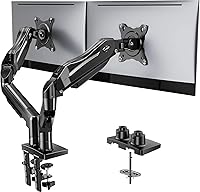
Spring vs Gas Monitor Arm: Which Should You Choose? (November 2026)
Pick a gas spring arm for the lightest one-touch adjustment and a mechanical spring arm for long-term tension without pressure loss. In this spring vs gas monitor arm comparison, your screen weight, how often you move it, and how your desk moves all matter.
On this page (11 sections)
- Quick verdict: spring vs gas monitor arm for most desks
- The two systems side by side
- How adjustment feels: gas spring vs mechanical spring
- Weight capacity and screen size
- Reach, height and tilt for a standing desk
- Setup and mounting: clamp vs grommet
- Which lasts longer: gas pressure or spring tension?
- Cable management and desk space
- Price tier and value: what you pay for
- Who should buy which spring type?
- Final verdict on spring vs gas monitor arm
Pick a gas spring arm for light, frequent adjustment and a mechanical spring arm for steady tension over time. Gas wins on ease of movement, while mechanical spring wins on a simpler long-term mechanism.
Your screen weight, how often you move it, and whether your desk itself moves will decide which system feels right in daily use.
We compared specs, weight limits and adjustment ranges for 4 arms. The ELG Gas Spring Monitor Arm leads for large screens, while the HUANUO FlowLift Pro leads for mechanical spring design.
The ELG suits a 17 to 35 inch screen up to 19.8 lb and gives 20.9 inches of reach. That long reach helps on a deep desk or a standing desk, where the screen often needs to come forward past a keyboard.
The HUANUO suits a 13 to 32 inch screen from 4.4 to 15.4 lb and gives 18.7 inches of extension. Its MechaSpring design uses set tension rather than gas pressure, so there is no sealed pressure to fade over time.
Neither arm is automatically better for every desk. A gas spring arm tends to feel lighter when you move it often, while a mechanical spring arm suits a screen you set once and leave in place.
Check the weight range before screen size. A spring system only balances well when matched to the screen you actually use, with its mount and cables included.
If you sit and stand through the day, adjustment feel matters most. If you work at a fixed desk, long term holding and simple setup may matter more.
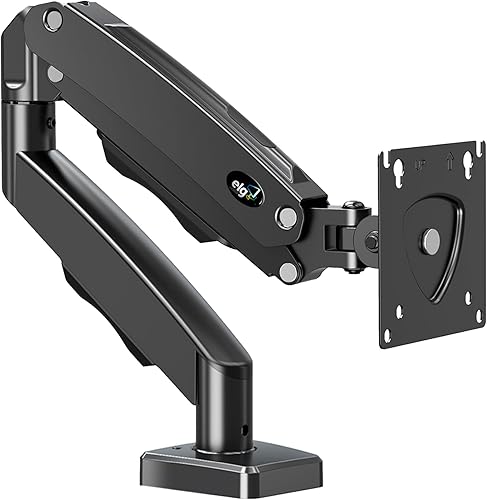
 Best for mechanical spring
HUANUO FlowLift™ Pro Monitor Arm for 13–32"
Quick verdict: spring vs gas monitor arm for most desks
Choose gas spring if you change height often and want one-finger moves. A gas spring counters your exact monitor weight, so the screen floats and stays where you leave it.
That floating feel is the main reason to pay for gas. When tension matches your monitor, you can raise or lower the screen with light pressure and it will hold the moment you let go.
It suits people who switch between sitting and standing several times a day. It also suits anyone who fine tunes the screen for calls, documents, or shared viewing and does not want to wrestle with a stiff joint.
Set up takes a little care at first. You need to set the tension for your exact screen weight, then check the position in both sitting and standing heights before you route the cables.
Choose mechanical spring if you set the screen once and want it to hold for years. A coil or MechaSpring system uses set tension, not gas pressure, to balance the load.
That design suits a fixed desk or a steady work pattern. Once tension is set, the screen should stay put through normal use, and you do not rely on sealed gas pressure to keep it there.
It can suit designers, coders, and analysts who work in one position for long stretches. They need the screen at eye level, stable and free from droop, rather than constant movement.
The HUANUO FlowLift Pro shows this approach with a visible window. A yellow indicator moves as you adjust tension, so you can see when the setting matches your screen instead of guessing by feel.
For most desks, the deciding question is simple. Do you move the screen every day, or do you set it and focus on work.
If you move it often, gas spring feel will shape your day more than any other spec. Reach, tilt, and height range then help you keep the screen at a comfortable angle in each position.
If you rarely move it, a mechanical spring arm can be a sound and simpler choice. Look for clear tension guidance, a firm VESA plate, and a desk mount that fits your desk thickness.
Weigh the monitor with its bracket fitted, because size alone does not tell you the load. A large flat screen and a smaller curved screen can place very different demands on the arm.
Also check desk thickness and material before you order. A clamp needs a solid edge, while a grommet mount needs a clean through hole and room underneath.
Leave slack in the cables for standing desk travel. A tidy cable route that is too tight will pull when the desk rises or the arm extends.
The two systems side by side
Gas spring uses sealed pressure; mechanical spring uses a coil or spring under tension. Both aim to balance your monitor so you don't fight its weight.
A gas spring arm, like the ELG, holds 17 to 35 inch screens up to 19.8 lb with 20.9 inches of reach. You adjust tension to match the screen, then push or pull to move it.
That setup gives light movement once it is tuned. It suits a standing desk, where you may raise and lower the screen several times a day without lifting the full weight yourself.
A mechanical spring arm, like the HUANUO FlowLift Pro, holds 13 to 32 inch screens from 4.4 to 15.4 lb. It uses MechaSpring tension with a visible window, so you can see when tension matches your screen.
That visible check helps at setup. You can avoid over tightening the spring and find the balance point with less trial and error.
The two systems share the same desk mounts and VESA patterns. The choice comes down to feel, weight match, and how often you plan to move the screen.
| Point | Gas spring | Mechanical spring |
|---|---|---|
| Balance source | Sealed gas pressure | Coil or spring tension |
| Best for | Frequent moves | Set and forget setups |
| Weight match | Must match closely | Tension set by dial or window |
| Long term risk | Pressure loss over years | Tension wear if mis-set |
| Example here | ELG, 19.8 lb limit | HUANUO, 15.4 lb limit |
Neither system removes the need for a strong desk mount. Check desk thickness and material in both cases.
How adjustment feels: gas spring vs mechanical spring
Gas spring arms move with the least effort once tension is set. The pressure does most of the work, so you can lift or lower the screen with one hand.
The ELG uses calibrated gas resistance that holds position when you let go. It also gives +85 to -30 degrees of tilt and 360 degrees of rotation for sitting and standing views.
Mechanical spring arms move smoothly too, but you set tension by hand. The HUANUO shows a yellow indicator in its PrecisionView window, so you can see the setting instead of guessing by feel.
If you switch between sitting and standing several times a day, gas spring feel is often the deciding factor. If you rarely move the screen, either system works.
Weight capacity and screen size
Match the arm to your monitor weight first, then screen size. A gas spring arm set for a light screen will bounce with a heavy one, and the reverse will droop.
The ELG covers 17 to 35 inch screens up to 19.8 lb. That range suits most 24 inch 4K screens, 32 inch curved screens and some 34 to 35 inch ultrawides, if weight stays within the limit.
The HUANUO covers 13 to 32 inch screens from 4.4 to 15.4 lb. It suits the 24 to 27 inch screens most people use, but not heavier ultrawides.
The WALI arm covers 13 to 34 inch screens with up to 26.4 lb for flat screens and 19.8 lb for curved screens. The ErGear arm covers 13 to 34 inch screens up to 19.8 lb.
Weigh your screen with its mount before you order. Screen size alone does not tell you the load.
Reach, height and tilt for a standing desk
Long reach matters more on a standing desk than on a fixed desk. You need the screen at eye level in 2 positions, not one.
The ELG reaches 20.9 inches from the base, past most keyboards. That helps you pull the screen close without pulling the whole desk forward.
The HUANUO extends 18.7 inches, with 16.5 inches of height adjustment and +85 to -25 degrees of tilt. The ErGear reaches 18.1 inches with 17.5 inches of height adjustment.
The WALI extends 19.3 inches and raises up to 17.3 inches above the desk. It swivels +180 to -180 degrees, tilts +70 to -45 degrees and rotates 360 degrees.
For a standing desk, set the screen at eye level while standing, then check it while sitting. Add a keyboard tray or footrest if your knees hit the frame.
Setup and mounting: clamp vs grommet
Both spring types use the same desk mounts, so choose by your desk, not by spring type. Gas and mechanical arms both attach with a C-clamp or a grommet base.
The ELG includes C-clamp and grommet options for desks 0.39 to 3.5 inches thick. The HUANUO recommends wood desks 0.59 to 3.54 inches thick.
The WALI offers C-clamp or grommet mounting for desks 0.39 to 2.76 inches thick, on wooden desks. The ErGear allows 0.39 to 2.56 inches for a clamp and 0.39 to 2.95 inches for a grommet.
A clamp suits a desk edge with no crossbeam underneath. A grommet suits a desk with a through-hole and a flat underside.
Read our full monitor arm mount guide before you drill or clamp. Measure desk thickness with calipers, not with a ruler alone.
Which lasts longer: gas pressure or spring tension?
Mechanical spring arms avoid gas pressure loss, while gas spring arms are rated for many adjustment cycles. Both can last for years if you match weight correctly.
The ELG gas spring is rated for 20,000 adjustment cycles. At one adjustment per day, that equals about 54 years of moves.
The HUANUO maker says its MechaSpring design lasts up to 2 times longer than conventional mounts. It also says the arm is tested at 3 times its load.
The WALI and ErGear use high-performance cores tested through 20,000 or more cycles. Those figures describe the arm mechanism, not the gas spring alone.
Gas pressure can fade over time, which may cause droop. Spring tension can also wear if you over-tighten it, so use the visible indicator or the guide marks.
Cable management and desk space
A good arm frees desk space and hides cables in both spring types. The spring choice does not change how much space you gain.
Lifting your screen off the desktop opens room for a keyboard, notebook or dock. Built-in channels and clips route display and power cables along the arm.
The ELG has a built-in cable organizer. The WALI guides wires along the arms.
The ErGear uses cable clips that open without tools.
On a standing desk, leave a loop of slack for height travel. Zip ties that are too tight will pull cables when the desk rises.
If you want a cleaner look, consider our guide to a monitor wall mounting rail as an alternative to a desk arm. A rail suits a fixed desk more than a moving one.
Price tier and value: what you pay for
Gas spring arms often cost more in the mid-range tier, while good mechanical spring arms sit in the budget to mid-range tier. The difference buys feel and range, not just the spring label.
The ELG adds long reach, a wide tilt range and 35 inch support. That set suits larger screens and deep desks.
The HUANUO adds a visible tension window and a tool-free VESA plate. That set suits buyers who want to set tension correctly on the first try.
The WALI adds high weight capacity and a 10 year warranty. The ErGear adds a 40 percent wider VESA head for stability at 19.8 lb.
Avoid a cheap arm with a weak core. It will droop, wobble or need constant tightening, which defeats the point of a spring arm.
Who should buy which spring type?
Buy gas spring for sit-stand desks, frequent moves and heavier screens within range. Buy mechanical spring for fixed desks, set-and-forget views and screens up to 15.4 lb.
Choose the ELG Gas Spring Monitor Arm if you have a 17 to 35 inch screen up to 19.8 lb and want 20.9 inches of reach.
Choose the HUANUO FlowLift Pro if you have a 13 to 32 inch screen up to 15.4 lb and want visible tension control.
Choose the WALI arm if your flat screen weighs more than 19.8 lb, up to 26.4 lb. Choose the ErGear if you want fast tool-free setup up to 19.8 lb.
If you are still deciding between an arm and a stand, read Monitor Arm vs Stand: Which Should You Choose?. If you want a general primer, see what is a gas spring monitor arm.
Final verdict on spring vs gas monitor arm
Pick gas spring for ease of daily movement and mechanical spring for pressure-free holding. Your screen weight and move frequency decide the winner.
For a standing desk you adjust 3 or more times a day, gas spring is the better buy. For a fixed desk or a screen you set once, mechanical spring is a sound choice.
Check our best gas spring monitor arm picks if you lean gas. For a dual setup, see the ergotron lx dual monitor arm review.
For dual screens on a stand instead, see the best dual monitor stand for standing desk.
Measure your monitor weight, desk thickness and reach needs. That 5 minute check will tell you more than the spring label alone.
Frequently asked questions
Is a gas spring monitor arm better than a mechanical spring arm?
A gas spring arm is easier to move with one hand for its exact weight, while a mechanical spring arm keeps tension without relying on gas pressure. Pick gas for frequent sit-stand changes and mechanical spring if you prefer a design that does not lose pressure over time.
How do I know which spring is right for my monitor?
Check screen size, monitor weight and VESA pattern first. A gas spring arm must match your monitor weight closely or it will drift or bounce, and a mechanical spring arm still needs its tension set for that weight.
Measure your desk thickness before you choose a clamp or grommet mount.
Can a monitor arm work on a standing desk?
Yes, if the arm holds your screen at eye level in both sitting and standing positions. Check reach, height range and desk thickness, and make sure cables have slack for the full travel.
Our guide to how to choose a standing desk can help you plan the whole setup.
What happens if a gas spring loses pressure?
The arm may droop or need more force to hold position. That can happen over years of use.
A mechanical spring arm avoids gas pressure loss, but its own tension still needs correct adjustment for your screen weight.