How to Use an Office Chair
To use an office chair well, adjust the seat height first, then set the backrest, lumbar support, armrests, and tilt for your desk and body. Keep your feet supported and change position during long work sessions.
On this page (8 sections)
- What should you adjust first on an office chair?
- How should you set the backrest and lumbar support?
- Where should your arms and hands rest?
- How do you use an office chair's tilt control?
- What is good posture in an office chair?
- How do you move and swivel safely?
- How should you care for an office chair?
- Which office chair setup should you choose?
To use an office chair correctly, adjust the seat height, back support, arm position, and tilt so your body stays supported while your desk work feels natural. Your feet should rest securely and your shoulders should stay relaxed.
Most office chairs use a lever beneath the seat for height and tilt controls. Other adjustments may include a tension knob, lumbar support, arm position, or tilt lock.
Start with the basics before you sit down for work. A chair that is too high or too low will force your legs, back, or arms to make up the difference.
Seat height is the first setting to check. Your feet need a firm base on the floor, and your knees should sit near hip level.
Next, sit fully back so the backrest can do its job. If you perch on the front edge, your lower back loses support.
Lumbar support should meet the curve of your lower back with light pressure. Armrests, when fitted, should support your elbows without lifting your shoulders.
Tilt controls come last because they affect how the chair feels once you move. Set the tension so reclining takes steady effort, and use the lock when you want a fixed upright position.
Make small changes, one control at a time. Then check how your feet, knees, elbows, and back feel together.
Take a short break after adjusting the chair. Stand, walk a little, and reset your position so the changes have time to settle into a habit.
What should you adjust first on an office chair?
Adjust seat height first, because it affects your feet, knees, desk position, and arm placement. Sit with your back against the backrest and lower or raise the seat until your feet are supported.
Your knees should stay near hip level rather than being forced sharply upward. If your feet cannot reach the floor at a desk-friendly height, use a footrest instead of perching on the front edge.
For more detail, read how to make an office chair higher and what is the standard chair height.
How do you raise or lower an office chair?
Sit in the chair and find the height lever under the seat. Most pneumatic chairs rise when you remove your weight while lifting the lever, then lower when you sit while lifting it.
Move the lever in small steps. Stop when your feet are supported and your desk allows your elbows to stay close to your sides.
A chair's adjustment range does not guarantee the right position for every desk. Measure your desk height and check that your knees, feet, and forearms remain comfortable together.
How should you set the backrest and lumbar support?
Set the backrest so it supports your lower and middle back without pushing you forward. Sit fully back in the chair instead of using only the front of the seat.
If the chair has adjustable lumbar support, move it until it fills the natural curve of your lower back. Use light support rather than pressing your back hard against the cushion.
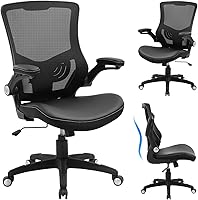
The BestOffice is an armless black office chair with lumbar support, a breathable mesh back, a cushioned seat, a metal base, and nylon casters. Its open-back design and 360-degree swivel suit a simple workstation where you want freedom around the seat.
This chair has a 15.6 in backrest width and measures 20 x 20 x 35.6 in. It supports height adjustment, 360-degree swiveling, and rolling movement.
BestOffice describes assembly as taking about 10–15 minutes with the included hardware and tools.
Choose it if you prefer an armless design or need to move your arms freely while working. Skip it if you want adjustable arm support or a high-back chair with a headrest.
Where should your arms and hands rest?
Keep your elbows near your sides and your forearms close to level with the desk. Your shoulders should not rise toward your ears as you type or use a mouse.
If the chair has adjustable arms, raise or lower them until they support your elbows without pushing your shoulders upward. Move them out of the way if they prevent the chair from getting close to the desk.
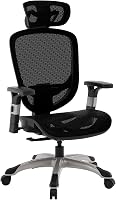
The Staples Hyken Ergonomic Mesh Task Chair has arms, adjustable seat height, adjustable lumbar support, and a mesh high-back design. It also has a swivel-tilt mechanism, an upright tilt lock, a tension knob, and carpet casters.
The Hyken measures 24 x 27 x 46 in and supports up to 250 lb. Its breathable mesh back suits people who want airflow during long work or gaming sessions, while its reclining controls suit users who change between upright and relaxed positions.
Choose it if you want more adjustment points than an armless task chair. Skip it if you need a chair without arms or prefer a smaller back design.
For another look at this model, see our hyken ergonomic mesh swivel task chair review.
How do you use an office chair's tilt control?
Use the tilt lock for a fixed upright position and release it when you want controlled reclining. Find the tilt lever under the seat and move it gently while seated.
The tension knob changes how much force you need to recline. Turn it in small steps, then test the chair with your back against the backrest.
Do not lean suddenly into a newly unprotected chair. Keep both feet supported and use the backrest for steady movement.
A high-back chair may support more of your back than a mid-back chair, but the taller design is not automatically better for every desk. Compare your needs with our guide to best high back office chair.
What is good posture in an office chair?
Good posture means sitting back with supported feet, relaxed shoulders, and your head balanced over your torso. Keep the screen and keyboard close enough that you do not need to reach forward.
Your back does not need to stay rigid. Shift position, recline briefly when the chair allows it, and stand or walk during longer work periods.
Our guide to best sitting posture in office chair explains how to position your pelvis, back, head, and arms.
Think of posture as a loose pattern rather than a fixed pose. Your pelvis should sit back in the seat, your lower back should have light support, and your head should rest over your torso without jutting forward.
Your shoulders work best when they drop away from your ears. If they creep upward, the seat may be too high, the arms may be set too high, or the desk may be too far away.
Your elbows should stay near your body and your forearms should rest close to level. Reaching forward for a keyboard or mouse tends to pull your head and shoulders with it.
Feet play a larger role than many people expect. When your feet are supported, your legs stop bracing your body and pressure spreads more evenly through the seat.
Change position through the day instead of holding one shape for hours. Check your setup after a break, since chairs shift, cushions compress, and habits return.
How do you move and swivel safely?
Use the chair's 360-degree swivel and casters for small movements, while keeping your work area clear. Turn your body with the chair instead of twisting repeatedly from the waist.
Roll slowly across the floor and keep the casters away from cords, loose rugs, and clutter. Do not use the chair as a step or lean far sideways while rolling.
Both products here are indoor office chairs with swivel movement. The BestOffice uses nylon smooth-rolling casters, while the Staples Hyken uses carpet casters.
How should you care for an office chair?
Keep the seat, mesh, controls, base, and casters clean and check the hardware regularly. Follow the assembly instructions if a screw or connection becomes loose.
Vacuum or wipe mesh gently and remove debris from the casters. Avoid forcing adjustment levers or using cleaning products that could damage upholstery or mesh.
Check that the chair remains stable before regular use. If a wheel, base, lever, or support becomes damaged, stop using that function until it is repaired or replaced.
Basic care starts with the parts you touch most often. Wipe the seat and arms with a soft, slightly damp cloth, then dry them so moisture does not sit in seams or padding.
Mesh needs a lighter touch than solid fabric. Use a vacuum with a brush attachment on low suction, or wipe it gently by hand and let it air dry before you sit on it again.
Avoid harsh cleaners and strong solvents on mesh and upholstery. They can weaken fibres, dull the finish, and leave residue.
Casters collect hair, thread, and grit, which makes rolling rough. Pull debris from around each wheel and check that each caster still spins freely.
If a lever feels stiff, check for dust or a loose connection before you force it. Extra pressure can crack plastic or bend a fitting.
Check screws and bolts every few months, especially after moving the chair. Keep the base clear of cords, rugs, and clutter.
Store the chair indoors, away from damp corners or direct heat. If you notice wobbling, persistent squeaking, or a slipping lever, pause and inspect the chair.
Which office chair setup should you choose?
For a simple setup, choose an armless chair with lumbar support when you want free arm movement and a compact feel. The BestOffice fits that pattern with a black mesh back, height adjustment, swivel movement, and rolling casters.
For more control, choose a high-back chair with arms, adjustable lumbar support, tilt lock, and tension adjustment. The Staples Hyken suits users who change between upright work and controlled reclining.
The best way to use an office chair is to adjust one control at a time, then check your feet, knees, shoulders, elbows, and back. If your current seat still feels wrong, compare the design and adjustments in our ergonomic office chair buying guide.
Frequently asked questions
How should I adjust an office chair?
Start with the seat height so your feet rest on the floor and your knees stay near hip level. Then adjust the backrest, lumbar support, armrests, and tilt tension.
Keep the chair close enough to the desk that your shoulders can stay relaxed while you work.
Should your feet touch the floor in an office chair?
Yes, your feet should rest securely on the floor or on a suitable footrest. This gives your legs a stable base and reduces pressure from dangling feet.
If raising the chair helps your desk position but leaves your feet unsupported, add a footrest rather than sitting on the edge.
How high should an office chair be?
Set the chair high enough for your forearms to reach the desk without lifting your shoulders, while keeping your feet supported. The correct height depends on your desk and body, so use your posture and leg support as the guide.
See our guide to what height should my office chair be.
How do you use an office chair tilt lock?
Use the tilt lock when you want the backrest to stay upright or at a chosen angle. Release it when you want to recline, then adjust the tension so the chair moves with controlled pressure.
Keep the chair stable and avoid forcing a lever.