Logitech ERGO K860 Review: Worth It? (November 2026)
The Logitech ERGO K860 is a strong fit for desk users who want a full-size ergonomic split keyboard with a cushioned wrist rest and adjustable palm lift. Choose the standard model for broader operating system support, or the business version for Logi Bolt security and IT deployment features.
On this page (10 sections)
- Logitech ERGO K860 review: the short answer
- What does the standard Logitech Ergo K860 include?
- What makes the K860 for Business different?
- Is the K860 layout comfortable for daily typing?
- How does the K860 fit a standing desk?
- Bluetooth or USB: which connection should you use?
- Does the K860 work for business use?
- What are the main trade-offs?
- How should you set up and care for the K860?
- Logitech ERGO K860 review verdict
The Logitech ERGO K860 is a good choice for a full-size ergonomic split keyboard, especially if you want a built-in wrist rest, adjustable palm lift and wireless connectivity. The standard model is more flexible across operating systems, while the business version makes more sense for managed office environments.
Both keyboards use the same 17.95 x 9.17 x 1.89 in footprint, so desk space matters. Their split shapes may feel different from a flat keyboard, but the layout is designed to support a more natural typing position.
Logitech ERGO K860 review: the short answer
The Logitech ERGO K860 earns its 9.6 score because its curved split keyframe, full-size layout, pillowed wrist rest and adjustable tilt legs address several common workstation concerns in one keyboard. It also supports Bluetooth and USB connections.
The K860 for Business scores 9.5. Its main advantage is Logi Bolt wireless technology with encrypted secure connections, plus support for IT deployment and management.
That makes it more specialized than the standard version.
Our score weighs specs, features and buyer feedback against what you're shopping for. We compared the two K860 versions by layout, wrist support, connectivity, operating system fit and desk use.
What does the standard Logitech Ergo K860 include?
The standard Logitech Ergo K860 Wireless Ergonomic Split Keyboard is the better all-around choice for a home office or mixed-device workstation. It has a curved split keyframe, a pillowed wrist rest, a full-size QWERTY layout and 78 buttons.
Logitech Ergo K860 Wireless Ergonomic Split Keyboard: Best for flexible home workstations

- Curved split keyframe
- Pillowed wrist rest
- Bluetooth and USB connectivity
- 0, -4 and -7 degree tilt legs
- Windows, macOS, Linux and Chrome OS support
The standard ERGO K860 combines a curved split layout, cushioned wrist rest and adjustable palm lift with Bluetooth or USB connectivity. It suits home and mixed-device workstations where operating system flexibility matters.
Pros
- Bluetooth and USB connectivity
- Full-size layout with integrated numpad
- Adjustable 0, -4 and -7 degree tilt legs
- Windows, macOS, Linux and Chrome OS compatibility
Cons
- Wide 9.17 in footprint needs desk space
- The split layout may require an adjustment period
- USB receiver storage should be checked in the packaging or battery area
The keyboard connects through Bluetooth or USB. For Mac compatibility details on another ergonomic model, see Logitech Wave Keys for Mac.
Its compatible operating systems include Windows, macOS, Linux and Chrome OS, which gives it broader listed support than the business version.
Logitech includes 2 x AAA alkaline batteries with the K860. The product data also identifies an included USB receiver in the item highlight, so check the packaging and battery area when setting up wireless use.
The standard model has three palm-lift positions: 0, -4 and -7 degrees. That range lets you change the keyboard angle when switching between seated and standing work.
Who should choose the standard K860?
Choose this model if you move between a laptop, desktop or other supported device and want a familiar full-size keyboard. Bluetooth and USB give you two connection paths, while the integrated numpad suits spreadsheets and number entry.
It also fits users who want a keyboard for both sitting and standing. The adjustable palm lift is useful when desk height changes, but the correct setting depends on your wrist position and elbow height.
The graphite keyboard uses plastic parts with 71% certified post-consumer recycled plastic, along with FSC-certified paper packaging. Those details may matter if material sourcing is part of your buying decision.
What makes the K860 for Business different?
The Logitech Ergo K860 Split for Business Wireless Keyboard keeps the curved split design and pillowed wrist rest, but it targets office deployment and managed connectivity. It uses Logi Bolt wireless technology with fully encrypted, Secure Connections Only mode.
Logitech Ergo K860 Split for Business Wireless: Best for managed business setups
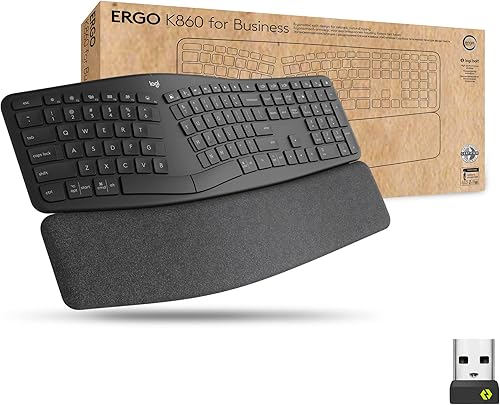
- Curved split layout
- Pillowed wrist rest
- Logi Bolt wireless technology
- Bluetooth and RF connectivity
- Connects to up to 3 devices
The business model keeps the K860 shape and wrist-support approach while adding Logi Bolt wireless technology, secure connections and features aimed at IT teams. It fits office deployments and users who value managed connectivity.
Pros
- Encrypted Logi Bolt wireless technology
- Bluetooth and RF connectivity
- Up to 3-device connection
- Support for remote deployment and management
Cons
- PC compatibility is narrower in the product details
- Heavier stated weight than the standard model
- Business features may matter less for a single personal workstation
The business model supports Bluetooth and RF connectivity and can connect to up to 3 devices. Its listed operating system family includes Linux, macOS and Windows, while the compatible device entry specifies PC.
Logitech describes the business version as supporting remote deployment and management of DFUs and the Logitech Options app. It is also certified in over 100 countries, according to the product information.
The keyboard includes 2 AAA batteries, a quick start guide and a Unifying USB receiver. Because the business model is built around office management, its extra features are most useful when an organization needs secure wireless connections and easier deployment.
Who should choose K860 for Business?
Choose it for an office, shared workstation program or IT-managed environment where secure wireless connections are a priority. The business features may also suit an individual who specifically wants Logi Bolt.
For a single personal desk, the standard K860 may be simpler if you need the broadest listed compatibility. Compare your computer, connection preference and management needs before paying attention to the business label.
Is the K860 layout comfortable for daily typing?
The K860 layout is designed around a curved, split keyframe and sloping shape. The left and right key areas are separated rather than arranged as one flat rectangle, so your hands may rest at a different angle than they do on a standard keyboard.
The pillowed wrist rest uses a memory foam layer. Logitech describes it as offering 54% more wrist support and 25% less wrist bending compared with a standard keyboard without a palm rest.
Those are brand claims, not a promise that the keyboard will solve discomfort for every user.
The keys are scooped to match fingertip shape. Both models retain a QWERTY layout, but the standard model lists 78 buttons while the business model lists 61 buttons.
Give yourself time to adjust if you've used flat keyboards for years. Start with short typing sessions, keep the keyboard centered with your body and change the palm-lift position one step at a time.
The ergonomic keyboard mouse buying guide covers how keyboard shape, mouse position and tray space work together.
How does the K860 fit a standing desk?
The K860 fits a standing desk when the keyboard height lets your wrists stay neutral and your elbows remain close to your sides. Its 0, -4 and -7 degree tilt legs give you three positions to compare as you change desk height.
Measure the keyboard area before buying. At 9.17 in wide and 17.95 in long, the K860 needs more surface than a compact keyboard, especially if you also keep a mouse, notebook or monitor controls nearby.
Place the keyboard so you don't reach forward to type. A standing desk can change your posture during the day, but a keyboard that sits too far away can still make your shoulders work harder.
The best standing desk keyboard options can help you compare this full-size design with keyboards that use different footprints or layouts.
Bluetooth or USB: which connection should you use?
Choose Bluetooth when you want a wireless connection without occupying a USB port. Choose the USB receiver when your workstation is already arranged around a receiver connection or when that setup is more convenient.
The standard K860 supports Bluetooth and USB. The business version uses Bluetooth and RF, with Logi Bolt providing the business-focused wireless path.
Keep the receiver close to the keyboard's operating area and avoid putting it behind equipment that blocks access. If you use a wireless keyboard or keyboard and mouse combo, the receiver may be inside the mouse under its battery cover or attached within the packaging.
For the standard model, Logitech Options can customize Fn keys, create custom shortcuts and provide battery-life notifications. The official Logitech ERGO K860 support page is the right place to check current software and setup information.
Does the K860 work for business use?
The standard K860 can fit business work when its operating system support and connection options match your computer. Its full-size layout, integrated numpad and quiet keys suit office tasks that include documents, spreadsheets and regular typing.
The K860 for Business is the stronger match for IT-managed business use. Logi Bolt, encrypted connections, global certification and remote deployment support address needs that a personal keyboard does not usually need to solve.
The two versions differ in more than their names. Compare the listed connection technology, compatible devices and included receiver before choosing a business model for a home desk or a standard model for an office rollout.
If you're pairing a mouse with the keyboard, see the best mice to pair with the Logitech ERGO K860. A comfortable keyboard can still feel awkward if the mouse forces your hand too far away.
What are the main trade-offs?
The standard K860's biggest strength is flexibility. It combines Bluetooth and USB connectivity with support for Windows, macOS, Linux and Chrome OS, while keeping the full-size layout and adjustable palm lift.
Its main trade-off is the wide footprint. A 9.17-inch width may crowd a shallow desk, a narrow keyboard tray or a small standing desk surface.
The business K860's biggest strength is managed wireless security. Logi Bolt and deployment features can matter a great deal in an organization, but they add less value when you only need a keyboard for one personal computer.
The K860 shape also requires an adjustment period for many flat-keyboard users. A split ergonomic keyboard is not automatically the right choice for every person, so use the layout, wrist support and desk fit as your decision points.
For a broader comparison, read how to choose a split ergonomic keyboard and mouse combo. If you prefer a wireless mouse shaped for a specific hand, see how to choose a wireless left-handed ergonomic mouse.
How should you set up and care for the K860?
Start by placing the keyboard directly in front of you with the split center aligned to your body. Adjust the palm lift after your desk reaches its normal sitting or standing height.
Keep your wrists supported by the rest without pressing heavily into it. If your shoulders rise or your elbows move away from your sides, adjust the keyboard position before changing the tilt again.
Keep food, drinks and loose debris away from the keys. Follow Logitech's care and cleaning guidance, and remove batteries according to the instructions when the keyboard will sit unused for an extended period.
The K860 is a membrane keyboard, not a mechanical keyboard. If you're comparing key feel and layout styles, are mechanical keyboards ergonomic? explains why switch type alone doesn't determine workstation comfort.
A wrist rest should support your palms while you type, not become a place to press your wrists for long periods. How to use a mouse wrist rest covers the same positioning principle for the mouse side of the workstation.
Logitech ERGO K860 review verdict
Pick the standard Logitech Ergo K860 if you want the broadest listed operating system support, Bluetooth and USB connections, a full-size layout and an adjustable palm lift for a personal workstation.
Pick the K860 for Business if secure Logi Bolt wireless connections, up to 3-device support and IT deployment features matter to your office. Both models suit users who want a curved split keyboard with a pillowed wrist rest, but the standard version is the more flexible general choice.
Frequently asked questions
Is the Logitech ERGO K860 a split ergonomic keyboard?
Yes. The Logitech ERGO K860 uses a curved, split keyframe that separates the left and right typing areas and slopes the keyboard toward the user.
It also has a pillowed wrist rest and adjustable tilt legs, so you can set the palm lift for seated or standing work.
What is the difference between Logitech Ergo K860 and K860 for Business?
The standard Logitech Ergo K860 supports Bluetooth and USB connections and works with Windows, macOS, Linux and Chrome OS. The K860 for Business adds Logi Bolt wireless technology, encrypted secure connections and features for IT deployment, while its listed compatible device is PC.
Is the Logitech ERGO K860 good for a standing desk?
The ERGO K860 can suit a standing desk because its adjustable palm lift has 0, -4 and -7 degree positions. Check that your desk has enough depth for its 9.17-inch width and that your elbows stay near a comfortable height when you alternate between sitting and standing.
Can you connect the Logitech ERGO K860 to more than one device?
The standard ERGO K860 supports Bluetooth and USB connectivity. The business model is described as connecting to up to 3 devices.
Choose the version that matches the switching and connection method you need across your workstation.


