Logitech Wave Keys and Lift Combo Review: Worth It? (November 2026)
The Logitech Wave Keys and Lift combo pairs a wavy ergonomic keyboard with a right-handed vertical mouse for a coordinated desk setup. Choose it if its cushioned palm rest and 57° mouse angle suit your preferences; choose a simpler wireless combo if you want a full-size layout or a slim design.
On this page (8 sections)
- What does the Logitech Wave Keys and Lift combo include?
- What do the Wave Keys shape and Lift angle mean at a desk?
- How do Wave Keys and Lift connect to a computer?
- How does the Wave Keys and Lift compare with simpler combos?
- How should you choose between the three Logitech combos?
- How do you set up and care for an ergonomic keyboard and mouse?
- Can you replace keys on a Logitech Wave keyboard?
- Is the Logitech Wave Keys and Lift combo the right choice?
The Logitech Wave Keys and Lift combo is a coordinated ergonomic keyboard and mouse set for people who want a wavy keyboard, cushioned palm rest and right-handed vertical mouse in one bundle. That pairing suits a desk where both devices should follow the same comfort-focused idea.
Its main trade-offs are the mouse’s right-hand orientation and the adjustment that may come with a less familiar shape. The Lift is intended for small to medium hands, so fit matters more than the product name alone.
The keyboard’s curved layout and built-in palm rest also change where your hands naturally sit.
This combo suits long stretches of typing and pointing when hand position is the priority. It is less suited to left-handed pointing or to someone who prefers every key and button in a traditional place.
Checking hand size and desk space before you buy can save frustration later.
The MK270 is a better fit if you want a familiar full-size keyboard and ambidextrous mouse. It keeps F-keys, arrow keys and a number pad in the usual places, which can make switching easier for fast or number-heavy work.
The slimmer MK470 suits a tighter desk and keeps a number pad in a compact layout. Its low-profile keys and quiet mouse may suit a shared room, and it works when space matters more than a vertical grip or palm rest.
Choosing between them comes down to what you notice most during a normal workday. If hand alignment and mouse shape top your list, the Wave Keys and Lift deserves close attention.
If a familiar layout or slimmer footprint matters more, a simpler combo may fit better.
What does the Logitech Wave Keys and Lift combo include?
The combo includes a Wave Keys ergonomic wireless keyboard and a Lift vertical ergonomic mouse. The keyboard has a wavy design and cushioned memory foam palm rest, while the mouse has a 57° vertical shape, softly textured grip and thumb rest.
Logitech Wave Keys & Lift Vertical Mouse: Best for a matched ergonomic setup

- Wavy keyboard design
- Cushioned memory foam palm rest
- Right-handed 57° vertical mouse
- Bluetooth Low Energy or Logi Bolt USB receiver
A keyboard and mouse designed as one ergonomic wireless combo, with a palm rest and a vertical mouse shape. The Lift is intended for small to medium hands.
Pros
- Keyboard and mouse are matched in one bundle
- Wavy keyboard and cushioned palm rest
- Vertical mouse has a 57° angle and thumb rest
- Bluetooth Low Energy and Logi Bolt USB receiver options
Cons
- Mouse is designed for right-handed use
- Lift is described for small to medium hands
- Wavy layout and vertical grip may take getting used to
The keyboard and mouse connect through Bluetooth Low Energy technology or a Logi Bolt USB receiver. The combo includes 2 AAA batteries for the keyboard, 1 AA battery for the mouse and a Logi Bolt USB receiver.
This is a bundle for buyers who want both input devices to share an ergonomic focus. Its title also specifies a graphite color, which can help if you want the keyboard and mouse to look like a set.
Who is the Wave Keys and Lift combo best for?
It suits someone who wants to try an ergonomic keyboard shape and a vertical mouse in the same setup. The Lift is intended for small to medium hands, and its right-handed design is a key fit condition.
A different mouse or combo may make more sense if you use your left hand for pointing. Also consider whether the keyboard’s wavy layout and palm rest fit how you place your hands at your desk.
What do the Wave Keys shape and Lift angle mean at a desk?
The wavy keyboard design and vertical mouse shape change the hand positions the combo encourages. They are useful details to weigh before buying, but comfort is personal and the design alone cannot promise a particular result.
The Wave Keys has plunger key switches described as tactile and discreet, plus a cushioned memory foam palm rest. The palm rest is built into the keyboard, so include its space when planning where the keyboard will sit.
The Lift's 57° angle turns the hand toward a vertical grip. Its thumb rest and softly textured grip provide contact points, while the right-hand orientation narrows who it fits.
Logitech says the keyboard and mouse were designed, tested and approved according to criteria set by leading ergonomists. That certification describes their design process; it doesn't guarantee that every shape will feel right to every person.
For the broader context, see the keyboards, mice and trays buying guide, which covers how these items fit into an ergonomic workstation.
How do Wave Keys and Lift connect to a computer?
The combo offers Bluetooth Low Energy and a Logi Bolt USB receiver as connection options. The listed compatible devices include laptops and personal computers, with operating system support spanning Windows, macOS, iPadOS, ChromeOS and Linux.
The operating system details include Windows 10 or later, macOS 12 or later and iPadOS 15 or later. ChromeOS and Linux are also listed, though the specific features available may differ by system.
The included Logi Bolt receiver can be useful if you want a USB connection path. Before arranging your desk, check that your computer supports the connection method you plan to use and that you can reach the relevant port.
If Mac use is your main concern, read whether Logitech Wave Keys works with a Mac for compatibility considerations. For a pairing-specific look, see whether Logitech Wave Keys and Lift work together.
How does the Wave Keys and Lift compare with simpler combos?
The Wave Keys and Lift puts ergonomic shape ahead of a traditional layout, while the MK270 favors a full-size keyboard and the MK470 favors a slim footprint. Their different layouts and connections make the choice clearer than a general “best” label.
| Combo | Keyboard approach | Mouse approach | Connection |
|---|---|---|---|
| Logitech Wave Keys & Lift Vertical Mouse | Wavy design with cushioned palm rest | Right-handed, vertical 57° shape | Bluetooth Low Energy or Logi Bolt USB receiver |
| Logitech MK270 Full Size Wireless Keyboard | Full size with F-keys, number pad and arrow keys | Ambidextrous compact mouse | Wireless USB-A nano receiver |
| Logitech MK470 Slim Wireless Combo Compact Keyboard | Compact layout with number pad and low-profile scissor keys | Ambidextrous three-button mouse | 2.4 GHz USB nano receiver |
Is the MK270 better if you want a regular keyboard?
The MK270 is a strong alternative if you prefer a full-size layout with familiar F-keys, arrow keys and number pad. Its low-profile, quiet keys and adjustable-height tilt legs suit buyers who want conventional typing rather than a wavy ergonomic design.
Logitech MK270 Full Size Wireless Keyboard: Best for a familiar full-size layout
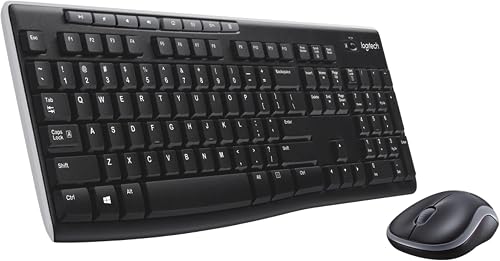
- Full-size keyboard with number pad
- Low-profile quiet keys
- USB-A nano receiver
- Ambidextrous mouse
A straightforward full-size keyboard and mouse combo for buyers who prefer a familiar layout and a receiver connection. Its mouse is designed for either hand.
Pros
- Full-size layout includes a number pad
- Low-profile, quiet keys
- Ambidextrous mouse
- Spill-resistant keyboard design
Cons
- Full-size keyboard takes more desk room than a compact option
- Uses a USB receiver instead of Bluetooth
Its included mouse is compact and ambidextrous, so it can suit shared desks or left-handed use. The keyboard has a spill-resistant design, and the combo uses a single USB-A nano receiver.
Choose the MK270 if conventional layout and receiver-based setup matter more than a vertical mouse or Bluetooth option. It will occupy more desk space than the compact MK470, so measure your keyboard area before deciding.
Is the MK470 better for a small desk?
The MK470 is the better fit if a slim keyboard and quiet mouse matter more than a wavy design. It keeps a number pad while using a compact keyboard layout, which can be useful when the desk has limited width.
Logitech MK470 Slim Wireless Combo Compact Keyboard: Best for a compact, quiet desk

- Compact keyboard with number pad
- Low-profile scissor keys
- Ambidextrous three-button mouse
- USB nano receiver
A slim wireless combo for a smaller work area, with a compact keyboard that keeps a number pad. Its mouse is quiet and ambidextrous.
Pros
- Slim keyboard suits tighter desk spaces
- Low-profile scissor keys
- Ambidextrous, noise-reduced mouse
- Auto-sleep feature
Cons
- Windows-optimized layout
- Uses a USB receiver
- Compact layout may feel less familiar than a full-size keyboard
Its keyboard uses low-profile scissor keys and is optimized for Windows. The ambidextrous three-button mouse has optical tracking and a mechanical scroll wheel, and the combo connects through a USB nano receiver.
The MK470 is a practical alternative when the desk needs a compact setup and a receiver is convenient. Its Windows-optimized layout and compact key arrangement are worth checking against your own typing habits.
How should you choose between the three Logitech combos?
Choose by hand fit, keyboard layout and available connection, in that order. The Wave Keys and Lift is the ergonomic pick, the MK270 is the conventional full-size option, and the MK470 is the slim desk-space option.
- Pick Wave Keys and Lift if you want a wavy keyboard, cushioned palm rest and right-handed vertical mouse in one bundle.
- Pick MK270 if you want a full-size keyboard, number pad, F-keys and an ambidextrous mouse.
- Pick MK470 if you want a compact, low-profile keyboard with a number pad and a quiet ambidextrous mouse.
Think about the mouse first if you have a strong hand preference or know that you need a particular grip. A keyboard’s shape matters too, but a mouse used throughout the workday can make orientation and fit especially important.
Then check your desk space and computer connections. A receiver-based combo needs an available USB port, while the Wave Keys and Lift also supports Bluetooth Low Energy.
How do you set up and care for an ergonomic keyboard and mouse?
Set up the keyboard and mouse so your hands can reach them without stretching, then adjust your chair and desk around a relaxed working position. Keep the keyboard on a stable surface and leave enough room for the mouse to move.
Place the keyboard directly in front of you, with the mouse beside it on the side that matches your dominant hand. Avoid forcing your wrists into a position that feels strained; small placement changes can make the setup easier to use.
For the Wave Keys and Lift, make sure the palm rest sits where you can use it comfortably and that the vertical mouse fits your hand. For either alternative, allow enough room for the full keyboard layout you choose.
Keep the devices clear of dust and food crumbs, and clean them with a soft, dry cloth unless Logitech's care instructions recommend another method. Before cleaning, follow the device guidance for powering down or removing batteries.
If you are comparing a standing desk setup as well, what a sit-stand workstation is explains how the desk, chair and input devices work together. For adjustable desk context, see what a lift desk is.
Can you replace keys on a Logitech Wave keyboard?
A damaged or missing key may need a replacement part that matches the keyboard model and key position. Check the keyboard's exact model before ordering a key, since shape and attachment can vary across models.
A close visual match is not always enough, so use the full model details rather than relying on the Wave name alone.
Read whether Logitech Wave keyboard keys can be replaced before trying to remove a keycap. That guide can help you decide whether a small repair is sensible or whether a more careful approach is needed.
Avoid forcing it if it resists, since that can damage the switch or surrounding parts.
For a comparison focused on another Wave Keys bundle, see the Logitech Wave Keys MK670 combo reviews. Check the exact combo name and included devices so you compare the right setup.
Small naming differences can point to different keyboards, mice or included parts.
If a key is loose rather than missing, cleaning around it and checking for trapped debris may help before you order anything. Keep the keyboard powered down while you inspect it, and stop if a part feels stuck.
When in doubt, a careful pause protects the keyboard better than extra force.
Is the Logitech Wave Keys and Lift combo the right choice?
The Wave Keys and Lift combo is the clearest choice when you want an ergonomic keyboard and right-handed vertical mouse together. It gives you a wavy keyboard with a cushioned palm rest and a mouse with a 57° vertical shape in one purchase.
Choose the MK270 for a familiar full-size layout or the MK470 when a compact, quiet keyboard better fits your desk. The MK270 keeps traditional keys and an ambidextrous mouse, while the MK470 keeps a number pad in a slimmer design.
Both trade the vertical mouse shape for a more conventional feel.
Use hand fit and typing layout as your decision rule, then confirm the connection your computer supports. If you are right-handed and your hands match the Lift size guidance, the ergonomic combo may suit long sessions better.
If you prefer a left-hand option, a standard layout or tight desk space, the alternatives may be more practical.
A vertical mouse can reward patience, but it may take time to feel natural for pointing and dragging. A familiar keyboard can also be easier to recommend to a colleague or family member who needs a quick setup.
Check desk width, available ports and Bluetooth support before you order. The Wave Keys and Lift supports Bluetooth Low Energy or a Logi Bolt USB receiver, while the other two combos use a USB receiver.
Making sure your computer matches your chosen connection avoids an awkward first day.
In the end, the right choice is the one that fits your hands, your layout habits and your desk. The Wave Keys and Lift is strongest when ergonomic shape is the priority.
The MK270 and MK470 are stronger when familiarity, ambidextrous use or compact size matters most.
Frequently asked questions
Is the Logitech Wave Keys and Lift combo worth considering?
The Logitech Wave Keys and Lift combo is worth considering if you want an ergonomic keyboard and a vertical mouse together. Its wavy keyboard has a cushioned memory foam palm rest, while the right-handed Lift has a 57° shape and thumb rest.
Check that the mouse orientation and hand fit work for you.
Can you use Logitech Wave Keys and Lift together?
Yes. This combo pairs the Wave Keys keyboard with the Lift vertical mouse as one workstation bundle.
Both are wireless, and the combo supports Bluetooth Low Energy technology or a Logi Bolt USB receiver.
The mouse is right-handed, so the pairing is best suited to a right-handed setup.
Does the Logitech Wave Keys and Lift combo work with Mac?
The combo lists macOS 12 or later support, along with Windows 10 or later and iPadOS 15 or later. It also lists ChromeOS and Linux support.
If you need a specific key behavior or connection setup on your Mac, check Logitech's compatibility guidance before choosing.
How does the Wave Keys and Lift combo compare with the MK270?
Wave Keys and Lift puts an ergonomic shape first, with a wavy keyboard, palm rest and right-handed vertical mouse. The MK270 offers a traditional full-size keyboard with F-keys, arrow keys and a number pad, plus an ambidextrous mouse.
Pick based on fit and layout preference.


