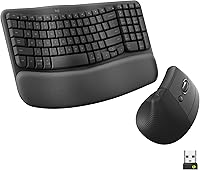
Can You Use Logitech Wave Keys with a Mac?
Yes, Logitech Wave Keys works with a Mac. The Wave Keys keyboard supports macOS through Bluetooth or Logi Bolt, while the MK270 is built for Windows.
On this page (9 sections)
- Does Logitech Wave Keys work with a Mac?
- Which Logitech Wave Keys connections work with a Mac?
- Does the Logitech Wave Keys layout change for Mac?
- Is the Logitech MK270 a good Mac alternative?
- Can you use Logitech Wave Keys and MK270 for different Mac needs?
- How should you set up Logitech Wave Keys with a Mac?
- Can Logitech Wave Keys and Lift work together?
- Can you replace keys on Logitech Wave Keys?
- Which Logitech keyboard should Mac users choose?
Yes, Logitech Wave Keys works with a Mac. The keyboard supports macOS through Bluetooth or Logi Bolt, and its wavy design, cushioned palm rest, and compact layout suit people who want an ergonomic keyboard near a Mac workstation.
The exact edition still matters. Check the key markings and connection method before ordering, especially if you want Mac-specific labels rather than a keyboard that simply connects to macOS.
Does Logitech Wave Keys work with a Mac?
Yes, Logitech Wave Keys supports macOS. The Wave Keys MK670 connects through Bluetooth or a Logi Bolt USB receiver, and Easy-Switch lets you move between a PC, tablet, and phone.
Its 99-key QWERTY layout keeps the keyboard more compact than a full-size design. Logitech says the shorter layout lets you bring the mouse closer to your body, which may suit a smaller desk or a setup where shoulder position matters.
The keyboard uses a wavy keyframe and a cushioned memory-foam palm rest. These features are designed around a more natural typing position, but comfort still depends on your desk height, chair position, and typing habits.
For a broader look at desk input devices, see our ergonomic keyboard and mouse guide.
Which Logitech Wave Keys connections work with a Mac?
Bluetooth and Logi Bolt are the two listed connection options for the Wave Keys keyboard. Bluetooth can keep your desk free of a receiver, while Logi Bolt gives you a USB receiver option.
The combo includes a USB receiver and batteries. The receiver may be inside the mouse under its battery cover or attached within the packaging, so check both places if it isn't immediately visible.
Easy-Switch supports moving the keyboard between Windows, macOS, iPadOS, and ChromeOS devices. The keyboard and mouse do not necessarily share every operating system feature, so focus on the keyboard when checking Mac compatibility.
If you use a standing desk, you may also want to compare Logitech Wave Keys and Lift together for a keyboard and mouse setup.
Does the Logitech Wave Keys layout change for Mac?
The key layout is the part to check most carefully when choosing Logitech Wave Keys for Mac. A keyboard can connect successfully while its printed labels and shortcut behavior differ from the layout you expect.
The Wave Keys data identifies a 99-key QWERTY membrane keyboard with single-color backlighting support. It does not give a full key-by-key map in the information available here, so confirm the exact Mac edition and printed legends before ordering.
Mac users who switch between computers should also check how they prefer to access operating-system shortcuts. The ability to connect to macOS does not by itself confirm that every key label matches an Apple keyboard.
For the differences between the standard and business versions, read Logitech Wave Keys vs. Wave Keys for Business.
What does the Wave Keys compact design mean at a Mac desk?
The compact Wave Keys design leaves the mouse closer to the keyboard than a full-size layout. That can help if you want both hands and the mouse to stay within a smaller working area.
The cushioned palm rest adds support at the front edge of the keyboard. Keep the keyboard flat enough for your wrists to stay relaxed, and adjust your chair or desk so your elbows are not forced upward.
Choose this combo if you want a Mac-compatible ergonomic keyboard and a matching wireless mouse. Its mouse is described for medium- to large-sized hands and includes a rubber grip, SilentTouch technology, and SmartWheel scrolling.
Skip it if you need a standard full-size layout with a number pad or if you want a simple Windows-focused keyboard. The Wave Keys design trades some traditional spacing for a more compact reach.
Is the Logitech MK270 a good Mac alternative?
The MK270 is not the safer Mac choice from the information available here. Its compatible operating system family is Windows, with Windows 10 listed as the minimum required operating system version.
The MK270 is a full-size QWERTY keyboard with F-keys, a number pad, arrow keys, low-profile quiet keys, and 8 multimedia hotkeys. It also includes a compact ambidextrous mouse and a USB receiver.
This combo suits someone who wants a traditional full-size layout for a Windows computer. Its spill-resistant keyboard design, adjustable tilt legs, and on/off switches may also help in a general office setup.
Mac buyers should choose it only after confirming compatibility for their exact computer and the functions they need. The supplied compatibility information identifies Windows rather than macOS, so it does not offer the same clear Mac fit as Wave Keys.
Can you use Logitech Wave Keys and MK270 for different Mac needs?
Choose Wave Keys for documented macOS support and ergonomic features; choose MK270 only when you need its Windows-focused full-size layout. These products solve different desk problems.
Wave Keys is the better fit for a Mac user who wants Bluetooth or Logi Bolt, a compact keyboard, a wavy design, and a cushioned palm rest. Its Easy-Switch feature also suits people who move between several supported device types.
MK270 is the better fit for a Windows user who wants a full-size keyboard, number pad, F-keys, arrow keys, and 8 multimedia hotkeys. Its wireless receiver and ambidextrous mouse create a familiar office combo.
Neither choice should be based only on the word “wireless.” Check the operating system, printed key layout, connection type, and the space available beside your mouse.
How should you set up Logitech Wave Keys with a Mac?
Start by choosing Bluetooth or Logi Bolt, then place the keyboard where your wrists and elbows stay relaxed. Pair the keyboard through your Mac's Bluetooth settings or connect the Logi Bolt receiver as appropriate.
Keep the keyboard close enough that the mouse does not force your arm outward. The compact layout is intended to bring the mouse nearer, but your desk height and chair position still determine whether the setup feels comfortable.
The Logi Options+ App can be used to personalize the Wave Keys experience with shortcuts. Only add shortcuts you can remember, because extra assignments can make a shared workstation harder to use.
If you use a separate mouse, our guide to the best left-handed ergonomic wireless mouse can help with the next choice.
Can Logitech Wave Keys and Lift work together?
Yes, the Wave Keys keyboard and Lift mouse can be used in the same desk setup. The keyboard's compact shape is intended to keep the mouse closer, while the mouse choice depends on your hand size, grip, and preferred shape.
The Wave Keys MK670 combo already includes the Signature M550 L Wireless Mouse, which is described as a fit for medium- to large-sized hands. If you are considering a Lift mouse instead, compare the device connections and the space each setup needs.
Our guide to using Logitech Wave Keys and Lift together covers that pairing in more detail. For a product-focused comparison, see the Logitech Wave Keys and Lift combo review.
Can you replace keys on Logitech Wave Keys?
Do not assume that Wave Keys key replacement works like a standard mechanical keyboard. The Wave Keys keyboard is described as a membrane design, and the available information does not confirm interchangeable replacement keycaps.
Clean the keyboard according to Logitech's care guidance and avoid pulling keys unless the exact model instructions allow it. A replacement key may not solve a damaged switch or membrane problem.
Read whether you can replace keys on a Logitech Wave keyboard before trying to remove a key. Check the model number as well, since the Wave Keys family includes more than one edition.
Which Logitech keyboard should Mac users choose?
Pick Logitech Wave Keys for a Mac because macOS support is documented and the keyboard offers Bluetooth, Logi Bolt, Easy-Switch, and an ergonomic compact design. Confirm the exact key markings if Mac-specific labels matter to you.
Pick the MK270 for a Windows setup that needs a full-size QWERTY layout, number pad, F-keys, arrow keys, and 8 multimedia hotkeys. Its data identifies Windows compatibility, so it is not the clear Mac choice here.
For related standing desk planning, what a sit-stand workstation is explains how the desk, screen, keyboard, and mouse fit together. If you are comparing desk frames too, see what a cross-frame standing desk is.
Frequently asked questions
Can you use Logitech Wave Keys with a Mac?
Yes. Logitech Wave Keys works with macOS through Bluetooth or the included Logi Bolt receiver.
Its 99-key QWERTY layout and Easy-Switch feature make it suitable for moving between a Mac, tablet, and phone, but check the exact edition and key markings before ordering.
Does Logitech Wave Keys work with a MacBook?
Yes, Logitech Wave Keys can connect to a MacBook through Bluetooth or Logi Bolt. Keep the receiver available if you prefer a USB connection, and check that your Mac supports the connection method you plan to use before setup.
Is the Logitech MK270 compatible with Mac?
The MK270 is listed with Windows compatibility and a minimum required operating system of Windows 10. It may not be the right choice for a Mac buyer who wants clearly documented macOS support, even though it uses a wireless USB receiver.
What is the difference between Logitech Wave Keys and the Mac edition?
The main buying question is the printed key layout and the operating system support shown for the exact model. Wave Keys supports macOS, while the MK270 data here identifies Windows as its compatible operating system family, so Mac users should confirm the edition before ordering.