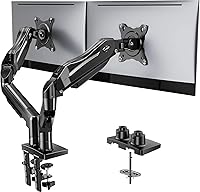
What Is a Gas Spring Monitor Arm?
A gas spring monitor arm is an arm that uses a sealed gas cylinder to counterbalance your monitor's weight. The cylinder pushes up as the arm moves, so you can reposition the screen with one hand and it stays where you leave it.
On this page (10 sections)
- How does a gas spring monitor arm balance your screen?
- What is a gas spring monitor arm in plain terms?
- How do gas assisted arms reposition a monitor?
- What parts make up a gas spring monitor arm?
- How do you set the balance on a gas spring arm?
- What size and weight do you need to check?
- How is a gas spring arm different from a spring arm?
- How do you install a gas spring monitor arm safely?
- What are the limits and trade offs of gas spring arms?
- Which gas spring arm should you pick for your desk?
A gas spring monitor arm is an arm that uses a sealed gas cylinder to counterbalance your monitor's weight. The gas pushes up inside the arm, so you can lift, lower, and tilt the screen with light force and it holds position without constant readjusting.
Start with a monitor arm mount guide for mount types. A clamp, grommet, or base decides how the arm fixes to your desk.
How does a gas spring monitor arm balance your screen?
A gas spring arm balances your screen by letting compressed gas push against a piston inside the arm. The push offsets gravity, so the arm does not need your hand to stay up.
Without that push, a monitor would pull the arm down every time you let go. Makers shape the gas force so effort feels fairly even from low to high.
Most arms add a tension or balance control. Turn it to match your monitor weight, then test the movement.
If the screen sinks, add tension. If it floats up, reduce it.
Weight range matters here. A cylinder sized for a light screen may not balance a heavier 34 inch screen, even if the arm can physically hold it.
What is a gas spring monitor arm in plain terms?
A gas spring monitor arm is a desk arm with a built-in counterweight that works with gas pressure. It carries part of the load while you aim the screen.
The pole, joints, and links reach out from the desk. VESA holes on the back of your monitor bolt to the head of the arm.
The gas spring sits inside one link and does not power the arm like a motor. It simply pushes back against the weight, so small adjustments feel easy while you still guide the screen by hand.
There is no cord to plug in, so setup is about fit, balance, and safe mounting.
How do gas assisted arms reposition a monitor?
Gas assisted arms reposition a monitor by combining counterbalance with multi point joints. You pull the screen down, push it up, or swing it sideways, and the gas force helps through the whole move.
The base joint lets the arm fold back toward the desk. The elbow joint lets it reach forward.
The head joint handles tilt and rotation, so portrait mode is a short twist.
Pull the screen close for detailed work, push it back for video calls, or turn it toward a second person. The arm holds each spot while you type.
For a smaller screen on the move, our best arm for portable monitor guide covers lighter arms that need less gas force.
What parts make up a gas spring monitor arm?
The parts of a gas spring monitor arm are the mount, pole, arm links, gas cylinder, joints, and VESA head. Each part has one job, and the gas cylinder only handles balance.
The mount anchors the arm to the desk by clamp, grommet, or base. Desk thickness and shape decide which mount works.
The pole sets height and the arm links create reach. The VESA head uses four screws in a 75x75mm or 100x100mm pattern.
Cable clips keep cords neat along the links. Leave enough slack for full movement.
How do you set the balance on a gas spring arm?
You set the balance by adjusting tension while the monitor is attached and testing the full range. Start with the maker instructions, make a small change, then move the arm up and down.
Loosen or tighten the balance control in small steps. After each change, lift the screen from its lowest spot to its highest spot.
The goal is smooth movement with no sinking or floating back.
Do not set balance with the arm empty, then add the monitor. The gas force is tuned for a load, so an empty arm will feel wrong.
If the arm still sags at the lowest angle, the monitor may be too heavy.
What size and weight do you need to check?
You need to check monitor size, monitor weight, and VESA pattern before you buy. If you are mounting two screens, see the Ergotron LX dual monitor arm review.
Those three numbers decide fit more than brand or style.
Size alone does not tell you weight. Two screens with the same diagonal can differ by several pounds, and curved panels often weigh more than flat ones.
Weigh your screen or check its specs before you order.
VESA pattern is the spacing of the four mounting holes. The common patterns are 75x75mm and 100x100mm.
If your monitor lacks VESA holes, you may need an adapter, and that adapter adds weight.
For arms built around this design, see best gas spring monitor arm picks with their size and weight ranges laid out.
Who should choose the Ergotron NX?
Choose the Ergotron NX if you want a single screen arm for displays up to 34 inches and 0 to 18 lb. It uses VESA patterns of 75x75mm and 100x100mm.
Ergotron says the arm pans 360 degrees, tilts 35 degrees, and rotates for portrait or landscape use. It also says the desk clamp fits worksurfaces up to 2 inches thick, and the arm mounts at any fixed point along a 13 inch pole.
The design routes cables through the arm and base, which helps keep the desk clear. That matters most if your desk sits close to a wall.
Skip this arm if your monitor weighs more than 18 lb or if you need wider tilt. Note that a notebook tray is sold as a separate accessory.
Who should choose the WALI adjustable arm?
Choose the WALI arm if you want a single screen arm for 13 to 34 inch screens with a higher weight limit. WALI rates it up to 26.4 lb for flat screens and 19.8 lb for curved screens.
WALI says the arm extends out 19.3 inches and raises up to 17.3 inches above the desktop. It swivels from +180 to -180 degrees, tilts from +70 to -45 degrees, and rotates 360 degrees.
Mounting options include a C-clamp or grommet base for desks from 0.39 to 2.76 inches thick. WALI recommends a wooden desk with no crossbeam blocking the underside.
Skip this arm if your screen is heavier than its curved or flat limit. Confirm the VESA pattern first.
How is a gas spring arm different from a spring arm?
A gas spring arm differs from a spring arm in how it creates counterbalance. A spring arm uses a coil or internal spring, while a gas arm uses pressurized gas in a sealed cylinder.
Both types try to make the screen feel light. The difference shows in adjustment and feel.
Spring arms often use a knob to preload the spring, while gas arms use a balance control tied to the gas piston.
Our spring vs gas monitor arm guide compares the two designs side by side. Read it if you are torn between them.
A spring arm may suit a lighter screen, while a gas arm may suit a heavier screen.
How do you install a gas spring monitor arm safely?
You install a gas spring monitor arm by mounting the base, attaching the arm, fitting the monitor, then setting balance. Work in that order so the clamp is secure before any weight goes on the arm.
First, check desk thickness and edge shape against the mount limits. A clamp needs a flat edge it can grip.
A grommet mount needs a hole and clear space below.
Next, mount the pole and arm, then attach the VESA head. Tighten the four VESA screws evenly and lift the screen with help if it is heavy.
Route cables last, with slack for movement. Then set balance and test tilt, swivel, and rotation.
If your desk is glass, read monitor arm on glass desk first. If you prefer a wall setup, see how to use monitor wall mount.
What are the limits and trade offs of gas spring arms?
The limits of gas spring arms are weight range, desk fit, and screen size. They balance well inside their range and feel wrong outside it.
A screen that is too heavy will sink. A screen that is too light may float upward.
A very wide screen can also stress the head joint in portrait mode.
Desk space is another trade off. The arm frees space under the screen, but it needs clearance behind the desk to fold.
Measure from the desk edge to the wall before you buy.
Compare that trade off with a simple stand in monitor arm vs stand. A stand is simpler and often cheaper, while an arm wins on height adjust and reach.
What else helps at a standing desk?
A water bottle helps at a standing desk when you want water within reach without leaving the screen. Keep it to one side so it does not crowd the keyboard area.
The pack holds twelve 1 liter bottles at 33.8 fluid ounces each. That size suits a desk only if you have space for a full liter bottle beside the arm.
Skip the pack if you prefer a refillable bottle or a smaller size. A large bottle can tip on a crowded desk, so place it away from cables.
Which gas spring arm should you pick for your desk?
Pick a gas spring arm by matching weight range, desk mount, and motion needs to your screen. Choose the Ergotron NX for a single screen up to 34 inches and 18 lb, or the WALI arm for screens up to 34 inches and up to 26.4 lb.
Read monitor arm for bed if your workspace is in a bedroom or a small room. Reach and fold back matter more in tight spaces.
For anyone asking what is a gas spring monitor arm, the short answer is a counterbalanced arm that makes screen changes easy. Measure your monitor, check the VESA pattern, confirm desk thickness, then set balance with the screen attached.
Frequently asked questions
What is a gas spring monitor arm?
It is a desk mount with a sealed gas cylinder inside the arm. The gas pushes against the arm to offset the monitor weight, so changing height or angle takes light force.
A tension or balance control lets you tune that force for your screen.
How is a gas spring arm different from a spring arm?
A spring arm uses a coil or internal spring that you adjust with a knob. A gas spring arm uses pressurized gas in a sealed cylinder.
Both aim to balance the screen, but the feel and adjustment method differ, so compare the two types before you buy.
Can a gas spring monitor arm hold any monitor?
No. Each arm has a size and weight range.
Check your monitor size, its weight, and its VESA pattern against the arm limits.
An arm that is too weak will sag, and one rated far above your screen may feel stiff.
Do gas spring arms need care?
Wipe the arm and joints with a dry cloth and check screws and the desk clamp now and then. Keep the arm within its rated angles, avoid hanging extra weight on it, and follow the maker instructions for any balance adjustment.