9 Best Dual Monitor Stands for Standing Desks (November 2026)
The best dual monitor stands for standing desks include the HUANUO FlowLift Dual Monitor Stand for most standing desks, the VIVO STAND-V002F Dual LED LCD Monitor Free-Standing for no-clamp desks, and the HUANUO Dual Monitor Stand for a light desk finish.
On this page (9 sections)
- How we compared these dual monitor stands for standing desks
- The best dual monitor stands for standing desks, ranked
- Clamp, freestanding or converter: which type fits your desk?
- Side-by-side comparison of the best dual monitor stands for standing desks
- Will these mounts stay steady as your desk moves up and down?
- What screen size and weight should you check first?
- How do you set eye level for sit and stand work?
- Do you need a clamp, a grommet hole or no holes at all?
- Which pick should you buy for a dual monitor stand for standing desk?
The best dual monitor stand for standing desk is the HUANUO FlowLift Dual Monitor Stand, because it covers 13 to 32 inch screens, holds 4.4 to 19.8 lb per arm and raises each screen up to 15.75 inches. Our score weighs specs, features and buyer feedback against what you are shopping for.
A dual monitor stand for standing desk has one main job. It keeps two screens at eye level while the desk moves from sit to stand.
It also lifts screens off the desktop, so your keyboard, dock and notebook have room again. If you work from a laptop, learn about laptop stand benefits.
Use this guide if you already have a height-adjustable desk. If you have a fixed desk, the last pick in this list solves the problem in a different way.
For the core setup idea, see our monitor arm mount guide. It explains how arms move and why eye level matters.
Our picks at a glance
-
1

-
2
 Best for no-clamp desks
VIVO STAND-V002F Dual LED LCD Monitor Free-Standing
9.6/10 our score
See it on Amazon -
3

- 4
 Best for larger flat and curved screensCheck it
- 5
 Best for two large screensCheck it
- 6
 Best for heavier monitorsCheck it
- 7
 Check it
WALI Freestanding Dual Monitor Stand for 13-27
Best freestanding compact base - 8
 Check it
MOUNTUP Dual Monitor Stand for Desk
Best for pneumatic adjustment - 9
 Check it
SANODESK 36 Standing Desk Converter
Best when your desk cannot move
How we compared these dual monitor stands for standing desks
We looked at screen size, weight limit, VESA pattern, desk fit, base type and range of motion. We checked the specs for each model and compared them side by side.
We looked for three things that matter most on a moving desk. The mount must hold steady, it must fit your screens and your desktop, and it must let you reset the angle after each height change.
We did not test these mounts by hand. We compared papers, features and buyer patterns, and we flag limits where a model does not fit a common desk or screen.
What to measure before you decide
Measure diagonal size, weight and VESA pattern for each screen first. Those three numbers rule out more models than any other check.
Then measure desk thickness, material and the space under the back edge. Clamp ranges here span about 0.39 to 3.54 inches, while grommet ranges are often narrower.
Also measure desk depth and width where the base or clamp will sit. Freestanding bases need clear footprint, and spring arms need clearance behind the desk.
Write those numbers down before you compare motion ranges. A wide tilt range helps only after the mount fits your screens and your desktop.
The best dual monitor stands for standing desks, ranked
The top pick suits most wooden standing desks. The freestanding picks suit glass, plastic or thick tops.
The converter suits a desk that cannot move.
HUANUO FlowLift Dual Monitor Stand: Best for most standing desks
- 13 to 32 inch screens
- 4.4 to 19.8 lb per arm
- VESA 75x75 and 100x100
- C-clamp and grommet base
- Raises up to 15.75 in
Full-motion arms for 13 to 32 inch screens with a dual C-clamp and grommet option. It raises screens to eye level and frees desktop space for a keyboard and dock.
Pros
- Wide 13 to 32 inch range
- Dual C-clamp and grommet options
- One-hand tilt, swivel and rotation
Cons
- Wooden desks only in the guidance
- Needs a clear underside for the clamp
The HUANUO FlowLift suits most people with 13 to 32 inch screens and a wooden standing desk. Each arm holds 4.4 to 19.8 lb and needs VESA 75x75 or 100x100 holes on the back of the screen.
The alloy steel build and the larger dual C-clamp platform are meant to keep both screens steady while you type, click and game.
In daily use, the tilt range of +85 to -50 degrees, swivel of plus or minus 90 degrees and 360 degree rotation let you move a screen closer for a spreadsheet or turn it to portrait for code. Height rise to 15.75 inches helps you set eye level in both sit and stand positions.
Cable management guides wires along the arms, so cords stay out of the way when the desk moves.
The trade-off is desk fit. HUANUO recommends wooden desks and a thickness of 0.59 to 3.54 inches, with a clear underside and no cross beams at the mounting point.
If your desk has a cross beam at the back, a grommet hole may work better than the clamp in some layouts, depending on hole position.
Compared with the VIVO freestanding model below, this mount uses no base footprint. Compared with the ErGear models, it has a wider screen range and a higher weight limit per arm.
It is the safest default when your desk meets the wooden and thickness guidance.
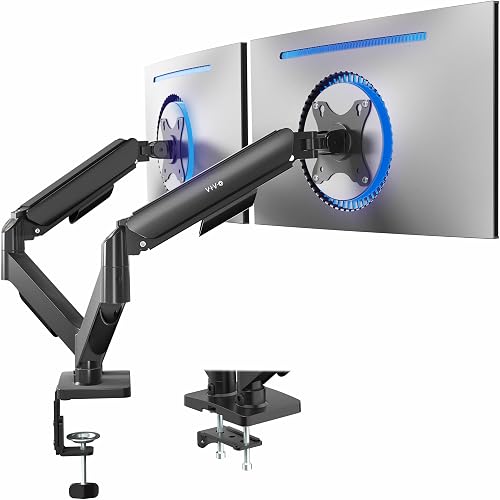
VIVO STAND-V002F Dual LED LCD Monitor Free-Standing: Best for no-clamp desks
- 13 to 27 inch screens
- Up to 22 lb per screen
- VESA 75x75 and 100x100
- 13 x 10.5 in freestanding base
- Height adjustment on center pole
A freestanding dual stand with a large padded base. It needs no clamp or bolts and suits glass, plastic or thick desks where a clamp will not fit.
Pros
- No desk drilling or clamp needed
- Large 13 x 10.5 in base
- Detachable VESA plates
Cons
- Base uses desk space
- Screens must stay near the base center
The VIVO STAND-V002F suits people who cannot clamp a mount to the desk edge. It holds two screens from 13 to 27 inches and up to 22 lb each, with VESA 75x75 or 100x100 holes.
The model is sold as STAND-V002F in black alloy steel, with detachable VESA plates to make monitor mounting simpler.
In daily use, the 13 x 10.5 inch base sits flat on the desktop and moves with the desk. Height adjustment runs along the center pole, with +90 to -90 degree tilt, 180 degree swivel and 360 degree rotation.
Detachable cable clips on the arms and center pole help route power and AV cables so they do not snag during a height change.
The trade-off is space. The base takes room that a clamp mount does not use.
VIVO also warns you not to pull the screens too far forward, or the stand can tip. Keep both screens near the center of the base, and check that the base fits your available desk space before assembly.
Compared with the WALI freestanding model below, this VIVO base is larger and padded. That padding helps protect the desk surface from scratches.
Compared with clamp models, it avoids thickness and beam checks, which is why it suits glass or thick tops.
HUANUO Dual Monitor Stand: Best for a light desk finish
- 13 to 32 inch screens
- 4.4 to 19.8 lb per arm
- VESA 75x75 and 100x100
- C-clamp or grommet base
- White finish
The white version of the HUANUO full-motion mount. It suits a bright office setup and holds the same 13 to 32 inch range as the black model.
Pros
- White finish for light setups
- Full swivel, tilt and rotation
- Cable management along the arms
Cons
- Same wooden desk guidance
- White finish shows dust more
This HUANUO model suits the same buyers as the top pick, but in a white finish. It holds 13 to 32 inch screens at 4.4 to 19.8 lb per arm, with VESA 75x75 or 100x100 holes.
The white HNDS6W-US version uses the same alloy steel construction and the same C-clamp or grommet mounting choice as the black version.
In daily use, the pneumatic spring action makes height and angle changes smooth. You can swivel, tilt and rotate each screen without loosening a screw for each move.
Cable management routes wires along the arms, and lifting both screens off the desktop can free extra space for a keyboard, notebook or docking station. For another way to keep laptop accessories organized, see laptop stands with storage.
The trade-off is finish care. White shows dust and fingerprints more than black.
The desk guidance is the same as the black model: wooden desks, 0.59 to 3.54 inches thick, with a clear underside and no beams where the clamp or grommet hardware will sit.
Compared with the black FlowLift, the choice is look and room color, not specs. Compared with the MOUNTUP model, this mount has a higher weight limit per arm.
Choose white only if the finish match matters more than easier dust concealment.
VIVO Dual Monitor Stand: Best for larger flat and curved screens
- 17 to 32 inch screens
- 4.4 to 19.8 lb per arm
- VESA 75x75 and 100x100
- Mechanical spring adjustment
- C-clamp to 3.1 in or grommet to 1.9 in
Mechanical spring arms for 17 to 32 inch flat and curved screens. Toolless counterbalance helps you place each screen with one hand.
Pros
- Fits 17 to 32 inch screens
- Toolless spring adjustment
- Open-top VESA plates slide on
Cons
- Arms extend past the desk edge at the back
The VIVO STAND-V002O suits people with 17 to 32 inch flat or curved screens. Each arm holds 4.4 to 19.8 lb and needs VESA 75x75 or 100x100 holes.
Mechanical spring counterbalance is designed to present the screen in all directions without toolless placement fussing during daily moves.
In daily use, mechanical spring counterbalance lets you place a screen with one hand. Tilt runs +90 to -90 degrees, swivel runs 180 degrees and rotation runs 360 degrees.
Open-top VESA plates slide on for faster setup, and the included hardware and step by step instructions are meant to keep assembly smooth for a first time arm user.
The trade-off is reach at the back. VIVO notes the back of the arms will extend past the edge of the desk.
You need clearance behind the desk for that swing, especially when the desk is near a wall or another piece of furniture.
Compared with the HUANUO top pick, this model starts at 17 inches, so small screens will not fit. Compared with the ErGear wide model, it has a higher weight limit per arm.
The clamp fits tops to 3.1 inches and the grommet option fits to 1.9 inches, so check your exact desk thickness.
ErGear Dual Monitor Stand: Best for two large screens
- 13 to 32 inch screens
- Up to 17.6 lb per arm
- VESA 75x75 and 100x100
- 31.22 in arm span
- 16 in high bar
A wide dual mount with a 31.22 inch arm span for two large screens. It offers swivel, tilt and rotation with cable clips.
Pros
- Wide span for two large screens
- Fits screens from 13 in
- C-clamp and grommet options
Cons
- Lower 17.6 lb limit per arm
- Wooden desk guidance
The ErGear EGCM1 suits people with two large screens. It holds 13 to 32 inch screens up to 17.6 lb per arm, with VESA 75x75 or 100x100 holes.
The metal build and labeled hardware are aimed at straightforward assembly with the included detailed instruction manual.
In daily use, the 31.22 inch arm span and 16 inch high bar give room for two large screens side by side. Swivel runs plus or minus 90 degrees, tilt runs plus or minus 45 degrees and rotation runs 360 degrees.
Integrated cable management clips help route cables for a clean look, which matters when you raise and lower the desk several times a day.
The trade-off is the weight limit. At 17.6 lb per arm, it is lower than the 22 lb limits on the VIVO freestanding and ErGear EGDS15B models.
Check your screen weight before you choose it, since a screen near the limit leaves less margin for smooth adjustment.
Compared with the top pick, this mount has a wider span for large screens. Compared with the MOUNTUP model, it fits smaller screens from 13 inches.
For desk fit, ErGear recommends wooden tables with no beams underneath, with C-clamp fit from 0.39 to 3 inches and grommet fit from 0.39 to 2.36 inches.
ErGear Dual Monitor Stand up: Best for heavier monitors
- 17 to 33 inch screens
- 4.4 to 22 lb per arm
- VESA 75x75 and 100x100
- Raises to 17.5 in
- Extends 17.5 in toward you
Steel arms that hold up to 22 lb per screen and reach 17.5 inches high. It suits heavier 17 to 33 inch monitors.
Pros
- Higher 22 lb limit per arm
- Tall 17.5 in reach
- Cable clips on arms and pillar
Cons
- No screens under 17 in
- Clamp fits thinner desks
The ErGear EGDS15B suits people with heavier 17 to 33 inch screens. Each arm holds 4.4 to 22 lb and needs VESA 75x75 or 100x100 holes.
The steel structured design is presented as tested for 20,000 cycles, with smooth adjustment while holding the screen securely in place.
In daily use, the arms rise to 17.5 inches above the desk and extend 17.5 inches toward you. That reach helps tall users set eye level when standing.
Tilt runs +90 to -35 degrees, swivel runs plus or minus 90 degrees and rotation runs 360 degrees, so you can switch between landscape and portrait for documents or video calls.
The trade-off is range at the low end. Screens under 17 inches do not fit.
Clamp fit is 0.39 to 2.56 inches, and grommet fit is 0.39 to 2.17 inches, so thick or beamed desks may not work. ErGear recommends wooden tables and a clear underside at the mounting side.
Compared with the ErGear EGCM1 above, this model holds more weight and reaches higher. Compared with the WALI freestanding model, it clamps to the desk instead of resting on a base.
Cable management clips on the arms and pillar help keep wires tidy across both screens.
WALI Freestanding Dual Monitor Stand for 13-27: Best freestanding compact base
- 13 to 27 inch screens
- Up to 22 lb per arm
- VESA 75x75 and 100x100
- 16 in height pole
- Detachable plates
A freestanding V-base stand for 13 to 27 inch screens. It holds up to 22 lb per arm and needs no clamp.
Pros
- No clamp needed
- 22 lb per arm
- Height adjustable on a 16 in pole
Cons
- No screens over 27 in
- Base needs desk room
The WALI MF002 suits people who want a freestanding stand for 13 to 27 inch screens. Each arm holds up to 22 lb and needs VESA 75x75 or 100x100 holes.
The heavy duty V-base is designed to sit stably on the desk without a clamp or bolt through the desktop.
In daily use, the 16 inch pole gives height adjustment, with plus or minus 90 degree tilt and swivel and 360 degree rotation. Detachable plates make monitor setup faster.
Four cable clips on the arms and a pole clip route wires down the center of the desk, which helps when the desktop rises and falls and cables need a clear path to a power strip.
The trade-off is screen size. Screens over 27 inches do not fit.
The V-base also needs desk room, so measure your desktop depth before you order. Keep the screens within the base footprint for stable balance, especially if you pull one screen forward for close reading.
Compared with the VIVO freestanding model, this WALI base is a V shape rather than a large flat plate. Compared with clamp models, it avoids desk thickness and beam checks.
The metal construction and contemporary design suit home, dorm, school and office desks where drilling or clamping is not wanted.
MOUNTUP Dual Monitor Stand for Desk: Best for pneumatic adjustment
- 17 to 32 inch screens
- 4.4 to 17.6 lb per arm
- VESA 75x75 and 100x100
- 17.3 in arm extension
- 9.4 in height adjustment
Pneumatic arms with 17.3 inches of extension and 9.4 inches of height adjustment. It suits 17 to 32 inch screens.
Pros
- Smooth pneumatic motion
- Long 17.3 in extension
- C-clamp and grommet options
Cons
- Lower 17.6 lb limit
- Tension must match monitor weight
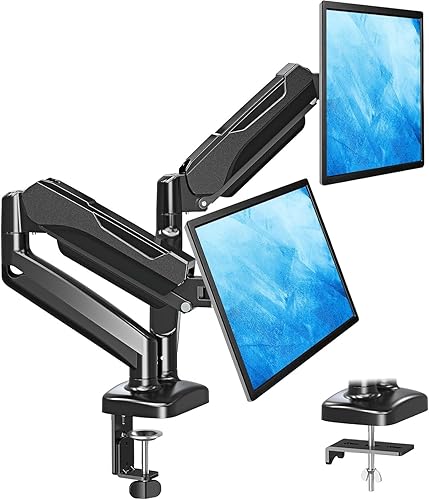
The MOUNTUP MU0005 suits people who want pneumatic arms for 17 to 32 inch screens. Each arm holds 4.4 to 17.6 lb, with VESA 75x75 or 100x100 holes.
The aluminum construction and pneumatic system are aimed at smooth, durable movement across tilt, swivel and rotation.
In daily use, the arms extend 17.3 inches and adjust 9.4 inches in height. Tilt runs 135 degrees, swivel runs 180 degrees and rotation runs 360 degrees.
Cable management conceals wires within the arms, and freeing the desktop by holding two monitors up can leave more room for decor, a keyboard or a laptop dock.
The trade-off is tension setup. The arm is pre-set to medium tension, so you must adjust the tension bolt to match your monitor weight.
If the arm rises or falls, turn the bolt as the manual directs, clockwise to reduce tension for lighter screens and counter clockwise to increase it for heavier screens.
Compared with the top pick, this model has a lower weight limit per arm. Compared with the ErGear EGCM1, it has pneumatic motion but a narrower screen range at the low end.
For desk fit, the C-clamp in the listing fits 0.39 to 2.76 inches, with a wider range noted for the clamp in the detailed guidance.
SANODESK 36 Standing Desk Converter: Best when your desk cannot move
- 36 in wide main tier
- 34.6 x 12.2 in keyboard tray
- 4.7 to 19.6 in lift range
- 33 lb main tier limit
- 4.4 lb keyboard tray limit
A 36 inch sit-stand converter with a keyboard tray. It raises dual monitors and a keyboard together on a fixed desk.
Pros
- Raises monitors and keyboard together
- 36 in wide main tier
- Mechanical spring lift
Cons
- Not a monitor arm
- 33 lb limit on the main tier
The SANODESK converter suits people whose desk cannot rise. It is a 36 inch wide sit-stand riser with a 34.6 x 12.2 inch keyboard tray.
It lifts from 4.7 to 19.6 inches on a 36 x 16.3 inch main tier, with a polished steel frame and metal base.
In daily use, both monitors and the keyboard rise together on a mechanical spring system. The patent pending spring design uses heavy duty steel wire construction rather than a gas spring, which the brand presents as avoiding air leakage or tension loss over time.
The main tier holds up to 33 lb and the keyboard tray holds up to 4.4 lb. That limit matters if your two monitors are heavy.
The trade-off is basic. This is not a monitor arm.
You cannot tilt, swivel or rotate each screen on its own. You also need desk space for the footprint when it is closed, and assembly is limited to attaching the keyboard tray with the included screws and your own screwdriver.
Compared with every other pick here, this is the only option that works on a fixed desk. If your desk already moves, a clamp or freestanding arm gives more screen control.
The converter is a different category, so judge it on lift range and load limits rather than arm motion.
Clamp, freestanding or converter: which type fits your desk?
A clamp or grommet mount is best if your desk is wooden, 0.39 to 3.54 inches thick and clear under the back edge. It uses no desktop footprint and moves with the desk.
A freestanding stand is best if your desk is glass, plastic, very thick or has beams under the back. It rests on top and needs no holes or clamp.
A converter is best if your desk does not move at all. It lifts monitors and keyboard together, but it cannot angle each screen on its own.
{% if false %}placeholder{% endif %}
Side-by-side comparison of the best dual monitor stands for standing desks
| Product | Best for | Screen size | Weight per arm | Desk thickness | Our score |
|---|---|---|---|---|---|
| HUANUO FlowLift Dual Monitor Stand | most standing desks | 13 to 32 in | 4.4 to 19.8 lb | 0.59 to 3.54 in | 9.7 |
| VIVO STAND-V002F Dual LED LCD Monitor Free-Standing | no-clamp desks | 13 to 27 in | 9.6 | ||
| HUANUO Dual Monitor Stand | a light desk finish | 13 to 32 in | 4.4 to 19.8 lb | 9.5 | |
| VIVO Dual Monitor Stand | larger flat and curved screens | 17 to 32 in | 4.4 to 19.8 lb | 9.4 | |
| ErGear Dual Monitor Stand | two large screens | 13 to 32 in | Up to 17.6 lb | 9.2 | |
| ErGear Dual Monitor Stand up | heavier monitors | 17 to 33 in | 4.4 to 22 lb | 9.1 | |
| WALI Freestanding Dual Monitor Stand for 13-27 | freestanding compact base | 13 to 27 in | Up to 22 lb | 9.0 | |
| MOUNTUP Dual Monitor Stand for Desk | pneumatic adjustment | 17 to 32 in | 4.4 to 17.6 lb | 8.9 | |
| SANODESK 36 Standing Desk Converter | when your desk cannot move | 8.4 |
We compared screen range, weight per arm, desk fit and motion. The top pick leads on range and motion, while freestanding models lead on desk fit.
Will these mounts stay steady as your desk moves up and down?
Yes, if you set them up right. A clamp mount locks to the desktop, so the screens move with the desk as one unit.
A freestanding base sits on the desktop and moves with it too.
Keep both screens near the center of a freestanding base. VIVO warns against pulling screens too far forward on the STAND-V002F.
Leave slack in your cables. A cable that is too short will pull on the arm when the desk rises.
Route cables with the clips on the arms, then check them at full height.
For more on arm types, see our guide to the best monitor arm for sit stand desk. It covers how arm motion affects daily use.
What screen size and weight should you check first?
Check three facts on each screen. You need the diagonal size, the weight per screen and the VESA hole pattern on the back.
Most models here need VESA 75x75 or 100x100 holes. If your screen has no VESA holes, it will not fit these mounts.
Match weight per arm, not total weight. The HUANUO top pick allows 4.4 to 19.8 lb per arm.
The VIVO freestanding and ErGear EGDS15B allow up to 22 lb per arm.
Our earlier roundup of best dual monitor arms for standing desk covers arm-only picks. Use it if you want more motion and a smaller base.
How do you set eye level for sit and stand work?
Set the top of each screen near eye level when you stand. Then tilt each screen slightly back so you look straight at the center.
Raise the screens until your neck stays straight. If you look down at the screens, raise them.
If you look up, lower them or tilt them back.
Reset the angle after each height change. A small tilt change can make the screen hard to read at a new height.
If you are unsure how much desk room you need for this setup, see How Much Space Do I Need for a Standing Desk?. Measure depth before you buy a freestanding base.
Do you need a clamp, a grommet hole or no holes at all?
Choose a clamp if your desk edge is free and the top is wooden. Most clamp ranges here run from about 0.39 to 3.54 inches.
Choose a grommet mount if you have a cable hole at the back of the desk. Check the grommet thickness range for your model, since it is often lower than the clamp range.
Choose no holes at all if your desk is glass or has a beam under the back. The VIVO STAND-V002F and WALI MF002 solve that issue with a base.
If you use a laptop as a second screen, is using a laptop stand good explains when a laptop riser helps more than a second arm.
Which pick should you buy for a dual monitor stand for standing desk?
Pick the HUANUO FlowLift if you have 13 to 32 inch screens and a wooden desk. Pick the VIVO STAND-V002F if you cannot clamp to your desk.
Pick the SANODESK converter if your desk cannot move.
Pick the ErGear EGDS15B if your screens are heavy and up to 33 inches. Pick the MOUNTUP if you want pneumatic arms and can set the tension to your screen weight.
For more VIVO options, see best vivo standing desk monitor mount. For arms with a tray, see best dual monitor arm with keyboard tray.
If you are still planning the desk itself, What Is a Dual Motor Standing Desk? Facts Worth Knowing explains motor types and desk movement.
That context helps you match mount weight to desk movement.
Measure your screens, your desk thickness and your desk depth. Then match those three numbers to the limits in this guide.
That check takes five minutes and saves a return.
Our top 3 picks at a glance
-
1
-
2
Best for no-clamp desks
VIVO STAND-V002F Dual LED LCD Monitor Free-Standing
9.6/10 our score
See it on Amazon -
3
Frequently asked questions
Will a dual monitor stand shake when my standing desk moves?
A clamp or grommet mount moves with the desk, so both screens rise and fall as one unit. A freestanding base also moves with the desk because it sits on the desktop.
Keep screens within the base center and check cable slack after the first move.
What desk thickness do I need for a clamp mount?
Most clamp models here fit about 0.39 to 3.54 inches, but the exact range varies by model. Measure your desktop first and check for beams or panels under the mounting area.
A freestanding base avoids this check.
Can I use a dual monitor stand on a glass desk?
Clamp guides for several models here recommend wooden desks only. A freestanding base such as the VIVO STAND-V002F or WALI MF002 rests on top and does not clamp to the edge, so it avoids that limit.
How high should dual monitors sit for standing work?
Set the top of each screen near eye level when you stand, then tilt the screens slightly back. Raise your chair or desk again after you change height, and check that your keyboard stays at elbow height.


