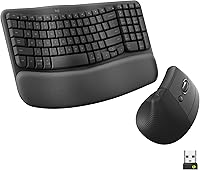
Can You Get a Vertical Mouse with Infinite Scroll?
A true vertical mouse with infinite scroll is uncommon. Most upright mice use a standard scroll wheel, so buyers who need fast document movement may need a programmable button, horizontal scrolling, or a trackball instead.
On this page (7 sections)
- Why is a vertical mouse with infinite scroll hard to find?
- What should you check before buying an upright mouse?
- Which Logitech vertical mouse offers the most connection flexibility?
- What does the other MX Vertical version add?
- How can you improve scrolling without infinite scroll?
- Do you need a tray for a vertical mouse?
- So, can you get a vertical mouse with infinite scroll?
A vertical mouse with infinite scroll is uncommon. Most upright mice use a regular stepped wheel, so fast movement through long documents may call for a programmable button, horizontal scrolling, or a trackball instead.
Infinite scroll usually means a wheel can switch from click by click movement to free spinning. That lets you flick the wheel and travel through a long page without repeated small movements.
It suits long spreadsheets, web pages, reports, and code files. It is less useful when you need to stop precisely on a menu item, heading, or small control.
The vertical shape is a separate choice from the wheel mechanism. An upright body changes how your hand rests, while the wheel decides how scrolling feels.
That is why a mouse can be vertical and still scroll in small steps. The shape may suit your wrist position, but it does not add free spinning by itself.
Think about your main task before you choose. Long reading and browsing may benefit from faster page movement, while detailed selection often suits stepped control.
Extra buttons can help in a different way. A next or previous button can speed browser navigation, but it does not replace horizontal or infinite scrolling.
A cursor speed switch can also change how far the pointer moves. It helps with control and reach, yet the scroll wheel still works in the same stepped way.
A trackball changes pointer movement altogether and may suit a different desk setup. It does not give you the upright grip of a vertical mouse.
Check the exact controls listed for any model you consider. Look for the wheel type, button count, hand orientation, and connection options in the product details.
Also check desk space and compatibility before you buy. A taller mouse needs room beside your keyboard, and a receiver based model needs a free USB port.
If free spinning is the main reason for shopping, keep it as a separate requirement. Do not assume the word vertical means the wheel will spin freely.
Why is a vertical mouse with infinite scroll hard to find?
A vertical mouse with infinite scroll combines two separate design goals, and many products focus on only one. The upright body changes hand position, while the wheel mechanism controls how scrolling feels.
A free-spinning wheel can move quickly through a long page. A stepped wheel gives more control when you need to stop on a menu item, line of text, or small button.
Check the mouse's controls instead of assuming that a vertical design includes advanced scrolling. Some models use extra side buttons for next and previous actions, while others use a button that changes cursor speed.
For broader setup advice, see our guide to ergonomic keyboard mouse. If you are still choosing the mouse shape, our overview of the best vertical ergonomic mouse covers the main trade-offs.
What should you check before buying an upright mouse?
Check scroll control, hand orientation, connection type, button layout, and desk space. These details matter more than the word “vertical” on the product name.
A mouse with a normal wheel can still work well for everyday browsing. It may be a poor match if your main task involves moving through very long files and you want the wheel to spin freely.
Also check whether the mouse is made for your hand. The Anker model below is right-handed, while the Logitech MX Vertical data describes an ambidextrous orientation for one version and a right-handed design for another.
Do not assume that similar names mean identical details.
Can a vertical mouse with infinite scroll use other controls?
A vertical mouse with infinite scroll may be replaceable with one that uses extra buttons or a cursor-speed switch. Those controls do not create free spinning, but they can reduce how often you reach for the scroll wheel.
The Anker 2.4G Wireless Ergonomic Mouse uses a 2.4 GHz connection through a USB receiver, offers 800, 1200, and 1600 DPI settings, and has next and previous buttons for webpage browsing. It is a right-handed mouse with 5 buttons.
The mouse enters power-saving mode after 8 minutes of inactivity and wakes when you press the right or left button. It uses 2 AAA batteries, which are not included, and the receiver is stored in the mouse's bottom.
Its 120 x 62.8 x 74.8 mm size may suit a reader who wants a larger vertical body beside a keyboard. The 2.4 GHz connection is not Bluetooth, so check that your computer has a suitable USB port.
Choose this model if browser back and forward controls matter more than a free-spinning wheel. Avoid assuming that the next and previous buttons replace horizontal scrolling or infinite scroll.
Which Logitech vertical mouse offers the most connection flexibility?
The Logitech Mouse MX Vertical offers Bluetooth or a USB receiver, which gives you more connection choices than a mouse that only uses a receiver. Its vertical layout and adjustable angle are aimed at a handshake-style grip.
It uses optical tracking with sensitivity up to 4000 DPI and has 4 buttons. Logitech states that its average battery life is 4 months, and the mouse works with Mac and Windows operating systems.
This is a sensible alternative if connection choice matters more than free spinning. The product uses 1 included lithium polymer battery and has a stated wireless range of 5 meters.
The title identifies this model as 910-005448. Keep that model number in your notes when comparing it with other MX Vertical versions, because the names and included features are not identical.
Readers using Apple computers can also compare our guide to the best vertical mouse for Mac. If your main need is side-to-side movement, read vertical mouse with horizontal scroll before deciding.
What does the other MX Vertical version add?
The Logitech MX Vertical Wireless Mouse Ergonomic Design uses a 57° vertical angle and a cursor-speed switch. Its 4000 DPI sensor is designed to reduce the amount of hand movement compared with a traditional 1000 DPI sensor.
This graphite model has a textured rubber surface, a thumb rest, 4 buttons, and wireless support through Bluetooth or an included USB receiver. It works with Windows, macOS, and iPadOS.
The package includes the mouse, quickstart guide, receiver, and USB-C cable. Logitech gives an average battery life of 4 months, and its description says a 1-minute quick charge can provide 3 hours of use.
Choose this version if the cursor-speed switch and wider device support fit your desk. It still does not turn the scroll wheel into an infinite wheel, so it is an alternative for control and posture rather than a direct match for free spinning.
If you want a different pointer style altogether, compare trackball mouse vs regular mouse. A trackball changes how you move the pointer, but it may not provide the upright grip you want.
How can you improve scrolling without infinite scroll?
You can improve scrolling by using keyboard shortcuts, assigning extra buttons, changing pointer settings, or choosing a mouse with another scrolling method. Start with the task that causes the most friction.
For long pages, keyboard shortcuts can be faster than repeated wheel movement. For precise work, stepped scrolling may be easier to control than a wheel that keeps moving after you release it.
A side button can help with browser navigation, but it is not the same as horizontal scrolling. A joystick is another control style worth comparing in vertical mouse with joystick.
Your desk setup also affects comfort. Keep the mouse close enough that your elbow stays near your body, and place the keyboard so you do not reach far between typing and pointer work.
Do you need a tray for a vertical mouse?
You may need a tray if your desktop is crowded or your mouse sits too far from your keyboard. A vertical mouse can take more room in use because its body is taller and your hand rests over it differently.
Measure the usable surface beside the keyboard. Leave enough space to move the mouse without hitting a monitor stand, desk edge, cable, or cup.
If you want to keep the mouse and keyboard at a consistent height, compare an under desk keyboard tray with drawer. For standing desk setups, see best standing desk keyboard tray and check whether the tray leaves room for your preferred mouse position.
So, can you get a vertical mouse with infinite scroll?
You can find vertical mice with useful scrolling alternatives, but a true infinite-scroll wheel is not common in this shape. Pick the Anker if next and previous buttons and a USB receiver suit your workflow.
The Anker 2.4G Wireless Ergonomic Mouse is right handed and has 5 buttons. It offers 800, 1200, and 1600 DPI settings for different pointer speeds.
It connects through a 2.4 GHz USB receiver rather than Bluetooth. Keep that in mind if your laptop relies on USB C ports or if you already use the available ports for other devices.
The receiver is stored in the bottom of the mouse when not in use. That helps with carrying it in a bag, but you still need to remember that the receiver is required for the connection.
It uses 2 AAA batteries, which are not included in the package. The mouse enters power saving mode after 8 minutes of inactivity and wakes with a press of the left or right button.
Pick the Logitech Mouse MX Vertical if you want Bluetooth or USB receiver flexibility. That choice gives you more options when moving between laptops or keeping a port free.
That model is listed with optical tracking up to 4000 DPI and 4 buttons. Logitech states an average battery life of 4 months, and it works with Mac and Windows.
Pick the graphite Logitech MX Vertical version if its 57 degree angle, cursor speed switch, and wider device support matter most. The listed support includes Windows, macOS, and iPadOS for this version.
That graphite model also has a textured rubber surface and a thumb rest. Its package includes the mouse, quickstart guide, receiver, and USB C cable.
If free spinning is essential, treat it as a separate search requirement. Confirm the wheel mechanism and controls before buying, then choose the upright shape only if its grip and size also suit your hand.
Frequently asked questions
Is there a vertical mouse with infinite scroll?
A true vertical mouse with an infinite or free-spinning scroll wheel is uncommon. Most vertical mice use a regular wheel with stepped scrolling.
If fast movement through long pages matters, compare programmable buttons, horizontal scrolling, or a trackball before choosing an upright shape.
What does infinite scroll mean on a mouse?
Infinite scroll usually means the wheel can switch from stepped scrolling to free spinning. A free-spinning wheel can move through long documents quickly, while stepped scrolling gives more control for short pages, menus, and precise selection.
Can a vertical mouse scroll horizontally?
Some vertical mice support horizontal scrolling through a tilt wheel, side buttons, or software commands, but the feature varies by model. Check the exact controls before buying.
A vertical shape alone does not mean the mouse supports horizontal or infinite scrolling.
Is a vertical mouse better for long work sessions?
A vertical mouse may suit you if a handshake-style grip feels more natural than a flat mouse. It does not guarantee comfort for every hand or desk setup, so check hand orientation, button placement, connection type, and the amount of space available beside your keyboard.