9 Best Tall Monitor Arms for Tall People (November 2026)
The best monitor arms for tall people include the Suptek Single Monitor Arm Desk Mount Fully Adjustable Monitor Stand for 1 / One Screen up to 32 inch Extra Tall 31.5 inch Pole for most tall users, the HUANUO Single Monitor Arm with 39 inch Extra-Tall Pole for maximum pole height, and the ErGear Single Monitor Arm for stability at height.
On this page (8 sections)
- Tall monitor arms compared by height, reach and screen size
- How we compared these tall monitor arms
- How tall should a monitor arm be for tall people?
- Which screen sizes work with tall monitor arms?
- Will a tall monitor arm fit my standing desk?
- How do you set up a tall monitor arm for standing work?
- Extra long or extra tall: which do tall people need?
- Verdict: best monitor arms for tall people
The best monitor arms for tall people lift a screen to standing eye level and keep it steady there, which is why pole height and reach matter more than a standard arm label. Our top pick is the Suptek MD6821 for most tall users, with the HUANUO 39 inch pole for the tallest setups.
If you stand at a height adjustable desk, a normal arm can force you to look down or work too close. A tall pole, a long arm, or a spring assisted lift gives you more room to set the screen where you actually look.
Our score weighs specs, features and buyer feedback against what tall users need. Start with our monitor arm mount guide if you want the basic terms before you compare models.
To see how desk height changes the math, read How Tall Is a Standing Desk? What to Expect.
That guide helps you match arm height to the desk height you use most.
Our picks at a glance
-
1
-
2

-
3

- 4
 Best for smooth spring liftCheck it
- 5
 Check it
WALI Extra Long Single Monitor Arm for 17-38 inch Screens, up to 26.4 lbs
Best for long reach - 6
 Best for reach on a budget setupCheck it
- 7
 Best for 49 inch ultrawidesCheck it
- 8
 Best for heavy ultrawide gamingCheck it
- 9
 Check it
MOUNTUP Odyssey G9 Tall Monitor Arm Holds 4.4-44 lbs for 32-49 Inch Screens
Best for Odyssey G9 style screens
Tall monitor arms compared by height, reach and screen size
The Suptek and HUANUO win on pole height for standard screens. The WALI and MOUNTUP extra long models win on reach.
The VIVO and MOUNTUP heavy duty models win on ultrawide weight, but their lift is shorter.
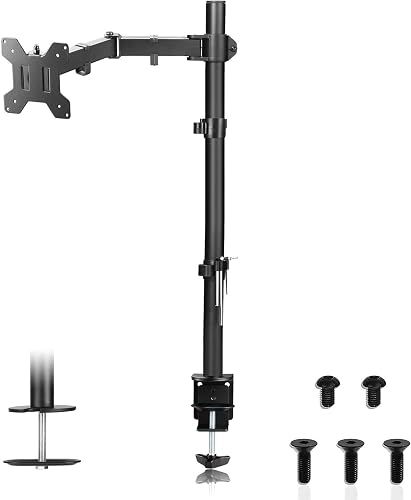
Suptek Single Monitor Arm Desk Mount Fully Adjustable Monitor Stand for 1 / One Screen up to 32 inch Extra Tall 31.5 inch Pole,Black (MD6821): Best for most tall users
- Extra tall 31.5 inch pole
- Fits screens 17 to 32 inches up to 22 lb
- VESA 75x75mm or 100x100mm
- Rotate 360 degrees, tilt plus or minus 90 degrees, swivel plus or minus 90 degrees
- C-clamp and grommet base for desks up to 4 inches thick
A tall pole and full motion make this the strongest all round pick for tall people who stand and sit at the same desk.
Pros
- Extra tall pole for standing height
- Full rotate, tilt and swivel motion
- C-clamp or grommet base included
Cons
- Single screen only
- Screen limit is 32 inches
Suptek suits tall users who use one screen up to 32 inches and switch between sitting and standing. Its 31.5 inch pole is the main reason it leads this list.
You can raise the screen high without moving the arm to the edge of its range.
The arm fits screens from 17 to 32 inches and up to 22 lb, with VESA 75x75mm or 100x100mm holes. That covers most standard office and home screens, but not large ultrawides.
Full motion helps in daily use. You get 360 degree rotation, tilt plus or minus 90 degrees, and swivel plus or minus 90 degrees.
That makes portrait mode and screen sharing easier to set up.
Two mount options add flexibility. The C-clamp and optional grommet base fit desks up to 4 inches thick, which is wider than several rivals here.
Detachable cable clips help keep power and video cables tidy.
Trade off is screen size. If you run a 34 inch or larger ultrawide, look further down this list.
For a standard tall setup, this is the safest first pick.
HUANUO Single Monitor Arm with 39 inch Extra-Tall Pole, Adjustable Computer Desk Mount for 13–32 inch Screens and up to 38 inch Ultrawide Screens, Hold 22 lbs, Monitor Stand with C-Clamp & Grommt Base: Best for maximum pole height
- 39 inch height adjustable center pole
- Fits 13 to 32 inch screens and up to 38 inch ultrawides
- Holds up to 22 lb
- VESA 75x75mm or 100x100mm
- 180 degree tilt, 180 degree swivel, 360 degree rotation
The tallest pole here suits very tall users and standing desks that rise high, with wide screen support for ultrawides.
Pros
- Tallest pole in this group at 39 inches
- Supports ultrawides up to 38 inches
- C-clamp and grommet mount included
Cons
- Check desk thickness carefully before ordering
- Weight limit is 22 lb
HUANUO suits the tallest users in this group. Its 39 inch pole gives more height than any other model here, which helps when a standing desk rises high.
The arm fits 13 to 32 inch screens and ultrawides up to 38 inches, with a 22 lb limit. That wide range makes it a strong pick for both a standard monitor and a large ultrawide.
Motion is full and simple to use. You get 180 degree tilt, 180 degree swivel, and 360 degree rotation.
You can move from landscape work to portrait reading without changing mounts.
Mounting choices cover most desks. The C-clamp fits desks up to 3.93 inches thick, and the grommet mount fits desks up to 2.75 inches thick.
Integrated cable management helps keep cords off the desktop.
Trade off is fit checks. HUANUO warns buyers to confirm desk thickness carefully before ordering.
If your desk is thick or has a tray underneath, check that before you choose this pole.
ErGear Single Monitor Arm, Adjustable Desk Gaming Monitor Mount for 13-34″ Screens, Up to 19.8 lbs, Enhanced Stability with Integrated C-Clamp, Upgraded Cable Management, Black: Best for stability at height
- Height adjustment up to 22.6 inches
- Horizontal extension up to 20.6 inches
- Fits 17 to 34 inch screens up to 19.8 lb
- VESA 75x75mm or 100x100mm
- Tilt plus 80 to minus 50 degrees, swivel plus or minus 90 degrees, rotate 360 degrees
A wider VESA plate and gap free arm to pole connection help reduce wobble when the screen sits high.
Pros
- Stability focused VESA plate and clamp
- Tool free cable clips
- Hand tightened clamp and VESA screws
Cons
- Weight limit is 19.8 lb
- Height travel is lower than the tallest poles here
ErGear suits tall users who worry about wobble at high positions. Its design focuses on stability when the arm is extended and raised.
Height adjustment goes up to 22.6 inches, with horizontal extension up to 20.6 inches. That is less pole height than the Suptek or HUANUO, but it still lifts many screens to standing eye level.
Compatibility covers 17 to 34 inch screens up to 19.8 lb, with VESA 75x75mm or 100x100mm patterns. Check your screen weight first, since the limit is lower than several rivals.
Stability details matter here. ErGear uses an integrated C-clamp with anti-slip silicone padding, a VESA plate that is 40 percent wider, and a gap free arm to post connection.
Those details help reduce sag and shake.
Tilt ranges from plus 80 to minus 50 degrees, swivel is plus or minus 90 degrees, and rotation is 360 degrees. Cable clips snap in without tools.
Choose this for a steady standard screen, not for a heavy ultrawide.
NB SmooVex™ Monitor Arm, Monitor Stand fits up to 32 Inch, Mechanical Spring Mount, VESA 75/100 mm, Model-A5(Black): Best for smooth spring lift
- Mechanical spring system
- Fits flat and curved monitors up to 32 inches
- VESA 75x75mm and 100x100mm
- 230mm height travel
- Rotation plus or minus 90 degrees, tilt minus 25 to 90 degrees, swivel adjustment
A mechanical spring gives smooth daily height changes, which helps when you switch between sitting and standing.
Pros
- Mechanical spring with no gas leakage concern
- Slim arm design saves desk space
- C-clamp and grommet options included
Cons
- Height travel is 230mm, below the tall pole models
- Screen limit is 32 inches
NB SmooVex suits buyers who adjust height often. Its mechanical spring system aims for smooth movement without a gas spring, so the screen should stay put during daily changes.
Height travel is 230mm, which is modest next to a 31.5 or 39 inch pole. Tall users should check whether that travel reaches standing eye level on their desk.
The arm fits flat and curved monitors up to 32 inches, with VESA 75x75mm or 100x100mm patterns. A slimmer arm design helps save desk space and reduces wall blocking.
Adjustment ranges are practical for work and study. You get plus or minus 90 degree rotation, tilt from minus 25 to 90 degrees, swivel adjustment, and 230mm of height travel.
Installation uses a 3 step process with C-clamp and grommet options. That suits most desks, and the slimmer arm suits tighter workstations.
Trade off is height. If you are very tall or stand at a high desk, a tall pole model will give you more lift.
Choose this for smooth motion and a cleaner desk.
WALI Extra Long Single Monitor Arm for 17-38 inch Screens, up to 26.4 lbs: Best for long reach
- Extends screen out by 26.77 inches
- Raises arm up to 29.13 inches above desktop
- Fits screens up to 38 inches, up to 26.4 lb
- VESA 75x75mm and 100x100mm
- Swivel plus or minus 180 degrees, tilt plus 70 to minus 45 degrees, rotate 360 degrees
Long reach lets you pull a large screen closer when you stand back from the desk, while still lifting it high.
Pros
- Long 26.77 inch extension
- Raises up to 29.13 inches above desktop
- Higher 26.4 lb load limit
Cons
- C-clamp and grommet fit desks 0.39 to 2.76 inches thick
- Maker recommends a wooden desk with no crossbeam blocking the underside
WALI suits tall users who need reach as much as height. It extends the screen out 26.77 inches and raises the arm up to 29.13 inches above the desktop.
That reach helps when you stand back from a standing desk or push the desk against a wall. You can pull the screen toward you instead of leaning forward.
Compatibility is broad for a single arm. It fits flat or curved screens up to 38 inches and up to 26.4 lb, with VESA 75x75mm or 100x100mm holes.
Motion covers full ergonomic use. Swivel goes plus or minus 180 degrees, tilt goes plus 70 to minus 45 degrees, and rotation is 360 degrees.
Built in cable management guides wires along the arm.
Mounting fits desks 0.39 to 2.76 inches thick with a C-clamp or grommet base. WALI recommends a wooden desk with no crossbeam blocking the underside.
Trade off is desk fit. If your standing desk has a thick frame or tray under the edge, check clearance before ordering.
For reach and load capacity, this is strong.
MOUNTUP 27 inch Extra Long Monitor Arm, Single Desk Mount for 22-32 inch, Tall Monitor Stand Holds 4.4-19.8lbs, Height Adjustable Monitors Stand for Desk with C-Clamp/Grommet Base, Black: Best for reach on a budget setup
- Extension up to 27.7 inches
- Height adjustment up to 28.5 inches
- Fits 22 to 32 inch screens up to 19.8 lb
- VESA 75x75mm and 100x100mm
- Tilt plus or minus 90 degrees, swivel plus or minus 90 degrees, rotation plus or minus 180 degrees
A long arm at a lower score suits buyers who care more about reach than a tall pole, in a 22 to 32 inch screen range.
Pros
- 27.7 inch extension and 28.5 inch height adjustment
- C-clamp fits desks 0.39 to 3.15 inches thick
- Grommet mount included
Cons
- Screen range starts at 22 inches
- Weight limit is 19.8 lb
MOUNTUP suits buyers who want long reach for a standard screen. Its arm extends up to 27.7 inches, which is the longest reach in this group.
Height adjustment goes up to 28.5 inches, so it can lift a screen high while also pulling it forward. That combo helps tall users who stand away from the desk.
Compatibility is narrower. It fits 22 to 32 inch screens and up to 19.8 lb, with VESA 75x75mm or 100x100mm patterns.
Do not use it for a smaller 17 inch screen or a heavy ultrawide.
Motion is wide. Tilt goes plus or minus 90 degrees, swivel goes plus or minus 90 degrees, and rotation goes plus or minus 180 degrees.
Mounting options are flexible. The C-clamp fits desks 0.39 to 3.15 inches thick.
The grommet mount fits desks 0.39 to 1.97 inches thick, with a hole diameter of 0.39 to 2.36 inches.
Trade off is screen range and weight. If your monitor is under 22 inches or over 19.8 lb, skip this model.
For a midsize screen and long reach, it fits well.
VIVO Pneumatic Arm Single Ultrawide Monitor Extra Tall Desk Mount for Up to 49 inch Screens, Heavy Duty Clamp, Holds Ultra Wides Up to 44 lbs, Black, STAND-V110K: Best for 49 inch ultrawides
- Fits one ultrawide up to 49 inches
- Holds 5.5 to 44 lb per arm
- VESA 75x75mm or 100x100mm
- Pneumatic height adjustment
- Tilt plus 55 to minus 25 degrees, 180 degree swivel, 360 degree rotation
Built for very large ultrawides, this pneumatic arm counterbalances heavy screens so height changes take less effort.
Pros
- Supports up to 49 inch ultrawides and 44 lb
- Cast aluminum clamp and arm
- Pneumatic height adjustment
Cons
- Clamp fits desktops up to 1.8 inches thick
- Minimum load is 5.5 lb
VIVO suits tall users with a very large ultrawide. It fits one screen up to 49 inches and holds 5.5 to 44 lb per arm.
That load range matters. Smaller arms in this list stop at 19.8 to 26.4 lb, so they are not a safe match for a heavy ultrawide.
The pneumatic arm counterbalances screen weight, so height adjustment should take less effort than a plain static arm. That helps when you move between sitting and standing.
Articulation is solid for glare control. Tilt goes plus 55 to minus 25 degrees, swivel is 180 degrees, and rotation is 360 degrees.
Construction uses cast aluminum for the clamp base and arm, with a heavy duty clamp that fits desktops up to 1.8 inches thick. VESA patterns are 75x75mm or 100x100mm, with a detachable plate.
Trade off is desk thickness and minimum load. Thick standing desks may exceed the clamp range, and very light screens under 5.5 lb are outside the stated range.
VIVO Heavy Duty Aluminum Ultrawide Monitor Tension Arm for up to 49 inch Screens, Holds 44 lbs, Premium Desk Mount Stand Designed for Samsung Odyssey G9 and More, Black, STAND-V101V: Best for heavy ultrawide gaming
- Fits ultrawides up to 49 inches and 44 lb
- VESA 75x75mm or 100x100mm
- Spring assist tension arm
- 11 inches of height adjustment with spring lift
- Tilt plus 50 to minus 20 degrees, 180 degree swivel, 360 degree rotation
A tension arm with 11 inches of lift suits heavy ultrawide gaming screens that need frequent repositioning.
Pros
- Heavy duty support for 49 inch screens and 44 lb
- Spring lift height adjustment
- Cable management covers
Cons
- 11 inches of height travel is short for very tall users
- Grommet mount fits desks up to 1.4 inches thick
VIVO suits tall gamers and workers with a heavy ultrawide. It supports screens up to 49 inches and 44 lb, with VESA 75x75mm or 100x100mm patterns.
The tension arm uses spring assist to counterbalance weight. That makes repositioning a large screen easier at the touch of a hand.
Height adjustment is 11 inches with spring lift. That is useful, but it is short for very tall users who need a high pole.
Articulation includes tilt plus 50 to minus 20 degrees, 180 degree swivel, and 360 degree rotation. That covers landscape and portrait use, plus glare reduction.
Mounting fits desks up to 3.2 inches thick with the heavy duty C-clamp, or up to 1.4 inches with the optional grommet mount.
Cable management covers help keep cords tidy during moves. A detachable VESA plate makes mounting a large screen easier.
Trade off is lift height. Choose this for weight capacity and smooth tension motion.
Choose a tall pole model if standing eye level is your main need.
MOUNTUP Odyssey G9 Tall Monitor Arm Holds 4.4-44 lbs for 32-49 Inch Screens: Best for Odyssey G9 style screens
- Designed for large displays up to 49 inches
- Supports up to 44 lb flat and 33 lb curved
- VESA 75x75mm and 100x100mm
- 15 inch pole and 25 inch extended arm
- Tilt plus 90 to minus 45 degrees, plus or minus 90 degree swivel, 360 degree rotation
A heavy duty steel arm for 32 to 49 inch screens, with a short pole that limits how high it lifts for tall users.
Pros
- Supports 49 inch ultrawides including Odyssey G9 sizes
- C-clamp and grommet options included
- Cable management along the arm
Cons
- 15 inch pole is short for standing height
- Curved screens are limited to 33 lb
MOUNTUP suits tall users with a large ultrawide up to 49 inches. It holds up to 44 lb for flat screens and 33 lb for curved screens.
That curved limit matters. Many ultrawides are curved, so check your exact screen weight before you order.
The arm has a 15 inch pole and a 25 inch extended arm. That gives reach, but the short pole limits how high the screen sits for standing use.
Full motion is useful for gaming and multitasking. Tilt goes plus 90 to minus 45 degrees, swivel is plus or minus 90 degrees, and rotation is 360 degrees.
Mounting uses a C-clamp for desks 0.39 to 1.97 inches thick, or a grommet base for desks 0.39 to 2.36 inches thick with a cable hole.
Cable management runs along the arm, which helps free desktop space. The steel arm is built for heavy displays and long term daily use.
Trade off is height. This is a reach and load pick, not a tall pole pick.
For very tall users, the Suptek or HUANUO will lift higher.
How we compared these tall monitor arms
We compared pole height, height travel, reach, screen size, weight limit, VESA pattern, desk thickness and motion range. Those specs decide whether an arm works at standing height.
We scored each model against the needs of tall users first. A high pole helps standing posture.
Long reach helps when you stand back. High load capacity helps with ultrawides.
We also checked mount fit. A C-clamp range of 2 inches will not fit a thick standing desk.
A grommet mount needs a hole and a thin enough top.
Our score weighs specs, features and buyer feedback against what you're shopping for. That is why the Suptek and HUANUO lead for most tall users, while heavy ultrawide arms score lower for height.
We did not test these arms hands on. We compared specs and features from the product data and used buyer patterns only as general signals.
How tall should a monitor arm be for tall people?
A tall monitor arm should lift the top of your screen to about eye level when you stand. For most tall users, that means a pole near 31 to 39 inches or an arm with high lift travel.
Measure your standing eye level first. Then set the desk at your normal standing height and compare that height with the arm spec.
If you sit and stand at the same desk, you need enough travel to move the screen between both positions. A short arm may work seated and fail standing.
For dual screens, compare our best dual monitor stand for standing desk guide. Dual setups need more reach and more clamp space.
Extra tall pole arms
Extra tall poles, like the HUANUO 39 inch pole, suit very tall users and high standing desks. They give the most headroom for eye level placement.
Long reach arms
Long reach arms, like the WALI at 26.77 inches, suit users who stand back from the desk. Reach and height are different needs, so check both numbers.
Spring lift arms
Spring lift arms help you change height often without much effort. They suit sit stand users, but check the total lift against your standing eye level.
Which screen sizes work with tall monitor arms?
Most tall arms here fit standard screens up to 32 inches. A few fit ultrawides up to 38 or 49 inches, but weight limits change with size.
Check three numbers before you buy. Screen size, screen weight and VESA pattern must all fit the arm.
Standard arms in this list hold about 19.8 to 26.4 lb. Heavy ultrawide arms hold up to 44 lb, with lower limits for curved screens.
If you run three screens, read our best monitor arms for 3 monitors guide. A single tall arm will not solve a triple screen setup.
Standard screens up to 32 inches
The Suptek, ErGear, NB SmooVex and MOUNTUP extra long models cover this range. They are the best match for most office and home use.
Ultrawides up to 38 inches
The HUANUO and WALI support ultrawides up to 38 inches. Check weight, since a large ultrawide can pass 22 lb fast.
Ultrawides up to 49 inches
The VIVO and MOUNTUP heavy duty models support up to 49 inches and 44 lb. Use them when screen weight is your main limit.
Will a tall monitor arm fit my standing desk?
Desk thickness decides fit more than screen size. Check your desktop thickness and look under the edge for a frame or cable tray.
Some clamps fit desks up to 4 inches. Others stop at 1.8 or 2.76 inches.
A grommet mount needs a hole and a thinner top.
Standing desks often have crossbeams or control boxes under the desktop. Those parts can block a clamp even when thickness looks fine.
Our best monitor arm for sit stand desk guide covers sit stand fit in more detail. Use it if your desk frame is complex.
C-clamp fit
A C-clamp grips the desk edge and works well when the underside is clear. Measure thickness and check for trays before you order.
Grommet fit
A grommet mount uses an existing cable hole. It suits thinner tops and frees edge space, but hole size and desk thickness still matter.
Dual screen fit
Dual screens need more edge space and more reach. Our best tall dual monitor arm guide covers taller dual setups.
How do you set up a tall monitor arm for standing work?
Set the desk at your standing height first. Then raise the monitor until the top edge sits near eye level.
Keep the screen close enough that you do not lean forward. Long reach arms help here, since you can pull the screen toward you.
Use tilt to cut glare from windows or lights. A small tilt down often works better than a straight on screen.
If you use a laptop as a second screen, add a best foldable laptop stand so both screens sit near the same height. That setup helps tall users keep one eye line.
Sit to stand changes
Mark your seated and standing positions with tape or a photo. Set the arm once, then move the desk and chair to match.
Cable care
Route cables with slack for height changes. Tight cables can pull the arm or limit travel when the desk moves.
Daily checks
Check clamp tightness and VESA screws after the first week. Heavy screens and frequent moves can loosen hardware over time.
Extra long or extra tall: which do tall people need?
Extra tall means height. Extra long means reach.
Tall people often need both, but one usually matters more.
If your desk rises high and you look down at a standard arm, choose extra tall. The HUANUO 39 inch pole is the clearest example here.
If you stand back from the desk or push it to a wall, choose extra long. The WALI and MOUNTUP models give the most reach.
Our best extra long monitor arm guide breaks down reach in more detail. Read it if distance from the desk is your main problem.
Choose tall first if
Your screen sits below eye level at standing height. A tall pole or high lift fixes that problem directly.
Choose long first if
Your screen sits too far away. Reach moves the screen to you without moving the desk.
Choose both if you can
The best setup for tall users combines high lift and long reach. That gives you room to sit, stand and move back.
Verdict: best monitor arms for tall people
Pick the Suptek MD6821 if you want the best all round tall arm for a screen up to 32 inches. Pick the HUANUO if you need the tallest pole at 39 inches.
Pick the WALI if reach matters most and your screen fits its 38 inch and 26.4 lb limits. Pick the MOUNTUP extra long model for a 22 to 32 inch screen with long reach.
Pick a VIVO or MOUNTUP heavy duty arm if you run a 49 inch ultrawide. Just know those arms lift less high than the tall pole models.
Before you order, check screen weight, VESA pattern and desk thickness. Those three checks prevent most returns.
Our top 3 picks at a glance
-
1
-
2
-
3
Frequently asked questions
How tall should a monitor arm be for a tall person?
A tall pole or high lift matters more than the brand name. For standing use, look for a pole near 31 to 39 inches or an arm that raises the screen well above the desktop at your standing desk height.
Measure your seated and standing eye level, then set the top of the screen near that level.
Can a standard monitor arm work for tall people?
Some can, if the arm lifts high enough and extends far enough. Short arms often run out of height or reach when the desk rises.
Check the stated height adjustment and extension, not just the screen size.
What screen weight should I check before buying?
Check your monitor weight against the arm limit, including curved screen limits where stated. Heavy ultrawides need an arm rated for 44 lb.
Also check that your VESA pattern is 75x75mm or 100x100mm.
Will a tall monitor arm fit my standing desk?
Check desk thickness for the C-clamp or grommet base you plan to use. Some clamps fit desks up to 4 inches, while others stop near 2 inches.
Also check for crossbeams or cable trays under the desktop that can block a clamp.